
Introduzione
The seenda COE200 Wireless Bluetooth Keyboard and Mouse Combo offers versatile connectivity and ergonomic design for enhanced productivity and comfort. This full-size keyboard features a numeric keypad and integrated wrist rest, while the symmetric mouse provides quiet clicks and adjustable DPI settings. Designed for multi-device integration, it supports both 2.4G USB and Bluetooth connections, making it compatible with a wide range of operating systems including Windows, macOS, iPadOS/iOS, and Android.
Cosa c'è nella scatola
- Wireless Keyboard (COE200)
- Wireless Mouse (COE200)
- Ricevitore USB (conservato nel vano batteria del mouse)
- Manuale d'uso
Impostare
1. Installazione della batteria
The keyboard requires 1 AAA battery and the mouse requires 1 AA battery (batteries not included). Open the battery compartments on the underside of both devices and insert the batteries according to the polarity indicators.

Figure 1: Battery installation for keyboard and mouse.
2. 2.4G USB Wireless Connection (Plug & Play)
For devices without Bluetooth, or for a direct connection:
- Locate the USB receiver stored in the mouse's battery compartment.
- Collega il ricevitore USB a una porta USB-A disponibile sul tuo computer o laptop.
- Accendere il mouse utilizzando l'interruttore ON/OFF posto nella parte inferiore.
- Sulla tastiera, premere Fn + Q to switch to 2.4G mode. The 2.4G indicator light on the keyboard will illuminate.
- The keyboard and mouse should connect automatically. No drivers are needed.

Figure 2: 2.4G USB connection steps.
3. Connessione Bluetooth
For devices with Bluetooth 4.0 or above:
- Turn on the mouse using the ON/OFF switch on its underside. Press the mode switch button on the mouse to select Bluetooth mode (BT indicator will blink).
- Sulla tastiera, tieni premuto Fn + W for 3 seconds to enter Bluetooth pairing mode. The BT indicator light on the keyboard will blink rapidly.
- On your device (computer, laptop, tablet, phone), go to Bluetooth settings and search for new devices.
- Select "SEENDA COE200 KB" for the keyboard and "SEENDA COE200 MS" for the mouse from the list of available devices to pair.
- Once paired, the indicator lights will stop blinking and remain solid.

Figure 3: Bluetooth connection steps.
4. Commutazione multi-dispositivo
The combo supports switching between two devices (one via 2.4G USB and one via Bluetooth). To switch between connected devices:
- For the keyboard: Press Fn + Q for 2.4G mode or Fn + W for Bluetooth mode.
- For the mouse: Press the mode switch button on the underside of the mouse to toggle between 2.4G and Bluetooth modes.
Istruzioni per l'uso
1. Caratteristiche della tastiera
- Full-Size Layout with Numpad: Includes a numeric keypad for efficient data entry and calculations.
- Poggiapolsi integrato: Provides ergonomic support to reduce wrist strain during long typing sessions.
- Gambe inclinabili regolabili: Customize the keyboard angle for optimal comfort.
- Design resistente agli schizzi: Offre protezione contro le fuoriuscite accidentali.
- Tasti funzione multimediali: Access media controls (play/pause, volume, etc.) using the F-keys, often in combination with the Fn key.
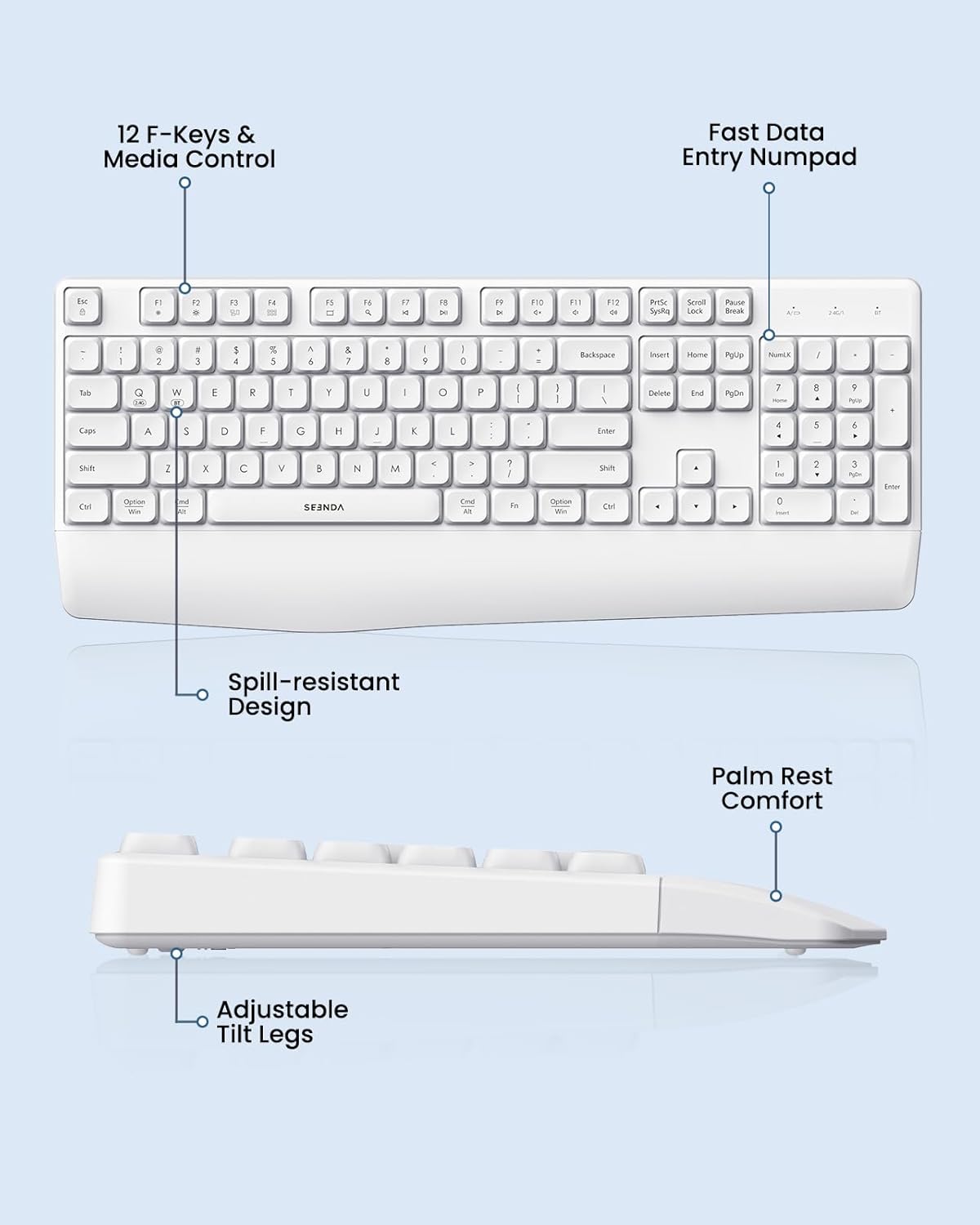
Figure 4: Keyboard features and layout.
2. Caratteristiche del mouse
- Design simmetrico: Comodo sia per i mancini che per i destrorsi.
- Clic silenzioso: Low-noise clicks create a peaceful working environment.
- DPI regolabile: Cycle through 1000, 1600, and 2400 DPI settings to adjust cursor speed and precision.

Figure 5: Mouse features and DPI settings.
Gestione dell'alimentazione
The keyboard and mouse are designed for long-lasting use:
- Durata prolungata della batteria: Offers up to 365 days of standby time.
- Funzione di sospensione automatica: Devices automatically enter sleep mode after 30 minutes of inactivity to conserve battery power. Simply press any key or click the mouse to wake them up.
Compatibilità
The seenda COE200 combo is widely compatible with various operating systems and devices:
- Modalità USB 2.4G: Compatible with Windows XP/7/8/10+.
- Modalità Bluetooth: Fully compatible with Windows XP/7/8/10/11+, macOS 10.12+, iPadOS/iOS 13.0+, and Android 4.3 or above. (Requires Bluetooth 4.0 or above on your device).
- Dispositivi compatibili: Laptop, Desktop, Computer, PC, Notebook, Mac, MacBook Pro/Air, iPad, Tablet, iPhone.
Manutenzione
Per garantire la longevità e le prestazioni ottimali della combinazione tastiera e mouse:
- Pulizia: Use a soft, dry cloth to clean the surfaces. For stubborn dirt, a slightly damp è possibile utilizzare un panno, assicurandosi che non penetri umidità nel dispositivo.
- Spill-Resistant: While the keyboard has a spill-resistant design, it is recommended to avoid direct exposure to liquids to prevent damage.
- Magazzinaggio: Conservare i dispositivi in un luogo fresco e asciutto, lontano dalla luce solare diretta e da temperature estreme.
Risoluzione dei problemi
If you encounter issues with your seenda COE200 combo, try the following steps:
- Nessuna connessione/ritardo:
- Ensure batteries are correctly inserted and have sufficient power. Replace if necessary.
- For 2.4G mode, ensure the USB receiver is securely plugged into your device.
- For Bluetooth mode, ensure Bluetooth is enabled on your device and the keyboard/mouse are in pairing mode (blinking indicator). Re-pair if connection is lost.
- Move the devices closer to your computer to rule out range issues (up to 33ft/10m).
- Try connecting to a different USB port or another device to check if the issue is device-specific.
- Keys/Mouse Buttons Not Working:
- Controllare i livelli della batteria.
- Ensure the correct connection mode (2.4G or Bluetooth) is selected on both the keyboard and mouse.
- Clean any debris around the keys or mouse buttons.
- Il cursore del mouse salta/non è preciso:
- Regola l'impostazione DPI sul mouse.
- Ensure the mouse is used on a clean, flat surface.
Specifiche
| Caratteristica | Dettaglio |
|---|---|
| Numero di modello | COE200 |
| Tecnologia di connettività | Bluetooth 5.0, USB 2.4G |
| Dispositivi compatibili | Laptop, Desktop, Computer, PC, Notebook, Mac, MacBook Pro/Air, iPad, Tablet, iPhone |
| Caratteristiche speciali | Wrist Rest, Spill-Resistant, Adjustable DPI (1000/1600/2400), Quiet Clicking |
| Batteria della tastiera | 1 AAA (non incluse) |
| Batteria del mouse | 1 AA (non incluse) |
| Peso dell'articolo | 1.98 libbre |
| Dimensioni del pacco | 17.36 x 9.69 x 1.85 pollici |
Garanzia e supporto
Your seenda COE200 Wireless Bluetooth Keyboard and Mouse Combo comes with a 24-month warranty. For any questions or assistance, please contact customer support:
- E-mail: support@seenda.com
- Orari di servizio: Mon-Sun, 9 AM - 6 PM (GMT+8) (Closed during holidays)
Please refer to the Quick Start Guide included in the packaging for additional contact details and troubleshooting tips.