
Redmi Redmi Pad 2 Wi-Fi + Cellular
Redmi Pad 2 Wi-Fi + Cellular User Manual
Model: Redmi Pad 2 Wi-Fi + Cellular
1. Introduzione
Welcome to the Redmi Pad 2 Wi-Fi + Cellular user manual. This guide provides essential information to help you get started with your new tablet, understand its features, and ensure optimal performance. Please read this manual thoroughly before using your device.
The Redmi Pad 2 offers a vibrant 2.5K display, powerful MediaTek Helio G100-Ultra processor, long-lasting 9000mAh battery, and supports an Active Pen for enhanced productivity and creativity. With HyperOS 2 and AI-powered features, your tablet experience is designed to be intuitive and efficient.

Immagine: Un overview of the Redmi Pad 2's key features, including its 2.5K display, cellular connectivity, immersive audio, 9000mAh battery, HyperOS 2, AI-Powered capabilities, and MediaTek Helio G100-Ultra processor.
2. Configurazione iniziale
2.1 Disimballaggio e contenuto della confezione
Your Redmi Pad 2 package should contain the following items:
- Redmi Pad 2 Tablet Computer
- Adattatore di alimentazione
- Cavo USB di tipo C.
- Strumento di espulsione della SIM
2.2 Ricarica del dispositivo
Before first use, fully charge your Redmi Pad 2. Connect the USB Type-C cable to the tablet's charging port and the power adapter, then plug the adapter into a wall outlet. The tablet supports 18W fast charging.
2.3 Accensione/Spegnimento
- Per accendere: Tieni premuto il pulsante di accensione finché non appare il logo Redmi.
- Per spegnere: Tenere premuto il pulsante di accensione, quindi selezionare "Spegni" dalle opzioni sullo schermo.
2.4 Inserting a SIM Card (Cellular Models)
For cellular connectivity, insert a nano-SIM card using the provided SIM ejector tool.
- Individuare il vassoio della scheda SIM sul lato del tablet.
- Inserire lo strumento di espulsione della SIM nel piccolo foro accanto al vassoio e premere delicatamente finché il vassoio non fuoriesce.
- Inserisci la scheda nano-SIM nel vassoio con i contatti dorati rivolti verso il basso.
- Spingere con cautela il vassoio nel tablet finché non scatta in posizione.

Immagine: Lato view of the Redmi Pad 2, illustrating the location of the SIM card tray and physical buttons.
2.5 Connessione al Wi-Fi
- Vai a Impostazioni > Wifi.
- Attiva il Wi-Fi.
- Seleziona la rete desiderata dall'elenco.
- Inserisci la password se richiesta e tocca Collegare.
2.6 Configurazione dell'account Google
Follow the on-screen prompts to set up your Google account. This is necessary to access the Google Play Store, synchronize data, and use various Google services.
3. Utilizzo del Redmi Pad 2
3.1 Navigation and User Interface (HyperOS 2)
Your Redmi Pad 2 runs on HyperOS 2, based on Android, providing a smooth and intuitive user experience. Swipe gestures and on-screen buttons allow for easy navigation between apps and settings.
3.2 Funzionalità di visualizzazione
Experience crystal-clear visuals on the 11-inch 2.5K (2560x1600 pixels) display with a 90Hz refresh rate for smooth scrolling and animations. The display offers up to 600 nits of brightness for clear visibility in various lighting conditions.

Image: The Redmi Pad 2's 2.5K Crystal Clear Display, highlighting its sharp resolution and vibrant color reproduction.
3.3 Esperienza audio
The tablet features quad speakers with Dolby Atmos support, delivering an immersive audio experience for movies, music, and games.

Image: The Redmi Pad 2 demonstrating its immersive audio capabilities with quad speakers and Dolby Atmos technology.
3.4 Active Pen Support
The Redmi Pad 2 supports an Active Pen (sold separately) for precise input. Use it for note-taking, sketching, marking up documents, and navigating the interface with ultra-low latency and 4096 pressure sensitivity levels.

Image: The Redmi Pad 2 demonstrating Active Pen support for creative tasks, instant answers, effortless note-taking, and handwriting recognition.

Image: A close-up of the Redmi Smart Pen in use, detailing its features such as seamless writing, millisecond-level latency, 4096 pressure sensitivity, 10g activation force, and 12 hours of continuous writing.
3.5 Funzionalità basate sull'intelligenza artificiale
Leverage AI capabilities like Cerchio per cercare for instant information retrieval and Gemini AI for personalized assistance, enhancing productivity and entertainment.

Image: The Redmi Pad 2 demonstrating AI-powered features, specifically 'Circle to Search' for instant answers.
3.6 Utilizzo della fotocamera
The tablet is equipped with an 8MP rear camera and a 5MP front camera, suitable for video calls and casual photography. Video capture resolutions include FHD 1080p and HD 720p.
3.7 Archiviazione e prestazioni
The Redmi Pad 2 comes with 8GB RAM and 256GB internal storage (UFS 2.2 for fast loads). Storage can be expanded up to 2TB using a microSD card (sold separately).

Image: The Redmi Pad 2 highlighting its storage and RAM capabilities, including up to 16GB RAM, 256GB UFS 2.2 storage, and 2TB expandable storage.
Powered by the MediaTek Helio G100-Ultra processor, the tablet delivers efficient performance for multitasking, gaming, and media consumption.
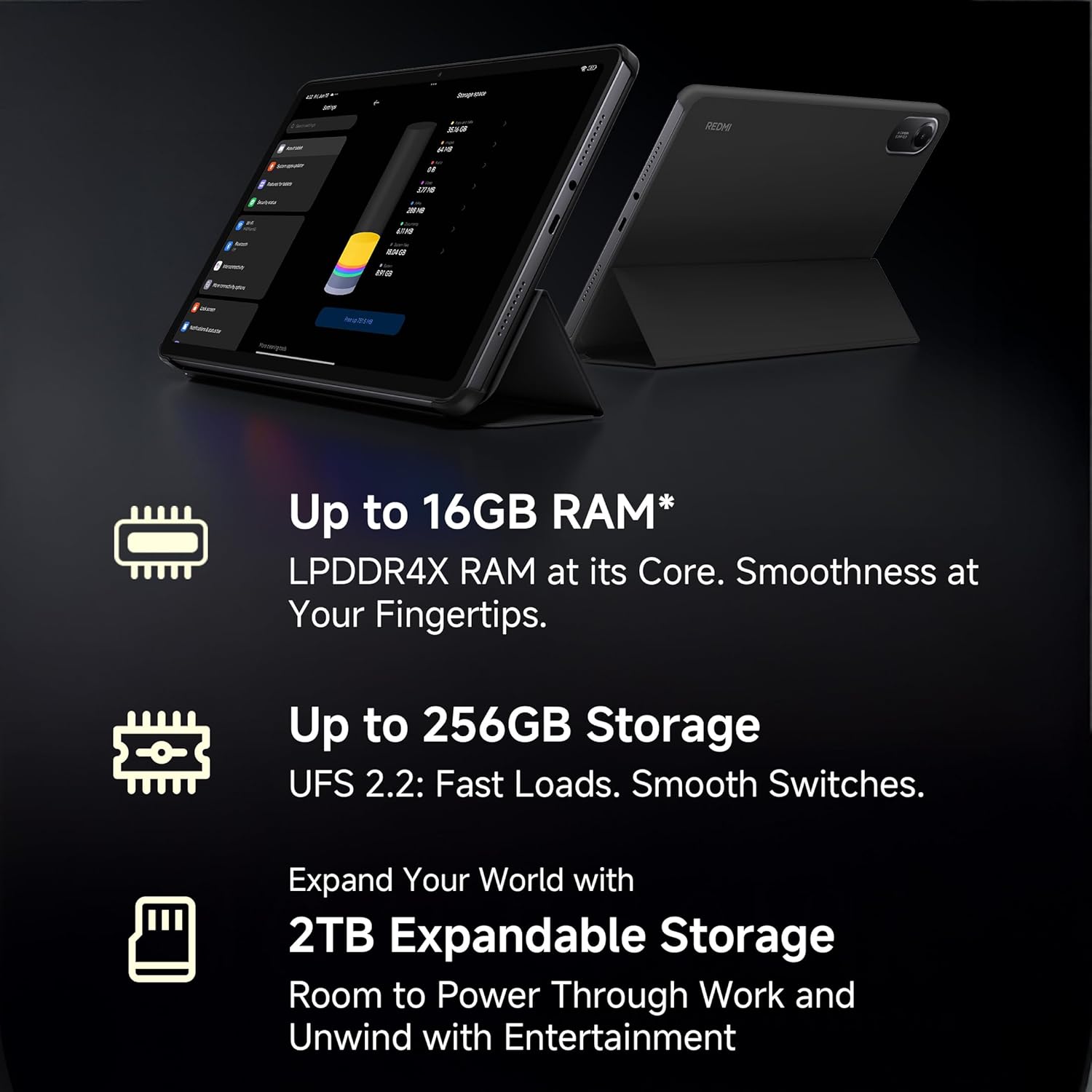
Image: A visual representation of the advanced MediaTek Helio G100-Ultra processor, emphasizing its performance capabilities.
3.8 Connettività
Stay connected with Wi-Fi (802.11a/b/g/n/ac) and cellular connectivity. The tablet also features Bluetooth for connecting accessories and a USB 2.0 Type-C port for charging and data transfer.

Image: The Redmi Pad 2 demonstrating its cellular connectivity, allowing users to stay connected anytime, anywhere.
4. Manutenzione e cura
4.1 Pulizia del tablet
Use a soft, lint-free cloth to clean the screen and body of your Redmi Pad 2. Avoid using harsh chemicals or abrasive materials that could damage the display or finish.
4.2 Cura della batteria
La batteria da 9000 mAh garantisce un utilizzo prolungato. Per prolungare la durata della batteria:
- Evitare temperature estreme.
- Non lasciare che la batteria si scarichi completamente prima di ricaricarla frequentemente.
- Per una ricarica ottimale, utilizzare il caricabatterie e il cavo originali.

Image: The Redmi Pad 2 highlighting its XL 9000mAh battery, capable of providing up to 19 hours of binge-watching, 22 hours of discoveries, and 10 hours of gaming.
4.3 Aggiornamenti software
Controlla regolarmente e installa gli aggiornamenti software per assicurarti che il tuo tablet abbia le ultime funzionalità, patch di sicurezza e miglioramenti delle prestazioni. Vai a Impostazioni > Informazioni sul tablet > Aggiornamento del sistema.
4.4 Ottimizzazione dell'archiviazione
Periodicamente riview ed eliminare ciò che non è necessario files, apps, and media to maintain optimal performance. Utilize cloud storage or the expandable storage option for large files.
5. Risoluzione Dei Problemi
This section addresses common issues you might encounter with your Redmi Pad 2.
5.1 Il dispositivo non si accende
- Assicurarsi che la batteria sia carica. Collegare il tablet al caricabatterie per almeno 30 minuti.
- Per eseguire un riavvio forzato, tenere premuto il pulsante di accensione per 10-15 secondi.
5.2 Problemi di connettività (Wi-Fi/cellulare)
- Wifi: Controlla se il Wi-Fi è abilitato nelle impostazioni. Riavvia il router. Ignora la rete e riconnettiti.
- Cellulare: Ensure the SIM card is correctly inserted and activated. Check your mobile data settings. Restart the tablet.
5.3 Prestazioni lente
- Chiudere le applicazioni non utilizzate in esecuzione in background.
- Cancella i dati della cache per le app.
- Assicuratevi di avere sufficiente spazio di archiviazione libero.
- Riavviare regolarmente il tablet.
5.4 Active Pen Not Responding
- Ensure the Active Pen is charged (if applicable).
- Check Bluetooth connection for the pen in tablet settings.
- Riavviare il tablet.
6. Specifiche
| Caratteristica | Dettaglio |
|---|---|
| Marca | RossoMi |
| Nome del modello | Redmi Pad 2 Wi-Fi + Cellular |
| Sistema operativo | Android, HyperOS 2 |
| Processore | MediaTek Helio G100-Ultra (2.2 GHz) |
| Coprocessore grafico | Mali-G57 MC2 |
| Memoria RAM | 8 GB |
| Memoria interna | 256 GB |
| Archiviazione espandibile | Yes (up to 2TB) |
| Dimensioni dello schermo | 11 pollici (27.94 cm) |
| Risoluzione dello schermo | 2560x1600 pixel (2.5K) |
| Tipo di visualizzazione | LCD |
| Frequenza di aggiornamento | Frequenza 90 Hz |
| Luminosità massima | 600 nit |
| Telecamera posteriore | 8 MP |
| Fotocamera frontale | 5 MP |
| Capacità della batteria | 9000 mAh |
| Durata media della batteria | 10 ore |
| Connettività | Wi-Fi (802.11a/b/g/n/ac), Cellular |
| Interfaccia umana | Touchscreen con supporto per stilo |
| Presa audio | 3.5 millimetri |
| Dimensioni (L x P x A) | 25.5L x 16.6W x 0.7Th Centimeters |
| Peso dell'articolo | 519 grammi |
| Colore | Azzurro cielo |
7. Informazioni sulla garanzia
The Redmi Pad 2 Wi-Fi + Cellular comes with a Garanzia del produttore di 1 anno. Please retain your proof of purchase for warranty claims. For detailed terms and conditions, refer to the warranty card included in your product packaging or visit the official Redmi websito.
8. Assistenza clienti
For further assistance, technical support, or service inquiries, please contact Redmi customer support. You can find contact information on the official Redmi websito o tramite la sezione di supporto nelle impostazioni del tuo dispositivo.
Produttore: BYD (India) Private Limited, Xiaomi
Informazioni di contatto del produttore: BYD (India) Private Limited, Developed Plot No. OZ 7, Sipcot, Oragadam, Sriperambudur, Kancheepuram, Tamil Nadu 602105, India
For online support, visit the official Redmi India Support Page.
Ask a question about this manual
Ask about setup, troubleshooting, compatibility, parts, safety, or missing instructions. Manuals+ will review the question and use this page’s manual context to help answer it.