
1. Introduzione
Thank you for choosing the Devoko Electric Height-Adjustable Standing Desk. This manual provides detailed instructions for the assembly, operation, and maintenance of your new desk. Please read this manual thoroughly before use to ensure proper function and safety. Keep this manual for future reference.
2. Avvertenze di sicurezza
- Limite di peso: Non sovraccaricare la scrivania. La capacità di carico massima è 70 kg. Exceeding this limit may cause damage to the desk or personal injury.
- Sicurezza elettrica: Use the integrated USB-A charging port with caution to avoid electrical hazards. Ensure cables are properly managed to prevent tripping or damage.
- Bambini e animali domestici: Per evitare incidenti, tenere bambini e animali domestici lontani dalla scrivania durante il funzionamento.
- Liquidazione: Quando si regola l'altezza della scrivania, assicurarsi che non vi siano ostacoli sopra o sotto.
- Fonte di energia: Connect the desk only to a grounded power outlet.
- Manutenzione: Non tentare di smontare o riparare autonomamente il motore o il sistema di controllo. Contattare l'assistenza clienti per ricevere assistenza.
3. Contenuto della confezione
Verificare che tutti i componenti siano presenti prima di iniziare il montaggio. Se qualche componente risulta mancante o danneggiato, contattare l'assistenza clienti Devoko.
- Desktop sections (4 parts, 15mm high-quality particle board)
- Desk frame (2 steel beams, 2 T-shaped legs)
- Control panel with LED display and USB-A port
- Motor and power supply
- Fabric drawer (35x22x10.5 cm)
- Gancio per cuffie
- Vassoio per la gestione dei cavi
- Passacavo
- Ferramenta e utensili per l'assemblaggio
- Manuale d'uso
4. Installazione e assemblaggio
The desktop is divided into 4 sections of 15mm high-quality particle board, which simplifies the assembly process. Follow the included graphical instructions for a smooth setup.
- Disimballare i componenti: Estrarre con cautela tutti i componenti dall'imballaggio e disporli su una superficie pulita e morbida per evitare graffi.
- Assemblare il telaio: Attach the two T-shaped legs to the steel beams. Ensure all screws are tightened securely. The frame features a robust double-beam construction (65x45 mm cold-rolled steel alloy) for enhanced stability.
- Allega sezioni desktop: Connect the four desktop sections together and then secure them to the assembled frame using the provided hardware.
- Installa il Pannello di controllo: Montare il pannello di controllo sul lato inferiore della scrivania, in una posizione facilmente accessibile.
- Collegare il motore e l'alimentazione: Connect the motor to the control panel and then plug the power supply into the control panel.
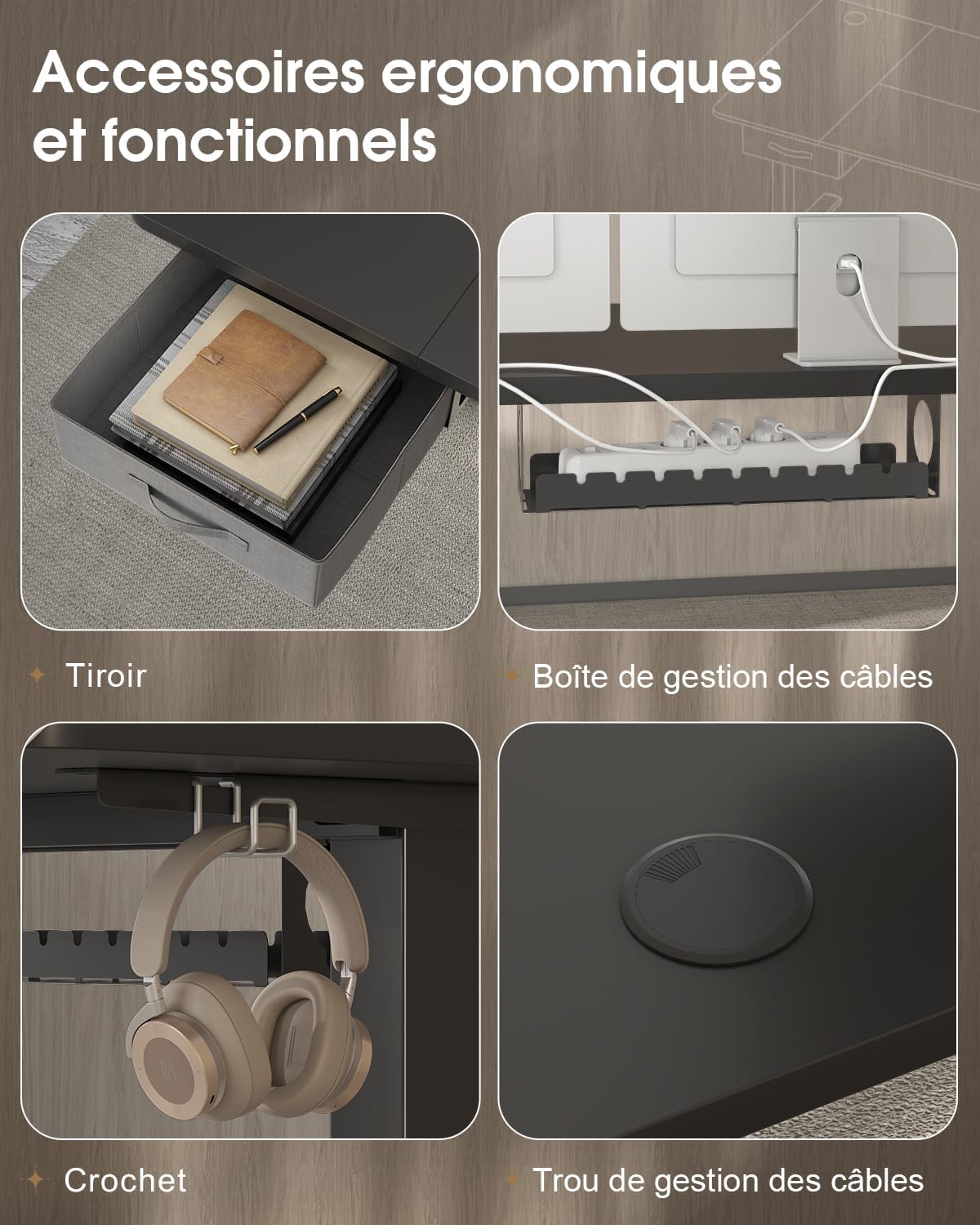
- Installare gli accessori: Attach the fabric drawer, headphone hook, cable management tray, and cable grommet as desired.


5. Istruzioni per l'uso
5.1 Pannello di controllo Sopraview
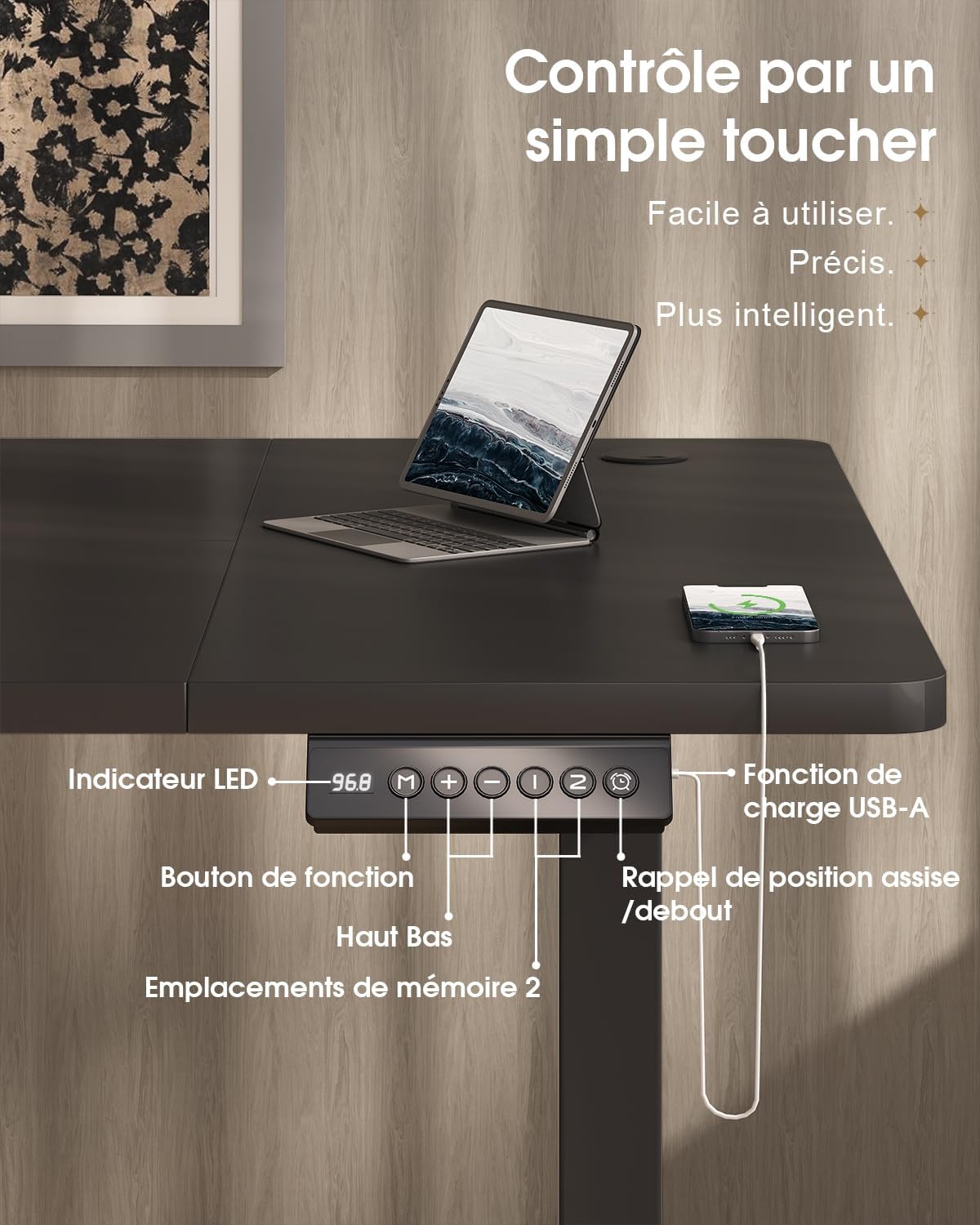
The desk features an intuitive control panel with an LED display for easy height adjustment and memory functions.

5.2 Regolazione dell'altezza
- Pulsanti su/giù: Press and hold the 'Up' or 'Down' arrow buttons on the control panel to raise or lower the desk to your desired height. The LED display will show the current height.
- Intervallo di altezza: The desk can be adjusted smoothly and quietly between 73 cm (sitting height) and 118 cm (standing height).
5.3 Preimpostazioni di memoria
Il pannello di controllo consente di salvare due impostazioni di altezza preferite per regolazioni rapide.
- Imposta una posizione di memoria: Regola la scrivania all'altezza desiderata utilizzando i pulsanti "Su" o "Giù".
- Press the 'M' (Memory) button. The LED display will flash.
- Within 3 seconds, press either '1' or '2' to save the current height to that memory position. The LED display will confirm the setting.
- Richiama una posizione di memoria: Basta premere il pulsante '1' o '2' per spostare automaticamente la scrivania all'altezza salvata.
5.4 porta di ricarica USB-A
A convenient USB-A charging port is integrated into the control panel. Connect your compatible devices, such as smartphones or tablets, for charging. Ensure your device's charging cable is compatible with a USB-A port.
6 Caratteristiche
The Devoko Electric Height-Adjustable Standing Desk is designed with several ergonomic and functional features to enhance your workspace.
- Regolazione elettrica dell'altezza: Smooth and quiet (less than 50 dB) motor allows for effortless transitions between sitting and standing positions.
- Costruzione robusta: Features a double-beam frame made of 65x45 mm cold-rolled steel alloy, providing exceptional stability and a load capacity of up to 70 kg. All metal parts are powder-coated for durability.
- Cassetto integrato: A fabric drawer (35x22x10.5 cm) is included for convenient storage of office supplies, helping to keep your desktop clutter-free.
- Gancio per cuffie: A side-mounted hook provides a dedicated spot for your headphones, keeping them within reach and off the desk surface.
- Sistema di gestione dei cavi: Includes a cable management tray and a cable grommet to organize and conceal power cords and other cables, maintaining a tidy and safe workspace.
- Porta di ricarica USB-A: Built-in port on the control panel for easy charging of your electronic devices.

7. Manutenzione
Regular maintenance will help prolong the life and performance of your Devoko standing desk.
- Pulizia: Pulisci la superficie e la struttura della scrivania con un panno morbido e asciutto.amp panno. Evitare l'uso di prodotti chimici aggressivi o detergenti abrasivi che potrebbero danneggiare la finitura.
- Controllare le connessioni: Controllare periodicamente tutte le viti e i bulloni per assicurarsi che siano ben serrati. Serrarli nuovamente se necessario.
- Gestione dei cavi: Ensure cables are neatly organized and not pinched or strained, especially during height adjustments.
- Cura del motore: Avoid spilling liquids on the motor or control panel. If the desk is not used for an extended period, unplug it from the power outlet.
8. Risoluzione Dei Problemi
If you encounter any issues with your desk, refer to the following common problems and solutions. If the problem persists, contact customer support.
| Problema | Possibile causa | Soluzione |
|---|---|---|
| La scrivania non si muove e non risponde ai comandi. | Power cable disconnected; motor cable disconnected; overload. | Check if the power cable is securely plugged into the wall outlet and the desk. Ensure the motor cable is connected. Reduce the load on the desk if it exceeds 70 kg. |
| La scrivania si muove in modo irregolare o produce rumori insoliti. | Collegamenti allentati; distribuzione non uniforme del peso. | Check and tighten all assembly screws. Redistribute weight evenly on the desktop. |
| Il display LED mostra un codice di errore. | Malfunzionamento del sistema; errore del sensore. | Unplug the desk from the power outlet for 10 minutes, then plug it back in to reset the system. If the error persists, contact customer support. |
| USB-A charging port not working. | Problema con il cavo; incompatibilità del dispositivo. | Prova un altro cavo USB o un altro dispositivo. Assicurati che la scrivania sia accesa. |
9. Specifiche
| Caratteristica | Specificazione |
|---|---|
| Marca | Devoko |
| Numero di modello | 0790 |
| Colore | Nero |
| Materiale del desktop | Pannello truciolare |
| Materiale del telaio | Steel alloy (65x45 mm cold-rolled steel) |
| Dimensioni del prodotto (L x P x A) | 180 cm x 80 cm x (73-118 cm) |
| Gamma di regolazione dell'altezza | da 73 cm a 118 cm |
| Capacità di carico | 70 kg |
| Livello di rumore | Meno di 50 dB |
| Caratteristiche speciali | Electric height adjustment, Integrated USB-A port, Cable management, Ergonomic design, 2 Memory presets, Drawer, Headphone hook |
| Peso dell'articolo | 30.8 kg |
| Paese di origine | Cina |
10. Garanzia e supporto
For warranty information or technical support, please refer to the purchase documentation or contact Devoko customer service. Keep your proof of purchase for any warranty claims.
You can visit the official Devoko store for more information: Negozio Devoko