
Introduzione
This manual provides comprehensive instructions for the installation and operation of your BRIKSMAX 2.0 LED Light Kit, specifically designed for the LEGO Icons 10351 Sherlock Holmes Book Nook set. Following these guidelines will help you successfully integrate the lighting system and enhance your LEGO model's display.

Image 1: The LEGO Sherlock Holmes Book Nook model illuminated by the BRIKSMAX LED Light Kit.
Contenuto della confezione
Prima di iniziare l'installazione, verificare che tutti i componenti elencati di seguito siano presenti nella confezione:
- LED Light Kit (various light types and quantities)
- Istruzioni cartacee
- Guida per l'utente
- AA Battery Box (batteries not included)
- Cavo di alimentazione USB
- Scheda di espansione
- Building Block Type Battery Box
- Assorted Light Bricks (e.g., 1x4 Light Brick - Warm White, 1x2 Light Brick - Warm White)
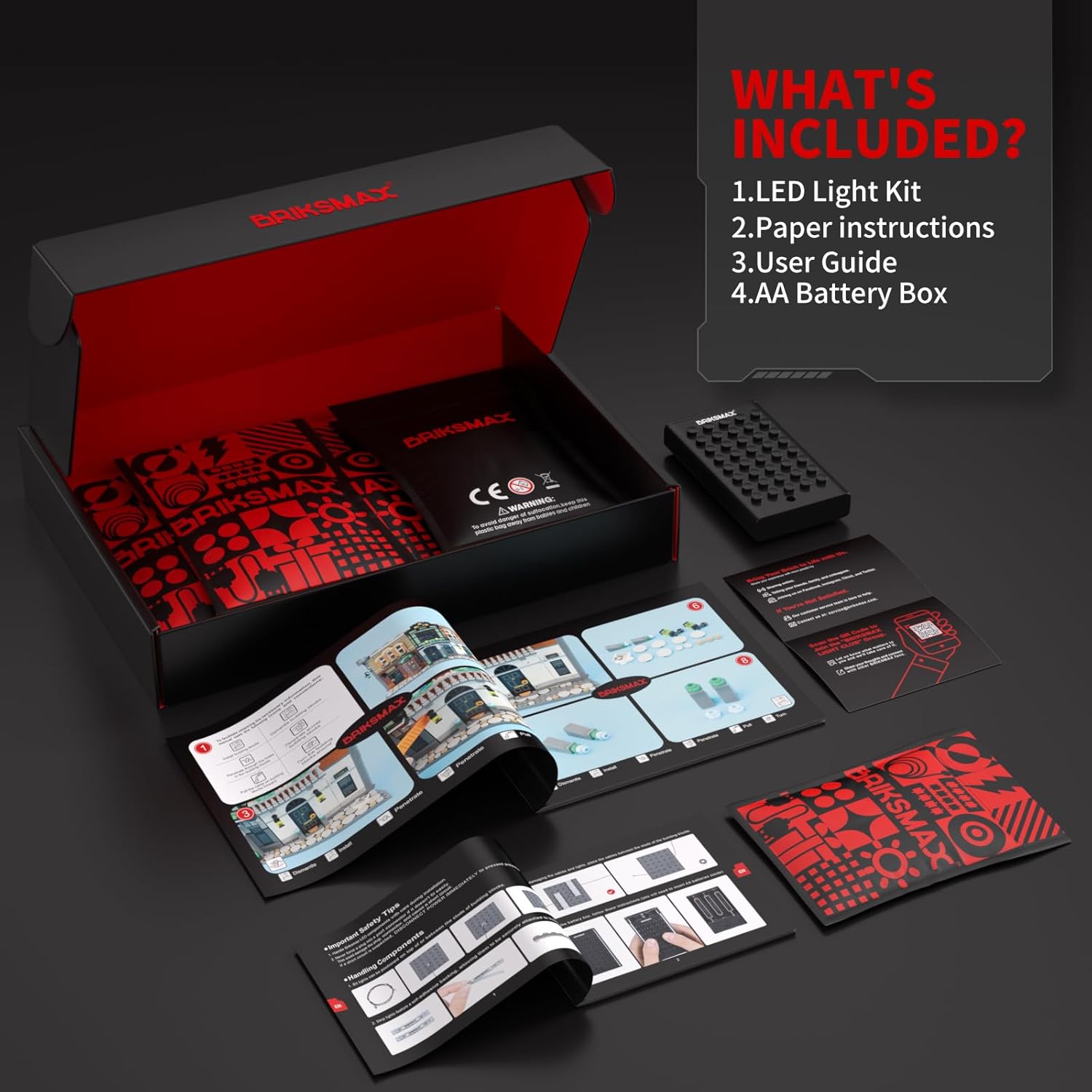
Image 2: All components included in the BRIKSMAX LED Light Kit.
Configurazione e installazione
The BRIKSMAX 2.0 Light Kit is designed for integration with your LEGO Icons 10351 Sherlock Holmes Book Nook. Follow the detailed paper instructions provided in your kit for step-by-step guidance. Key aspects of the installation include:
- Gestione dei cavi: Utilize the newly designed wire organizer parts to conceal wires effectively. This prevents breakage and ensures a neat, integrated appearance within your LEGO model.
- Integrazione dei componenti: Lights and expansion boards are designed to fit within the existing brick structure, minimizing exposed components for a cleaner aesthetic.
- Posizionamento flessibile: Independent accessories allow for flexible installation. You can adjust the placement of light points to achieve desired display effects.

Immagine 3: Es.ample of wire management using BRIKSMAX organizer parts.
Refer to the included paper instructions for specific brick removal and light placement details. Ensure all connections are secure to prevent intermittent lighting.
Istruzioni per l'uso
Once the light kit is fully installed and connected, you can power it on using either the USB cable or the AA Battery Box.
- Alimentazione USB: Connect the provided USB cable to the light kit's expansion board and then to a compatible USB power source (e.g., a USB wall adapter, power bank, or computer USB port).
- Potenza della batteria: Insert the required AA batteries (not included) into the AA Battery Box. Connect the battery box to the light kit's expansion board.
The lights will illuminate upon connection to a power source. There are no additional switches on the light kit itself; power is controlled by connecting or disconnecting the power source.

Image 4: Visualizing the LEGO model with lights on and off.
Manutenzione
To ensure the longevity and optimal performance of your BRIKSMAX LED Light Kit, consider the following maintenance tips:
- Pulizia: Gently dust the LED components and wires with a soft, dry cloth. Avoid using liquid cleaners directly on the electrical components.
- Gestione: When moving or disassembling your LEGO model, handle the light kit components carefully to avoid bending or breaking wires.
- Magazzinaggio: If storing the model for an extended period, disconnect the power source (remove batteries or unplug USB cable) to prevent battery drain or potential damage.
Risoluzione dei problemi
If you encounter any issues with your BRIKSMAX LED Light Kit, please refer to the following common solutions:
- Le luci non si accendono:
- Ensure the power source (USB cable or battery box) is correctly connected and functional.
- Se si utilizzano le batterie, verificare che siano inserite correttamente e che abbiano una carica sufficiente.
- Verify all wire connections to the expansion board and individual lights are secure.
- Luci individuali non funzionanti:
- Check the specific wire connection for the non-functional light.
- Inspect the wire for any visible damage or kinks.
- Luci tremolanti:
- Assicurarsi che tutti i collegamenti siano saldi e non allentati.
- If using battery power, low battery charge can cause flickering. Replace batteries if necessary.
Se questi passaggi non risolvono il problema, contattare l'assistenza clienti.
Specifiche
| Caratteristica | Dettaglio |
|---|---|
| Marca | BRIKSMAX |
| Numero di modello | 10351 (BX761) |
| Materiale | Plastica |
| Tipo di sorgente luminosa | GUIDATO |
| Numero di sorgenti luminose | Multiple individual LEDs (e.g., 19 total as per kit contents) |
| Voltage | 5 Volt (CC) |
| Fonte di alimentazione | USB or AA Battery Box (Batteries not included) |
| Assemblaggio richiesto | SÌ |
| Uso interno/esterno | Al chiuso |
| Peso dell'articolo | 180 grammi (6.3 once) |
| Dimensioni del prodotto | 6.5 x 4.72 x 1.57 pollici |
| Età consigliata dal produttore | 8 anni e oltre |
Garanzia e supporto
BRIKSMAX LED lighting kits are manufactured using safe and reliable materials. We are committed to providing quality products and support.
- Parti danneggiate o mancanti: If you receive a kit with damaged or missing components, please contact us directly for a replacement.
- Assistenza clienti: For any questions, concerns, or assistance with installation and operation, please reach out to BRIKSMAX customer support. Refer to the contact information provided in your product packaging or on the official BRIKSMAX websito.