
LD Systems LDS-DAVE15G4X
LD Systems DAVE 15 G4X PA System User Manual
Model: LDS-DAVE15G4X
1. Introduzione
The LD Systems DAVE 15 G4X is a powered compact PA system designed for various live sound applications, including DJs, live bands, and solo entertainers. This system comprises a 15-inch subwoofer and two 8-inch satellites, delivering a total peak power of 2060 Watts. It features an integrated 6-channel mixer, versatile input options, Bluetooth connectivity, and advanced DSP technology for clear and powerful sound reproduction.
This manual provides essential information for the safe and efficient setup, operation, and maintenance of your DAVE 15 G4X PA system. Please read it thoroughly before initial use and keep it for future reference.
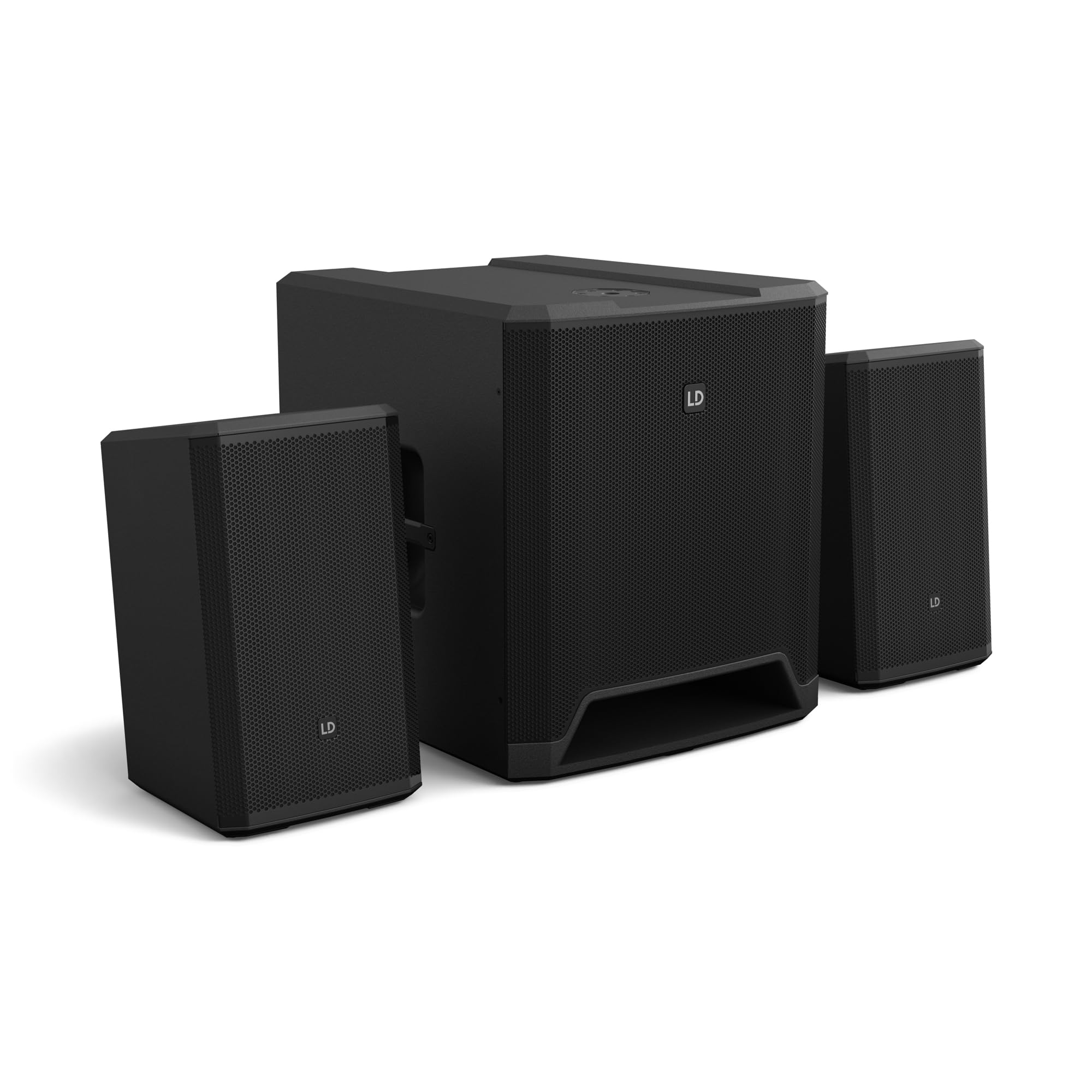
Figura 1: Oltreview of the LD Systems DAVE 15 G4X PA System components.
2. Istruzioni di sicurezza
Per evitare scosse elettriche, incendi o lesioni, osservare sempre le seguenti precauzioni di sicurezza:
- Garantire l'alimentazione voltage corrisponde alla classificazione dell'unità.
- Non esporre l'unità alla pioggia o all'umidità.
- Non aprire il casing; affidare ogni intervento di manutenzione a personale qualificato.
- Posizionare l'unità su una superficie stabile e piana.
- Assicurare un'adeguata ventilazione attorno all'unità.
- Evitare di posizionare oggetti sopra l'unità.
- Scollegare l'alimentazione prima di pulire o spostare l'unità.
3. Impostazione
Proper setup is crucial for optimal performance and safety. Follow these steps to assemble your DAVE 15 G4X system:
3.1 Disimballaggio e posizionamento
- Carefully unpack all components: one 15-inch subwoofer and two 8-inch satellite speakers.
- Posizionare il subwoofer su una superficie stabile e piana.
- Position the satellite speakers. They can be placed on speaker stands (not included) or mounted on a T-stand above the subwoofer (accessories sold separately).

Figura 2: Esample of a stereo setup with one satellite speaker mounted on a pole above the subwoofer. Speaker pole not included.

Figura 3: Esample of a stereo setup with both satellite speakers on separate poles. Speaker poles not included.

Figura 4: Esample of a cluster mode setup with both satellite speakers mounted on a T-stand above the subwoofer. Speaker pole not included.
3.2 Collegamento degli altoparlanti
- Connect the two satellite speakers to the "SAT LEFT" and "SAT RIGHT" outputs on the rear panel of the subwoofer using appropriate speaker cables.
- Garantire connessioni sicure.

Figure 5: Rear panel connections of the DAVE 15 G4X subwoofer, including power input, satellite outputs, and various audio inputs.
3.3 Collegamento di alimentazione
- Connect the supplied power cable to the "POWER INPUT" on the subwoofer's rear panel.
- Plug the other end into a suitable AC power outlet.
- Prima di collegare l'apparecchio all'alimentazione, assicurarsi che l'interruttore di alimentazione sia in posizione "OFF".
4. Funzionamento del mixer
The DAVE 15 G4X features an integrated 6-channel mixer for connecting various audio sources. Familiarize yourself with the control panel:

Figura 6: dettagliata view of the DAVE 15 G4X mixer control panel, showing input controls, EQ, reverb, and mode selection.
4.1 Input Channels 1 & 2 (Mono)
- Input Type Selection: Use the "SELECT" button to toggle between Microphone (MIC), High-Impedance Instrument (HI-Z), or Line-level (LINE) input.
- Controllo di guadagno: Adjust the "HIGH" knob for input sensitivity.
- Equalizzatore a 2 bande: Use the "LOW" and "HIGH" knobs to adjust bass and treble frequencies for each channel.
- Riverbero: Select one of three reverb presets (SMALL, LARGE, PLATE) and adjust the "REVERB" knob for the desired effect level.
4.2 Input Channels 3 & 4 (Stereo Line)
- These inputs are designed for stereo line-level sources such as keyboards, synthesizers, or drum machines.
- Adjust the "INPUT 3/4" knob for the overall volume of these channels.
4.3 Input Channels 5 & 6 (Digital/Bluetooth)
- Ingresso SPDIF: Connect a digital audio source via the SPDIF TOSLINK input on the rear panel.
- Accoppiamento Bluetooth: Press and hold the "HOLD TO LINK" button to activate Bluetooth pairing mode. Cercare "LD Systems DAVE 15 G4X" on your device and connect.
- Selezione della fonte: Use the "SOURCE" button to switch between SPDIF and Bluetooth inputs.
- Adjust the "INPUT 5/6" knob for the overall volume of these channels.
4.4 Controlli principali
- Volume PRINCIPALE: The large "MAIN" knob controls the overall output volume of the system.
- SUB Volume: Adjust the "SUB" knob to control the volume level of the subwoofer.
- Volume ALTO: Adjust the "HIGH" knob to control the volume level of the satellite speakers.
- Modalità preimpostate: Use the "SELECT" button under "MODE" to choose between different setup presets (e.g., Stereo, Cluster Mode) for optimized sound dispersion.
5. Manutenzione
Regular maintenance ensures the longevity and optimal performance of your DAVE 15 G4X PA system.
- Pulizia: Utilizzare un panno morbido e asciutto per pulire le superfici. Per lo sporco ostinato, un panno leggermenteamp cloth can be used, followed by a dry cloth. Avoid abrasive cleaners or solvents, as they may damage the polyurea coating.
- Ventilazione: Ensure that all ventilation openings remain clear of dust and debris to prevent overheating.
- Magazzinaggio: When not in use for extended periods, store the system in a dry, dust-free environment. Consider using protective covers or bags (accessories sold separately) to prevent damage.
- Gestione dei cavi: Controllare regolarmente tutti i cavi per verificare la presenza di segni di usura o danni. Sostituire immediatamente eventuali cavi danneggiati.
6. Risoluzione Dei Problemi
If you encounter issues with your DAVE 15 G4X system, refer to the following common problems and solutions:
6.1 Nessuna uscita audio
- Controlla la potenza: Ensure the system is powered on and the power cable is securely connected. Verify the "POWER" indicator light is illuminated.
- Livelli del volume: Confirm that the "MAIN," "SUB," and "HIGH" volume knobs are turned up. Check individual channel gain controls.
- Selezione input: Ensure the correct input source is selected for the active channel (e.g., MIC, HI-Z, LINE, SPDIF, Bluetooth).
- Connessioni via cavo: Verify all audio cables (input sources, satellite speakers) are correctly and securely connected.
- Dispositivo di origine: Check if your audio source device (microphone, instrument, media player) is functioning correctly and outputting sound.
6.2 Suono distorto o poco chiaro
- Guadagno in ingresso: Reduce the input gain for the affected channel if the "SIGNAL" or "LIMIT" indicator lights are constantly red.
- Volume principale: Lower the "MAIN" volume if the overall sound is distorted.
- Impostazioni dell'equalizzatore: Adjust the EQ (LOW, HIGH) settings on individual channels to improve clarity.
- Qualità del cavo: Ensure you are using high-quality, shielded audio cables.
6.3 Problemi di connessione Bluetooth
- Modalità di accoppiamento: Ensure the DAVE 15 G4X is in Bluetooth pairing mode (press and hold "HOLD TO LINK").
- Visibilità del dispositivo: Make sure Bluetooth is enabled on your source device and it is discoverable.
- Distanza: Keep your Bluetooth device within the effective range of the PA system.
- Interferenza: Allontanarsi da altri dispositivi wireless che potrebbero causare interferenze.
- Dimentica dispositivo: If previously paired, try "forgetting" the DAVE 15 G4X on your device and re-pairing.
7. Specifiche
Detailed technical specifications for the LD Systems DAVE 15 G4X PA System:
| Caratteristica | Specificazione |
|---|---|
| Nome del modello | LDS-DAVE15G4X |
| Tipo di altoparlante | Powered 2.1 PA System |
| Dimensioni del subwoofer | 15 pollici |
| Dimensioni dell'altoparlante satellitare | 2 x 8 pollici |
| Potenza di uscita massima | 2060 Watt |
| Canali mixer | 6-Channel Integrated Mixer |
| Tecnologia di connettività | Bluetooth, SPDIF TOSLINK, XLR, 1/4" Jack, RCA |
| Tipo di montaggio | Floor Standing (Subwoofer), Pole Mount (Satellites) |
| Dimensioni del prodotto (subwoofer) | 20"P x 19"L x 21"A (circa) |
| Peso dell'articolo | 119 pounds (total system approximate) |
| Componenti inclusi | LDDAVE15G4X (Subwoofer, 2 Satellites, Power Cable) |
| Tecnologia DSP | DynX DSP (Gen.2), FIR Filters |
| Materiale del mobile | Durable Polyurea Coating |
8. Informazioni sulla garanzia
Warranty terms and conditions for the LD Systems DAVE 15 G4X PA System are typically provided with your purchase documentation or can be found on the official LD Systems websito. Conservare la prova d'acquisto per eventuali reclami in garanzia.
Per informazioni dettagliate sulla garanzia, visitare il sito LD Systems official websito or contact your authorized dealer.
9. Assistenza clienti
Should you require technical assistance, service, or have questions regarding your LD Systems DAVE 15 G4X PA System, please contact LD Systems customer support or your local authorized dealer.
For further support and resources, please visit the LD Systems official websito.
Ask a question about this manual
Ask about setup, troubleshooting, compatibility, parts, safety, or missing instructions. Manuals+ will review the question and use this page’s manual context to help answer it.