
Manuale utente della lettiera automatica per gatti CATLINK Luxury Pro-X
Modello: PRO X (CL-06-N) | Marca: COLLEGAMENTO CAT
Introduzione
Thank you for choosing the CATLINK Luxury Pro-X Automatic Cat Litter Box. This device is designed to simplify cat care by offering automatic self-cleaning, health monitoring, and odor control features. Please read this manual thoroughly before setup and operation to ensure proper use and maintenance of your litter box.
Informazioni sulla sicurezza
Your safety and the safety of your pet are paramount. Observe the following precautions:
- Design anti-pizzicamento: The unit incorporates smart sensors that detect movement and instantly pause cleaning cycles when a cat is nearby.
- Sensori di peso: Equipped with 4 gravity sensors for weight detection protection.
- Protezione del motore: Features 2 motor protection programs, including startup self-check and anti-jamming.
- Dispositivi di sicurezza: Includes radar and anti-pinch sensors for enhanced safety.
- Posizionamento: Always place the litter box on a firm, level surface. Avoid placing on carpets to prevent sensor interference and ensure stable operation.
- Limite di peso: Suitable for cats weighing between 3.5 lbs (1.6 kg) and 22 lbs (10 kg).
- Sicurezza elettrica: Ensure the power cord is not damaged and is connected to a grounded outlet. Keep the unit away from water sources.
- Bambini e animali domestici: Non permettere ai bambini o agli animali domestici di giocare con il dispositivo o i suoi componenti.

This diagram highlights the safety mechanisms of the CATLINK Luxury Pro-X, such as gravity sensors for weight detection, motor protection, and anti-pinch sensors.
Contenuto della confezione
Verificare che tutti gli articoli siano presenti nel pacco:
- CATLINK Luxury Pro-X Automatic Cat Litter Box Unit
- Adattatore di alimentazione
- Waste Liners (quantity may vary based on package)
- Manuale d'uso
Accessori opzionali (venduti separatamente)
- Trash Liner refills
- Ramp
- Tappetino per lettiera
- Spazzola per la pulizia
- Deodorante intelligente
- Activated Carbon Filter Box
- Filtro a carbone attivo
- C70 Odor Eliminator

A selection of optional accessories available for the CATLINK Luxury Pro-X, such as trash liners, ramps, litter mats, cleaning brushes, smart deodorizers, and activated carbon filters.
Prodotto finitoview
The CATLINK Luxury Pro-X is an advanced automatic litter box designed for multi-cat households, offering convenience and health monitoring capabilities.

The CATLINK Luxury Pro-X Automatic Cat Litter Box, shown with a cat, the companion mobile application, and a roll of waste liners.
Componenti principali
- Globo: The rotating chamber where the cat uses the litter.
- Unità base: Contiene il motore, i sensori e il pannello di controllo.
- Cassetto dei rifiuti: Located at the bottom front, collects waste.
- Pannello di controllo: Buttons and indicators for manual operation and status.
- Litter Bed: The area inside the globe where litter is placed.

A visual representation of the spacious interior and wide entrance of the CATLINK Luxury Pro-X, suitable for cats weighing between 3.5 and 22 pounds.
Impostare
Follow these steps to set up your CATLINK Luxury Pro-X:
- Disimballaggio: Rimuovere con cautela tutti i componenti dall'imballaggio. Conservare l'imballaggio per un trasporto o uno stoccaggio futuri.
- Posizionamento: Place the litter box on a firm, level, and dry surface. Ensure there is sufficient space around the unit for proper ventilation and access for cleaning. Avoid placing it on carpets or uneven surfaces.
- Riempimento della lettiera: Open the globe and fill it with clumping cat litter. The unit is compatible with various litter types, including Bentonite, Mineral, Mixed, and Tofu litter. Do not exceed the maximum fill line.

The CATLINK Luxury Pro-X is compatible with various litter types, including Bentonite, Mineral, Mixed, and Tofu litter, using interchangeable filters.
- Collegamento elettrico: Connect the power adapter to the unit and then plug it into a wall outlet. The unit will perform an initial self-check.
- Configurazione dell'app:
- Download the CATLINK Exclusive APP from your smartphone's app store.
- Crea un account o accedi.
- Segui le istruzioni nell'app per connettere la lettiera alla rete Wi-Fi di casa. Note: Requires a 2.4 GHz Wi-Fi connection.
- Once connected, you can monitor and control the device remotely.
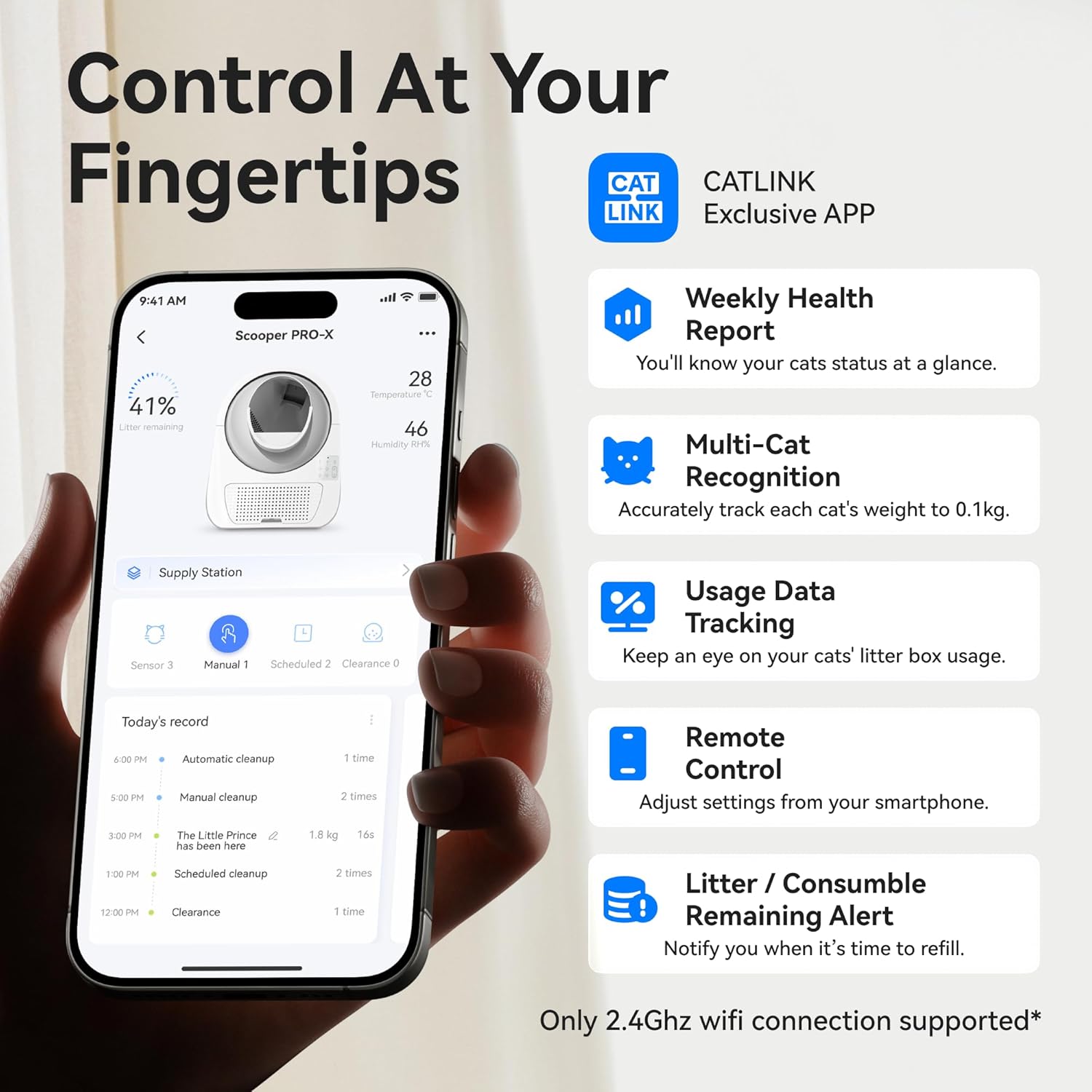
The CATLINK mobile application interface, demonstrating features such as health reports, multi-cat identification, usage statistics, and remote control capabilities.
Istruzioni per l'uso
The CATLINK Luxury Pro-X offers multiple operating modes and smart features:
Modalità di controllo
- Modalità automatica: The litter box automatically cleans after your cat uses it, based on preset delay times.
- Modalità timer: Schedule specific cleaning times through the app.
- Modalità remota: Initiate a cleaning cycle manually via the CATLINK app from anywhere.
- Modalità manuale: Use the physical buttons on the control panel for immediate cleaning or other functions.

The CATLINK Luxury Pro-X offers convenient one-click cleaning, simplifying the process of emptying the litter box.
Caratteristiche dell'app
The CATLINK app provides comprehensive control and monitoring:
- Monitoraggio della salute: Tracks cat weight, frequency of use, ambient temperature, and humidity. Provides daily alerts and 12-month wellness reports.
- Riconoscimento multi-gatto: Identifies individual cats (within the 3.5-22 lbs range) by weight, allowing you to monitor each cat's usage. Note: Cats weighing within 400g of each other may not be accurately distinguished.
- Usage Data Tracking: Records and displays historical usage data.
- Telecomando: Adjust settings, initiate cleaning, and receive notifications from anywhere.
- Litter/Consumable Alerts: Notifies you when it's time to refill litter or replace consumables.

An illustration of the CATLINK Luxury Pro-X's multi-cat recognition feature, where the app tracks individual cat usage and weight for households with multiple felines.
Cleaning Cycle and Odor Control
The unit automatically initiates a cleaning cycle after your cat exits. The globe rotates to sift waste into the sealed waste drawer. The integrated triple odor control system includes:
- Filtro a carbone: Removes up to 90% of odors.
- Sealed Globe Chamber: Traps dust and scent.
- Built-in Active Deodorization System: Features an ozone generator, odor eliminator, and deep deodorization for a hygienic environment.

Un oltreview of the CATLINK Luxury Pro-X's active deodorization system, featuring an ozone generator, odor eliminator, and deep deodorization for a fresh environment.
Customizing Scooping Time
To minimize litter sticking and maintain optimal hygiene, it is recommended to allow sufficient litter clumping time before initiating the cleaning cycle. This can be adjusted via the CATLINK app.

The CATLINK app allows users to customize scooping times, and the litter box features a non-stick bottom to prevent litter adhesion.
Manutenzione
Regular maintenance ensures optimal performance and hygiene:
- Svuotamento del cestino dei rifiuti: The 13L waste bin can hold waste for up to 14 days for one cat. When the app indicates the bin is full, remove the drawer, tie the waste liner, and dispose of it. Replace with a new liner.
- Pulire il globo: The smooth, dirt-resistant PP interior of the globe can be wiped down or rinsed. For thorough cleaning, the globe is designed for easy disassembly. Ensure it is completely dry before reassembling and operating the unit.
- Sostituzione del filtro al carbone: Replace the carbon filter periodically to maintain effective odor control. Refer to the app for alerts or recommended replacement intervals.
- Pulizia generale: Pulire l'esterno dell'unità con adamp panno. Non immergere l'unità base in acqua.

The CATLINK Luxury Pro-X is designed for easy maintenance, with a detachable globe that can be rinsed for thorough cleaning. Ensure all parts are completely dry before reassembly.
Risoluzione dei problemi
If you encounter issues with your CATLINK Luxury Pro-X, refer to the following common problems and solutions:
- Unità non in pulizia:
- Check if the unit is powered on and properly connected.
- Ensure the waste drawer is correctly inserted.
- Verify that no cat is currently inside or near the unit, as safety sensors will pause operation.
- Check the litter level; if too low, it may prevent cleaning.
- Problemi di connettività dell'app:
- Verifica che la tua rete Wi-Fi sia a 2.4 GHz.
- Assicurati che la lettiera si trovi nel raggio di azione del router Wi-Fi.
- Riavvia il router e la lettiera.
- Se necessario, associare nuovamente il dispositivo all'app.
- Inaccurate Cat Identification:
- The system may have difficulty distinguishing between cats with very similar weights (within 400g).
- Ensure the unit is on a stable, level surface, not on carpet, to prevent sensor interference.
- Persistenza dell'odore:
- Check if the waste drawer is full and needs emptying.
- Replace the carbon filter if it's old.
- Ensure the waste drawer is sealed properly.
- Rumore insolito:
- Check for any obstructions inside the globe or waste drawer.
- Ensure the globe is properly seated and assembled.
Per problemi non trattati qui, contattare l'assistenza clienti.
Specifiche
| Nome del modello | PRO X (CL-06-N) |
| Marca | COLLEGAMENTO CAT |
| Peso dell'articolo | 22 libbre (10 kg) |
| Dimensioni del prodotto (LxWxH) | 23.62 x 23.62 x 27.95 pollici (60 x 60 x 71 cm) |
| Materiale | Acrilonitrile Butadiene Stirene (ABS) |
| Tipo di lettiera | Lettiera autopulente automatizzata |
| Pubblico di destinazione | Cats (3.5 - 22 lbs / 1.6 - 10 kg) |
| Connettività Wi-Fi | 2.4 GHz |
| Capacità del cestino dei rifiuti | 13 litri |
| Livello di rumore | Circa 35 dB durante il funzionamento |

The CATLINK Luxury Pro-X operates at an ultra-quiet 35 dB, ensuring minimal disturbance for both pets and owners, as depicted by a sleeping cat.
Garanzia
The CATLINK Luxury Pro-X Automatic Cat Litter Box comes with a Garanzia di 1 anno from the date of purchase. This warranty covers manufacturing defects under normal use. Please retain your proof of purchase for warranty claims. For detailed terms and conditions, refer to the warranty card included with your product or contact customer support.
Assistenza clienti
If you require further assistance, have questions about your product, or need to make a warranty claim, please contact CATLINK customer support. Refer to the contact information provided in your product packaging or on the official CATLINK websito.