
Modello: Philips 111
PHILIPS Smartwatch Model 111 User Manual
Modello: 111 | Marca: Philips
Introduzione
Thank you for choosing the PHILIPS Smartwatch Model 111. This device is designed to enhance your daily life with features such as conference recording, real-time translation, Bluetooth calling, and comprehensive health monitoring. This manual provides essential information for setting up, operating, and maintaining your smartwatch.
Informazioni sulla sicurezza
- Non tentare di smontare o modificare lo smartwatch. Ciò potrebbe invalidare la garanzia e causare danni.
- Tenere il dispositivo lontano da temperature estreme, dalla luce solare diretta e da liquidi corrosivi.
- Avoid strong impacts or drops, as these can damage the internal components.
- Ensure the charging cable is properly connected to prevent electrical hazards.
- Consult a medical professional before using health monitoring features if you have pre-existing medical conditions.
- The smartwatch is 5 ATM water-resistant, suitable for shallow-water activities like swimming. It is not suitable for diving or high-pressure water activities.
Contenuto della confezione
Si prega di controllare la confezione per verificare la presenza dei seguenti elementi:
- PHILIPS Smartwatch Model 111
- Cavo di ricarica magnetico
- Manuale dell'utente (questo documento)
Impostare
1. Ricarica dello smartwatch
Before first use, fully charge your smartwatch. Connect the magnetic charging cable to the charging points on the back of the watch and to a USB power source. The watch will display a charging indicator.
- Metodo di ricarica: Ricarica magnetica.
- Durata della batteria: Approximately 2-3 days with continuous use, up to 15 days with light use.

Immagine: lo smartwatch collegato al cavo di ricarica magnetico.
2. Accensione/spegnimento
- Accensione: Press and hold the side button until the PHILIPS logo appears.
- Spegni: Tieni premuto il pulsante laterale, quindi seleziona "Spegni" sullo schermo.
3. Associazione con lo smartphone
To utilize features like Bluetooth calls and notifications, pair your smartwatch with your smartphone via Bluetooth.
- Assicurati che il Bluetooth sia abilitato sul tuo smartphone.
- Open the companion app (refer to the packaging or quick start guide for app name) on your smartphone.
- Follow the on-screen instructions in the app to search for and connect to your PHILIPS Smartwatch Model 111.
- Conferma la richiesta di associazione sia sul telefono che sullo smartwatch.

Image: The smartwatch displaying a phone call interface, demonstrating Bluetooth call functionality.
4. Aggiornamento software
It is recommended to update your smartwatch to the latest system version immediately after receiving it. This ensures optimal performance and access to all features, including real-time transcription in Spanish.
- Connect your smartwatch to your smartphone.
- Open the companion app and navigate to the update section.
- Follow the instructions to download and install any available updates.
Istruzioni per l'uso
1. Display e navigazione
The smartwatch features a 1.952-inch 3D high-definition square display with a resolution of 410x502 pixels, offering vibrant colors and sensitive touch response.
- Schermo tattile: Scorri verso sinistra, destra, in alto o in basso per navigare tra i menu e le funzioni. Tocca per selezionare.
- Changing Dials: Press and hold the screen to access multiple dial settings. Swipe to choose your preferred watch face and tap to confirm.
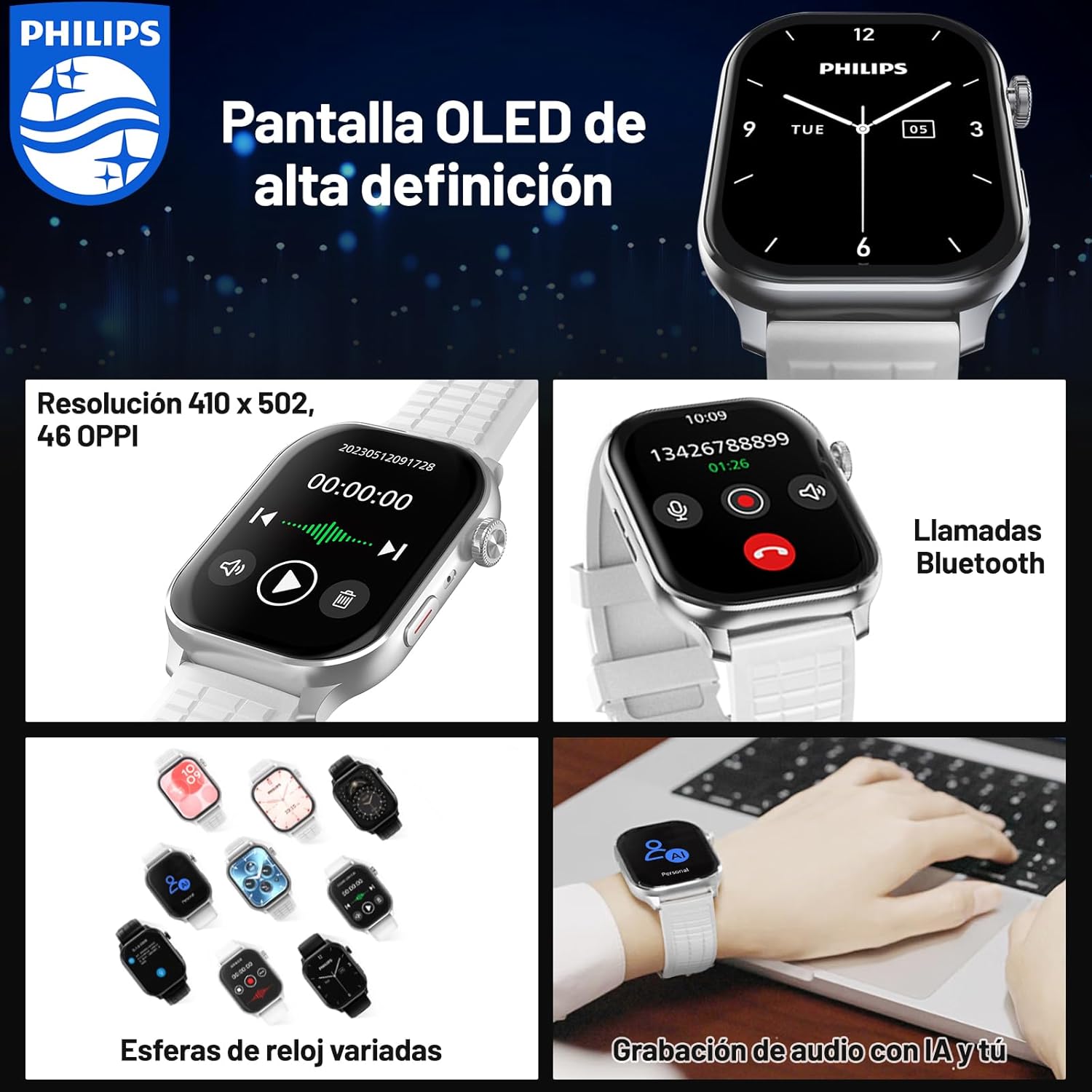
Image: The smartwatch displaying different watch faces and a Bluetooth call screen.

Immagine: un primo piano view of the smartwatch's clear and vivid OLED display.
2. Conference Recording and Translation
The smartwatch is equipped with a one-click recording function and supports real-time voice transcription and translation, making it ideal for efficient meetings and cross-border communication.
- Registrazione con un clic: Access the recording feature from the main menu and tap to start/stop recording.
- Real-time Transcription & Translation: The device can accurately recognize conference conversations and generate text records simultaneously. It supports 2+24 languages for transcription and translation.
- Registrazione offline: Voice notes are saved directly on the device, eliminating the need for an internet connection during recording.
- Archiviazione locale: Recorded audio and transcribed text are stored in the smartwatch's 4GB memory for easy access and review.

Image: The smartwatch and a smartphone screen showing the real-time transcription and translation feature in action.

Image: The smartwatch demonstrating its audio recording capabilities, highlighting offline functionality and local storage.
3. Chiamate e notifiche Bluetooth
Stay connected by making and receiving calls directly from your wrist. Important information and notifications from your smartphone are synchronized to your smartwatch.
- Chiamate Bluetooth: Once paired with your phone, you can dial numbers, answer incoming calls, and view call history directly on the smartwatch.
- Synchronized Notifications: Receive alerts for messages, emails, and app notifications on your wrist, ensuring you don't miss important updates.

Image: The smartwatch displaying its Bluetooth calling interface, including a dial pad and recent call logs.
4. Monitoraggio della salute e della forma fisica
The smartwatch supports multiple professional sports modes and monitors various health data in real-time to help you maintain an active and healthy lifestyle.
- Molteplici modalità sportive: Track data for various activities, including exercise duration, heart rate, steps taken, and distance covered.
- Promemoria sedentarietà: Ricevi avvisi che ti invitano a spostarti se sei rimasto inattivo per troppo tempo.
- Personalized Event Reminders: Set custom reminders for important events.

Image: A user engaging in outdoor exercise, with the smartwatch displaying real-time fitness data and a companion app showing an activity summary.
Manutenzione
- Pulizia: Wipe the smartwatch and strap with a soft, dry cloth. For stubborn dirt, use a slightly damp panno e asciugare accuratamente. Evitare prodotti chimici aggressivi.
- Resistenza all'acqua: The device is 5 ATM water-resistant. After exposure to water, especially saltwater, rinse with fresh water and dry completely. Do not press buttons underwater.
- Magazzinaggio: Quando non lo si utilizza per lunghi periodi, conservare lo smartwatch in un luogo fresco e asciutto.

Image: The smartwatch submerged in water, illustrating its 5 ATM water resistance feature.
Risoluzione dei problemi
| Problema | Possibile soluzione |
|---|---|
| Lo smartwatch non si accende. | Ensure the device is fully charged. Connect to the magnetic charger and wait a few minutes before attempting to power on again. |
| Impossibile effettuare l'associazione con lo smartphone. |
|
| Transcription/Translation not working correctly. |
|
| Durata breve della batteria. |
|
Specifiche
| Caratteristica | Dettaglio |
|---|---|
| Numero di modello | 111 |
| Marca | Philips |
| Dimensioni dello schermo | 1.952 pollici |
| Risoluzione dello schermo | 410 x 502 pixel |
| Capacità di archiviazione | 4 GB |
| Capacità della batteria | 350 milioneamp Ore |
| Durata media della batteria | 3 days (continuous use) |
| Resistenza all'acqua | 5 bancomat |
| Connettività | Bluetooth |
| Dispositivi compatibili | Smartphone |
| Caratteristiche speciali | Audio Recording, Phone Calls, Notifications, Touch Screen, Multi-sport Tracker, Sedentary Reminder |
| Dimensioni | 13.7 x 13.6 x 6.7 cm; 230 g (confezione) |
Garanzia e supporto
For warranty information and customer support, please refer to the warranty card included in your product packaging or visit the official Philips support website. If you have any questions or encounter issues not covered in this manual, please contact Philips customer service.
Supporto online: www.philips.com/support
Ask a question about this manual
Ask about setup, troubleshooting, compatibility, parts, safety, or missing instructions. Manuals+ will review the question and use this page’s manual context to help answer it.