
1. Introduzione
This manual provides detailed instructions for the LIGE EF14-G Smartwatch. Please read this manual thoroughly before using your device to ensure proper operation and to fully utilize its features. Keep this manual for future reference.
2. Prodotto finitoview
The LIGE EF14-G Smartwatch is a robust and versatile wearable device designed for daily use and active lifestyles. It features a 1.62-inch HD AMOLED display, Bluetooth calling capabilities, comprehensive health monitoring, and multiple sport modes. Its durable construction and long-lasting battery make it a reliable companion.
Caratteristiche principali:
- Display AMOLED da 1.62 pollici: 480x480 resolution with 850 nits brightness for clear visuals.
- 730mAh Polymer Battery: Provides 5-7 days of typical use and up to 50 days standby.
- Costruzione durevole: Zinc Alloy casing, Polycarbonate back, and soft silicone strap.
- Resistenza all'acqua 3 ATM: Suitable for rain, sweat, and swimming.
- 110+ Professional Sport Modes: Comprehensive activity tracking.
- Monitoraggio sanitario 24 ore su 24, 7 giorni su 7: Heart Rate, Blood Oxygen (SpO2), Blood Pressure, Sleep Analysis.
- Bluetooth 5.3: For calls, notifications, and music control.
- Integrated LED Tactical Flashlight.
- Supporto multilingua: Compatible with Android 5.0+ and iOS 10.0+ via FitCloudPro app.

The LIGE EF14-G Smartwatch, showcasinil suo design e gli accessori inclusi.

The LIGE EF14-G Smartwatch, highlighting its robust design for outdoor activities.
3. Impostazione
3.1 Ricarica del dispositivo
Before initial use, fully charge your smartwatch. Connect the magnetic charging cable to the charging points on the back of the watch. Connect the other end to a USB power adapter (not included) or a computer's USB port. A full charge takes approximately 2.5 hours.

The smartwatch connected to its magnetic charging cable, illustrating the charging process.

An illustration highlighting the 730mAh battery capacity, indicating extended usage time.
3.2 Installazione dell'app
Scarica il FitCloudPro application on your smartphone. You can find it in the Apple App Store for iOS devices or the Google Play Store for Android devices. Alternatively, scan the QR code provided in the watch's packaging or on the watch screen to download the app.

The smartwatch displaying a QR code for easy FitCloudPro app download, shown alongside a smartphone with the app interface.
3.3 Associazione del dispositivo
Ensure Bluetooth is enabled on your smartphone. Open the FitCloudPro app, register or log in, and follow the on-screen instructions to add your device. Select 'EF14-G' from the list of available devices to establish a Bluetooth 5.3 connection. Grant all necessary permissions for full functionality.
4. Istruzioni per l'uso
4.1 Navigazione di base
The smartwatch features a full-touch AMOLED display and physical buttons for navigation. Swipe left/right, up/down to access different functions and menus. Press the side buttons to return to the home screen or access specific features.
4.2 Chiamate e notifiche Bluetooth
Once paired with your smartphone, the watch supports Bluetooth calls. You can answer, reject, or make calls directly from your wrist. The watch will also display notifications for messages, social media alerts, and other app updates.

A close-up of the smartwatch on a wrist, displaying an incoming call notification.

The smartwatch screen displaying multiple notification icons from various applications.
4.3 Monitoraggio sanitario
The EF14-G smartwatch continuously monitors your health metrics. Access the dedicated sections on the watch or in the FitCloudPro app for detailed data.
- Frequenza cardiaca: Monitoraggio della frequenza cardiaca in tempo reale.
- Ossigeno nel sangue (SpO2): Misura i livelli di saturazione dell'ossigeno nel sangue.
- Pressione sanguigna: Fornisce letture della pressione sanguigna.
- Monitoraggio del sonno: Analizza il sonnotages (deep, light, awake) and duration.

The smartwatch screen displaying detailed heart rate monitoring data and a historical graph.

A visual representation of the smartwatch's wellness features, including heart rate, daily activity, sleep, and breathing exercise tracking.
4.4 Modalità Sport e monitoraggio delle attività
The watch supports over 110 professional sport modes. Select your desired activity to track steps, calories burned, distance, and other relevant metrics. All fitness data synchronizes with the FitCloudPro app for detailed analysis.

The smartwatch displaying an active sport mode, showing real-time metrics like duration, heart rate, and step count.

A man wearing the smartwatch while engaged in rock climbing, demonstrating its use during outdoor sports.
4.5 LED Tactical Flashlight
The smartwatch is equipped with a powerful LED flashlight for emergencies or low-light conditions. Activate this feature through the watch's menu.
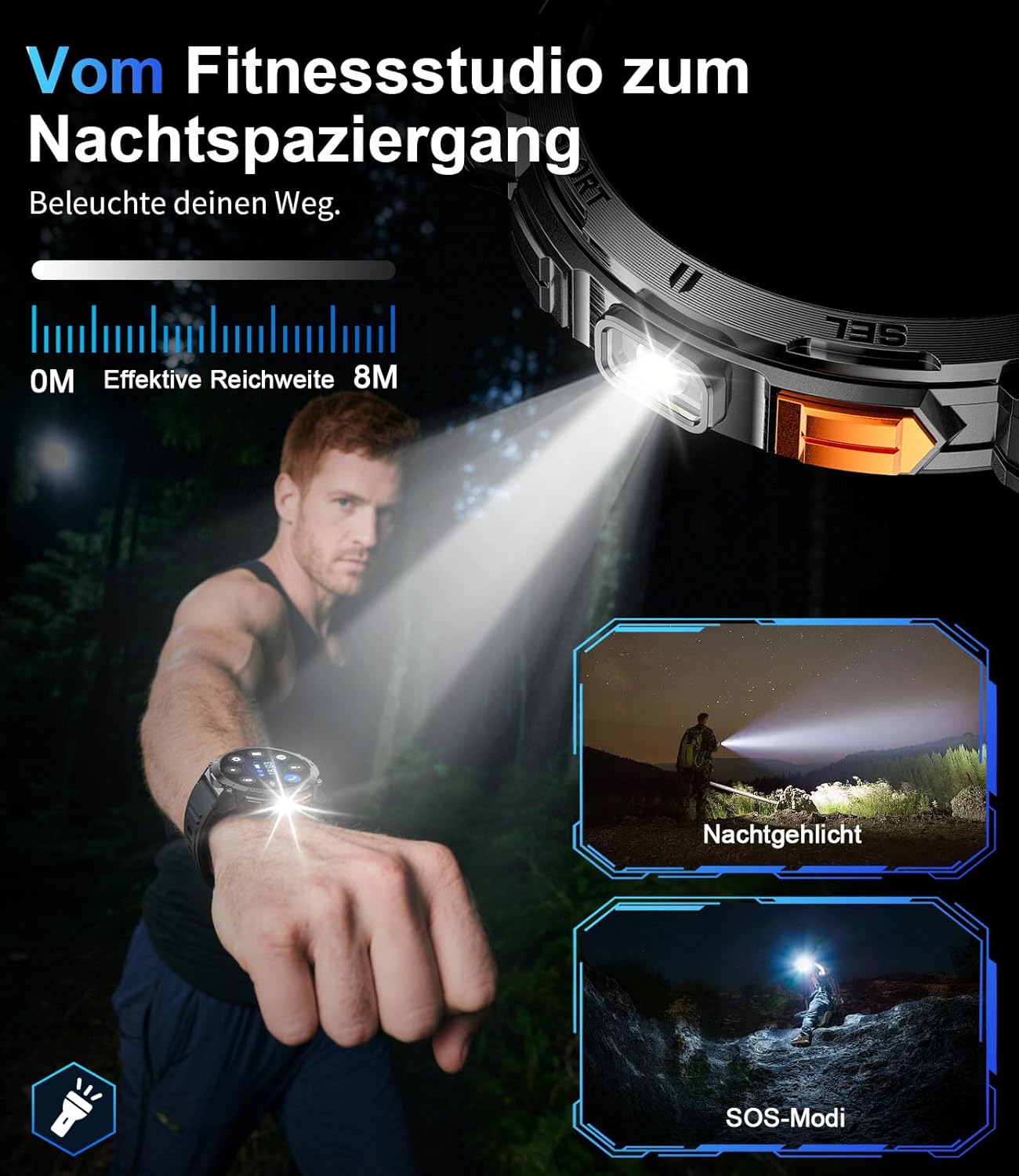
Un primo piano view of the smartwatch with its integrated LED flashlight activated.

A person using the smartwatch's LED light to navigate in a dark outdoor environment.
MAI personalizzazione
Personalize your smartwatch experience. Choose from a variety of pre-installed watch faces or create custom ones through the FitCloudPro app. The 22mm interchangeable straps allow for further personalization.
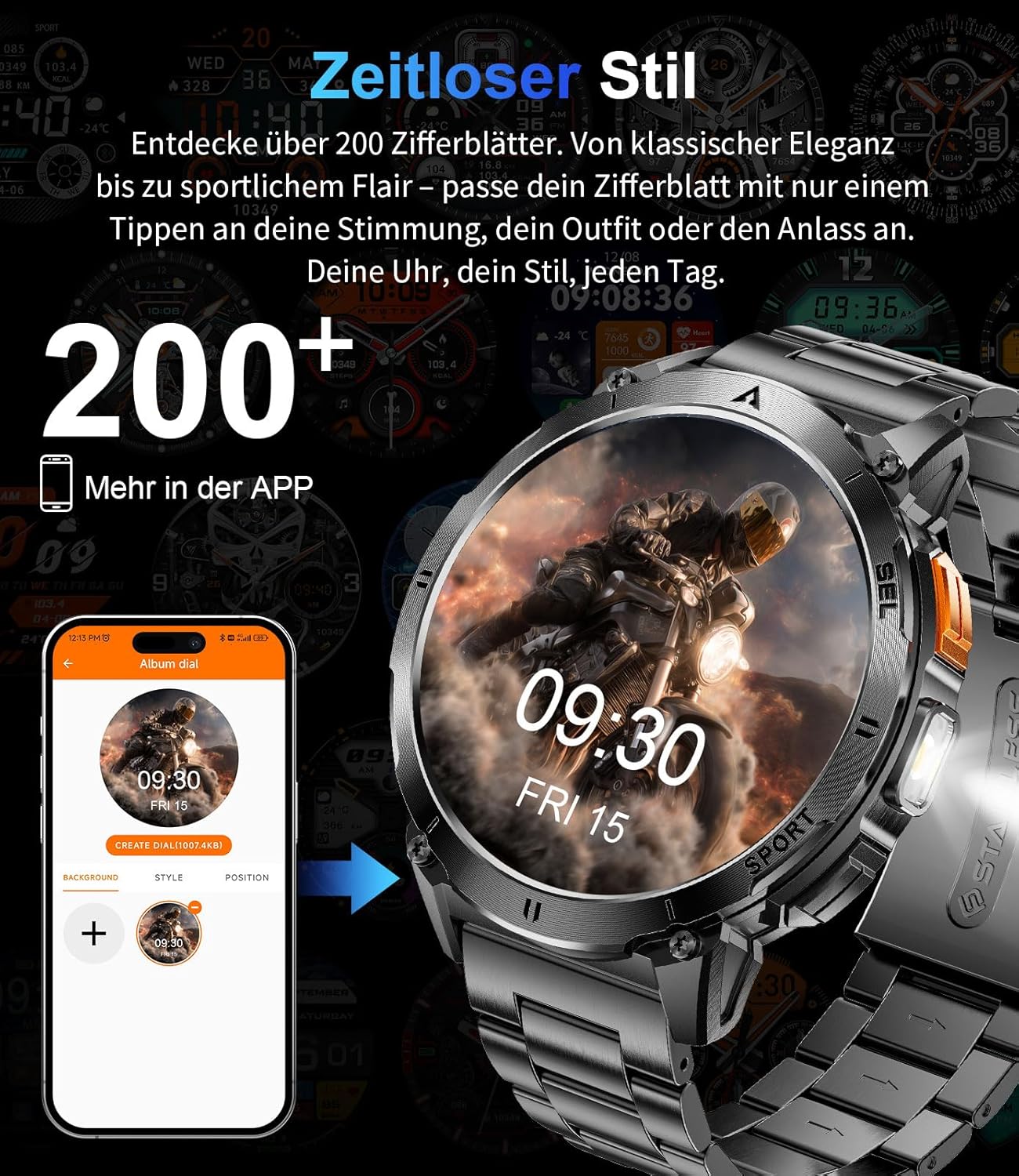
The smartwatch display showing various customizable watch face options.
5. Manutenzione
5.1 Pulizia
Regularly clean your smartwatch and strap to prevent skin irritation and maintain optimal performance. Use a soft, damp panno per pulire lo schermo e casing. Evitare prodotti chimici aggressivi o materiali abrasivi.
5.2 Resistenza all'acqua
The EF14-G smartwatch is 3ATM water-resistant, meaning it can withstand splashes, rain, and brief immersion in water, making it suitable for swimming. However, it is not recommended for diving or exposure to hot water, steam, or high-pressure water jets, as this may compromise the seals.

A visual representation highlighting the smartwatch's durability, including its waterproof, shockproof, and dustproof capabilities.
6. Risoluzione Dei Problemi
If you encounter issues with your LIGE EF14-G Smartwatch, refer to the following common solutions:
- Dispositivo non si accende: Assicurati che l'orologio sia completamente carico. Collegalo al caricabatterie per almeno 30 minuti.
- Impossibile associare allo smartphone:
- Assicurati che il Bluetooth sia abilitato sul tuo telefono.
- Assicurati che l'orologio si trovi nel raggio d'azione del tuo telefono.
- Riavvia sia il telefono che lo smartwatch.
- Verificare che l'app FitCloudPro disponga di tutte le autorizzazioni necessarie.
- Prova a disaccoppiare e riassociare il dispositivo nell'app.
- Letture sanitarie imprecise:
- Assicurati che l'orologio sia indossato comodamente al polso, né troppo stretto né troppo largo.
- Pulisci il sensore sul retro dell'orologio.
- Evitare movimenti eccessivi durante le misurazioni.
- Durata breve della batteria:
- Ridurre la luminosità dello schermo.
- Disattiva le notifiche o le funzionalità non necessarie.
- Assicurarsi che l'orologio sia completamente carico ogni volta.
- Notifiche non visualizzate:
- Check app permissions on your phone for FitCloudPro.
- Ensure notifications are enabled in both the phone's settings and the FitCloudPro app.
- Verificare che la connessione Bluetooth sia stabile.
7. Specifiche
Detailed technical specifications for the LIGE EF14-G Smartwatch:
| Marca | LIGE |
| Numero di modello | EF14-G |
| Colore | Nero |
| Sistema operativo | Wear OS (Compatible with FitCloudPro app) |
| Dimensioni dello schermo | 1.62 pollici |
| Tipo di visualizzazione | AMOLED, 480x480 pixels, 850 nits |
| Connettività | Bluetooth 5.3 |
| Capacità della batteria | Polimeri di litio da 730 mAh |
| Durata della batteria | 5-7 giorni (uso tipico), fino a 50 giorni (standby) |
| Resistenza all'acqua | 3 bancomat |
| Caratteristiche speciali | LED light, Pedometer, Fitness Tracker, Heart Rate Monitor, SpO2 Monitor, Sleep Tracker, Bluetooth Calls, Music Player, Voice Assistant, Reminders, Alarms, Notifications, Sedentary Reminder, Calculator |
| Dispositivi compatibili | Smartphone (Android 5.0+ / iOS 10.0+) |
| Capacità di archiviazione della memoria | 256 MB |
| GPS | Nessun GPS |
8. Garanzia e supporto
LIGE provides comprehensive support for your EF14-G Smartwatch.
- Garanzia: 2 anni di garanzia dalla data di acquisto.
- Politica di ritorno: 30-day return service.
- Assistenza clienti: 24-hour customer support is available for any inquiries or assistance.

An illustration detailing the customer support services: 24-hour customer service, 6-month return policy, and 2-year warranty service.