
1. Prodotto finitoview
The TRIGKEY Key i13 Mini PC is a compact and powerful computing solution designed for various applications, from gaming and content creation to business and educational use. It features a 13th Gen Intel Core i9-13900HK processor, high-speed DDR5 RAM, and PCIe 4.0 SSD storage, offering robust performance in a small form factor.

Figure 1: The TRIGKEY Key i13 Mini PC, showcasing its compact design and various ports on the front and rear.
Caratteristiche principali:
- Processore: 13th Gen Intel Core i9-13900HK (14 Cores/20 Threads, up to 5.4 GHz)
- Memoria: RAM DDR32 da 5 GB (espandibile)
- Magazzinaggio: 1TB PCIe 4.0 SSD (expandable with dual M.2 2280 slots)
- Grafica: Scheda grafica Intel Iris Xe (96EU)
- Uscita di visualizzazione: Triple display support via HDMI (4K 60Hz), DisplayPort 1.4 (4K 144Hz), and Thunderbolt 4 (40Gbps/DP1.4)
- Connettività: WiFi 6 (Intel AX200), Bluetooth 5.2, 2.5G LAN
- Porte: Thunderbolt 4, USB-C 3.2, USB-A 3.2, DP1.4, HDMI, 2.5G LAN, 3.5mm audio jacks
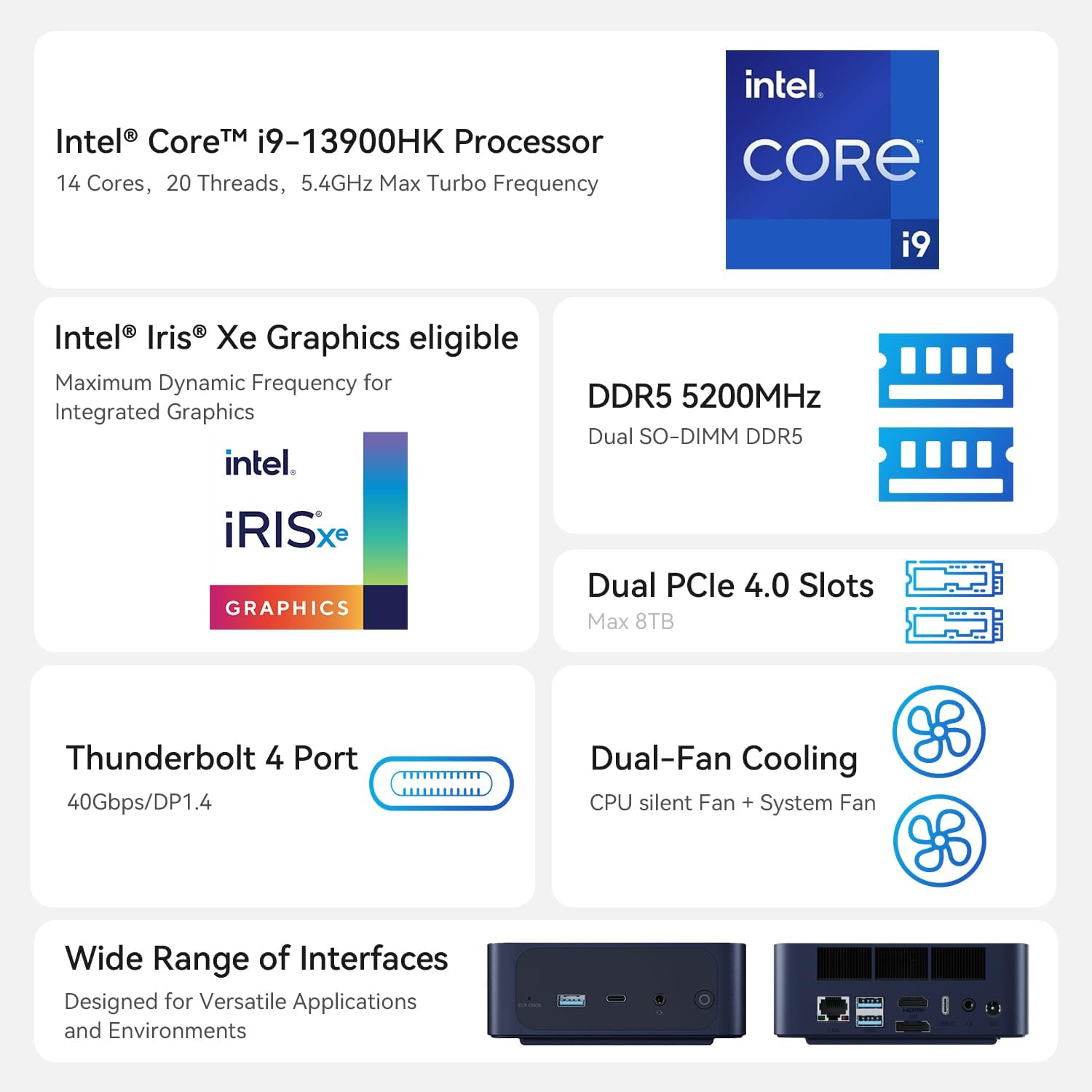
Figure 2: An illustration of the Intel Core i9-13900HK processor, emphasizing its core count, threads, and turbo frequency.
2. Guida all'installazione
2.1 Cosa c'è nella scatola
Prima di procedere con la configurazione, assicurarsi che tutti i componenti siano presenti:
- 1 x TRIGKEY Key i13 Mini PC
- 1 x HDMI Cable (100CM)
- 1 x Manuale utente
- 1 x adattatore di alimentazione (19 V/5.26 A)
2.2 Collegamento del mini PC
Follow these steps to connect your TRIGKEY Key i13 Mini PC:
- Connetti Display: Use the provided HDMI cable or a DisplayPort/Thunderbolt cable to connect your monitor(s) to the corresponding ports on the mini PC. The device supports up to three independent displays.
- Connetti le periferiche: Plug in your USB keyboard, mouse, and any other USB devices into the available USB-A or USB-C ports.
- Connetti rete: For a wired connection, connect an Ethernet cable from your router or modem to the 2.5G LAN port on the mini PC. For wireless, ensure the WiFi antennas are properly positioned (if external) or that the internal antenna has clear signal access.
- Connetti alimentazione: Insert the power adapter into the DC IN port on the mini PC, then plug the adapter into a power outlet.
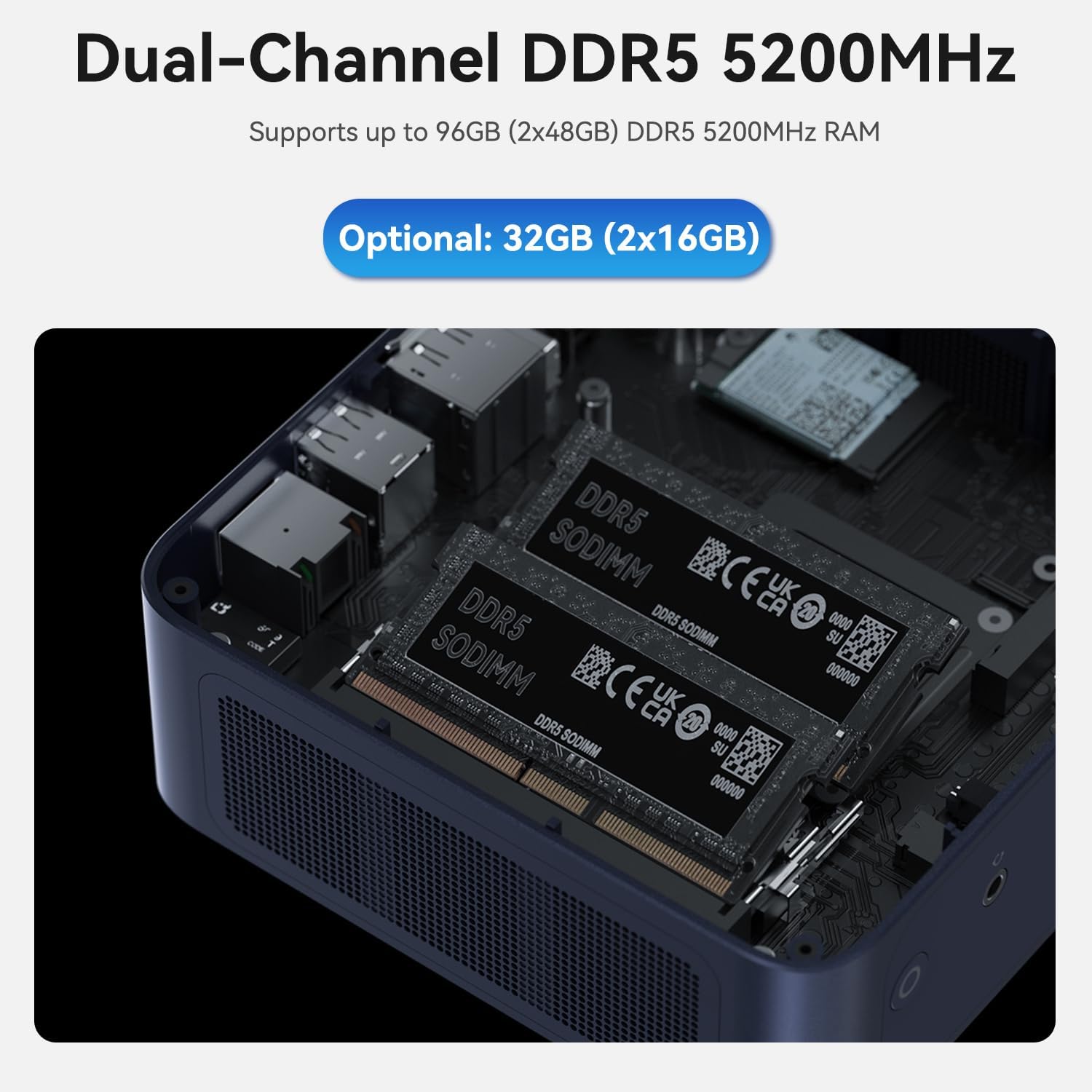
Figure 3: A diagram illustrating the various ports on the TRIGKEY Key i13 Mini PC, including Thunderbolt 4, USB-C, USB-A, DP1.4, HDMI, LAN, and audio jacks.
2.3 Accensione iniziale
After connecting all necessary cables, press the power button located on the front of the mini PC. The system will boot up, and you should see the operating system loading on your connected display.
3. Istruzioni per l'uso
3.1 Gestione dell'alimentazione
- Accensione: Premere una volta il pulsante di accensione.
- Fermare: Access the operating system's power options to perform a proper shutdown.
- Ricomincia: Access the operating system's power options to restart the system.
- Modalità risparmio: Access the operating system's power options to put the system into sleep mode.
3.2 Configurazione del display
The TRIGKEY Key i13 supports up to three independent displays. To configure multiple displays:
- Connect your monitors to the HDMI, DisplayPort, and Thunderbolt 4 ports.
- Once connected, the operating system (e.g., Windows) should automatically detect the displays.
- Navigate to your display settings (e.g., right-click on desktop > Display settings) to arrange, extend, or duplicate your displays as needed.
3.3 Rete e connettività wireless
The mini PC offers advanced connectivity options:
- Wired Network (2.5G LAN): For optimal speed and stability, use the 2.5G Ethernet port. Ensure your router and network infrastructure support 2.5G speeds for full performance.
- Rete wireless (WiFi 6): The integrated WiFi 6 (Intel AX200) module provides high-speed wireless connectivity. To connect, open your operating system's network settings, select your desired WiFi network, and enter the password.
- Bluetooth (BT 5.2): Use Bluetooth 5.2 to connect wireless peripherals such as keyboards, mice, headphones, or speakers. Access your operating system's Bluetooth settings to pair devices.

Figura 4: Un overview of the mini PC's connectivity options, including WiFi 6, Bluetooth 5.2, and 2.5G LAN.
3.4 Espansione di memoria e archiviazione
The TRIGKEY Key i13 Mini PC is designed for easy upgrades:
- Memoria RAM: The device comes with 32GB DDR5 RAM (2x16GB) and supports up to 96GB (2x48GB) DDR5 5200MHz SO-DIMM memory. To upgrade, carefully open the chassis and replace the existing SO-DIMM modules.
- SSD: It includes a 1TB PCIe 4.0 SSD. The mini PC features dual M.2 2280 PCIe 4.0 slots, each supporting up to 4TB, for a total of 8TB storage. To add or upgrade SSDs, open the chassis and install M.2 2280 NVMe SSDs into the available slots.

Figura 5: Un interno view of the mini PC, displaying the dual DDR5 SO-DIMM slots for memory installation.

Figura 6: Un interno view of the mini PC, illustrating the dual M.2 2280 PCIe 4.0 slots for storage expansion.
4. Manutenzione
4.1 Pulizia
To ensure optimal performance and longevity, regularly clean your mini PC:
- Utilizzare un panno morbido e asciutto per pulire la parte esterna del dispositivo.
- Per eliminare l'accumulo di polvere nelle prese d'aria, utilizzare aria compressa. Assicurarsi che il dispositivo sia spento e scollegato prima di pulirlo.
- Evitare di utilizzare detergenti liquidi direttamente sul dispositivo.
4.2 Aggiornamenti software
Keep your operating system and drivers updated to ensure system stability, security, and performance. Regularly check for updates through your operating system's settings.
4.3 Sistema di raffreddamento
The TRIGKEY Key i13 features a dual-fan cooling system to manage internal temperatures. Ensure the vents are not obstructed to allow for proper airflow. If you notice excessive fan noise or overheating, ensure the device is in a well-ventilated area.

Figure 7: A diagram demonstrating the airflow and cooling mechanism within the TRIGKEY Key i13 Mini PC, highlighting the system fan and SSD heatsink.
5. Risoluzione Dei Problemi
This section addresses common issues you might encounter with your TRIGKEY Key i13 Mini PC.
5.1 Nessun potere
- Assicurarsi che l'adattatore di alimentazione sia collegato saldamente sia al mini PC sia a una presa di corrente funzionante.
- Verificare che la presa di corrente funzioni collegandovi un altro dispositivo.
- Controllare che l'adattatore di alimentazione non presenti danni visibili.
5.2 Nessuna uscita di visualizzazione
- Confirm that the display cable (HDMI, DP, Thunderbolt) is securely connected to both the mini PC and the monitor.
- Assicurarsi che il monitor sia acceso e impostato sulla sorgente di input corretta.
- Try connecting to a different display or using a different cable to rule out display or cable issues.
5.3 Problemi di connettività di rete
- Wired: Check if the Ethernet cable is properly connected. Verify your router/modem is working correctly.
- Senza fili: Ensure WiFi is enabled in your operating system settings. Confirm you are connected to the correct network and have entered the password accurately. Restart your router/modem if necessary.
- Update network drivers if issues persist.
5.4 Problemi di prestazioni del sistema
- Chiudere le applicazioni non necessarie in esecuzione in background.
- Verificare la presenza di eventuali aggiornamenti in sospeso del sistema operativo o dei driver e installarli.
- Ensure the mini PC has adequate ventilation and is not overheating.
- Run a system diagnostic or antivirus scan to check for software conflicts or malware.
If you encounter issues not covered here or require further assistance, please contact TRIGKEY customer support.
6. Specifiche
| Caratteristica | Specificazione |
|---|---|
| Processore | Intel Core i9-13900HK (14C/20T, up to 5.4 GHz) |
| Memoria RAM | 32GB DDR5 5200MHz (2x16GB), Max 96GB |
| Magazzinaggio | 1TB PCIe 4.0 SSD (Dual M.2 2280 slots, Max 8TB) |
| Grafica | Scheda grafica Intel Iris Xe (96EU) |
| Risoluzione massima dello schermo | 3840x2160 (4K) |
| Sistema operativo | OS (Pre-installed, typically Windows 11 Pro) |
| Connettività wireless | Wi-Fi 6 (Intel AX200), Bluetooth 5.2 |
| Rete cablata | LAN 2.5G |
| Porti | 1x Thunderbolt 4 (40Gbps/DP1.4), 1x USB-C 3.2 (10Gbps), 3x USB-A 3.2 (10Gbps), 1x DP1.4 (4K 144Hz), 1x HDMI (4K 60Hz), 1x 2.5G LAN, 2x 3.5mm audio jack, 1x DC IN |
| Peso dell'articolo | 2.38 libbre |
| Dimensioni del pacco | 5.67 x 5.51 x 4.29 pollici |
| Tipo di progettazione | Mini PC |
7. Garanzia e supporto
7.1 Informazioni sulla garanzia
The TRIGKEY Key i13 Mini PC comes with a one-year warranty from the date of purchase. This warranty covers manufacturing defects and hardware malfunctions under normal use conditions. Please retain your proof of purchase for warranty claims.
7.2 Assistenza clienti
TRIGKEY is committed to providing excellent customer service. For any technical assistance, troubleshooting, or warranty inquiries, please utilize the following support options:
- Supporto online: Visit the official TRIGKEY store on Amazon for FAQs and product information: TRIGKEY Amazon Store
- Supporto tecnico: We offer 24/7 one-to-one customer service and lifelong technical support. Refer to the contact information provided with your product packaging or on the official TRIGKEY websito per canali di supporto diretto.