
Introduzione
This manual provides detailed instructions for the setup, operation, and maintenance of your PELADN HA-4 Mini PC. This compact desktop computer is equipped with an AMD Ryzen 7 7840HS processor, Radeon 780M graphics, 16GB DDR5 RAM, and a 512GB NVMe SSD, designed for efficient performance in business, entertainment, and light gaming applications.

Figura 1: Fronte view of the PELADN HA-4 Mini PC, showcasing its compact design and RGB light strip.
Contenuto della confezione
Si prega di verificare che tutti gli articoli siano presenti nel pacco:
- PELADN HA-4 7840HS Mini PC
- Cavo HDMI
- Adattatore di alimentazione
- Manuale dell'utente (questo documento)
- Staffa di montaggio (per montaggio VESA)
Prodotto finitoview
Componenti interni
The PELADN HA-4 Mini PC features a well-engineered internal layout for optimal performance and cooling. Key components include the AMD Ryzen 7 7840HS processor, DDR5 RAM, and an NVMe SSD.
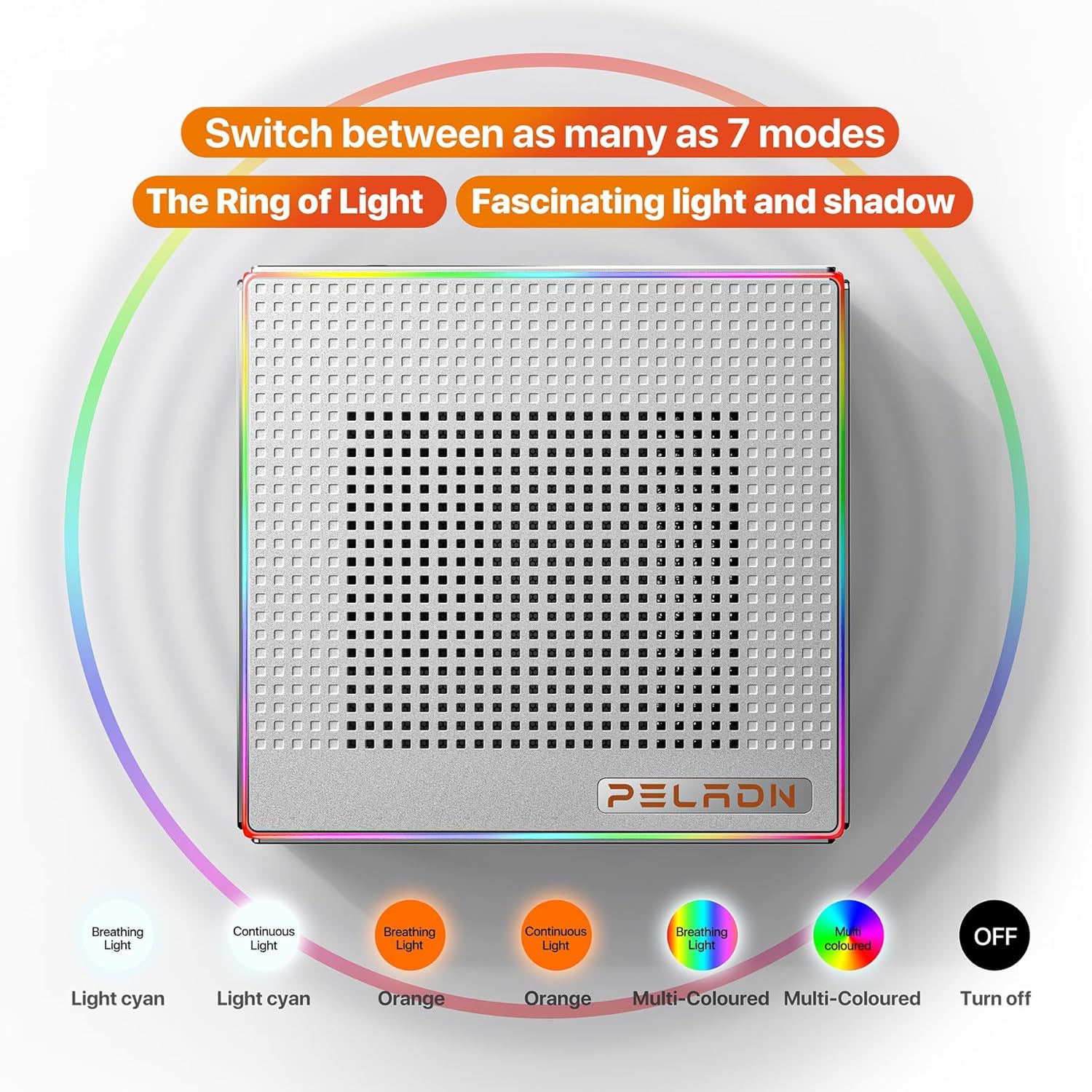
Figura 2: Esploso view illustrating the internal structure and components of the Mini PC.
Porte e interfacce
The Mini PC offers a comprehensive range of ports for connectivity, including multiple USB ports, HDMI, and Type-C for versatile peripheral and display connections.
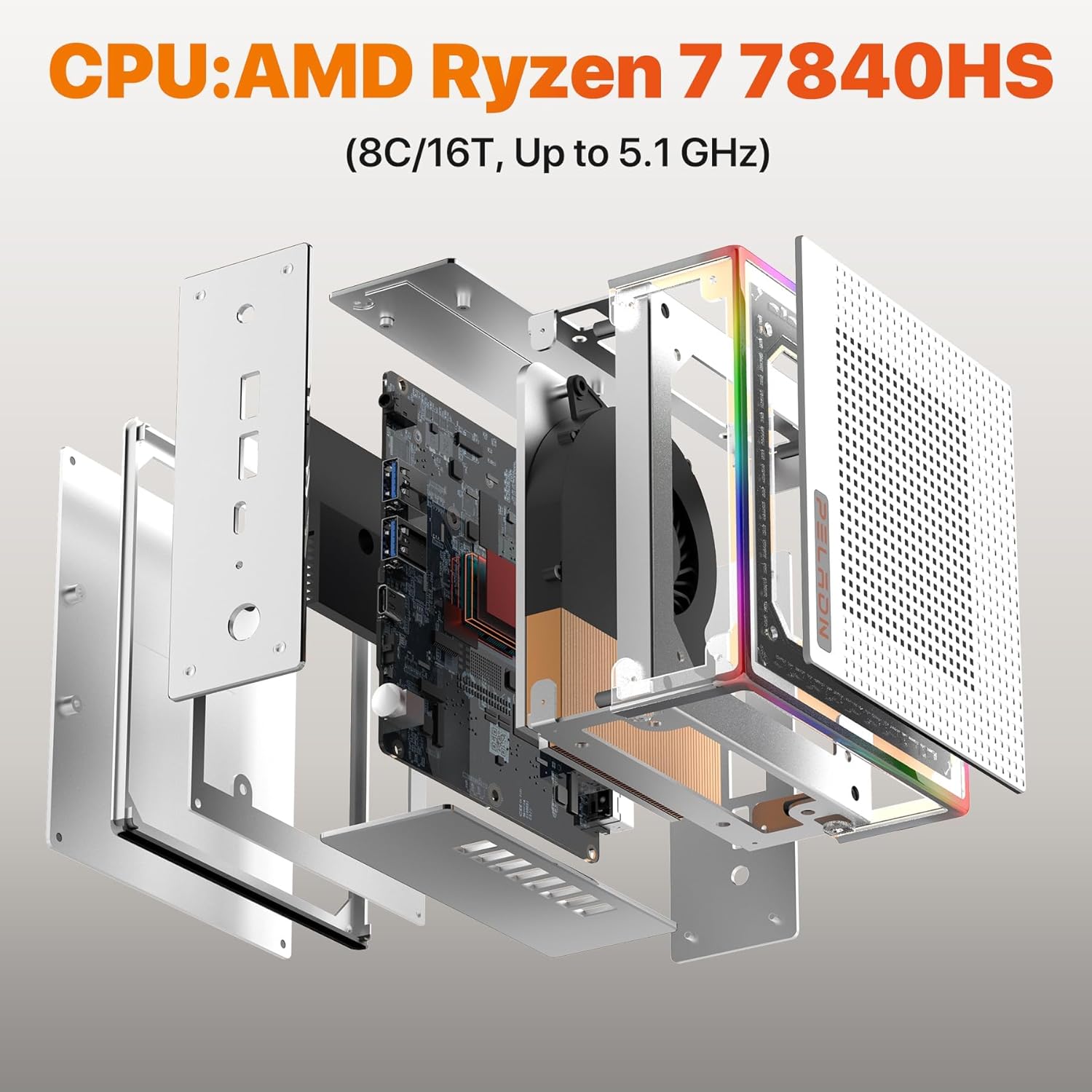
Figura 3: dettagliata view of the Mini PC's front and rear ports, including USB, HDMI, Type-C, RJ45 LAN, and power input.
- Porte anteriori: Power Button, Reset Button, 2x USB 3.2, Earphone Jack.
- Porte posteriori: DC 19V Power Input, 2x USB 2.0, 2x HDMI 2.0, 1x RJ45 LAN (1000Mbps), 1x Type-C (USB 4.0, 40 Gbps).
Illuminazione RGB
The PELADN HA-4 features a 64-color RGB light strip on its shell. A button at the rear of the machine allows users to cycle through three different modes: breathing, single-color constant light, and off.

Figure 4: Visual representation of the various RGB lighting modes available on the Mini PC.
Impostare
- Connetti le periferiche: Collega la tastiera, il mouse e gli altri dispositivi USB alle porte USB disponibili.
- Connetti Display: Use an HDMI cable to connect your monitor(s) to the HDMI ports on the Mini PC. For triple display setup, utilize both HDMI ports and the USB-C 4.0 port with a compatible adapter/cable.
- Connetti alimentazione: Collegare l'adattatore di alimentazione alla porta di ingresso CC 19 V del Mini PC, quindi collegare l'adattatore a una presa di corrente.
- Accensione: Premere il pulsante di accensione situato sulla parte anteriore del Mini PC.
- Configurazione iniziale: Follow the on-screen instructions to complete the operating system setup.
Montaggio VESA
Il supporto VESA incluso consente di fissare il Mini PC sul retro di un monitor compatibile, risparmiando spazio sulla scrivania.
- Fix the mounting bracket to the Mini PC using the provided screws.
- Fix the bracket to the back of your display using the appropriate VESA mounting holes and screws.

Figure 5: Instructions for VESA mounting the Mini PC to a monitor.
Istruzioni per l'uso
Accensione/spegnimento
- Per accendere: Premere una volta il pulsante di accensione.
- Spegnere: Use the operating system's shutdown function. Alternatively, press and hold the Power Button for 5 seconds for a forced shutdown (use only when necessary).
Controllo della luce RGB
The RGB light strip can be controlled via the button located at the rear of the device. Press the button to cycle through the available modes: breathing, single-color constant light, and off.
Configurazione del display triplo
The Mini PC supports up to three 4K@60Hz displays simultaneously using its two HDMI 2.0 ports and one USB-C 4.0 port. Connect your monitors and configure display settings within your operating system.

Figura 6: Esample of a triple display setup connected to the Mini PC.
Manutenzione
- Pulizia: Regularly clean the exterior of the Mini PC with a soft, dry cloth. Use compressed air to clear dust from ventilation openings. Ensure the device is powered off and unplugged before cleaning.
- Ventilazione: Ensure adequate airflow around the Mini PC. Do not block the ventilation holes.
- Aggiornamenti software: Mantieni aggiornati il sistema operativo e i driver per garantire prestazioni e sicurezza ottimali.
- Magazzinaggio: Evitare di posizionare oggetti pesanti sul Mini PC. Conservarlo in un ambiente fresco e asciutto, lontano dalla luce solare diretta e da temperature estreme.
Risoluzione dei problemi
- No Power / System Not Starting:
- Assicurarsi che l'adattatore di alimentazione sia collegato saldamente sia al Mini PC sia a una presa di corrente funzionante.
- Verificare che la presa di corrente funzioni collegandovi un altro dispositivo.
- Se disponibile, provare una presa di corrente diversa.
- Nessuna uscita di visualizzazione:
- Verificare che il cavo HDMI o USB-C sia collegato saldamente sia al Mini PC sia al monitor.
- Assicurarsi che il monitor sia acceso e impostato sulla sorgente di input corretta.
- Se possibile, provare un cavo di visualizzazione o un monitor diverso.
- Slow Internet Speed (Wi-Fi):
- Assicurati che il Mini PC si trovi nel raggio d'azione del router Wi-Fi.
- Check for obstructions between the Mini PC and the router.
- Aggiorna i driver Wi-Fi.
- Consider connecting via Ethernet cable to the RJ45 LAN port for a stable wired connection.
- Incorrect Default Language:
- Access the operating system's language settings and change the display language to your preference.
- If the issue persists or the system is unusable, a reinstallation of the operating system with the correct language pack may be required.
Specifiche
| Caratteristica | Dettaglio |
|---|---|
| Marca | PELADN |
| Nome del modello | HA-4 Ryzen 7 7840HS |
| Modello CPU | AMD Ryzen 7 7840HS (8 Cores/16 Threads, up to 5.1 GHz) |
| Coprocessore grafico | Radeon 780M (12-core GPU, 2200MHz) |
| Memoria RAM | 16 GB DDR5 (5600 MHz, upgradeable to 64GB) |
| Magazzinaggio | 512 GB M.2 2280 NVMe SSD (PCIe Gen 4.0) |
| Sistema operativo | OS (as shipped) |
| Connettività | WiFi 6, Bluetooth 5.2, 1000Mbps Ethernet (RJ45 LAN) |
| Uscita video | 2x HDMI 2.0, 1x USB Type-C 4.0 (Supports Triple 4K@60Hz Displays) |
| Porte USB | 2x USB 3.2, 2x USB 2.0, 1x USB Type-C 4.0 |
| Consumo energetico | 45 Watts (Max 54W TDP) |
| Dimensioni | Circa 5.3 x 5.0 x 2.0 pollici |
| Caratteristiche aggiuntive | 64-color RGB light strip, VESA mount support |
Garanzia e supporto
The PELADN HA-4 Mini PC comes with a 1-year free warranty. For technical assistance or customer support, please refer to the contact information provided with your purchase or visit the official PELADN website. All Mini PCs have obtained FCC, CE, and RoHS certifications.