
1. Introduzione
This manual provides detailed instructions for the installation, operation, and maintenance of the LiftMaster SRDRST O2-SRDRST Multi-Technology Smart Reader. This device is designed for secure access control in both indoor and outdoor environments, supporting various credential types including 125 KHz proximity cards, 13.56 MHz cards, and Bluetooth Low Energy (BLE) mobile credentials.
2. Informazioni sulla sicurezza
Please read and understand all safety instructions before installing or operating the SRDRST Smart Reader. Failure to follow these instructions may result in product damage, property damage, or personal injury.
- Sicurezza elettrica: Ensure power is disconnected before performing any wiring or installation procedures. All wiring should be performed by a qualified technician in accordance with local electrical codes.
- Condizioni ambientali: While designed for indoor/outdoor use, avoid exposing the reader to extreme temperatures, direct water spray, or corrosive substances beyond its specified operating conditions.
- Montaggio: Mount the reader securely to a stable surface to prevent accidental dislodgement.
- Uso autorizzato: This device is intended for access control applications only. Do not use it for purposes other than its intended design.
3. Contenuto della confezione
Verificare che tutti i componenti siano presenti nella confezione prima di iniziare l'installazione:
- SRDRST Smart Reader (Model O2-SRDRST)
- Hardware di montaggio (viti, tasselli)
- Guida all'installazione (questo documento)
4. Configurazione e installazione
The SRDRST Smart Reader offers flexible installation options, including surface mount or single gang box mounting.
4.1 Montaggio del lettore
- Seleziona Località: Choose a suitable indoor or outdoor location for the reader, ensuring it is within reach of necessary wiring and at an appropriate height for user access.
- Prepara la superficie: For surface mounting, ensure the surface is clean and flat. For single gang box mounting, ensure the box is securely installed.
- Fori di perforazione: Use the reader's mounting plate (if applicable) or the reader itself as a template to mark and drill pilot holes for the mounting screws.
- Secure Reader: Attach the reader securely to the wall or single gang box using the provided mounting hardware. Do not overtighten screws.
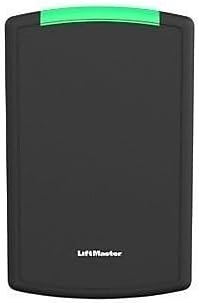
Figura 1: Fronte view of the SRDRST O2-SRDRST Smart Reader. This image shows the sleek, black rectangular reader with a green indicator light at the top and the LiftMaster logo at the bottom.
4.2 Collegamenti di cablaggio
ATTENZIONE: scollegare completamente l'alimentazione prima di effettuare qualsiasi collegamento elettrico.
The SRDRST reader typically connects to an access control panel using standard Wiegand or OSDP protocols. Refer to your access control panel's documentation for specific wiring requirements.
- Energia: Connect the reader to a regulated DC power supply (voltage range typically 9-16V DC). Observe correct polarity.
- Dati: Connect the data lines (e.g., Data 0, Data 1 for Wiegand, or RS485 A, B for OSDP) from the reader to the corresponding inputs on the access control panel.
- Terra: Assicurare un corretto collegamento a terra.

Figura 2: Angolato view of the SRDRST O2-SRDRST Smart Reader. This image provides a side perspective of the reader, highlighting its depth and the green indicator light.
4.3 Power Up and Testing
- After all wiring is complete and verified, restore power to the access control system.
- Observe the reader's LED indicator. It should typically illuminate or flash to indicate power and readiness.
- Present a known valid credential (card or mobile device) to the reader to confirm proper operation and communication with the access control panel.
5. Istruzioni per l'uso
The SRDRST Smart Reader supports multiple credential technologies for flexible access.
5.1 Using 125 KHz and 13.56 MHz Cards/Fobs
- Ensure your card or fob is enrolled in the access control system.
- Present the card or fob directly to the face of the SRDRST reader.
- The reader will emit an audible beep and/or change its LED indicator color (e.g., green for access granted, red for access denied) to indicate the access status.
5.2 Using BLE Mobile Credentials
- Ensure your mobile device has the compatible access control application installed and your mobile credential is provisioned.
- Abilita il Bluetooth sul tuo dispositivo mobile.
- Depending on the application settings, you may need to open the app, tap your phone to the reader, or simply approach the reader with your phone in your pocket (hands-free mode).
- The reader will communicate with your mobile device via Bluetooth and indicate access status through its LED and/or an audible signal.
6. Manutenzione
The SRDRST Smart Reader is designed for minimal maintenance. Follow these guidelines to ensure optimal performance:
- Pulizia: Clean the reader's surface periodically with a soft, damp panno. Non utilizzare detergenti abrasivi, solventi o prodotti chimici aggressivi, poiché potrebbero danneggiare l'alloggiamento.
- Ispezione: Ispezionare periodicamente il lettore per verificare la presenza di eventuali segni di danni fisici o collegamenti allentati.
- Aggiornamenti del firmware: Consult your access control system administrator or LiftMaster support for information on available firmware updates for enhanced features or security.
7. Risoluzione Dei Problemi
If you encounter issues with your SRDRST Smart Reader, refer to the following common problems and solutions:
| Problema | Possibile causa | Soluzione |
|---|---|---|
| Reader is not powering on (no LED activity). | Nessuna alimentazione; cablaggio errato; alimentatore difettoso. | Controllare i collegamenti di alimentazione e il volumetage. Ensure power supply is active. Verify wiring polarity. |
| Reader does not respond to cards/fobs. | Credential not enrolled; incorrect credential type; reader malfunction; communication issue with panel. | Verify credential enrollment in the access control system. Ensure the credential type is supported by the reader. Check wiring to the access control panel. |
| BLE mobile access not working. | Bluetooth off on mobile device; app not running; credential not provisioned; signal interference. | Ensure Bluetooth is enabled. Open the access app. Verify mobile credential provisioning. Reduce interference. |
| Reader grants access but door does not unlock. | Issue with door strike/lock; wiring to door strike; access control panel output. | This indicates the reader is functioning. Troubleshoot the door lock mechanism or the access control panel's output to the lock. |
8. Specifiche
- Modello: O2-SRDRST
- Produttore: Maestro di sollevamento
- Tecnologie supportate:
- 125 KHz Proximity Cards/Fobs (e.g., 26 Bit HID, 30 Bit, 36 Bit Li'Master, 37 Bit formats)
- 13.56 MHz Cards/Fobs (e.g., 32 Bit Mi Fare, 56 Bit Li'Master)
- Bluetooth Low Energy (BLE) Mobile Credentials
- Opzioni di installazione: Surface Mount, Single Gang
- Componenti inclusi: Lettore intelligente SRDRST
- Ambiente: Interno/Esterno
9. Garanzia e supporto
Specific warranty details for the SRDRST O2-SRDRST Smart Reader are not provided in this document. For warranty information, technical support, or service, please refer to the official LiftMaster website or contact your authorized LiftMaster dealer.
Si consiglia di registrare il prodotto per ricevere aggiornamenti e supporto.