
Dyurwa Smart Watch T60 User Manual
Modello: T60
1. Introduzione
Thank you for choosing the Dyurwa Smart Watch T60. This manual provides essential information for setting up, operating, and maintaining your new smartwatch. Please read it thoroughly to ensure proper use and to maximize your device's potential.
2. Cosa c'è nella scatola
Upon opening your Dyurwa Smart Watch T60 package, you should find the following items:
- Dyurwa Smart Watch T60
- Cavo di ricarica
- Manuale dell'utente (questo documento)

Image: Package contents showing the Dyurwa Smart Watch T60, an extra strap, a charging cable, and the user manual.
3. Impostazione
3.1 Installazione dell'app
- Scan the QR code provided in the quick start guide or search for the "GloryFit" app in your smartphone's app store (Apple App Store for iOS, Google Play Store for Android).
- Download and install the "GloryFit" app.
- Apri l'app e segui le istruzioni sullo schermo per creare un account e impostare il tuo profilo personalefile.
3.2 Associazione del dispositivo (connessione Bluetooth)
To connect your Dyurwa Smart Watch T60 to your smartphone:
- Assicurati che il Bluetooth del tuo smartphone sia attivato.
- Apri l'app "GloryFit".
- In the app, navigate to the device section and select "Add Device" or "Cercare Device."
- The app will search for available devices. Select "T60" from the list to initiate pairing.
- Se richiesto, conferma la richiesta di associazione sia sullo smartphone che sullo smartwatch.
For iOS 13.0 and above, and Android 5.0 and above, a single connection through the GloryFit app is usually sufficient for all functions. For older iOS versions (13.0 and below), an additional Bluetooth connection for audio functions (answer/make calls) may be required:
- After successful binding in the GloryFit app, go to your phone's Bluetooth settings.
- Find "T60" in the list of available devices and tap to connect.
- Una volta connesso, puoi usare l'orologio per rispondere ed effettuare chiamate.

Image: Visual guide for connecting the smartwatch to your phone, showing app download, Bluetooth activation, device search, and binding confirmation.
4. Istruzioni per l'uso
4.1 Display and Dials
The Dyurwa Smart Watch T60 features a 1.91-inch HD full touch screen. You can customize your watch face:
- Modifica dei quadranti dell'orologio: Access over 200 designs through the "GloryFit" app.
- Quadranti personalizzati: Upload your favorite picture via the app to set it as your watch face.
- Regolazione della luminosità: Manually adjust the screen brightness through the watch settings (4 levels available) for optimal visibility in various lighting conditions.

Immagine: Lo smartwatch mostraasing its large 1.91-inch HD display and several customizable watch face options, including data like steps, heart rate, and weather.

Image: A user customizing their watch face with a personal photo through the companion app, demonstrating the DIY dial feature.
4.2 Chiamate e messaggi
With Bluetooth 5.3, the watch offers stable connectivity for communication features:
- Chiamate Bluetooth: Make and receive calls directly from your watch using the built-in microphone and Hi-Fi speaker.
- Notifiche dei messaggi: Receive alerts for text messages and notifications from social media applications (e.g., Facebook, WhatsApp, Twitter) directly on your watch.

Image: The smartwatch displaying its Bluetooth call features, including a dial pad, contact list, incoming call screen, and call history.

Image: The smartwatch displaying notifications from various social media platforms and other apps, indicating its smart notification capabilities.
4.3 Monitoraggio sanitario
The Dyurwa Smart Watch T60 provides comprehensive health tracking features:
- Cardiofrequenzimetro: Continuously monitors your heart rate 24/7. Data is for reference only and not for medical diagnosis.
- Monitoraggio del sonno: Automatically measures your sleep patterns, including awake, light, and deep sleep stages, to help you understand and improve your sleep habits.
- Monitoraggio dell'ossigeno nel sangue: Misura i livelli di ossigeno nel sangue.
- Monitoraggio della salute femminile: Manage and track menstrual cycles and predict fertile periods through the app.
- Esercizi di respirazione: Sessioni di respirazione guidata per favorire il rilassamento.

Image: A split image showing the smartwatch's sleep monitoring function with sleep duration, and heart rate and blood oxygen monitoring displays.

Image: A woman exercising while wearing the smartwatch, with a close-up of the watch displaying heart rate data and a corresponding app screen.

Image: Demonstrates breathing exercises and blood oxygen monitoring features of the smartwatch, showing users engaging with these functions.
4.4 modalità sportive
The watch supports over 110 built-in sports modes. During exercise, it records data such as steps, calories burned, distance, and heart rate.

Image: A cyclist wearing the smartwatch, with an overlay showing various sports icons and the watch displaying real-time exercise data like calories, steps, distance, and heart rate.

Image: A collage of people participating in various sports like running, cycling, yoga, and tennis, illustrating the wide range of supported sport modes.
4.5 Altre funzioni
The Dyurwa Smart Watch T60 includes several practical features:
- Assistente vocale: Accedi all'assistente vocale del tuo telefono direttamente dall'orologio.
- Controllo della musica: Controlla la riproduzione della musica sul tuo smartphone.
- Controllo della telecamera: Attiva da remoto l'otturatore della fotocamera del tuo smartphone.
- Previsioni del tempo: View condizioni meteorologiche attuali e previsioni.
- Sveglia e timer: Imposta sveglie e usa la funzione timer.
- Cronometro: Per le attività di cronometraggio.
- Trova il tuo telefono: Localizza il tuo smartphone smarrito facendolo squillare.
- Calcolatrice: Funzioni di calcolo di base.
- Torcia elettrica: Utilizza lo schermo come fonte di luce.

Image: A comprehensive display of the smartwatch's various utility features, including calendar, stopwatch, camera remote, weather, alarm, timer, flashlight, calculator, breathing exercises, phone finder, voice assistant, and music control.
5. Batteria e ricarica
The Dyurwa Smart Watch T60 is equipped with a large capacity battery, offering extended usage times:
- Tempo di ricarica: Circa 2 ore per una ricarica completa.
- Uso regolare: Fino a 7-10 giorni.
- Tempo di standby: Fino a 30 giorni.
Use the provided magnetic charging cable to charge your device. Connect the magnetic end to the charging points on the back of the watch and the USB end to a standard USB power adapter (not included).
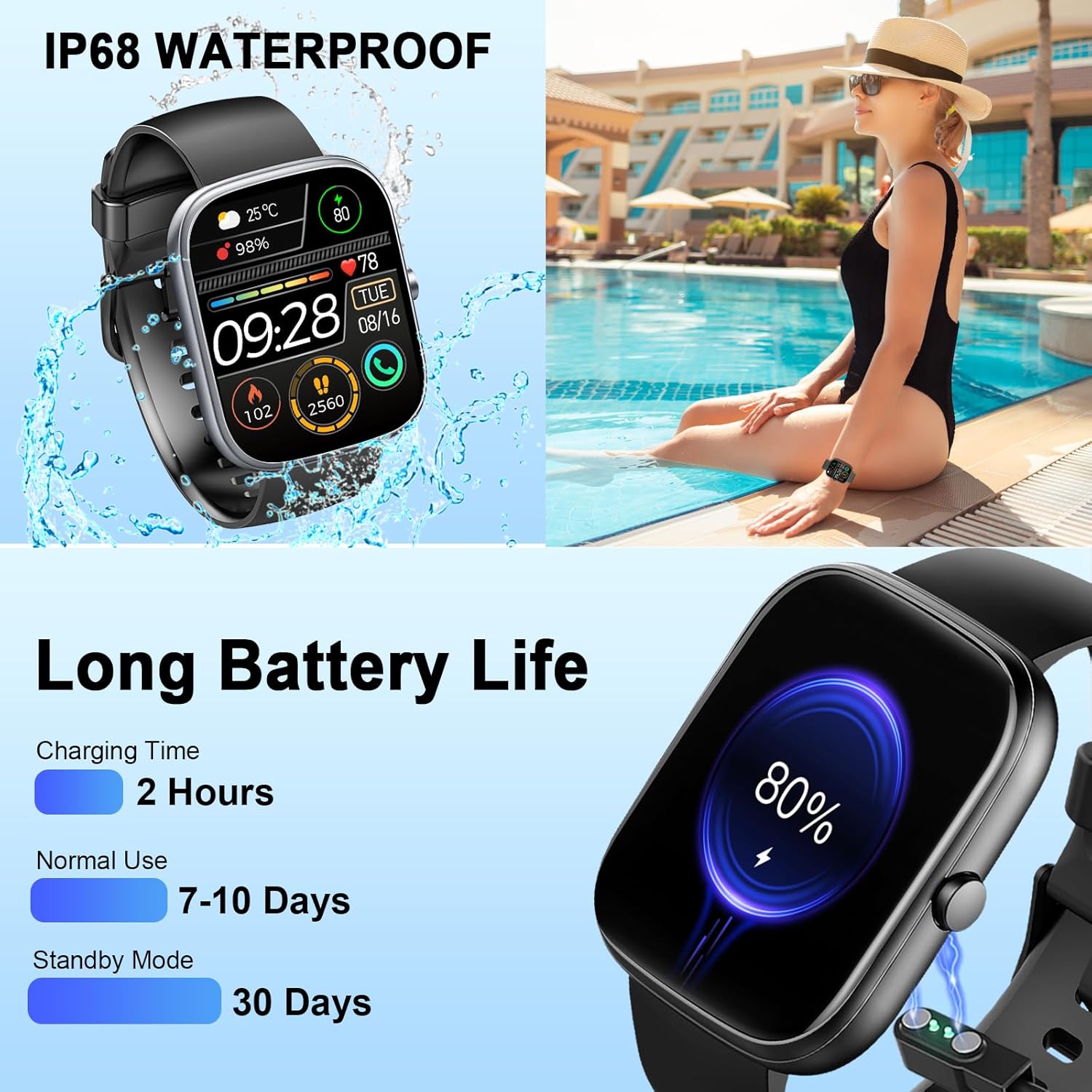
Image: The smartwatch connected to its magnetic charging cable, illustrating the charging process and highlighting its long battery life specifications.

Image: The smartwatch on its magnetic charger, with text indicating a daily use time of 7 days and a standby time of 30 days.
6. Informazioni sull'impermeabilità
The Dyurwa Smart Watch T60 is IP68 waterproof. This means it is resistant to dust and can withstand immersion in water up to 1.5 meters for up to 30 minutes. It is suitable for daily use, such as hand washing, bathing, and swimming.
Nota:
- Not suitable for hot water, saunas, or diving.
- Avoid exposure to high humidity or corrosive liquids.
- La resistenza all'acqua può diminuire nel tempo a causa della normale usura.

Image: The smartwatch being splashed with water, accompanied by icons indicating its IP68 waterproof rating for activities like bathing and swimming.
7. Manutenzione
- Pulizia: Pulire regolarmente l'orologio e il cinturino con un panno morbido e asciutto. Se necessario, utilizzare un panno leggermenteamp panno e asciugarlo accuratamente.
- Evitare i prodotti chimici: Non utilizzare prodotti chimici aggressivi, solventi o detergenti aggressivi, poiché potrebbero danneggiare la finitura e le guarnizioni dell'orologio.
- Contatti di ricarica: Per garantire una ricarica corretta, mantenere puliti e privi di detriti i contatti di ricarica sul retro dell'orologio.
- Magazzinaggio: Quando non lo si utilizza, conservare l'orologio in un luogo fresco e asciutto.
8. Risoluzione Dei Problemi
| Problema | Possibile soluzione |
|---|---|
| L'orologio non si accende | Assicurati che l'orologio sia completamente carico. Collegalo al caricabatterie per almeno 10 minuti. |
| Impossibile associare allo smartphone | 1. Assicurati che il Bluetooth sia abilitato sul tuo telefono. 2. Assicurati che l'orologio sia nel raggio d'azione del tuo telefono. 3. Riavviare sia l'orologio che il telefono. 4. Try unpairing and re-pairing the device through the GloryFit app and phone's Bluetooth settings. |
| Dati imprecisi sulla frequenza cardiaca/sonno | Ensure the watch is worn snugly on your wrist, not too tight or too loose. Clean the sensor on the back of the watch. Note that data is for reference and not medical use. |
| Notifiche non ricevute | 1. Check app permissions for GloryFit on your phone (notifications, background activity). 2. Ensure Bluetooth connection is stable. 3. Verify notification settings within the GloryFit app. |
| Durata breve della batteria | Reduce screen brightness, limit continuous heart rate monitoring, and disable unnecessary notifications. Ensure proper charging. |
9. Specifiche
| Caratteristica | Specificazione |
|---|---|
| Modello | T60 |
| Dimensioni dello schermo | 1.91 inches (4.85 cm) HD Full Touch Screen |
| Connettività | Bluetooth 5.3 |
| Sistema operativo | Android Wear 1.0 (compatibile con iOS 9.0+ e Android 4.0+) |
| Grado di impermeabilità | Grado di protezione IP68 |
| Tipo di batteria | Ioni di litio (batteria da 1 A inclusa) |
| Tempo di ricarica | Circa 2 ore |
| Tempo di utilizzo tipico | 7-10 giorni |
| Tempo di standby | Fino a 30 giorni |
| Peso dell'articolo | 3.2 once |
| GPS | Nessun GPS |
10. Garanzia e supporto
For warranty information and customer support, please refer to the documentation included with your purchase or contact Dyurwa customer service directly. Details for contacting support are typically available on the product packaging or the official Dyurwa websito.