Introduzione
This manual provides essential information for the safe and efficient operation of your Ulefone Armor 34 Pro Plus 5G Rugged Phone. It covers device setup, feature usage, maintenance, and troubleshooting. Please read this manual thoroughly before using your device to ensure optimal performance and longevity.
Video: Ulefone Armor 34 Pro Rugged Phone overview, mostraasinil suo design robusto e le sue caratteristiche principali.
Cosa c'è nella scatola
Verifica che tutti gli articoli siano presenti nella confezione del prodotto:
- 1 x telefono
- 1 x AC Power Charger, 66W
- 1 cavo dati da tipo C a tipo C (100 cm)
- 1 x pellicola protettiva (preinstallata)
- 1 x Pellicola protettiva in vetro temperato per lo schermo
- 1 x Ago SIM
- 1 x cordino
- 1 x Manuale utente multilingue
- 1 x Scheda di istruzioni per la ricarica
- 1 x scheda di sicurezza

Image: Contents of the Ulefone Armor 34 Pro Plus retail package.
Impostare
1. Installazione della scheda SIM e della memoria
- Individuare il vassoio della scheda SIM sul lato del dispositivo.
- Inserire l'ago SIM fornito nel piccolo foro accanto al vassoio per espellerlo.
- Place your Nano-SIM cards and/or a microSD card (up to 2TB) into the designated slots on the tray. Ensure correct orientation.
- Reinserire con cautela il vassoio nel telefono finché non scatta in posizione.
2. Accensione iniziale e configurazione
- Tenere premuto il pulsante di accensione finché non viene visualizzato il logo Ulefone.
- Segui le istruzioni sullo schermo per selezionare la lingua, connetterti al Wi-Fi e configurare il tuo account Google.
- Configure security settings such as fingerprint unlock or face unlock for enhanced device protection.
3. Carica del dispositivo
Connect the provided 66W AC power charger and Type-C cable to the phone's charging port. The device supports fast charging. Ensure the charger is connected to a compatible power outlet. The phone also supports 10W reverse charging, allowing it to act as a power bank for other devices.
Istruzioni per l'uso
1. General Phone Operation
The Ulefone Armor 34 Pro Plus runs on Android 15. Navigate the interface using touch gestures. Swipe up from the bottom for the app drawer, swipe down from the top for notifications and quick settings. Customize your home screen by long-pressing on empty space.
2. 5G Network Connectivity
The device supports global 5G networks with dual SIM dual standby functionality. Ensure your SIM cards are properly installed and your mobile data plan supports 5G. Access network settings via Impostazioni > Rete e Internet > Rete mobile per configurare le preferenze.
3. Funzionalità del proiettore
The Ulefone Armor 34 Pro Plus features a built-in DLP projector with 150 lumens brightness and 854x480 resolution. It supports smart autofocus and ±40° keystone correction for clear projection. The integrated 98 dB loudspeaker enhances the audio experience.
- Attivazione: Use the dedicated projector button or access the projector app to activate.
- Messa a fuoco automatica: The projector automatically adjusts focus. Manual adjustment options are available in the projector settings.
- Correzione trapezoidale: Adjust vertical keystone up to ±40° to correct distorted images.
- Distanza di proiezione: Project a screen size of up to 100 inches from a distance of 3 meters.
Video: Demonstration of the Ulefone Armor 34 Pro Plus projector features, including autofocus and keystone correction.

Image: The Ulefone Armor 34 Pro Plus projecting a movie for outdoor entertainment.

Image: Visual representation of screen sizes achievable with the projector at different distances.
4. Sistema di telecamere
Il dispositivo è dotato di un versatile sistema di telecamere:
- Fotocamera per visione notturna da 64 MP: Features 4 infrared LEDs and NightEif Ultra 3.0 algorithm for clear images in low-light conditions.
- Fotocamera principale da 50 MP: Utilizes a large 1/1.3" sensor for high-resolution photos.
- 50MP Ultra-wide Macro Camera: Offre un campo di 117.3° view for expansive shots and detailed close-ups.
- Fotocamera frontale da 32 MP: Per selfie e videochiamate di alta qualità.

Image: Night vision camera capabilities comparison.
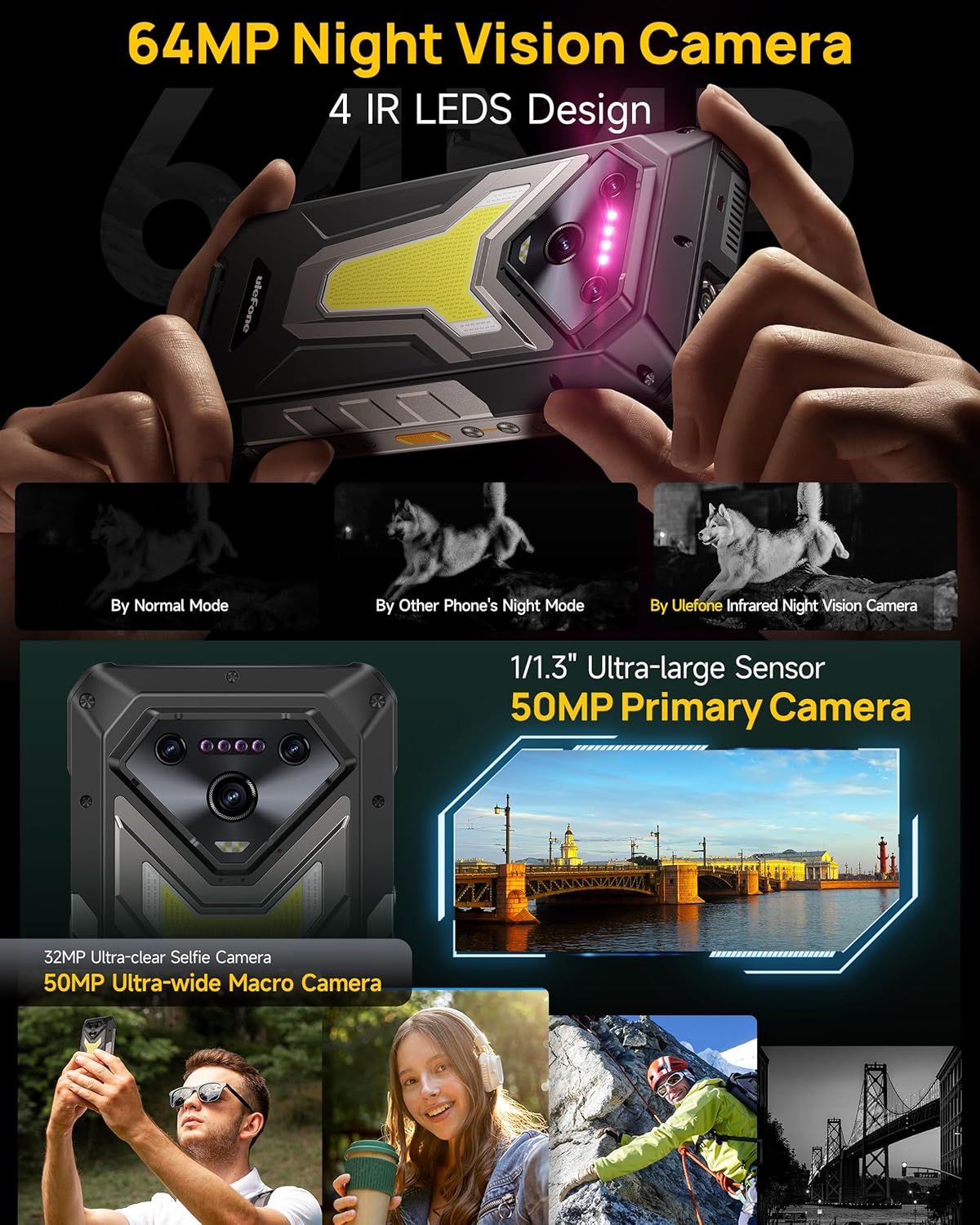
Immagine: dettagliata view of the Ulefone Armor 34 Pro Plus camera setup.
5. LED Light and Warning Lights
The device integrates an 1100 Lumens camping light and red/blue warning lights for various situations.
- CampLuce di accensione: Provides powerful illumination for outdoor activities. Adjustable brightness and duration settings are available in the dedicated app.
- Spie luminose: Red and blue lights can be activated for emergency alerts, signaling for help, or increasing visibilità.
Video: Demonstration of the Ulefone Armor 34 Pro Plus LED camping light and warning light functions.

Image: The 1100 Lumens LED light in use during camping.
6. Gestione della batteria
The Armor 34 Pro Plus features a 25500mAh battery, providing extended usage. It supports 66W fast charging for quick power replenishment and 10W reverse charging to power other compatible devices.

Image: The 25500mAh battery and 66W fast charging feature.
7. Caratteristiche robuste
Designed for durability, the phone is MIL-STD-810H certified and boasts IP68/IP69K ratings for water and dust resistance. The 6.95-inch FHD+ display is protected by Corning Gorilla Glass 5.

Image: Demonstrating the IP68/IP69K and MIL-STD-810H ruggedness of the device.
8. uConnettore di espansione Smart
The uSmart Expansion Connector allows for integration with various external accessories, such as endoscopes and microscopes, expanding the phone's utility for specialized tasks.
Video: Showcase of various accessories compatible with the Ulefone Armor 34 Pro Plus, including the uSmart ecosystem.

Image: The uSmart Expansion Connector in use with an endoscope accessory.
9. Altre caratteristiche
The device includes additional functionalities:
- NFC: Per pagamenti contactless e trasferimento dati.
- Widevine L1: Abilita lo streaming ad alta definizione dalle piattaforme supportate.
- Blaster IR: Controlla i dispositivi a infrarossi compatibili.
- Sblocco tramite impronta digitale e sblocco facciale: Biometric security options.
- Chiave personalizzata: Pulsante programmabile per un rapido accesso alle funzioni.
- GPS + GLONASS + Beidou + Galileo: Supporto completo alla navigazione.

Immagine: Oltreview of additional functionalities available on the device.
Manutenzione
To ensure the longevity and optimal performance of your Ulefone Armor 34 Pro Plus, follow these maintenance guidelines:
- Pulizia: Pulire il dispositivo con un panno morbido, damp panno. Evitare prodotti chimici aggressivi o materiali abrasivi. Assicurarsi che tutte le porte siano asciutte prima di caricare o collegare gli accessori.
- Aggiornamenti software: Controlla regolarmente e installa gli aggiornamenti di sistema per assicurarti che il tuo dispositivo abbia le patch di sicurezza e le funzionalità più recenti. Vai a Impostazioni > Sistema > Aggiornamento di sistema.
- Cura della batteria: Avoid extreme temperatures. Do not fully discharge the battery frequently. Use only the provided charger for optimal charging.
- Protezione dello schermo: While the screen is durable, using the provided tempered glass screen protector can offer additional protection against scratches.
Risoluzione dei problemi
Se riscontri problemi con il tuo dispositivo, fai riferimento ai seguenti passaggi comuni per la risoluzione dei problemi:
- Il dispositivo non risponde: Per forzare il riavvio, tenere premuto il pulsante di accensione per circa 10-15 secondi.
- Problemi di ricarica: Ensure the charger and cable are securely connected and undamaged. Try a different power outlet. Clean the charging port if necessary.
- Problemi di connettività di rete: Controlla che la modalità aereo sia disattivata. Riavvia il dispositivo. Verifica che la scheda SIM sia inserita correttamente e che il tuo piano dati mobile sia attivo.
- Proiettore non funzionante: Ensure the projector is enabled in settings. Check for any obstructions in front of the lens. Adjust focus and keystone correction.
- Arresti anomali/blocchi dell'app: Cancella la cache e i dati dell'app tramite Impostazioni > App > [Nome app] > Archiviazione e cacheSe il problema persiste, disinstalla e reinstalla l'app.
- Surriscaldamento: Close background applications and reduce screen brightness. Avoid direct sunlight exposure during heavy use or charging.
For more complex issues, refer to the built-in Service Center 2.0 application on your device or contact customer support.

Image: The Service Center 2.0 application for device diagnostics and support.
Specifiche
| Caratteristica | Specificazione |
|---|---|
| Marca | Ulefone |
| Numero di modello | Armor 34 Pro Plus |
| Sistema operativo | Androide 15 |
| Processore | MediaTek Dimensity 7400X |
| Memoria RAM | 32GB (16GB + 16GB adjustable) |
| Memoria interna | 512GB ROM (expandable up to 2TB) |
| Display | 6.95 inch FHD+ 120Hz Corning Gorilla Glass 5 |
| Fotocamera principale | 50MP (1/1.3" sensor) |
| Fotocamera macro ultra-grandangolare | 50MP (117.3° FOV) |
| Telecamera per visione notturna | 64MP (4 IR LEDs) |
| Fotocamera frontale | 32MP |
| Proiettore | 150 Lumens DLP (854x480 resolution), Autofocus, ±40° Keystone Correction |
| Capacità della batteria | 25500mAh |
| Ricarica | Ricarica rapida da 66 W, ricarica inversa da 10 W |
| Robustezza | IP68/IP69K, certificato MIL-STD-810H |
| Connettività | 5G, Wi-Fi 6E, Bluetooth 5.4, NFC, IR Blaster |
| Caratteristiche speciali | 1100 lumen Camping Light, Red & Blue Warning Lights, uSmart Expansion Connector, Widevine L1, Custom Key, GPS |
| Dimensioni | 7.21 x 3.41 x 1.29 pollici |
| Peso | 3.14 libbre |
Garanzia e supporto
Your Ulefone Armor 34 Pro Plus comes with a Servizio di garanzia del produttore di 12 mesi in the US, covering defects in materials and workmanship under normal use. Please retain your proof of purchase for warranty claims.
For technical assistance, warranty inquiries, or product support, please contact Ulefone customer service through the Service Center 2.0 app on your device or visit the official Ulefone website for contact information. Our support team is available to assist you with any questions or concerns regarding your product.