
EONON GMX7
Eonon GMX7 Android 14 Car Stereo User Manual
Compatible with GMC, Chevrolet, and Buick Vehicles
1. Introduzione
This manual provides comprehensive instructions for the installation, operation, and maintenance of your Eonon GMX7 Android 14 Car Stereo. Please read this manual thoroughly before using the product to ensure proper function and to maximize your user experience. Keep this manual for future reference.

Image 1.1: Eonon GMX7 Car Stereo displaying the Apple CarPlay interface.
2. Compatibilità del prodotto
The Eonon GMX7 car stereo is designed for specific Chevrolet, GMC, and Buick models. Ensure your vehicle is listed below for proper fitment and functionality.
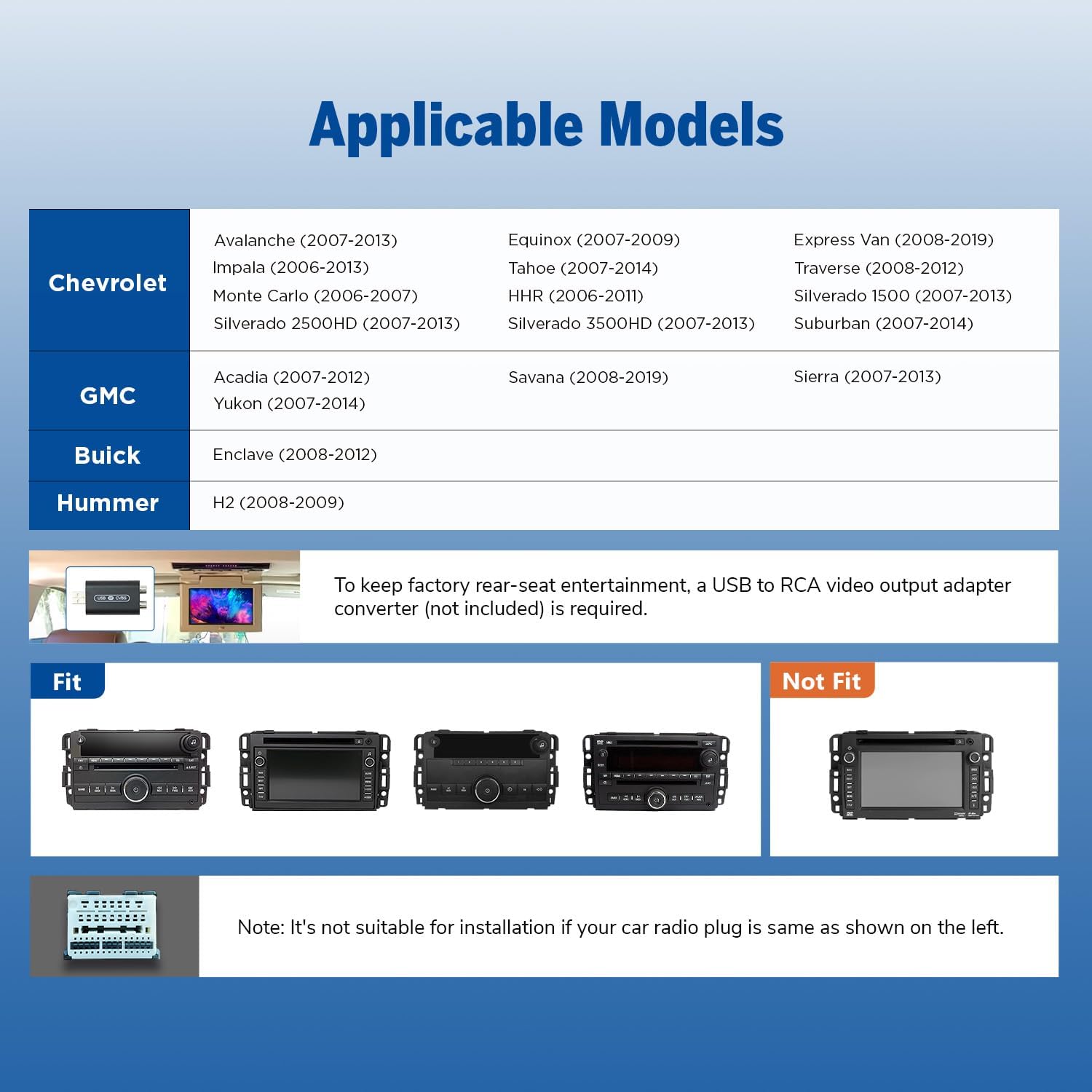
Image 2.1: Applicable vehicle models and years for the Eonon GMX7.
2.1 Modelli compatibili
- Chevrolet: Silverado/Avalanche (2007-2013), Tahoe (2007-2014), Impala (2006-2013), Traverse (2008-2012), Suburban (2007-2012), Express Van (2008-2019), Equinox (2007-2009), Monte Carlo (2006-2007), HHR (2006-2011), Silverado 1500 (2007-2013), Silverado 2500HD (2007-2013), Silverado 3500HD (2007-2013).
- GM: Sierra (2007-2013), Yukon (2007-2014), Acadia (2007-2012), Savana (2008-2019).
- Modello: Enclave (2008-2012).
- Hummer: H2 (2008-2009).
Nota: To retain the factory rear-seat entertainment system, a USB to RCA video output adapter converter (not included) may be required. Please verify your vehicle's original radio plug type. If your car radio plug matches the 'Not Fit' example shown in Image 2.2, this unit is not suitable for installation.

Immagine 2.2: Es.amples of compatible and incompatible car radio plug types.
3. Cosa c'è nella scatola
Prima di iniziare l'installazione, verificare che tutti i componenti elencati di seguito siano inclusi nel pacchetto.

Image 3.1: Contents of the Eonon GMX7 package.
- Eonon GMX7 Head Unit
- A0125 Reversing Camera
- Cavo di alimentazione
- Antenna GPS
- Cavo adattatore USB (x2)
- Audio/Video Adapter Cable (x2)
- Cavo di ingresso video inverso
- Fusibile 15A
- Microfono esterno
- Decoder CANBUS
- Manuale d'uso
- Double-sided Adhesive Sticker
- Adattatore per antenna radio
- Oratore
4. Configurazione e installazione
The Eonon GMX7 is designed for plug-and-play installation, retaining many original vehicle features. Professional installation is recommended if you are unfamiliar with car audio systems.
4.1 Schema elettrico
Refer to the wiring diagram below for correct connections. Ensure all cables are properly connected to avoid issues with steering wheel controls or the backup camera.

Image 4.1: Eonon GMX7 Wiring Diagram with numbered connections.
4.2 Retained OEM Features
The CANBUS system ensures compatibility with your vehicle's original functions:
- Comandi al volante (SWC)
- Bose Audio System
- SuStar
- Door Information Display
- Factory Reverse Camera Support

Image 4.2: Visual representation of retained factory features.
4.3 Dimensioni
Ensure the dimensions of the head unit are suitable for your vehicle's dashboard opening.

Image 4.3: Eonon GMX7 unit dimensions.
5. Istruzioni per l'uso
5.1 Interfaccia utente e visualizzazione
The GMX7 features an 8-inch IPS display with 1280x720 resolution, offering a 178° viewing angle and precise capacitive touch response.

Image 5.1: Display features of the Eonon GMX7.
5.2 Sistema Android 14
The unit operates on the Android 14 system, providing access to various applications and features. Firmware updates are available online without requiring a USB stick.

Image 5.2: Android 14 interface and system performance details.
5.3 CarPlay wireless e Android Auto
Connect your smartphone wirelessly for Apple CarPlay or Android Auto functionality. Use voice commands for navigation, calls, messages, and music.

Immagine 5.3: CarPlay wireless e Android Auto in funzione.
5.3.1 Connessione wireless Apple CarPlay
- Click the Zlink5 app on the car stereo.
- Attiva il Wi-Fi e il Bluetooth sul tuo iPhone.
- Find 'EONON' in your phone's Bluetooth device list and enter '0000' to pair.
- Once connected, tap 'Use CarPlay'.
- Wait a few seconds for the connection to complete.

Image 5.4: Wireless Apple CarPlay connection steps.
5.3.2 Connessione wireless Android Auto
- Click the Zlink5 app on the car stereo.
- Attiva il Wi-Fi e il Bluetooth sul tuo telefono Android.
- Find 'EONON' in your phone's Bluetooth device list, enter '0000' to pair, and click 'OK'.
- Wait a few seconds for the connection to complete.

Image 5.5: Wireless Android Auto connection steps.
5.4 Connettività Bluetooth
The built-in Bluetooth 5.4 system supports hands-free calls, contact synchronization, and music playback. An external microphone is included for clear call quality.
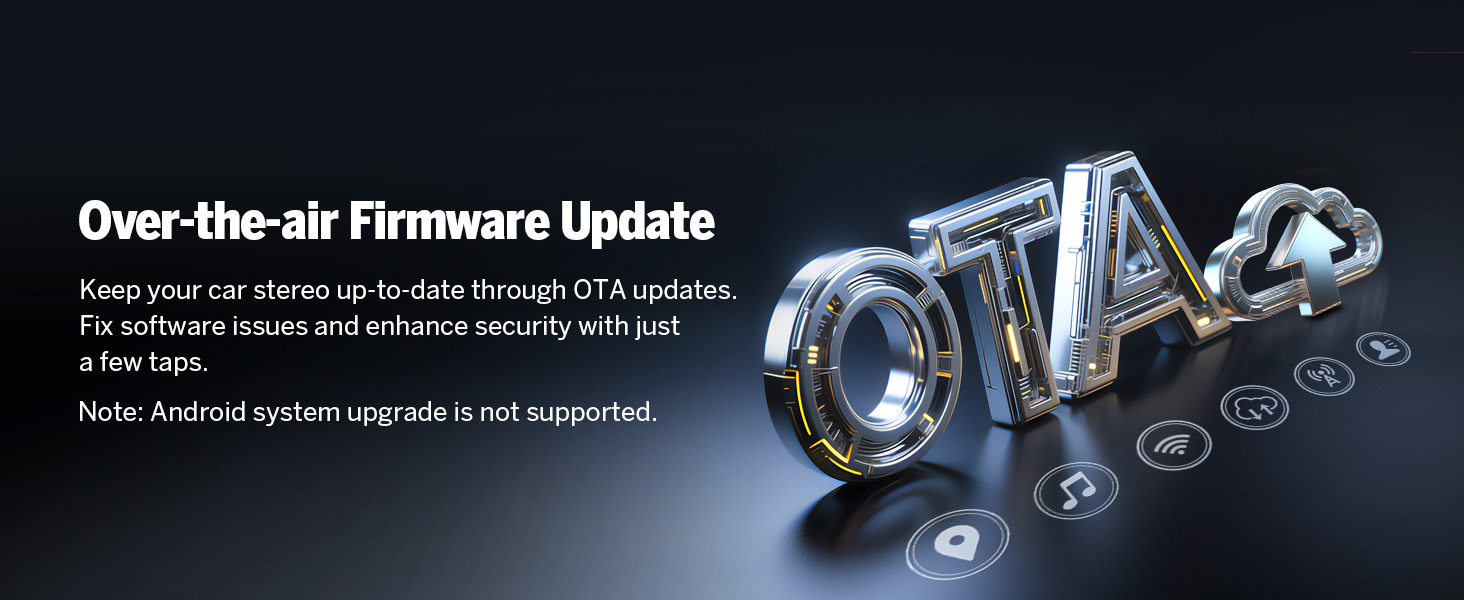
Image 5.6: Bluetooth features and benefits.
5.5 Funzionamento della radio
The unit includes a high-quality FM/AM radio with RDS support, powered by a Silicon Labs SI4755 radio module.

Immagine 5.7: Interfaccia radio FM.
5.6 Mirroring dello schermo
Riproduci lo schermo del tuo smartphone sul display dell'autoradio.
5.6.1 Mirroring dello schermo per iOS
- Click the Zlink5 app on the car stereo. Set the car stereo to iPhone wireless screen mirroring mode.
- Attiva l'hotspot dell'iPhone e connettiti all'autoradio.
- Attiva la funzione di mirroring dello schermo dell'iPhone e seleziona "zj-airplay".

Image 5.8: iOS Screen Mirroring connection steps.
5.6.2 Mirroring dello schermo per Android
- Click the Zlink5 app on the car stereo. Set the car stereo to Android wireless screen mirroring mode.
- Turn on your phone's Bluetooth. Find 'EONON' in your phone's Bluetooth device list, enter '0000' to pair.
- Turn on your phone's hotspot and connect to the car stereo.
- Installa l'app Zplus sul tuo telefono. Avvia l'app e seleziona "connessione wireless".

Image 5.9: Android Screen Mirroring connection steps.
5.7 Processore audio digitale (DSP)
The built-in DSP allows for precise audio adjustments, including a 36-band equalizer and 4x45W output, to optimize sound quality within your vehicle.

Image 5.10: Built-in DSP features.
5.8 Navigazione
The unit supports online and offline maps, offering a full-view navigation mode. Compatible with popular navigation apps like Google Maps, Apple Maps, Waze, and Sygic.

Image 5.11: Navigation interface with various map options.
MAI personalizzazione
Personalize your stereo's appearance by changing the boot logo, button colors, and wallpaper.

Image 5.12: Customization options for the user interface.
5.10 Altre caratteristiche
- Avvio rapido: 1-second quick boot-up.
- Porte USB: Three USB ports for flash drive use.
- Wifi: 5GHz Wi-Fi connectivity.
- Uscita RCA: Per connessioni audio/video esterne.
- Ingresso telecamera di retromarcia: Supports HD 720P/1080P backup cameras. The A0125 reversing camera is included.
- Ingresso fotocamera frontale: For optional front camera connectivity (camera not included).
- OBD Scanner Connectivity: Supports OBD2 scanners for vehicle fault diagnosis and real-time status (scanner not included).

Image 5.13: Included A0125 Backup Camera features.

Image 5.14: OBD2 Scanner connectivity for vehicle diagnostics.
6. Manutenzione
To ensure the longevity and optimal performance of your Eonon GMX7 car stereo, follow these maintenance guidelines:
- Pulizia: Utilizzare un panno morbido e asciutto per pulire lo schermo e l'esterno. Evitare detergenti abrasivi o solventi.
- Aggiornamenti software: Regularly check for and install online firmware updates provided by Eonon to ensure the system is running the latest software and security patches. Note that Android system upgrades are not supported via OTA.
- Condizioni ambientali: Evitare di esporre l'unità a temperature estreme, alla luce solare diretta per periodi prolungati o a umidità eccessiva.
- Connessioni via cavo: Controllare periodicamente tutti i collegamenti dei cavi per assicurarsi che siano saldi e privi di danni.

Image 6.1: Over-the-air firmware update process.
7. Risoluzione Dei Problemi
If you encounter issues with your Eonon GMX7, refer to the following common troubleshooting steps:
- Nessun potere: Check all power connections and the 15A fuse. Ensure the vehicle's ignition is on.
- Nessun suono: Verificare i collegamenti degli altoparlanti, i livelli del volume e le impostazioni dell'uscita audio. Verificare che la funzione mute sia attiva.
- Touchscreen non reattivo: Perform a soft reset by pressing the RST button (if available) or power cycle the unit.
- CarPlay/Android Auto non si connette: Ensure Wi-Fi and Bluetooth are enabled on your phone and the stereo. Re-pair the devices. Check the Zlink5 app settings.
- Comandi al volante non funzionanti: Verificare che il decoder CANBUS sia installato e collegato correttamente.
- La telecamera di backup non viene visualizzata: Check the reverse video input cable connection. Ensure the camera is powered and functioning.
- Problemi con il segnale GPS: Assicurarsi che l'antenna GPS sia installata correttamente e abbia una visuale libera view del cielo.
If problems persist after attempting these steps, contact Eonon customer support for further assistance.
8. Specifiche
| Caratteristica | Specificazione |
|---|---|
| Nome del modello | Modello GMX7 |
| Sistema operativo | Androide 14 |
| Dimensioni dello schermo | 8 pollici |
| Risoluzione dello schermo | Schermo IPS 1280x720 |
| Processore | Rockchip (8-core) |
| Memoria RAM | 3 GB |
| Memoria interna | 32 GB |
| Car Play/Android Auto | Senza fili/cablato |
| Versione Bluetooth | 5.4 |
| Wifi | 5GHz |
| Potenza di uscita audio | 4x45W |
| Equalizzatore | 36-band (DSP) |
| Porte USB | 3 |
| Ingresso telecamera di backup | HD 720P/1080P |
| Peso dell'articolo | 4.4 libbre |
| Dimensioni del pacco | 11.34 x 6.93 x 6.46 pollici |
9. Informazioni sulla garanzia
The Eonon GMX7 car stereo comes with a Garanzia di 2 anno. For warranty claims or service, please retain your proof of purchase and contact Eonon customer support.
10. Supporto
For additional support, technical assistance, or inquiries, please visit the official Eonon website or contact their customer service department. Refer to the contact information provided with your product packaging or on the Eonon brand store page.
Documenti correlatiModello GMX7


Ask a question about this manual
Ask about setup, troubleshooting, compatibility, parts, safety, or missing instructions. Manuals+ will review the question and use this page’s manual context to help answer it.