
1. Introduzione
Welcome to the LIGE Military Smartwatch EF13-L user manual. This guide provides essential information for setting up, operating, and maintaining your new smartwatch. Please read this manual thoroughly to ensure proper use and to fully utilize all features of your device.

Image 1.1: LIGE Military Smartwatch EF13-L, showcasingrazie al suo design robusto e ai cinturini intercambiabili.
2. Contenuto della confezione
Upon opening your LIGE Military Smartwatch EF13-L package, please verify that all the following items are included:
- LIGE Military Smartwatch EF13-L (1 unit)
- Watch Strap (2 units - typically one metal, one silicone)
- Caricabatterie magnetico (1 unità)
- Manuale di istruzioni (1 unità)
3. Prodotto finitoview
3.1 Componenti fisici
The LIGE EF13-L smartwatch features a durable casing and a large display. It comes with two interchangeable straps for versatility. The watch includes physical buttons for power and navigation, along with a crown for additional control.

Immagine 3.1: Dettagliata view of the smartwatch dimensions, including a 56mm case diameter and strap length, along with included accessories.
3.2 Visualizzazione
The smartwatch is equipped with a 1.85-inch HD display, offering a resolution of 360*360 pixels. This large screen provides clear visuals for notifications, health data, and watch faces.

Image 3.2: Comparison illustrating the 1.85-inch Ultra HD display size against a smaller screen, highlighting its clarity and full-touch capability.
4. Impostazione
4.1 Ricarica dello smartwatch
Before initial use, fully charge your smartwatch. Connect the magnetic charging cable to the charging points on the back of the watch and plug the USB end into a power adapter (not included) or a computer's USB port. The watch features a 1000mAh battery, providing extended usage time.
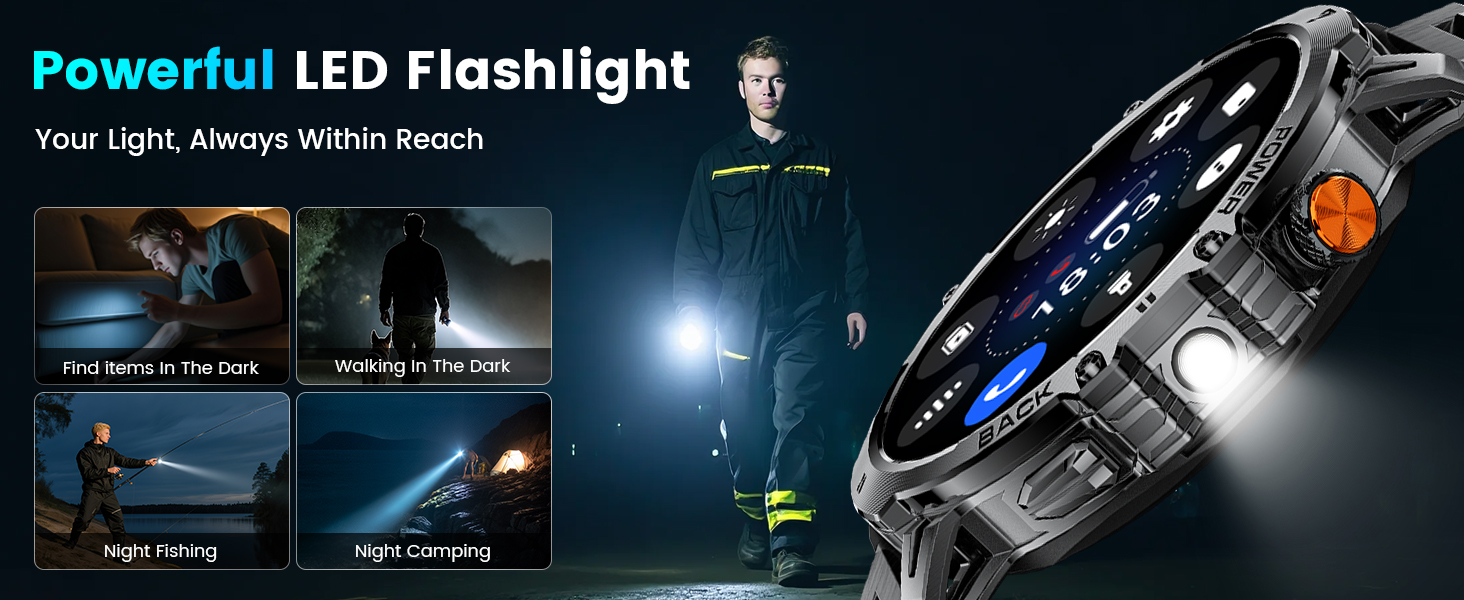
Image 4.1: The smartwatch connected to its magnetic charger, highlighting its 1000mAh battery capacity.
4.2 Installazione dell'app
To unlock the full functionality of your smartwatch, download and install the companion application on your smartphone. The app is named "FitCloudPro" and is available on both the Google Play Store for Android devices and the Apple App Store for iOS devices.
4.3 Associazione del dispositivo
Per associare lo smartwatch allo smartphone, segui questi passaggi:
- Download and install the "FitCloudPro" app from your phone's app store.
- Assicurati che il Bluetooth sia abilitato sul tuo smartphone.
- Open the "FitCloudPro" app. Navigate to the device section and tap "Add New Device."
- The app will search for available devices. Select "EF13" or "EF13-L" from the list.
- Conferma la richiesta di associazione sia sul telefono che sullo smartwatch.
- Grant necessary permissions within the app for notifications and health data synchronization.
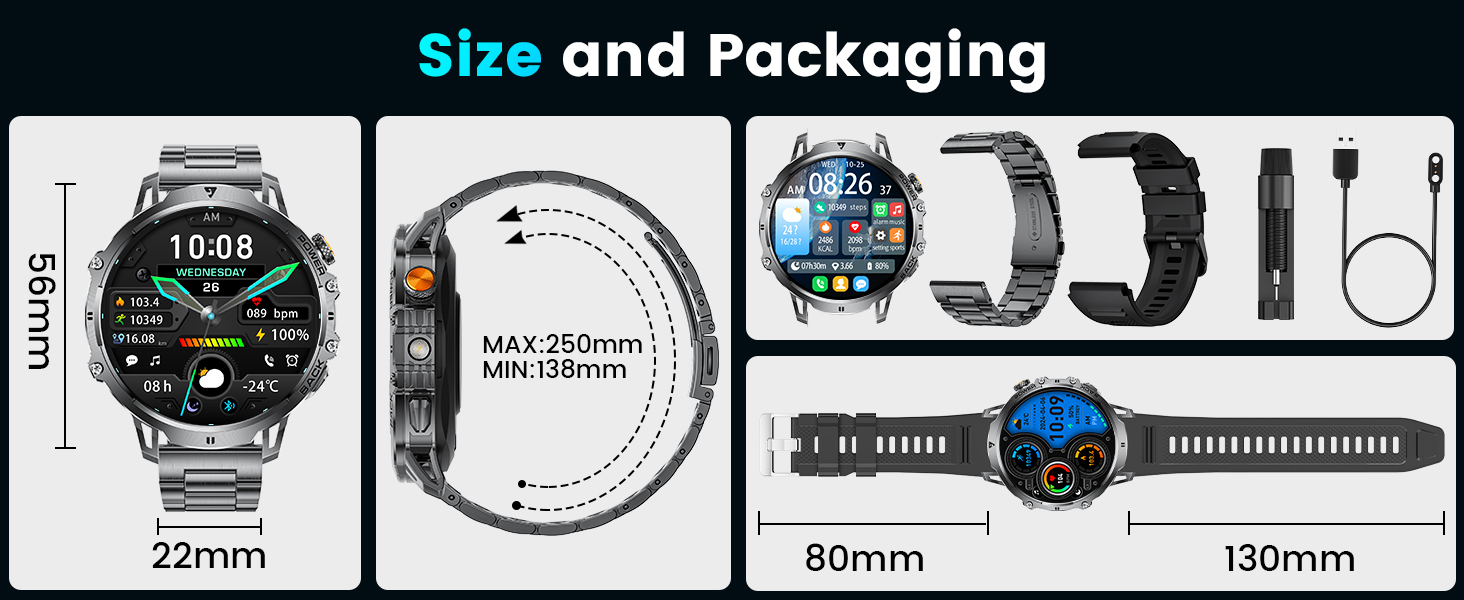
Image 4.2: Visual guide demonstrating the five steps to connect the smartwatch to a smartphone using the FitCloudPro application.
5. Istruzioni per l'uso
5.1 Navigazione di base
- Schermo tattile: Scorri verso sinistra/destra, su/giù per navigare nei menu e accedere alle diverse funzionalità. Tocca per selezionare.
- Pulsanti laterali: Typically, one button serves as a power/back button, while others may provide quick access to specific functions or the sports mode menu.
5.2 Chiamate e notifiche Bluetooth
Once paired, the smartwatch supports Bluetooth 5.3 for stable connections. You can answer or dial calls directly from your watch using its built-in speaker and microphone. The watch also displays incoming messages and notifications from various social media applications (SMS, Facebook, WhatsApp, etc.).

Image 5.1: The smartwatch displaying AI voice assistant, message alerts, and call handling interfaces.
5.3 modalità sportive
The EF13-L offers over 100 sports modes to track your physical activities. It automatically records data such as steps, calories burned, and distance covered, helping you monitor your fitness progress.

Image 5.2: The smartwatch interface showing various sports modes and activity tracking data like steps, distance, calories, and heart rate.
5.4 Monitoraggio sanitario
The smartwatch monitors various health metrics, including heart rate, sleep patterns, and blood oxygen levels. These features are designed for general wellness tracking and should not be used for medical diagnosis.
Torcia elettrica 5.5 LED
Activate the built-in LED flashlight function for instant illumination in low-light conditions. This feature is useful for outdoor activities or in emergencies.

Image 5.3: The smartwatch emitting light from its integrated LED flashlight, illustrating its utility in various scenarios like outdoor adventures or power outages.
5.6 Altre funzioni
The smartwatch includes several additional features:
- Assistente vocale: Controlla il tuo dispositivo tramite comandi vocali.
- Previsioni del tempo: Ricevi aggiornamenti meteo in tempo reale.
- Controllo remoto della telecamera: Attiva la fotocamera del tuo telefono da remoto.
- Controllo della musica: Gestisci la riproduzione musicale sul tuo smartphone.
- Quadranti personalizzabili: Choose from various watch faces or create your own.
- Alarms, Stopwatches, Timers: Strumenti essenziali per la gestione del tempo.
- Sedentary and Water Reminders: Stimola a rimanere attivi e idratati.
6. Manutenzione
6.1 Pulizia
Regularly clean your smartwatch and straps to prevent skin irritation and maintain device longevity. Use a soft, dry cloth to wipe the screen and casing. For silicone straps, a damp è possibile utilizzare un panno imbevuto di sapone neutro e asciugare accuratamente.
6.2 Resistenza all'acqua
The LIGE EF13-L smartwatch is IP68 waterproof, meaning it is resistant to dust and can withstand immersion in water up to 1.5 meters for 30 minutes. It is suitable for daily use, hand washing, and light rain. However, it is not recommended for hot showers, saunas, diving, or prolonged submersion in water, as steam and high water pressure can compromise the seals.
7. Risoluzione Dei Problemi
- L'orologio non si accende: Assicurati che l'orologio sia completamente carico. Collegalo al caricabatterie per almeno 30 minuti.
- Impossibile associare il telefono: Make sure Bluetooth is enabled on your phone and the watch is within range. Restart both the watch and your phone, then try pairing again through the "FitCloudPro" app.
- Notifiche non ricevute: Check app permissions on your phone to ensure "FitCloudPro" has access to notifications. Also, verify that "Do Not Disturb" mode is not active on either the watch or your phone.
- Dati sanitari inesatti: Ensure the watch is worn snugly on your wrist, not too tight or too loose. Keep the sensor clean. Remember that data is for reference only and not for medical purposes.
- Schermo non reattivo: Try restarting the watch by pressing and holding the power button. If the issue persists, ensure the screen is clean and dry.
- Watch feels too large: Please note that this smartwatch has a 1.85" screen and a case diameter of approximately 56mm, which may not be suitable for customers with smaller wrists.
8. Specifiche
| Caratteristica | Specificazione |
|---|---|
| Marca | LIGE |
| Modello | EF13-L |
| Dimensioni dello schermo | 1.85 pollici |
| Risoluzione dello schermo | 360*360 pixel |
| Capacità della batteria | Polimero di litio da 1000 mAh |
| Durata della batteria (uso normale) | 10-15 giorni |
| Durata della batteria (modalità di risparmio energetico) | Fino a 30 giorni |
| Connettività | Bluetooth 5.3 |
| Resistenza all'acqua | Grado di protezione IP68 |
| Dispositivi compatibili | iOS 11.0 e versioni successive, Android 5.0 e versioni successive |
| Caratteristiche speciali | Bluetooth Calls, Message Alerts, Voice Assistant, LED Flashlight, 100+ Sports Modes, Exercise Data Tracking, Music Control, Alarm Clock, Stopwatch, Drinking Water Reminder, Sedentary Reminder, DIY Wallpaper, Screen Brightness Adjustment, Timer, Find Phone, Do Not Disturb Mode |
9. Garanzia e supporto
LIGE offers 24 months of product maintenance for your smartwatch. If you encounter any issues or require assistance, please contact LIGE customer support. We aim to respond and resolve your concerns within 24 hours.
Per assistenza, fare riferimento alle informazioni di contatto fornite con l'acquisto o visitare il sito ufficiale LIGE websito.