
Introduzione
Welcome to your new NIMO 15.6" FHD Laptop N151. This manual provides essential information to help you get started, operate, maintain, and troubleshoot your device. Please read through these instructions carefully to ensure optimal performance and longevity of your laptop.
Impostare
1. Disimballaggio e ispezione iniziale
Rimuovere con attenzione tutti gli articoli dall'imballaggio. Assicurarsi che siano presenti i seguenti componenti:
- 1 x Nimo N151 Laptop
- 1 x Type-C 65W PD Fast Charger
- 1 x Manuale utente (questo documento)
- Windows 11 Home (preinstallato)
Inspect the laptop for any physical damage. If any components are missing or damaged, contact customer support immediately.
2. Ricarica del laptop
Before first use, fully charge your laptop. Connect the provided Type-C 65W PD Fast Charger to the Type-C charging port on your laptop and then to a power outlet. The charge LED indicator will illuminate.

Image: The NIMO laptop connected to its Type-C PD fast charger, illustrating the charging process.
3. Accensione e configurazione iniziale
Press the power button located on the keyboard. The laptop will boot up and guide you through the initial Windows 11 Home setup process. Follow the on-screen instructions to configure your language, region, network, and user account.
Utilizzo del tuo laptop
Display
Your NIMO laptop features a 15.6-inch Full HD (1920x1080) Anti-Glare IPS display. This display offers clear visuals and reduced eye strain, suitable for various tasks from work to entertainment.

Image: The NIMO laptop's 15.6-inch FHD IPS display, highlighting its narrow bezels and vibrant visual capabilities.
Keyboard and Fingerprint Sensor
The laptop is equipped with a backlit keyboard for comfortable typing in various lighting conditions and a numeric keypad for efficient data entry. A fingerprint sensor is integrated for secure and quick login.

Image: Close-up of the NIMO laptop's backlit keyboard, showcasing the fingerprint sensor and numeric keypad.
Webcamma
Un 2MP webcam is integrated for video calls and online meetings.
Porte e connettività
The NIMO N151 offers a variety of ports for versatile connectivity:
- Porte USB: 3.0 Per il trasferimento dati ad alta velocità.
- Porta USB 2.0: Per collegare le periferiche.
- Porta HDMI: Per il collegamento a display esterni.
- Porte di tipo C: One for charging (PD Fast Charger) and one for multifunction use.
- Slot per scheda microSD: Per espandere lo spazio di archiviazione o trasferire files.
- Headphone Combo Jack: Per ingresso/uscita audio.
- Slot per blocco Kensington: Per la sicurezza fisica.
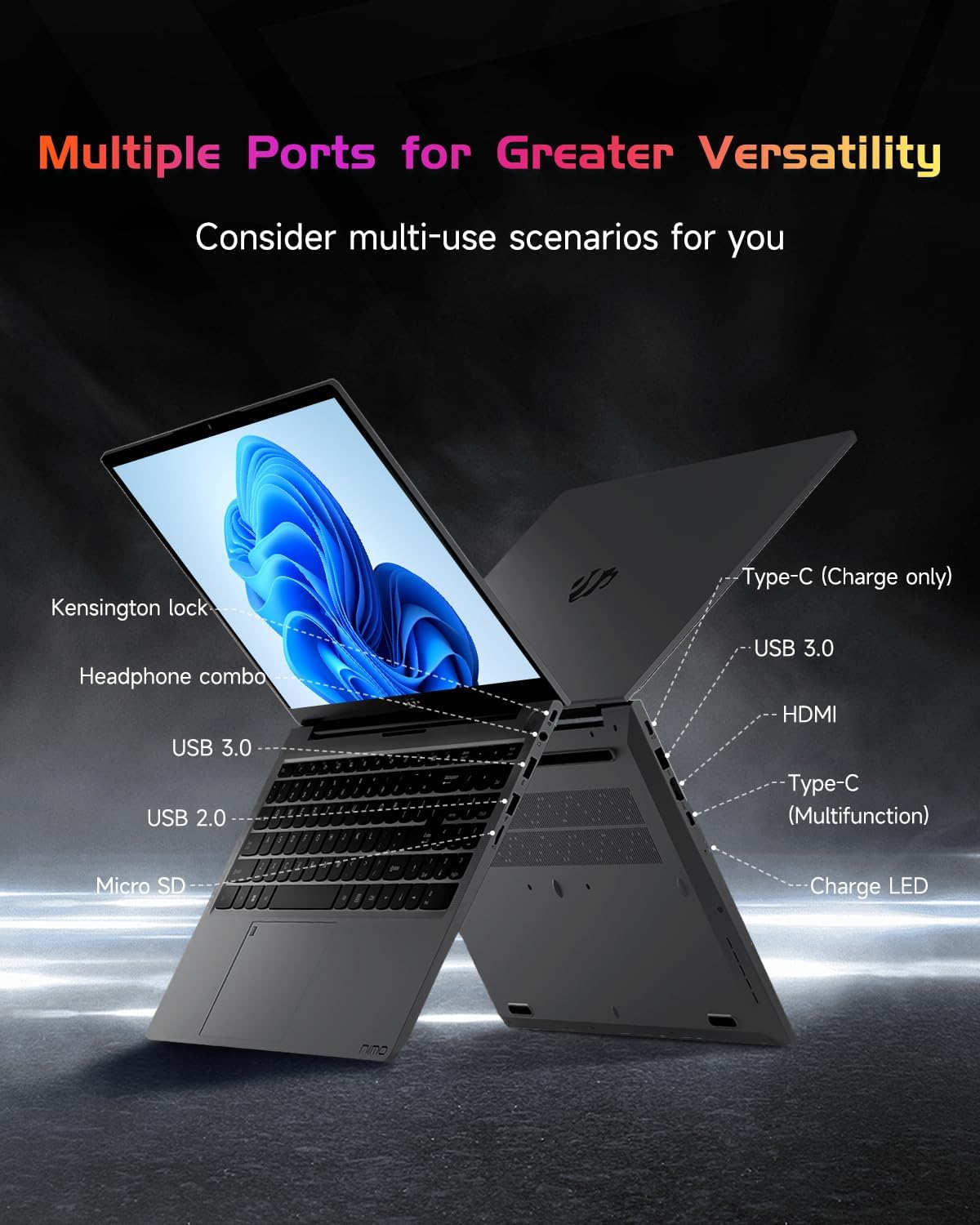
Immagine: Il lato profile of the NIMO laptop, displaying its array of ports for diverse connectivity needs.
Stay connected with integrated Wi-Fi 6 for fast wireless internet and Bluetooth 5.2 for connecting wireless accessories.
Processore e prestazioni
Powered by the Intel Alder Lake-N100 12th Gen processor, the NIMO N151 delivers reliable performance for multitasking, streaming, and everyday computing tasks. It comes with 16GB DDR4 RAM and a 256GB PCIe SSD for fast startups and seamless operation.

Image: A visual representation of the Intel Alder Lake-N100 12th Gen processor, highlighting its role in the laptop's performance.
Sistema operativo
The laptop comes pre-installed with Windows 11 Home, offering a modern and intuitive user experience.
Manutenzione
Assistenza generale
- Conservare il portatile in un ambiente pulito e asciutto, lontano da temperature estreme.
- Avoid spilling liquids on the keyboard or screen.
- Utilizzare un panno morbido e privo di lanugine per pulire lo schermo e l'esterno. Non utilizzare prodotti chimici aggressivi.
- Garantire una ventilazione adeguata non ostruendo le prese d'aria.
Cura della batteria
Per prolungare la durata della batteria, evitare di scaricarla completamente frequentemente. Si consiglia di mantenere la carica della batteria tra il 20% e l'80%, quando possibile.
Risoluzione dei problemi
Problemi comuni e soluzioni
- Il portatile non si accende: Ensure the charger is properly connected and the battery has sufficient charge. Try holding the power button for 10-15 seconds to perform a hard reset.
- Lo schermo è vuoto: Connect an external monitor to check if the display is the issue. Restart the laptop.
- Problemi di connessione Wi-Fi: Controlla se il Wi-Fi è abilitato nelle impostazioni di Windows. Riavvia il router e il laptop.
- Prestazioni lente: Close unnecessary applications, check for malware, and ensure Windows is up to date.
For persistent issues, refer to the online support resources or contact NIMO customer service.
Specifiche
| Caratteristica | Dettaglio |
|---|---|
| Marca | NIMO |
| Nome del modello | Nimo N151 |
| Dimensioni dello schermo | 15.6 pollici |
| Risoluzione dello schermo | 1920 x 1080 pixel (FHD) |
| Processore | Intel Pentium Quad Core N100 (up to 3.4 GHz) |
| Memoria RAM | 16 GB DDR4 |
| Velocità di memoria | 3200 MHz |
| Disco rigido | SSD da 256 GB (PCIe) |
| Coprocessore grafico | Grafica integrata |
| Sistema operativo | Windows 11 Casa |
| Tipo senza fili | 802.11a/b/g/n/ac (Wi-Fi 6) |
| Bluetooth | Bluetooth 5.2 |
| Porte USB 2.0 | 1 |
| Porte USB 3.0 | 3 |
| Durata media della batteria | 5 ore |
| Peso dell'articolo | 3.8 libbre |
| Dimensioni del prodotto | 14.07 x 8.98 x 0.76 pollici |
| Caratteristiche speciali | Backlit Keyboard, Fingerprint Reader, HD Audio, Memory Card Slot, Numeric Keypad |
Garanzia e supporto
Your NIMO laptop is covered by a 2 anno di garanzia del produttore, ensuring peace of mind for your purchase. Additionally, NIMO offers a 90-Day Hassle-Free Return Policy.
For technical assistance, warranty claims, or returns, please contact NIMO customer support through their official channels. Refer to the contact information provided with your product or on the NIMO websito.
Video del prodotto
Guarda questi video ufficiali per una panoramica completaview and demonstration of your NIMO laptop's features.
NIMO 15.6 Laptop Comprehensive Introduction
Video: A detailed introduction to the NIMO 15.6" FHD Laptop, showcasing il suo design e le sue funzionalità chiave.
NIMO Laptop: Perfect for Work and Study, Anytime, Anywhere
Video: This video highlights the NIMO laptop's versatility for both work and study environments, emphasizing its portability.
NIMO 15.6 FHD Laptop for Students Home Work
Video: A demonstration of the NIMO 15.6" FHD Laptop's suitability for students and home-based work tasks.
Efficiency Meets Convenience: Nimo Laptop
Video: This video showcases the NIMO laptop's efficiency and convenient features for daily use.
NIMO Laptop UGC
Video: User-generated content featuring the NIMO laptop, demonstrating real-world usage scenarios.
NIMO 15.6 FHD Laptop Promotion Video
Video: A promotional video for the NIMO 15.6" FHD Laptop, showcasinle sue caratteristiche e i suoi vantaggi.