
Introduzione
This manual provides essential information for setting up, operating, maintaining, and troubleshooting your NIMO 15.6" IPS FHD Business Laptop. Please read this manual thoroughly before using your device to ensure optimal performance and longevity.
Cosa c'è nella scatola
- 1 x Nimo N154 Laptop
- 1 x Type-C 65W PD Fast Charger
- 1 x Manuale utente (questo documento)
- Windows 11 Home (preinstallato)
- Warranty Information (2 Years Warranty, 90 Days Return)
Prodotto finitoview
Familiarize yourself with the key components and features of your NIMO laptop.

Figura 1: NIMO 15.6" Laptop Front View con caratteristiche chiave
This image displays the NIMO 15.6-inch laptop from the front, showcasing its full HD IPS display. Icons on the screen highlight key features including the Intel Core i3-1215U 6-core processor, 8GB RAM, 256GB SSD, fingerprint reader, Type-C PD charger, and backlit keyboard. An eagle graphic is prominently featured on the screen.
Porte e connettori

Figura 2: Laptop Ports and Connectors
This image illustrates the various ports available on the NIMO laptop. On the left side, from left to right, are the Micro SD card slot, USB 2.0 port, USB 3.0 port, headphone combo jack, and Kensington lock slot. On the right side, from left to right, are a Type-C (charge only) port, USB 3.0 port, HDMI port, Type-C (multifunction) port, and a Charge LED indicator.
- Lato sinistro: Micro SD Card Slot, USB 2.0, USB 3.0, Headphone Combo Jack, Kensington Lock
- Lato destro: Type-C (Charge Only), USB 3.0, HDMI, Type-C (Multifunction), Charge LED
Guida all'installazione
1. Ricarica iniziale
Before first use, fully charge your laptop. Connect the provided 65W Type-C PD fast charger to the Type-C (Charge only) port on the right side of the laptop and to a power outlet. The Charge LED will indicate charging status.

Figura 3: 65W Type-C PD Fast Charger
This image shows the compact NIMO 65W Type-C PD fast charger with its accompanying Type-C cable. It highlights the charger's versatility, indicating it can be used for laptops, tablets, and iPhones. Below, a comparison graphic contrasts the single, organized Type-C charger with a cluttered power strip filled with multiple, tangled chargers, emphasizing the convenience of the NIMO charger.
2. Accensione
Open the laptop lid. Press the power button, typically located on the top right of the keyboard, to turn on the device. The laptop will boot into Windows 11 Home.
3. Installazione iniziale di Windows
Follow the on-screen prompts to complete the Windows 11 Home setup. This includes selecting your region, language, connecting to a Wi-Fi network, creating a user account, and setting up security features like the fingerprint reader.
4. Configurazione del lettore di impronte digitali
During Windows setup or later via Windows Settings, configure the integrated fingerprint reader for secure and quick login. This feature is located on the touchpad area.

Figura 4: Fingerprint Reader and Webcam Privacy Shield
This image highlights two security features of the NIMO laptop. The upper left section shows a close-up of the touchpad with a glowing fingerprint icon, indicating the integrated fingerprint scanner for seamless security integration. The lower right section displays the laptop's webcam with a physical privacy shield, emphasizing privacy-focused camera convenience.
Istruzioni per l'uso
Tastiera e touchpad
Your NIMO laptop features a full-size keyboard with a numeric keypad and a backlit function for use in low-light conditions. The large trackpad supports multi-touch gestures.

Figura 5: Caratteristiche della tastiera
This image displays the NIMO laptop's keyboard, highlighting its features for effortless typing in any environment. Icons above the keyboard represent the backlit keyboard, webcam shield, fingerprint reader, and numeric keypad. Insets show the backlit keyboard in use in a dimly lit setting.
Display
The 15.6" Full HD (1920x1080) IPS display offers vibrant colors and wide viewangoli di visualizzazione. Regola la luminosità e le impostazioni dello schermo tramite le impostazioni di Windows.

Figura 6: Display Full HD vivido
This image showcases the NIMO laptop's vivid Full HD display, featuring a vibrant image of a jellyfish on the screen. Icons above the display highlight its key attributes: FHD 1920x1080 resolution, IPS technology, Bright View, and Eye Protection. The screen-to-body ratio is indicated as 85%.
Connettività
- Wi-Fi 6: Connect to high-speed wireless networks.
- Bluetooth: Pair with Bluetooth-enabled devices such as headphones or mice.
- Porte USB: Utilize the USB 2.0 and USB 3.0 ports for connecting external devices.
- HDMI: Collegare a monitor o proiettori esterni.
Manutenzione
Pulizia del tuo computer portatile
- Utilizzare un panno morbido e privo di lanugine leggermente dampcon acqua o un detergente per schermi per pulire il display.
- Per la tastiera e lo chassis, utilizzare un panno morbido. Evitare prodotti chimici aggressivi.
- Utilizzare periodicamente aria compressa per rimuovere la polvere dalle prese d'aria e garantire un raffreddamento adeguato.
Cura della batteria
- Evitare di scaricare completamente la batteria frequentemente.
- Se non si utilizza il computer portatile per lunghi periodi, conservarlo in un luogo fresco e asciutto.
- Use only the provided NIMO 65W Type-C PD charger.
Storage and Upgrades
The laptop comes with 8GB DDR4 RAM and a 256GB SSD. Both RAM and SSD are upgradeable, offering flexibility for future performance enhancements.

Figura 7: RAM and SSD Configuration
This image shows the NIMO laptop screen displaying various applications, illustrating its multitasking capabilities. Below the laptop, three boxes highlight its memory and storage specifications: 8GB DDR4 RAM, 256GB PCIe 4.0 SSD, and the presence of Dual RAM Channels, indicating support for upgrades and expansion.
Risoluzione dei problemi
This section addresses common issues you might encounter with your NIMO laptop.
Il portatile non si accende
- Assicurarsi che il caricabatterie sia collegato saldamente sia al laptop sia a una presa di corrente funzionante.
- Check if the Charge LED illuminates when connected to power.
- Prova a tenere premuto il pulsante di accensione per 10-15 secondi per eseguire un hard reset.
La batteria si scarica rapidamente
- Regolare la luminosità dello schermo su un valore più basso.
- Chiudere le applicazioni non necessarie in esecuzione in background.
- Ensure Windows is updated, as updates often include power management improvements.
- Check power settings in Windows to optimize battery usage.
Applications Freeze or Laptop is Slow
- Close any applications that are not in use.
- Riavviare il portatile.
- Check Task Manager (Ctrl+Shift+Esc) for processes consuming high CPU or RAM.
- Assicurati che il sistema operativo e i driver siano aggiornati.
- Consider upgrading RAM or SSD if performance issues persist, as the laptop supports upgrades.
Problemi di connettività Wi-Fi
- Riavvia il router e il modem Wi-Fi.
- Disattiva e riattiva il Wi-Fi sul tuo laptop.
- Assicurarsi che i driver Wi-Fi siano aggiornati.
- Dimentica la rete e riconnettiti.
Specifiche
Detailed technical specifications for your NIMO N154 laptop.
| Caratteristica | Specificazione |
|---|---|
| Marca | NIMO |
| Nome del modello | Nimo N154 |
| Dimensioni dello schermo | 15.6 pollici |
| Risoluzione dello schermo | 1920 x 1080 pixel (Full HD IPS) |
| Processore | Intel Core i3-1215U (6 core, fino a 4.4 GHz) |
| Memoria RAM | 8 GB DDR4 (Upgradeable) |
| Velocità di memoria | 3200 MHz |
| Disco rigido | 256 GB SSD (Upgradeable) |
| Coprocessore grafico | Intel grafica integrata |
| Sistema operativo | Windows 11 Casa |
| Tipo senza fili | Wi-Fi 6 (802.11a/b/g/n/ac), Bluetooth 5.2 |
| Porte USB | 1x USB 2.0, 3x USB 3.0, 2x Type-C (1x Charge Only, 1x Multifunction) |
| Altre porte | HDMI, Headphone Combo Jack, Micro SD Card Slot, Kensington Lock |
| Caratteristiche speciali | Fingerprint Reader, HD Audio, Memory Card Slot, Numeric Keypad, Backlit Keyboard, Webcam Shield |
| Peso dell'articolo | 3.8 libbre |
| Dimensioni del prodotto | 14.07 x 8.98 x 0.76 pollici |
| Durata media della batteria | 5 Hours (54Wh Smart Battery) |
| Fonte di alimentazione | Battery Powered, 65W Type-C PD Charger |
Garanzia e supporto
NIMO is committed to providing reliable products and excellent customer service.
- Garanzia: Your NIMO laptop is covered by a 2-year warranty.
- Resi: Puoi restituire il prodotto entro 90 giorni dall'acquisto.
- Assistenza clienti: Our 24/7 support team is available to provide assistance.
- Contatto: For support inquiries, please visit the official NIMO websito o contatto servizio@nimopc.com.

Figura 8: Professional Customer Assistance
This image depicts a customer service representative wearing a headset, symbolizing the availability of professional customer assistance via phone and live chat.
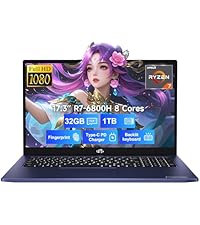
Figura 9: Supporto di 2 anni
This image shows a technician working on a laptop's internal components with tools, representing the 2-year support coverage for Nimo products.

Figura 10: Politica di restituzione di 90 giorni
This image illustrates a delivery person handing a package to a customer, signifying the 90-day return policy for Nimo products.