
1. Prodotto finitoview
This manual provides detailed instructions for the installation, operation, and maintenance of your AINAVI 15-inch Android 13 Car Stereo Radio, designed specifically for Toyota FJ Cruiser models from 2007 to 2021. This unit integrates advanced features such as wireless CarPlay, Android Auto, GPS navigation, and a high-resolution QLED touch screen to enhance your driving experience.

Immagine 1.1: Passoview of the AINAVI Car Stereo Radio's key features.
Caratteristiche principali:
- CarPlay e Android Auto wireless: Stable signal flow for seamless smartphone integration.
- 15-inch HD QLED Touch Screen: 1920x1080 resolution for clear visuals and responsive interaction.
- Navigazione GPS avanzata: Supports most satellite services with 5G WiFi for accurate real-time mapping.
- Alte prestazioni: 8-Core CPU, Dual-Core GPU, 6GB RAM, and 128GB ROM for smooth operation and amplo stoccaggio.
- Integrated Audio Processing: 48-band EQ with DSP for customizable sound profiles.
- Posteriore View Supporto per fotocamera: 1080P AHD input for clear reversing visuals with trajectory display.
- Controlli fisici: Two large knobs for AC temperature and fan speed, a central knob for volume, and dedicated AC function buttons.
- Funzionalità schermo diviso: Run multiple applications simultaneously on the display.
- Uscita USB a RCA: Allows independent video playback on multiple screens for rear passengers.
2. Cosa è incluso
Prima di iniziare l'installazione, verificare che tutti i componenti elencati di seguito siano presenti nel pacchetto.
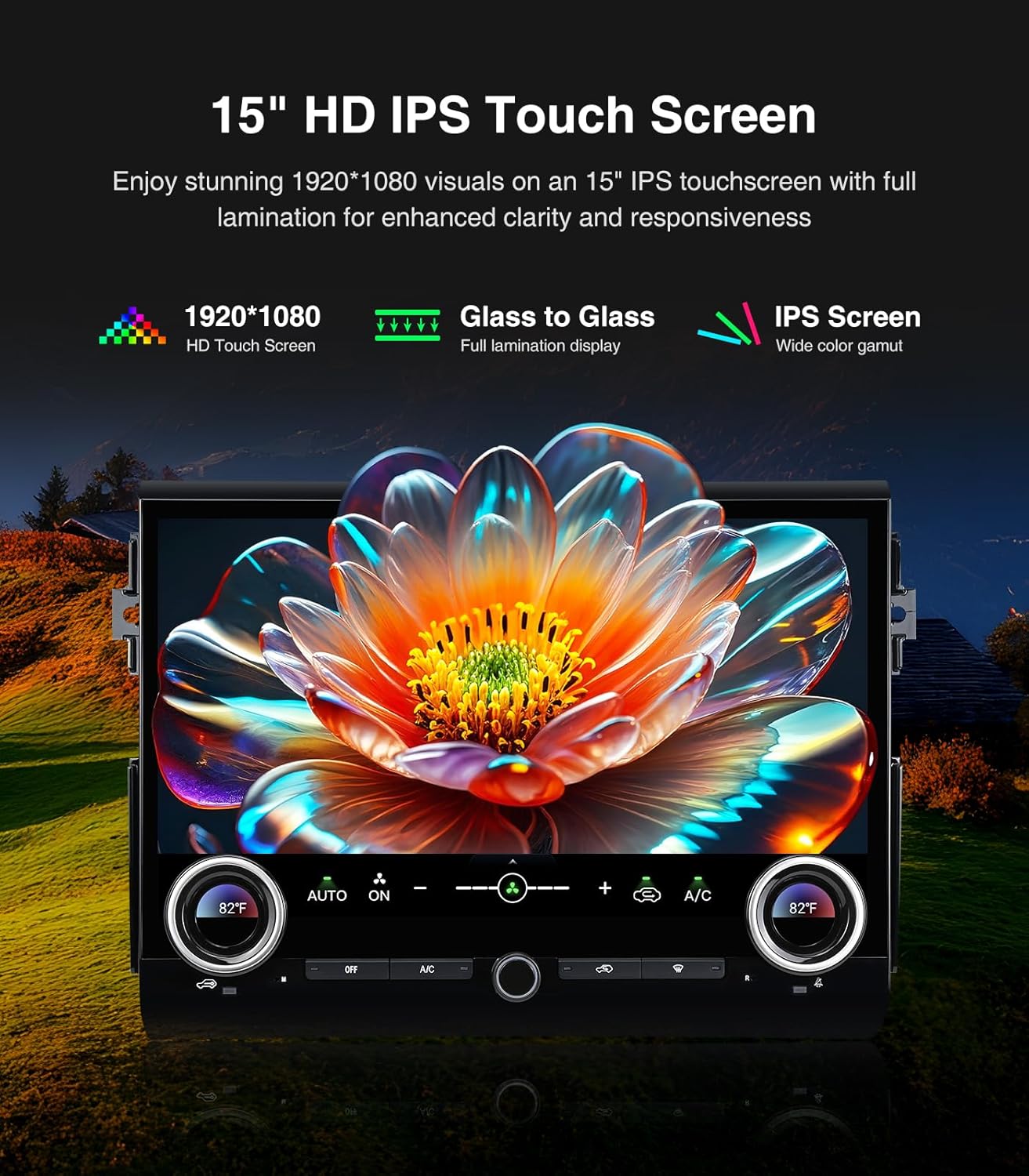
Image 2.1: Contents of the AINAVI Car Stereo Radio package.
- Car Head Unit with Frame for Toyota FJ Cruiser (1 unit)
- AHD 1080P posteriore View Fotocamera (1 unità)
- GPS Antenna (1 unit)
- USB 4-Pin Cable (1 unit)
- USB 6-Pin Cable (1 unit)
- Microphone (1 unit)
- Blue Frame Removal Tool (1 unit)
- Manuale dell'utente (1 unità)
- Cavo di alimentazione (1 unità)
3. Configurazione e installazione
Professional installation is recommended for this product. Ensure the vehicle's battery is disconnected before starting any electrical work. Refer to the provided wiring diagrams and follow these general steps.
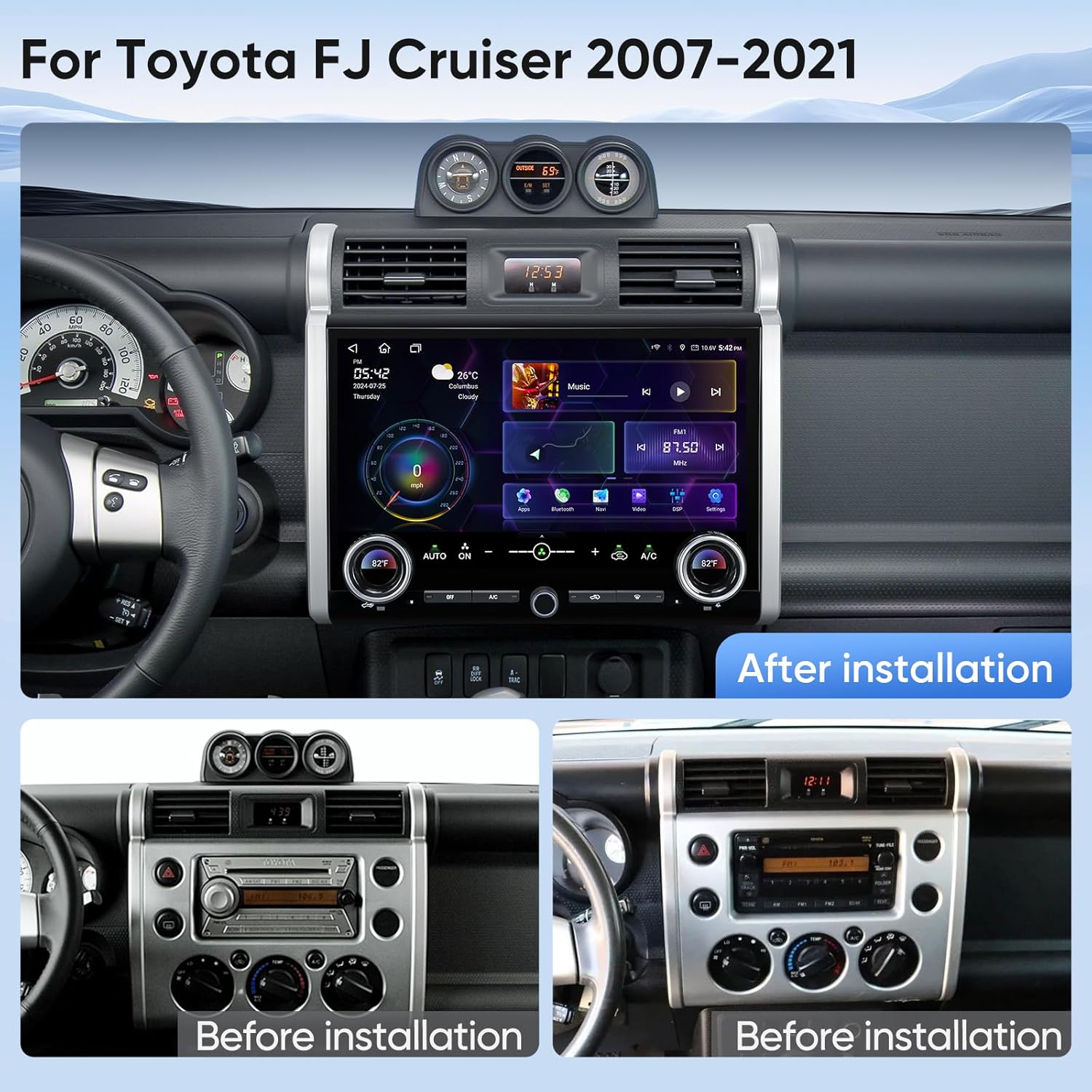
Image 3.1: Visual comparison of the dashboard before and after installing the AINAVI Car Stereo Radio.
3.1 Installazione dell'unità principale
- Carefully remove the original factory radio and dashboard trim using the provided frame removal tool.
- Connect the main power harness from the new head unit to the vehicle's wiring harness. Ensure all connections are secure.
- Connect the GPS antenna and external microphone to the designated ports on the head unit. Position the GPS antenna in a location with a clear view of the sky, and the microphone near the driver for optimal voice pickup.
- If applicable, connect the USB cables for external devices.
- Carefully mount the new head unit and frame into the dashboard opening. Secure it with screws if necessary.
- Reconnect the vehicle's battery and test the unit's basic functions before fully reassembling the dashboard trim.
3.2 Posteriore View Installazione della telecamera
- Mount the AHD 1080P rear view camera in a suitable location at the rear of your vehicle, typically near the license plate light.
- Route the camera's video cable and power cable through the vehicle's interior to the head unit.
- Connect the camera's video output to the 'CAM IN' or 'REVERSE CAMERA' input on the head unit.
- Connect the camera's power wire to the vehicle's reverse light circuit (12V) so it receives power when the vehicle is in reverse.
- Connect the reverse trigger wire from the head unit's harness to the vehicle's reverse light signal wire. This tells the head unit to switch to the camera view quando è inserita la retromarcia.
Video di installazione:
Video 3.1: Detailed installation manual for the AINAVI Car Stereo Radio in a Toyota FJ Cruiser (2007-2021).
Video 3.2: Instructions for installing a camera with the head unit.
4. Istruzioni per l'uso
This section details the various functions and features of your AINAVI Car Stereo Radio.
4.1 Interfaccia generale e navigazione
The 15-inch QLED touchscreen provides access to all functions. Swipe left or right to navigate between application pages. Tap icons to launch applications.

Image 4.1: GPS Navigation interface on the AINAVI Car Stereo Radio.
The built-in GPS module and 5G WiFi connectivity ensure accurate and real-time navigation. You can use pre-installed navigation apps or download others from the Google Play Store.
4.2 CarPlay wireless e Android Auto
Connect your iPhone or Android smartphone wirelessly to access navigation, music, messages, and more directly on the head unit's screen.

Immagine 4.2: Funzionalità Wireless CarPlay e Android Auto.
4.3 Audio Controls and DSP
The unit features a professional DSP (Digital Sound Processor) with a 48-band equalizer. Adjust sound settings, including bass boost, surround sound patterns, and individual speaker volume, to customize your audio experience.

Image 4.3: DSP and Equalizer interface for audio customization.
Video 4.1: Demonstration of DSP settings and audio adjustments.
4.4 Controllo dell'aria condizionata
The unit integrates with your vehicle's AC system. Use the two large physical knobs to adjust temperature and fan speed. Press the knobs to switch between functions. Additional physical buttons control various AC modes.
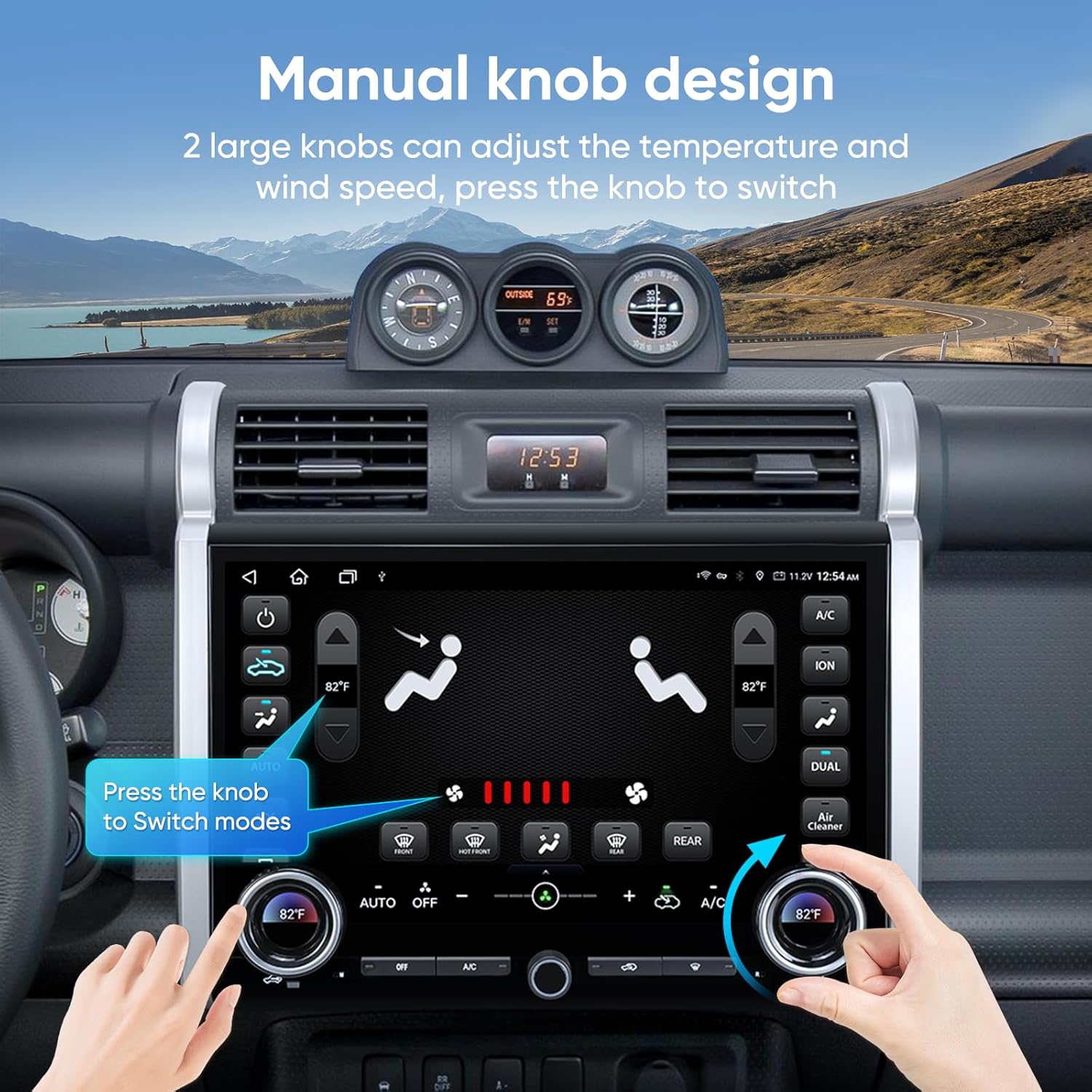
Image 4.4: Manual knob design for integrated AC control.
Video 4.2: Demonstration of AC control functionality on the touchscreen.
4.5 Funzionalità schermo diviso
Utilizza la funzione schermo diviso per eseguire due applicazioni contemporaneamente, ad esempio la navigazione da un lato e la riproduzione musicale dall'altro.

Image 4.5: Split screen and mirroring capabilities.
4.6 Posteriore View Display della fotocamera
When the vehicle is shifted into reverse, the screen automatically displays the 1080P AHD rear view camera feed, complete with guiding lines for safe maneuvering.

Immagine 4.6: posterioreview display della telecamera con assistenza al parcheggio.
4.7 Connettività (WiFi e Bluetooth)
The unit supports 2.4GHz and 5GHz WiFi for internet access and Bluetooth for hands-free calling and audio streaming.

Image 4.7: WiFi and Bluetooth connection options.
4.8 Video di presentazione del prodotto
Video 4.3: A brief showcase of the 15-inch head unit's features.
5. Manutenzione
Per garantire la longevità e le prestazioni ottimali della tua autoradio AINAVI, segui queste linee guida per la manutenzione:
- Pulizia dello schermo: Use a soft, lint-free cloth specifically designed for electronics to clean the touchscreen. Do not use abrasive cleaners or harsh chemicals.
- Aggiornamenti software: Controllare periodicamente la presenza di aggiornamenti software e installarli per garantire che il sistema funzioni in modo efficiente e disponga delle funzionalità e delle patch di sicurezza più recenti.
- Connessioni via cavo: Assicurarsi che tutti i cavi siano saldamente collegati. Collegamenti allentati possono causare problemi intermittenti.
- Condizioni ambientali: Evitare di esporre l'unità a temperature estreme, alla luce solare diretta per periodi prolungati o a umidità eccessiva.
6. Risoluzione Dei Problemi
If you encounter issues with your AINAVI Car Stereo Radio, refer to the following common troubleshooting steps:
- Nessun potere: Check all power cable connections. Ensure the vehicle's battery is charged and the ignition is on. Verify the fuse for the stereo is not blown.
- Nessun suono: Check speaker connections. Ensure the volume is not muted or set too low. Verify audio settings in the DSP/Equalizer.
- Touchscreen non reattivo: Prova a riavviare l'unità. Se il problema persiste, potrebbe essere necessario un ripristino delle impostazioni di fabbrica (nota: questa operazione cancellerà le impostazioni personalizzate).
- GPS non funzionante: Assicurarsi che l'antenna GPS abbia una visuale libera view of the sky. Check GPS settings in the system menu. Update navigation maps if available.
- Problemi di connessione CarPlay/Android Auto: Ensure Bluetooth and WiFi are enabled on both the head unit and your smartphone. Try forgetting the device and re-pairing. Check for software updates on both devices.
- Posteriore View La fotocamera non visualizza: Check the camera's video and power connections. Ensure the reverse trigger wire is correctly connected to the vehicle's reverse light circuit.
- AC Control Issues: If you experience problems with air conditioner control, please contact customer support for assistance.
For persistent issues not resolved by these steps, please contact AINAVI customer support.
7. Specifiche
| Marca | AINAVI |
| Tipo di servizio del veicolo | Toyota FJ Cruiser 2007-2021 |
| Dimensioni dello schermo | 15 pollici |
| Tipo di visualizzazione | QLED |
| Tipo di schermo tattile | Capacitivo |
| Sistema operativo | Android |
| Capacità di archiviazione della memoria | 128 GB |
| Tecnologia di connettività | Bluetooth, USB, Wi-Fi, Cablato, Wireless |
| Sistema di navigazione satellitare supportato | BeiDou, GPS, Galileo |
| Modalità di uscita audio | Stereo surround |
| Metodo di controllo | App, Telecomando, Tocco, Voce |
| Peso dell'articolo | 3.01 chilogrammi |
8. Garanzia e supporto
8.1 Garanzia del produttore
Questa autoradio stereo AINAVI è dotata di un Garanzia del produttore di 12 mesi dalla data di acquisto. La presente garanzia copre i difetti di materiali e fabbricazione in condizioni di normale utilizzo. Si prega di conservare la prova d'acquisto per eventuali reclami in garanzia.
8.2 Supporto tecnico
Our professional technical support team is available to assist you with installation, troubleshooting, and any questions you may have regarding your product. If you encounter any issues, particularly with air conditioner integration, please do not hesitate to contact us.

Image 8.1: Customer Installation Support contact details.
You can reach our customer service team via:
- Telefono: +1 (833) 858-5016
- E-mail: info@ainavi.com
- Operating Hours (PST):
- Lunedì - Venerdì: 9:00 - 9:00
- Saturday: 2:00 PM - 10:00 PM
Please have your product model number (B0FCY3Z2D1) and purchase details ready when contacting support.