Introduzione
This manual provides detailed instructions for the installation, operation, and maintenance of your Commercial Electric 12-inch LED Flush Mount Smart CCT and RGB Selectable Light. This fixture is designed to provide versatile lighting options, including adjustable color temperature (CCT), RGB color selection, and a night light feature, all powered by the Hubspace smart home platform. Please read this manual thoroughly before installation and use to ensure proper function and safety.
Informazioni sulla sicurezza
- AVVERTIMENTO: Rischio di scossa elettrica. Scollegare l'alimentazione dall'interruttore automatico o dalla scatola dei fusibili prima dell'installazione o della manutenzione.
- Questo prodotto deve essere installato in conformità al codice di installazione applicabile da una persona a conoscenza della costruzione e del funzionamento del prodotto nonché dei pericoli connessi.
- Use only with 120V, 60Hz circuits.
- Non tentare di modificare l'apparecchio. Qualsiasi modifica potrebbe invalidare la garanzia e rappresentare un rischio per la sicurezza.
- Assicurarsi che tutti i collegamenti siano sicuri e adeguatamente isolati.
- Non installare vicino a fonti di calore o in aree con eccessiva umidità.
Configurazione e installazione
Follow these steps to properly install your LED flush mount light fixture.
- Prepararsi per l'installazione: Turn off power at the circuit breaker. Ensure the power is completely off before proceeding.
- Installazione della staffa di montaggio: Fissare la staffa di montaggio alla scatola di giunzione utilizzando le viti fornite. Assicurarsi che sia fissata saldamente.
- Collegamenti elettrici: Connect the fixture's wires to the household wiring.
- Collegare il filo nero proveniente dall'apparecchio al filo nero (fase) proveniente dalla scatola di giunzione.
- Collegare il filo bianco proveniente dall'apparecchio al filo bianco (neutro) proveniente dalla scatola di giunzione.
- Collegare il filo di terra verde o in rame nudo proveniente dall'apparecchio al filo di terra proveniente dalla scatola di giunzione.
- Assicurare tutti i collegamenti con morsetti e nastro isolante.
- Fissare l'apparecchio alla staffa: Carefully align the fixture with the mounting bracket and secure it using the provided screws. Ensure the fixture is flush with the ceiling.
- Ripristina alimentazione: Una volta completata l'installazione, ripristinare l'alimentazione tramite l'interruttore automatico.
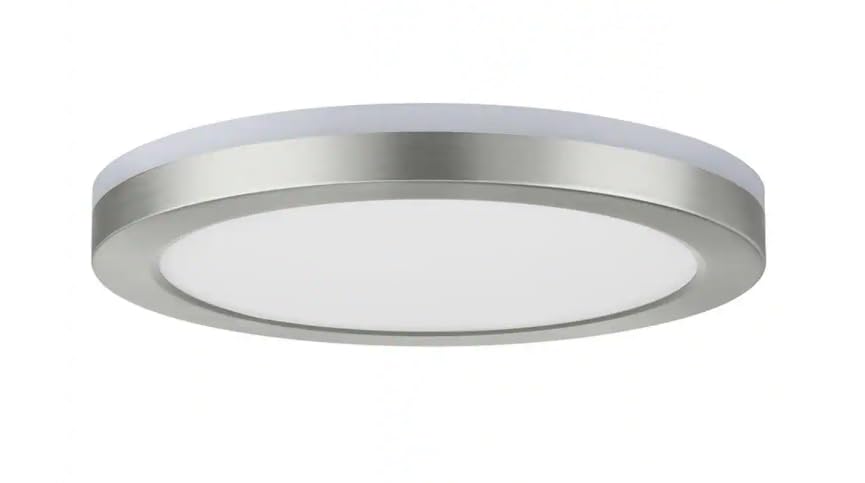
Image: The Commercial Electric 12-inch LED Flush Mount Light, showcasing its brushed nickel finish and low-profile design when installed on a ceiling.
Istruzioni per l'uso
This smart flush mount light is powered by Hubspace, allowing for advanced control via the Hubspace app or voice assistants.
1. Connecting to Hubspace
- Scarica l'app Hubspace: Cercare "Hubspace" in your mobile device's app store and download the application.
- Creare un account: Open the app and follow the prompts to create a new account or log in to an existing one.
- Aggiungi dispositivo: Nell'app Hubspace, tocca l'icona "+" per aggiungere un nuovo dispositivo.
- Power Cycle the Light: Turn the light fixture off and on three times at the wall switch. The light should begin to blink, indicating it's in pairing mode.
- Abbinamento completo: Follow the in-app instructions to connect the light to your Wi-Fi network. Ensure your Wi-Fi network is 2.4GHz.
2. Light Control Features
- Main Light (CCT Selectable): Adjust the color temperature of the main light from warm white to cool white (e.g., 2700K to 5000K) using the Hubspace app. You can also dim the brightness.
- Retroilluminazione RGB: Select from a wide spectrum of colors for the RGB backlight feature, creating ambient lighting effects. Control color and brightness via the app.
- Luce notturna: Activate the dedicated night light mode for a soft, low-intensity illumination, ideal for nighttime use.
- Pianificazione e scene: Use the Hubspace app to set schedules for your light to turn on/off or change settings automatically. Create custom scenes for different moods or activities.
3. Controllo vocale
Once connected to Hubspace, you can link your light to compatible voice assistants like Google Home or Amazon Alexa for hands-free control.
- Pagina iniziale di Google: Link your Hubspace account in the Google Home app. Then use commands like, "Hey Google, turn on the ceiling light," or "Hey Google, set the ceiling light to red."
- Amazon Alexa: Enable the Hubspace skill in the Alexa app. Use commands such as, "Alexa, dim the flush mount," or "Alexa, change the flush mount to blue."
Manutenzione
- Pulizia: Assicurarsi che l'alimentazione sia spenta prima di pulire. Pulire l'apparecchio con un panno morbido, asciutto o leggermente asciutto.amp panno. Non usare detergenti abrasivi o solventi.
- Longevità dei LED: The integrated LED components are designed for long life and do not require replacement.
Risoluzione dei problemi
| Problema | Possibile causa | Soluzione |
|---|---|---|
| La luce non si accende. | Nessuna alimentazione; cablaggio allentato; interruttore difettoso. | Controllare l'interruttore automatico. Assicurarsi che tutti i collegamenti elettrici siano saldi. Testare l'interruttore a parete. |
| La luce tremola o si attenua inaspettatamente. | Loose wiring; incompatible dimmer switch (if applicable); Wi-Fi interference. | Check wiring. Ensure you are using the Hubspace app for dimming. Check Wi-Fi signal strength. |
| Cannot connect to Hubspace app. | Incorrect Wi-Fi network (not 2.4GHz); light not in pairing mode; incorrect password. | Ensure your Wi-Fi is 2.4GHz. Power cycle the light to enter pairing mode. Double-check Wi-Fi password. |
| Il controllo vocale non funziona. | Hubspace account not linked; incorrect device name; internet connectivity issues. | Verify Hubspace account is linked to your voice assistant. Use the exact device name. Check internet connection. |
Specifiche
- Marca: Elettrico commerciale
- Numero modello: 1011101171
- Dimensioni del prodotto: 12 x 12 x 1.33 pollici
- Peso dell'articolo: 3 libbre
- Materiale: Plastica
- Stile: Moderno
- Forma della lampada: Soffitto (montaggio a filo)
- Tipologia di camera: Bedroom, Living Room, Office, Bathroom, etc.
- Fonte di energia: Hardwired (120V, 60Hz)
- Piattaforma intelligente: Hubspace
- Caratteristiche: Smart CCT (Color Correlated Temperature) Selectable, RGB Color, Night Light
Garanzia e supporto
This Commercial Electric product is backed by a manufacturer's warranty. For specific warranty details, please refer to the warranty card included with your product or visit the Commercial Electric website. For technical support, troubleshooting assistance, or to inquire about replacement parts, please contact Commercial Electric customer service. Keep your purchase receipt for warranty claims.