
1. Introduzione
This manual provides instructions for the setup, operation, and maintenance of your Retroid Pocket Classic handheld gaming console. The Retroid Pocket Classic is a portable Android-based gaming device featuring a 3.92-inch OLED touchscreen, designed for a versatile gaming experience.

Image 1.1: Retroid Pocket Classic consoles in white and yellow.
2. Cosa c'è nella scatola
Verificare che tutti gli articoli siano presenti nel pacco:
- Retroid Pocket Classic Gaming Console
- Cavo di ricarica (USB-C)
- Manuale dell'utente (questo documento)
3. Dispositivo suview
Familiarize yourself with the physical components and controls of your Retroid Pocket Classic.
3.1 Front View

Immagine 3.1: anteriore view of the Retroid Pocket Classic.
- 3.92-inch OLED Touchscreen: The primary display for all operations and gaming.
- Tasto direzionale: Directional input for navigation and gameplay.
- Pulsanti di azione: (A, B, X, Y or similar layout) for in-game actions.
- Pulsanti Start/Selezione: For game and system functions.
- Griglie degli altoparlanti: Uscita audio.
3.2 Top and Back View

Immagine 3.2: In alto view showing shoulder buttons and ports.
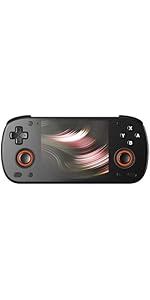
Image 3.3: Curved back design and trigger buttons.
- Pulsanti sulle spalle (L1, R1): Situato sul bordo superiore.
- Pulsanti di attivazione (L2, R2): Located on the back, below the shoulder buttons.
- Porta USB-C: Per la ricarica e il trasferimento dei dati.
- Jack audio da 3.5 mm: Per collegare le cuffie.
- Slot per scheda microSD: Per espandere lo spazio di archiviazione.
- Pulsante di accensione: Per accendere/spegnere il dispositivo o metterlo in modalità sospensione.
- Pulsanti del volume: Per regolare l'uscita audio.
3.3 Internal Components (Cooling)

Image 3.4: Integrated active cooling system.
The Retroid Pocket Classic features an integrated active cooling system designed to maintain optimal performance and manage heat during extended use.
4. Impostazione
4.1 Carica iniziale
Before first use, fully charge the device. Connect the provided USB-C charging cable to the console's USB-C port and the other end to a compatible USB power adapter (not included). The device has a 5000mAh battery.
4.2 Accensione/Spegnimento
- Per accendere: Tenere premuto il pulsante di accensione finché lo schermo non si illumina.
- Per spegnere: Tenere premuto il pulsante di accensione, quindi selezionare "Spegni" dalle opzioni sullo schermo.
- Per dormire/svegliarsi: Premi brevemente il pulsante di accensione.
4.3 Connessione Wi-Fi
To access online features and download applications, connect to a Wi-Fi network:
- Vai a Impostazioni.
- Selezionare Rete e Internet.
- Rubinetto Wifi e accenderlo.
- Seleziona la rete desiderata dall'elenco e inserisci la password se richiesta.
4.4 Configurazione dell'account Google
The Retroid Pocket Classic runs Android 14 and supports the Google Play Store. To download apps and games, you will need to sign in with a Google account during the initial setup process or later via the Settings menu.
4.5 Installazione della scheda Micro SD
To expand the device's storage (128GB internal), insert a Micro SD card into the designated slot. Ensure the card is inserted correctly until it clicks into place. The device supports various Micro SD card capacities.
5. Istruzioni per l'uso
5.1 Navigazione nell'interfaccia Android
The device operates on Android 14. Use the touchscreen for navigation, tapping icons to open applications, swiping to scroll, and using gestures for system controls. The D-pad and action buttons can also be used for navigation within compatible applications and games.
5.2 Downloading and Installing Applications
Applications and games can be downloaded from the Google Play Store. Open the Play Store app, search for your desired content, and follow the on-screen prompts to download and install.
Note: The Retroid Pocket Classic does not come with preloaded games. Users are responsible for acquiring and installing their own game content.
5.3 Gestione dell'archiviazione
A view and manage internal and external storage, go to Impostazioni > Archiviazione. Here you can see storage usage and manage files. For optimal performance, ensure sufficient free space is available.
5.4 Connettività Bluetooth
The device supports Bluetooth 5.1 for connecting wireless accessories such as headphones or external controllers.
- Vai a Impostazioni.
- Selezionare Dispositivi connessi.
- Rubinetto Associa nuovo dispositivo e seleziona il tuo accessorio dall'elenco.
6. Manutenzione
6.1 Pulizia del dispositivo
Use a soft, dry, lint-free cloth to clean the device's exterior. For the screen, a screen cleaner specifically designed for electronics can be used. Avoid using harsh chemicals or abrasive materials.
6.2 Cura della batteria
Per prolungare la durata della batteria:
- Evitare temperature estreme.
- Non scaricare completamente la batteria frequentemente.
- Se non utilizzato per periodi prolungati, conservare il dispositivo con una carica parziale.
6.3 Aggiornamenti software
Controlla regolarmente e installa gli aggiornamenti di sistema per garantire prestazioni e sicurezza ottimali. Vai a Impostazioni > Sistema > Aggiornamento di sistema per verificare la disponibilità di aggiornamenti.
7. Risoluzione Dei Problemi
7.1 Il dispositivo non si accende
- Assicurarsi che il dispositivo sia sufficientemente carico. Collegarlo a una fonte di alimentazione per almeno 30 minuti.
- Prova a tenere premuto il pulsante di accensione per 10-15 secondi per forzare il riavvio.
7.2 Problemi di connettività Wi-Fi
- Verifica che il Wi-Fi sia abilitato nelle Impostazioni.
- Riavvia il router Wi-Fi.
- Forget the network and reconnect, ensuring the password is correct.
7.3 Applicazioni che si bloccano o si bloccano
- Chiudere e riaprire l'applicazione.
- Cancella la cache e i dati dell'app tramite Impostazioni > App > [Nome app] > Archiviazione e cache.
- Assicurarsi che l'applicazione sia aggiornata alla versione più recente.
- Riavviare il dispositivo.
7.4 Schermo non reattivo
- Riavviare il dispositivo tenendo premuto il pulsante di accensione.
- Assicurarsi che lo schermo sia pulito e privo di detriti.
8. Specifiche

Image 8.1: Retroid Pocket Classic detailed specifications.
| Caratteristica | Dettaglio |
|---|---|
| Nome del modello | RP CLASSIC |
| Processore | G1 Gen2 (8-Core Kryo CPU, 2 Performance Cores, 6 Efficiency Cores) |
| Scheda grafica | Adreno A12 |
| Memoria RAM | 6GB LPDDR4x @2133M |
| Magazzinaggio | 128GB EMMC 5.1 (expandable via Micro SD card) |
| Schermo | 3.92-inch AMOLED, 1240x1080 @60fps |
| Sistema operativo | Androide 14 |
| Wifi | Wi-Fi 5 |
| Bluetooth | Bluetooth 5.1 |
| Interfaccia | USB-C / 3.5mm Audio Jack / TF Card Slot |
| Uscita video | N / A |
| Batteria | 5000mAh |
| Velocità di ricarica | 27 Watt |
| Dimensioni | 138 x 89.8 x 26 mm (5.43 x 3.53 x 1 pollici) |
| Peso | 223 g (7.9 once) |
9. Garanzia e supporto
For warranty information and technical support, please refer to the official Retroid Pocket websito o contattare il servizio clienti. Conservare la prova d'acquisto per eventuali reclami in garanzia.
Online resources and community forums may also provide helpful information and troubleshooting tips.