
1. Introduzione
This manual provides detailed instructions for the safe and efficient assembly, operation, and maintenance of your SpeaKa Professional SP-TVS-600 TV Floor Stand. Please read this manual thoroughly before installation and retain it for future reference.
The SP-TVS-600 is designed to support televisions and monitors ranging from 37 to 86 inches, with a maximum load capacity of 45 kg. It features tool-free tilt adjustment, adjustable height for the screen (900 to 1100 mm), and an integrated cable management system. An additional height-adjustable storage shelf (200 to 910 mm) is included for media devices.
2. Informazioni sulla sicurezza
AVVERTIMENTO: Failure to read, understand, and follow all instructions can result in serious personal injury, property damage, or voiding of your warranty.
- Ensure the floor stand is placed on a stable, level surface.
- Non superare la capacità di carico massima di 45 kg (99 libbre).
- Verify that your TV's VESA mounting pattern is compatible with the stand (100x100 to 600x400 mm).
- Per sollevare e posizionare il televisore sul supporto, utilizzare sempre due persone.
- Tenere bambini e animali domestici lontani dal supporto durante il montaggio e il funzionamento.
- Do not hang on the stand or TV.
- Controllare regolarmente tutte le viti e i collegamenti per assicurarsi che siano sempre ben saldi.
- Smaltire i materiali di imballaggio in modo responsabile.
3. Contenuto della confezione
Please check that all components are present and undamaged before beginning assembly. If any parts are missing or damaged, contact your retailer.
- TV Floor Stand (disassembled components)
- Manuale di istruzioni (questo documento)
- Scheda di sicurezza
- Hardware Kit (screws, washers, spacers, tools for assembly)

Figura 1: Fronte view of the SpeaKa Professional SP-TVS-600 TV Floor Stand.
4. Installazione e assemblaggio
Follow these steps carefully to assemble your TV floor stand. It is recommended to have a second person assist with assembly, especially when mounting the television.
- Disimballare i componenti: Estrarre con cautela tutti i componenti dall'imballaggio e disporli su una superficie morbida e pulita per evitare graffi.
- Assemblare la base: Attach the main support column to the base plate using the provided screws and tools. Ensure all connections are tight and secure.
- Install TV Brackets: Attach the VESA mounting brackets to the back of your television using the appropriate screws, washers, and spacers from the hardware kit. Refer to your TV's manual for specific screw requirements. Ensure the brackets are level and securely fastened.
- Montare la TV: With assistance, carefully lift the television and hook the TV brackets onto the main support column's mounting plate. Secure the TV in place using the safety screws or locking mechanisms provided.
- Attacca lo scaffale: Install the media shelf onto the main support column at your desired height. Secure it with the designated fasteners.
- Gestione dei cavi: Route all TV and device cables through the integrated cable management system within the stand's column for a tidy appearance.
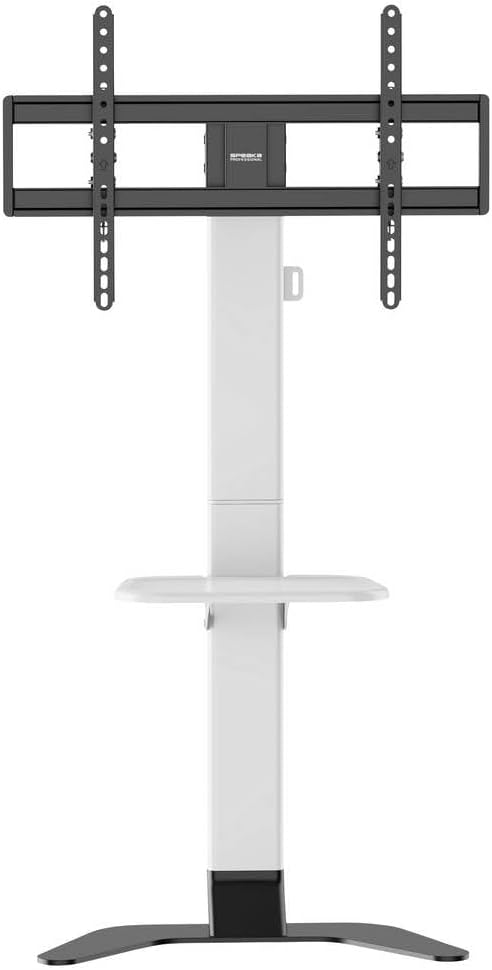
Figura 2: Fronte view of the stand showing the adjustable shelf.

Figura 3: lato view of the stand, illustrating the profile e stabilità.
5. Istruzioni per l'uso
5.1 Regolazione dell'altezza della TV
The TV mounting plate can be adjusted in height from 900 mm to 1100 mm. To adjust, loosen the height adjustment screws on the main column, carefully slide the TV to the desired height (with assistance), and then securely tighten the screws.
5.2 Regolazione dell'inclinazione della TV
The stand features tool-free tilt adjustment. Gently push or pull the top or bottom of the TV to achieve your desired viewing angle. The mechanism will hold the TV in place.
5.3 Regolazione dell'altezza del ripiano
The media shelf can be adjusted in height from 200 mm to 910 mm. Loosen the shelf adjustment screws, move the shelf to the preferred height, and then re-tighten the screws firmly.
6. Manutenzione
- Pulizia: Utilizzare un panno morbido e asciutto per pulire il supporto. Per i segni ostinati, un panno leggermenteamp È possibile utilizzare un panno con un detergente delicato, quindi asciugare. Evitare detergenti abrasivi o solventi.
- Controlli periodici: Regularly inspect all screws, bolts, and connections to ensure they are tight and secure. Re-tighten if necessary.
- Danno: Se una qualsiasi parte del supporto dovesse danneggiarsi, interromperne immediatamente l'uso e contattare l'assistenza clienti per richiedere pezzi di ricambio o consigli.
7. Risoluzione Dei Problemi
| Problema | Possibile causa | Soluzione |
|---|---|---|
| Il supporto è traballante o instabile. | Le viti sono allentate; il supporto è su una superficie irregolare; è stata superata la capacità di peso. | Ensure all assembly screws are tightened. Move stand to a level surface. Verify TV weight is within 45 kg limit. |
| TV does not tilt smoothly or stays in position. | Tilt mechanism needs adjustment or is obstructed. | Check for any obstructions. Ensure the tilt mechanism is clean. |
| I cavi non sono gestiti in modo ordinato. | Cables not routed through the designated channels. | Re-route cables through the integrated cable management system in the main column. |
8. Specifiche
- Modello: SP-TVS-600
- Numero parte: SP-13382656
- Marca: SPEAKA PROFESSIONAL
- Tipo di montaggio: Supporto da pavimento
- Tipo di movimento: inclinabile
- Materiale: Acciaio legato
- Colore: Bianco/Nero
- Dimensioni TV compatibili: 37 - 86 inches (94.0 cm - 218.4 cm)
- Compatibilità VESA: 100x100, 200x100, 200x200, 300x200, 400x200, 300x300, 400x300, 400x400, 600x400 mm
- Capacità di carico massima: 45 kg (99 libbre)
- Regolazione dell'altezza della TV: 900 - 1100 millimetro
- Regolazione dell'altezza del ripiano: 200 - 910 millimetro
- Dispositivi compatibili: Televisione, Monitor
- Peso dell'articolo: 12.505 kg (12505 grammi)
- Paese di origine: Cina
9. Garanzia e supporto
9.1 Informazioni sulla garanzia
This SpeaKa Professional product comes with a 2-year manufacturer's warranty. Please refer to the terms and conditions provided with your purchase or visit the official SpeaKa Professional website for full details. Keep your proof of purchase for warranty claims.
9.2 Assistenza clienti
For technical assistance, missing parts, or warranty inquiries, please contact your retailer or SpeaKa Professional customer support. Contact information can typically be found on the product packaging or the official brand websito.


