
1. Introduzione
This manual provides detailed instructions for the installation, operation, and maintenance of your Eonon FDF1X7 (Upgraded FDF1X6) Android 14 Car Stereo. This unit is specifically designed to integrate seamlessly with 2009-2014 Ford F150 models, enhancing your in-car entertainment and connectivity experience.

Image: The Eonon FDF1X7 Android 14 Car Stereo, showcasing its 9-inch display, along with the included external microphone and backup camera.
2. Modelli applicabili
The Eonon FDF1X7 car stereo is custom-designed for the 2009-2014 Ford F150 radio, ensuring a perfect match with your dashboard without requiring additional frame modifications. It offers plug-and-play functionality and retains original equipment manufacturer (OEM) features such as steering wheel controls, stock amplifier integration, door reminder, and AC controls.
Image: Visual guide indicating suitable and unsuitable dashboard configurations for the 2009-2014 Ford F150, ensuring proper fitment.
Please verify your vehicle's model year and dashboard dimensions to ensure compatibility before purchase. The installation process is simplified by following the provided wiring diagram and video instructions.

Image: Detailed comparison of various Ford F150 dashboard types, highlighting which ones are compatible with the Eonon FDF1X7 unit.
3. Caratteristiche principali
3.1. Prestazioni potenti
The Eonon FDF1X7 operates on a REAL Android 14 OS, allowing for extensive app installations and customization. It is powered by an RK3562 Quad-core ARM Cortex-A53 @ 2.0GHz CPU, ensuring smooth and responsive performance for multitasking and navigation. With 3GB RAM and 32GB ROM, it provides ample memory for applications, media, and system operations.
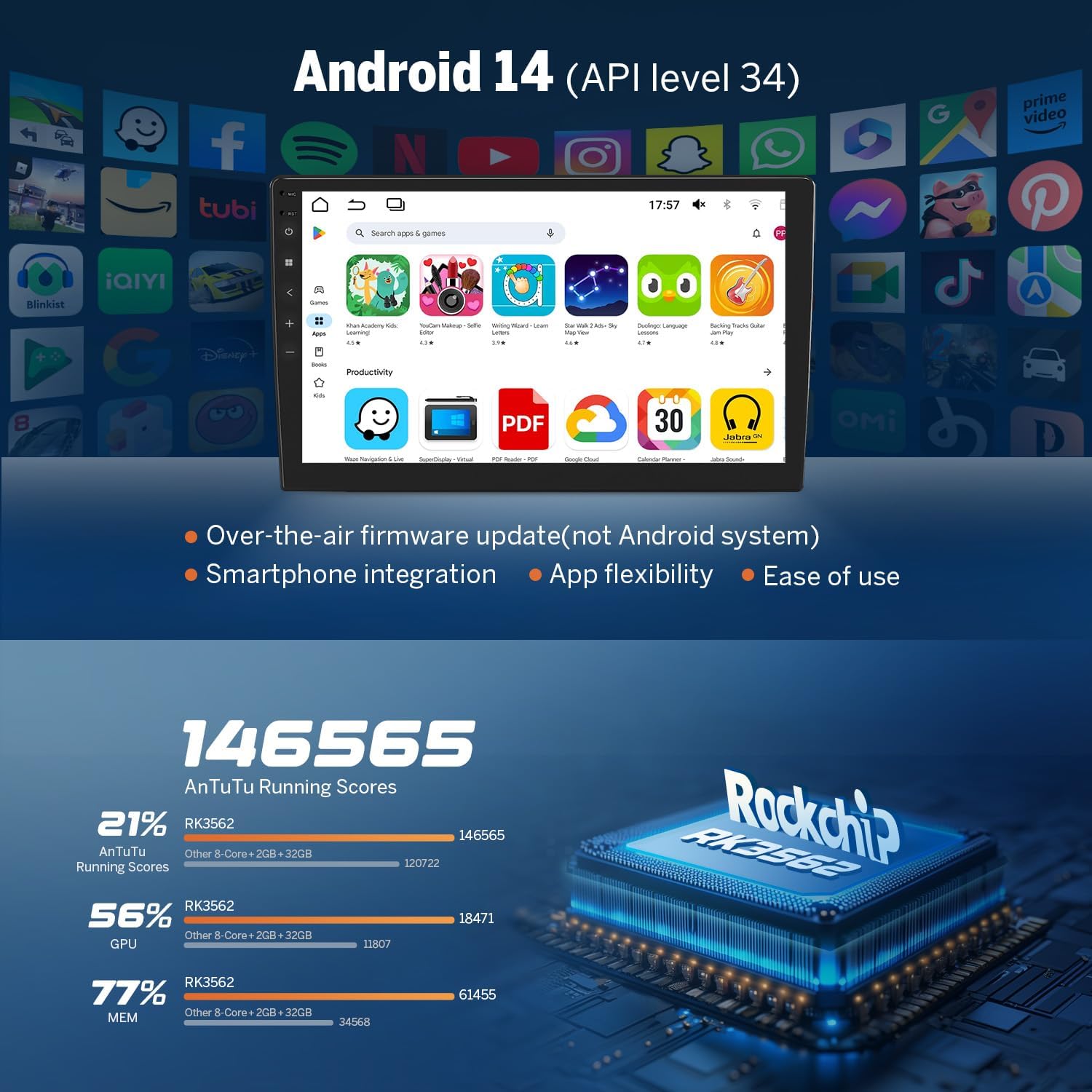
Image: Screenshot of the Android 14 interface, demonstrating app flexibility and ease of use, alongside performance benchmarks for the RK3562 processor.

Image: Instructions on how to verify the true specifications of the device, including Android version, processor, RAM, and ROM, using a 'Fake Device Test' application.

Immagine: Un esploso view of the Eonon X7 series internal components, highlighting the ST 4x45W amplifier, Wi-Fi 6 & Bluetooth 5.4 module, Silicon Labs Si4755 tuner, Samsung & Micron memory, and a 4-layer automotive PCB.
3.2. Seamless Connectivity
Experience effortless smartphone integration with Wireless & Wired Apple CarPlay and Android Auto, enabling navigation, calls, and media playback directly from your car stereo. Screen Mirroring allows you to display your phone’s screen on the unit for enhanced convenience. Bluetooth 5.4 ensures fast and stable connections for hands-free calls and audio streaming. The unit also includes a 1080P AHD Rearview Camera for improved safety during reversing. It is compatible with other Eonon accessories, such as Eonon dash cams and V0056 OBD2 diagnostic tools.

Image: Demonstrates the seamless integration of Wireless Apple CarPlay and Android Auto, showing their respective interfaces on the car stereo display.
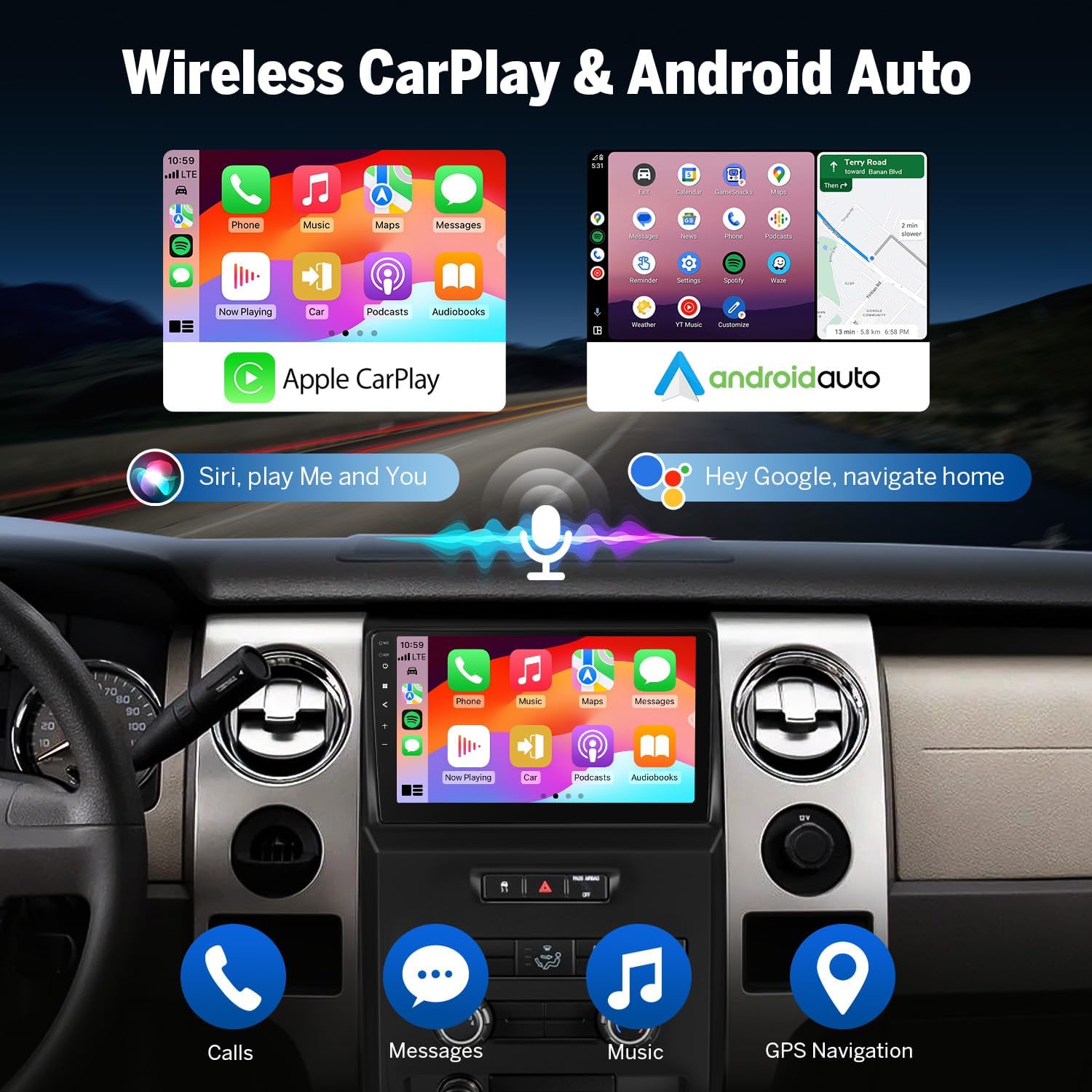
Image: Highlights the independent Bluetooth module and extra Bluetooth antenna, emphasizing quick and stable connection, noise reduction, crystal-clear call quality, and high-quality Bluetooth music streaming.

Image: Illustrates the integration of essential Android car stereo accessories, including the A100 dash cam (not included), A0125 backup camera (included), and V0056 OBD2 diagnostic tool (not included).
3.3. Esperienza audio immersiva
The Eonon FDF1X7 features a built-in DSP Audio Processor with a 48-band equalizer for precise sound customization. The ST TDA7388 Amplifier delivers 4x45W surround sound output, providing a rich audio experience. It includes 4-Channel FR/FL/RR/RL RCA audio outputs plus 1 Subwoofer output for professional-grade audio setups. EQ Modes such as Custom, Standard, Popular, Rock, Classical, and Jazz are available for tailored sound profiles.

Image: Depicts the professional 32-bit DSP with FFT acceleration, highlighting its ability to deliver ultra-precise, dynamic sound, a 48-band EQ with 3D surround & virtual bass, and optimization for car acoustics.
3.4. Design intuitivo
Personalize your car's interior with customizable button lights. Choose from 3 preloaded UI themes to suit your preference. The Power-Off Playback Memory feature ensures that playback resumes from where you left off, even after restarting the car.
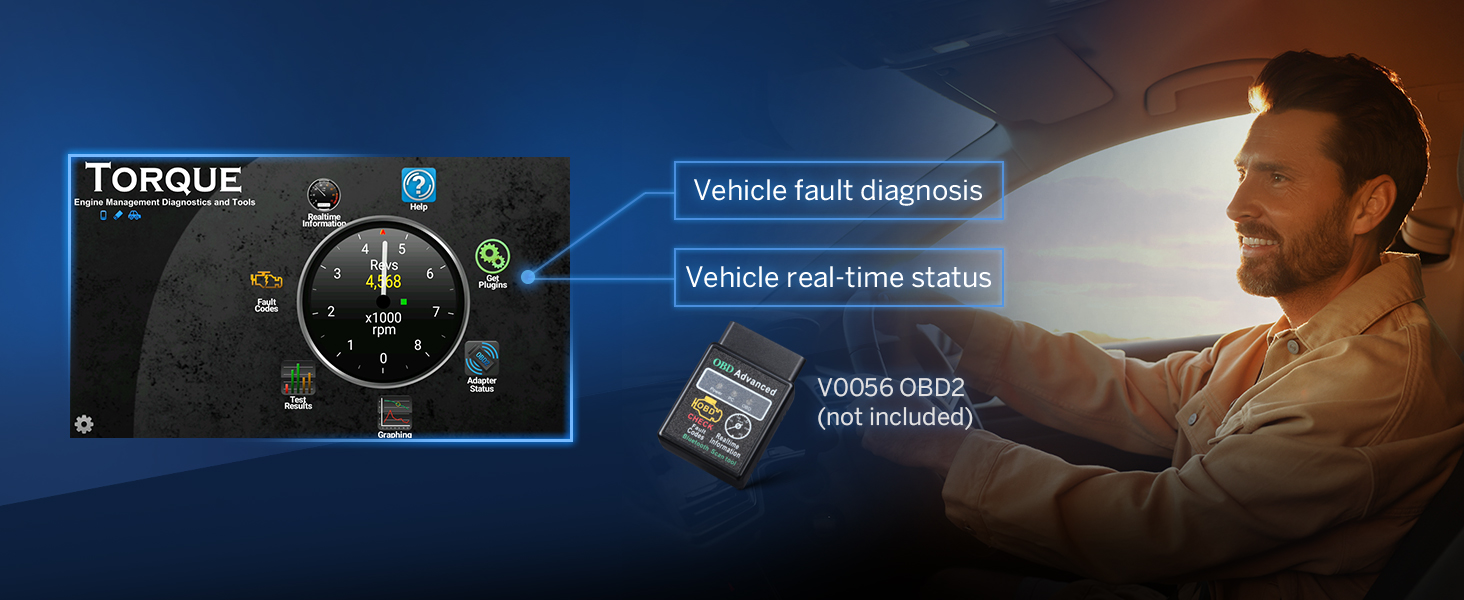
Image: Shows three distinct user interface themes available for customization, allowing users to personalize the look of their car stereo display.
4. Configurazione e installazione
4.1. Cosa c'è nella scatola
Verificare che tutti i componenti elencati di seguito siano inclusi nel pacchetto:

Image: A visual representation of all items included in the product package, such as cables, antennas, screws, brackets, and the user manual.
- Audio Video Adapter Cable x1
- Audio Adapter Cable x1
- CarPlay & Android Auto USB Adapter Cable x1
- USB Adapter Cable x1
- Backup Camera Video Input Cable x1
- Radio Antenna Adapter Cable x1
- Cavo di alimentazione x1
- Antenna GPS x1
- Vite x8
- Staffa x2
- Radio Antenna Adapter x1
- Microfono esterno x1
- Tampone adesivo x1
- CAN-Bus x1
- Fusibile di ricambio x1
- Manuale utente x1
4.2. Schema elettrico
Follow the detailed wiring diagram for proper installation. Ensure all connections are secure to prevent malfunctions.

Image: Comprehensive wiring diagram illustrating all connection points and cable types for the Eonon FDF1X7 head unit, including CAN Bus, power, audio outputs, and accessory inputs.
5. Istruzioni per l'uso
5.1. Connessione wireless Apple CarPlay
To connect your iPhone wirelessly to Apple CarPlay:
- Click the Zlink5 app on the car stereo.
- Attiva il Wi-Fi e il Bluetooth sul tuo iPhone.
- Find 'EONON' in your phone's Bluetooth device list and enter '0000' to pair.
- Una volta effettuata la connessione, tocca "Usa CarPlay" e attendi qualche secondo per completare la connessione.

Image: Step-by-step visual guide for connecting an iPhone to the car stereo via wireless Apple CarPlay, detailing app selection, Bluetooth pairing, and confirmation.
5.2. Connessione automatica Android wireless
Per connettere il tuo telefono Android in modalità wireless ad Android Auto:
- Click the Zlink5 app on the car stereo.
- Attiva il Wi-Fi e il Bluetooth sul tuo telefono Android.
- Find 'EONON' in your phone's Bluetooth device list, enter '0000' and click 'OK'.
- Attendi qualche secondo per completare la connessione.

Image: Step-by-step visual guide for connecting an Android phone to the car stereo via wireless Android Auto, detailing app selection, Bluetooth pairing, and confirmation.
5.3. Screen Mirroring for iOS
To mirror your iOS device screen:
- Click the Zlink5 app on the car stereo. Set the car stereo to iPhone wireless screen mirroring mode.
- Attiva l'hotspot dell'iPhone e connettiti all'autoradio.
- Turn on the iPhone screen mirroring function and select 'zj-airplay'.

Image: Visual instructions for setting up screen mirroring from an iOS device to the car stereo, including Zlink5 app settings, hotspot connection, and AirPlay selection.
5.4. Screen Mirroring for Android
To mirror your Android device screen:
- Click the Zlink5 app on the car stereo. Set the car stereo to Android wireless screen mirroring mode.
- Turn on your phone's Bluetooth. Find 'EONON' in your phone's Bluetooth device list, enter '0000' to pair.
- Turn on your phone's hotspot and connect to the car stereo.
- Install the Zplus app on your phone. Turn on the app and select 'wireless connection'.
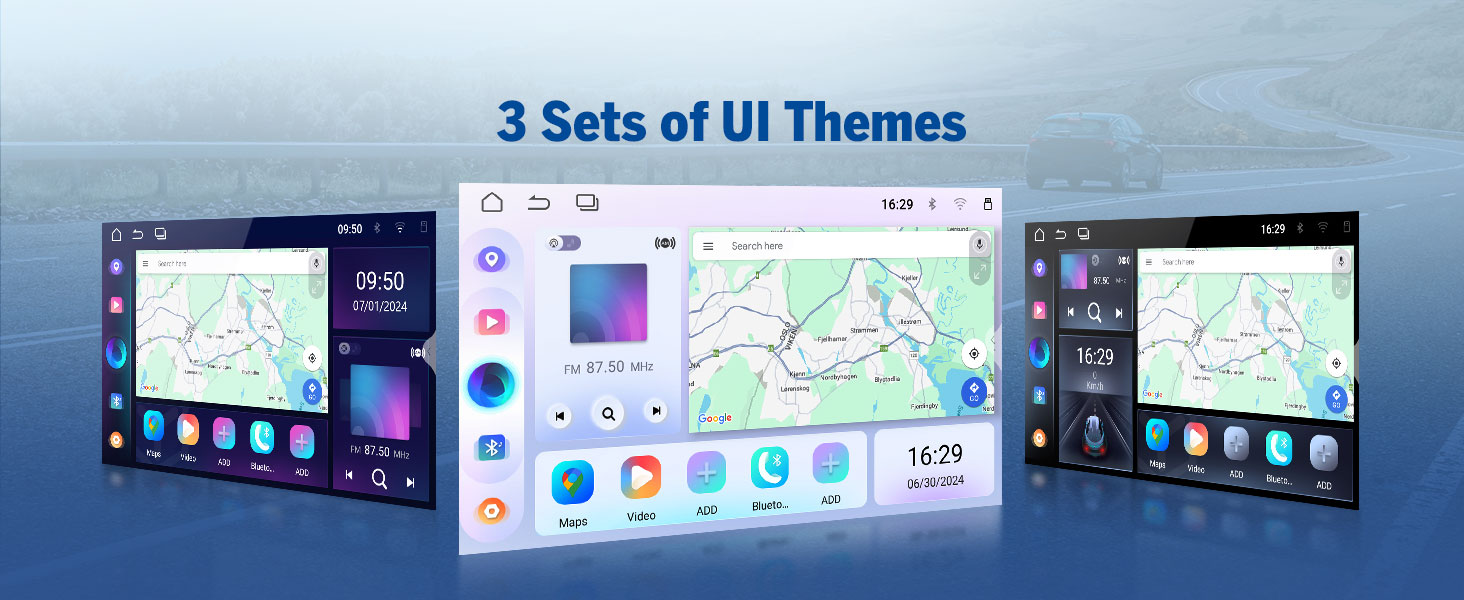
Image: Visual instructions for setting up screen mirroring from an Android device to the car stereo, including Zlink5 app settings, Bluetooth pairing, hotspot connection, and Zplus app usage.
5.5. Funzionamento della telecamera di retromarcia
The included 1080P AHD Rearview Camera enhances safety by providing a clear view while reversing. It features reversing guidelines and a 140° rear viewing angle. The camera is IP68 waterproof for durability.

Immagine: Una simulazione view from the backup camera, showing reversing guidelines and the wide 140-degree viewangolo di sterzata per manovre di parcheggio sicure.
5.6. Dash Cam and OBD2 Integration
The unit supports integration with Eonon dash cams (e.g., A100, not included) for recording driving footage con un 120° viewing angle and video playback. It also works seamlessly with V0056 OBD2 diagnostic tools (not included) to provide vehicle fault diagnosis and real-time status information.

Image: Illustrates the view from a compatible dash cam, highlighting its 120-degree viewing angle and adjustable features for comprehensive road recording.

Image: Shows the interface of the Torque app with an OBD2 diagnostic tool, displaying vehicle fault diagnosis and real-time status information.
6. Manutenzione
To ensure the longevity and optimal performance of your Eonon car stereo, follow these maintenance guidelines:
- Pulizia dello schermo: Utilizzare un panno morbido e privo di lanugine per pulire delicatamente il display. Per macchie ostinate, leggermente dampPulisci il panno con acqua o un detergente per schermi. Evita materiali abrasivi o sostanze chimiche aggressive.
- Pulizia generale: Mantenere l'unità libera da polvere e detriti. Utilizzare una spazzola morbida o aria compressa per pulire le prese d'aria e le porte.
- Aggiornamenti software: Periodically check for firmware updates via Over-The-Air (OTA) updates to ensure the system runs efficiently and securely. Note that Android system upgrades are not supported, but firmware updates address software issues and enhance security.
7. Risoluzione Dei Problemi
If you encounter issues with your Eonon car stereo, refer to the following common troubleshooting tips:
- Nessun potere: Controllare tutti i collegamenti elettrici e la scatola dei fusibili del veicolo. Assicurarsi che l'unità sia correttamente inserita nel suo cablaggio.
- Nessun suono: Verify speaker connections and audio output settings. Check the volume level and ensure the mute function is not activated. If using an external amplifier, confermarne la potenza e le connessioni.
- Problemi di connettività Bluetooth: Ensure Bluetooth is enabled on both the stereo and your mobile device. Delete previous pairings and attempt to re-pair. Check for interference from other devices.
- CarPlay/Android Auto non si connette: Ensure the Zlink5 app is running. Verify Wi-Fi and Bluetooth are active on your phone. For wired connections, try a different USB cable.
- Touchscreen non reattivo: Try restarting the unit. If the issue persists, a factory reset may be necessary (refer to the system settings for this option).
- Perdita del segnale GPS: Assicurarsi che l'antenna GPS sia installata correttamente e che abbia una visuale libera verso il cielo. Evitare di posizionarla sotto oggetti metallici.
- Software Bugs: While the software is generally stable, minor bugs may occur. Ensure your firmware is up to date via OTA updates. If a persistent bug affects core functionality, contact Eonon support.
For more complex issues, please refer to the comprehensive troubleshooting section in the full user manual or contact Eonon customer support.
8. Specifiche
Technical specifications for the Eonon FDF1X7 (Upgraded FDF1X6) Android 14 Car Stereo:
| Caratteristica | Specificazione |
|---|---|
| Sistema operativo | REAL Android 14 |
| Processore | RK3562 Quad-core ARM Cortex-A53 @ 2.0GHz |
| Memoria RAM | 3 GB |
| ROM | 32 GB |
| Dimensioni dello schermo | 9 pollici |
| Risoluzione dello schermo | 1280*720 |
| Viewangolo di ing | 178° |
| Versione Bluetooth | 5.4 |
| Amppiù vivace | ST TDA7388 (4x45W) |
| Controllo di Produzione | Built-in 32-bit DSP Audio Processor with 48-band EQ |
| Tecnologia di connettività | Bluetooth, USB, Wi-Fi (5 GHz) |
| Modalità di uscita audio | Stereo (4-Channel FR/FL/RR/RL + 1 Subwoofer output) |
| Metodo di controllo | Tocco, Voce |
| Servizi Internet supportati | Netflix, Pandora, Skype, YouTube |
| Codifica video | MPG, DAT, TS, AVI, MP4, MOV, 3GP, ASF, VOB, MKV, FLV, RM, RMVB |
| Dimensioni del pacco | Dimensioni: 44.6 x 31.1 x 13.4 cm; 2.57 kg |
| Paese di origine | Cina |
9. Garanzia e supporto
Eonon provides comprehensive support for its products:
- Garanzia: The Eonon FDF1X7 comes with a 2-year warranty.
- Resi: Approfitta del reso gratuito entro 30 giorni.
- A disposizione: Replacements are available within 90 days of purchase.
- Assistenza clienti: Quick replies within 24 hours (except weekends) and lifelong after-sales service are provided.
For further assistance, visit the official Eonon store or contact their customer support team.