
1. Introduzione
This instruction manual provides detailed guidance for the assembly, operation, maintenance, and troubleshooting of your Pinmoco LED TV Stand, Model B0FDGJBNW6. Please read this manual thoroughly before beginning assembly or use to ensure safe and correct operation. Keep this manual for future reference.
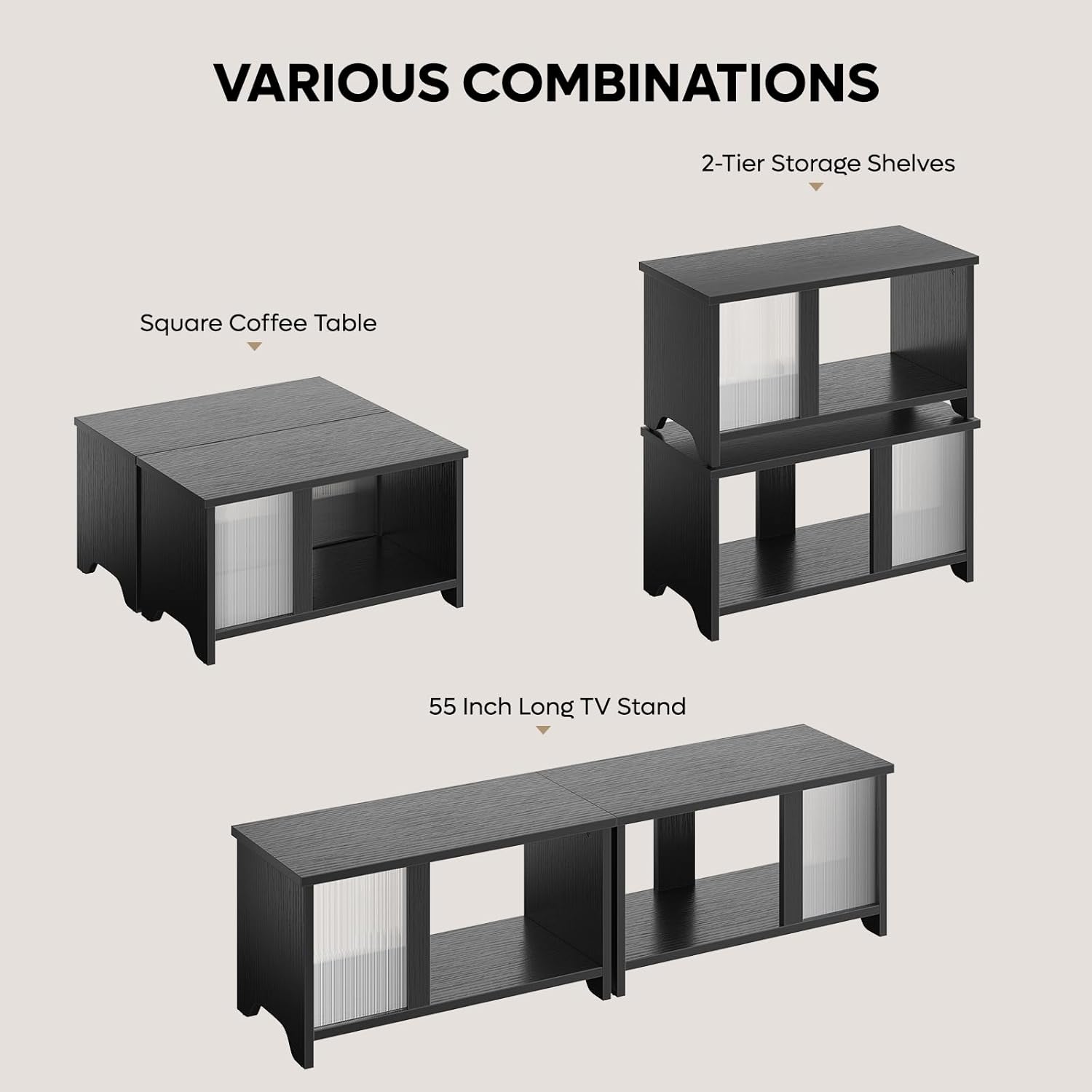
The Pinmoco LED TV Stand is designed with clean lines and a stylish wave-patterned acrylic door, allowing LED backlighting to create a captivating ambiance. Its versatile design supports multiple configurations, including a TV cabinet, a double-layer stackable storage unit, or a rectangular coffee table. It features two spacious compartments for media devices, DVDs, gaming accessories, and other items.

2. Informazioni sulla sicurezza
Warning: This product requires assembly. Use caution when handling sharp objects and electrical components. Keep away from children and pets. Do not operate if damaged or modified from the original condition.
Ensure all components are securely fastened before use. Do not exceed the recommended weight capacity for the stand. Place the stand on a level and stable surface to prevent tipping. Keep electrical components, such as the LED lights and power adapter, away from water and moisture.
3. Contenuto della confezione
Verificare che tutti i componenti elencati di seguito siano presenti prima di iniziare il montaggio. Se alcuni componenti risultano mancanti o danneggiati, contattare l'assistenza clienti.
- All necessary P2 particleboard panels for construction.
- Wave-patterned acrylic sheets for doors.
- LED light strips and remote control.
- Ferramenta di montaggio (viti, tasselli, serrature a camma, ecc.).
- Manuale di istruzioni.

4. Installazione e assemblaggio
The Pinmoco LED TV Stand is designed for easy assembly. Follow the detailed instructions provided in the included manual or refer to the assembly video below. A screwdriver is required for assembly.
Guida video all'assemblaggio:
Fasi chiave dell'assemblaggio:
- Identificare tutti i componenti e l'hardware utilizzando l'elenco delle parti fornito.
- Assemble the base units according to the diagrams, ensuring all cam locks and screws are tightened.
- Insert the acrylic doors into their designated slots.
- Attach the LED light strips to the interior of the stand using the provided clips and screws. Connect the wiring as shown in the diagram.
- For wall mounting (optional), use the provided wall anchors and screws. Ensure the wall is suitable for supporting the weight of the stand and its contents.
5. Istruzioni per l'uso
5.1 Product Configurations
The Pinmoco LED TV Stand offers three primary configurations:
- 55-Inch Long TV Stand: Place the two units side-by-side to create a wide entertainment center suitable for TVs up to 65 inches.
- 2-Tier Stackable Storage Shelves: Stack one unit on top of the other to form a vertical storage cabinet.
- Square Coffee Table: Position the two units adjacent to each other to form a square coffee table.
5.2 Funzionamento dell'illuminazione a LED
The integrated LED lighting system can be controlled using the included remote control. It features 7 main colors and 20 dynamic modes to customize the ambiance of your living space.
- Accensione/spegnimento: Premi il pulsante di accensione sul telecomando.
- Selezione del colore: Use the color buttons to select one of the 7 main colors.
- Modalità dinamiche: Cycle through the 20 dynamic modes using the mode selection buttons.
- Regolazione della luminosità: Use the brightness control buttons to increase or decrease the light intensity.

Prodotto finitoview Video:
6. Manutenzione
To ensure the longevity and appearance of your Pinmoco LED TV Stand, follow these maintenance guidelines:
- Pulizia: Pulire le superfici con un panno morbido, damp cloth. Avoid harsh chemicals or abrasive cleaners that may damage the finish or acrylic doors.
- Spolverare: Spolverare regolarmente il supporto per evitare accumuli di polvere, soprattutto attorno ai componenti LED.
- Controllo hardware: Controllare periodicamente tutte le viti e gli elementi di fissaggio per assicurarsi che siano ben serrati. Serrarli nuovamente se necessario.
- Cura dei LED: Avoid bending or excessively pulling on the LED strips or wiring. If an LED strip malfunctions, contact customer support for replacement options.
7. Risoluzione Dei Problemi
If you encounter any issues with your Pinmoco LED TV Stand, refer to the following common troubleshooting steps:
- Luci LED non funzionanti:
- Controllare che l'adattatore di alimentazione sia collegato saldamente a una presa funzionante e alla striscia LED.
- Ensure the remote control has working batteries and is pointed directly at the receiver.
- Verificare che tutti i collegamenti elettrici siano saldi.
- Instabilità del supporto:
- Assicurarsi che il supporto sia posizionato su una superficie piana e livellata.
- Check all assembly hardware (screws, cam locks) for tightness and re-tighten if loose.
- Le porte non scorrono fluidamente:
- Inspect the tracks for any obstructions or debris and clean if necessary.
- Assicurarsi che le porte siano posizionate correttamente nelle loro guide.
Se il problema persiste dopo aver provato questi passaggi, contatta l'assistenza clienti per ulteriore assistenza.
8. Specifiche
| Caratteristica | Dettaglio |
|---|---|
| Marca | Pinmoco |
| Modello | B0FDGJBNW6 |
| Colore | Nero |
| Materiale | Legno ingegnerizzato |
| Caratteristica speciale | Expandable Side by Side or Stacking TV Stand, LED Light |
| Tipo di montaggio | Montaggio a pavimento |
| Stile della porta | Slab (Wave-patterned acrylic) |
| Tipo di finitura | Semi-lucido |
| Dimensioni (L x A x P) | 60 inches x 18 inches x 15 inches (when configured side-by-side) |
| Numero di ripiani | 1 per unit (2 total in side-by-side configuration) |
| Peso dell'articolo | 36.04 libbre |
| Assemblaggio richiesto | SÌ |
| Caratteristiche LED | 7 Colors, 20 Dynamic Modes, Remote Control |
9. Garanzia e supporto
Pinmoco is committed to providing high-quality products and customer satisfaction. If you encounter any missing parts, bent components, or require assistance with assembly or operation, please contact our customer support team.
We offer parts replacement or upgrade services for eligible issues. For specific warranty details, please refer to the documentation included with your purchase or visit the official Pinmoco websito.
Per supporto, visita: Pinmoco Direct Store on Amazon