
1. Introduzione e oltreview
Thank you for choosing the Ninkear L12Pro Gaming Mini PC. This compact yet powerful desktop computer is designed to deliver exceptional performance for a wide range of applications, from demanding gaming and 4K video editing to business productivity and multi-display setups. Featuring an Intel Core i9-12900HK processor, 32GB of RAM, and a 1TB NVMe SSD, the L12Pro offers a seamless and responsive computing experience. This manual provides essential information for setting up, operating, maintaining, and troubleshooting your new Mini PC.
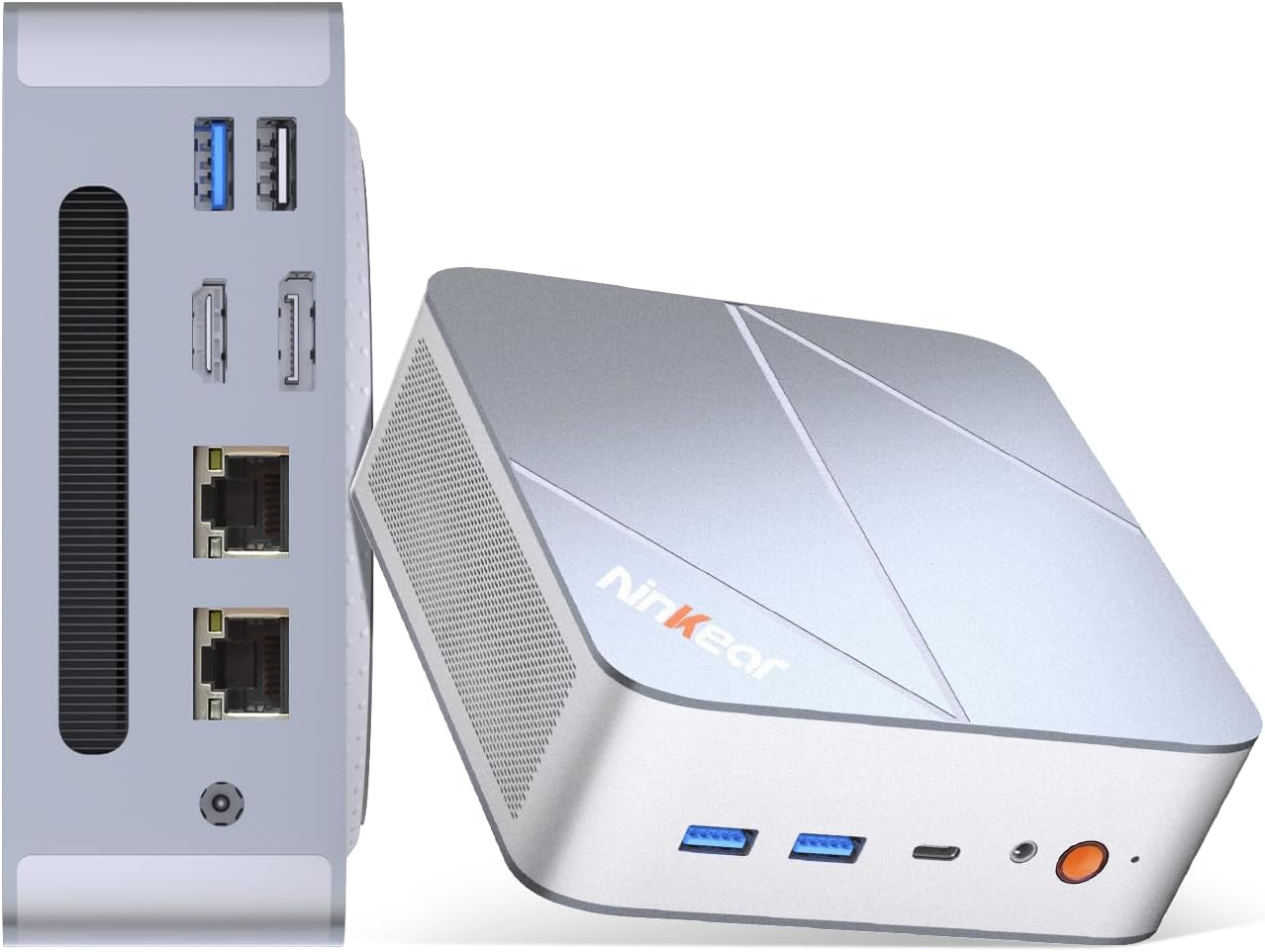
Figure 1.1: Ninkear L12Pro Mini PC - Front and Side View con i porti.
2. Caratteristiche del prodotto
- Lightning-Fast Performance: Powered by Intel’s 12th Gen i9-12900HK processor (14 cores, 20 threads, up to 5.0GHz), capable of handling 4K video editing, coding, and intensive multitasking.
- Memoria e archiviazione ad alta velocità: Equipped with 32GB DDR4 RAM and an ultra-fast 1TB NVMe SSD for instant file access, smooth application performance, and rapid boot times.
- Triple 8K UHD Display Support: Create an immersive multi-screen setup with HDMI 2.0 (up to 4K@60Hz), DisplayPort 1.4 (up to 8K@60Hz), and USB4/Thunderbolt 4 (up to 8K@60Hz) outputs.
- Compact and Flexible Design: Small form factor allows for versatile placement behind monitors, under desks, or in backpacks, offering powerful desktop capabilities in a portable size.
- Connettività avanzata: Features USB4.0, USB-C, WiFi 6, Bluetooth 5.2, dual 2.5G LAN ports, and multiple USB 3.2 Gen 2 and USB 2.0 ports for comprehensive peripheral support and high-speed data transfer.
- Sistema di raffreddamento efficiente: Designed with an all-metal cooling system for quiet and efficient operation, ensuring stable performance even under heavy loads.
- Archiviazione espandibile: Supports additional M.2 NVMe PCIe SSD (up to 4TB) and an optional 2.5-inch HDD for expanded storage capacity.

Figure 2.1: Key Features and Specifications Overview.

Figure 2.2: Triple 8K Display Setup for Enhanced Productivity.

Figure 2.3: Comprehensive Connectivity Options.
3. Cosa c'è nella scatola
All'apertura della confezione, assicurarsi che siano presenti tutti i seguenti elementi:
- Ninkear L12Pro Mini PC
- Cavo HDMI
- Adattatore di alimentazione
- Manuale dell'utente (questo documento)
4. Guida all'installazione
Follow these steps to set up your Ninkear L12Pro Mini PC:
- Disimballare il Mini PC: Estrarre con cautela il Mini PC e tutti gli accessori dalla confezione.
- Collegamento a un display:
- Connect one end of the HDMI cable (included) to the HDMI port on the Mini PC and the other end to an available HDMI input on your monitor or TV.
- For DisplayPort or USB4/Thunderbolt 4 connections, use appropriate cables (not included) to connect to compatible displays.
- For triple display setup, connect additional monitors using the available DisplayPort, USB4/Thunderbolt 4, or a USB-C to HDMI/DP adapter (not included).
- Connetti le periferiche:
- Plug your USB keyboard and mouse into any available USB ports on the Mini PC.
- If using wireless peripherals, ensure their receivers are plugged into a USB port.
- Connettiti all'alimentazione: Collegare l'adattatore di alimentazione alla porta DC-in del Mini PC, quindi collegare l'altra estremità a una presa di corrente.
- Connessione di rete (facoltativa):
- For a wired connection, connect an Ethernet cable from your router or modem to one of the 2.5G LAN ports on the Mini PC.
- For a wireless connection, the Mini PC supports WiFi 6. You will configure this after the initial boot.
- Avvio iniziale: Press the power button on the front of the Mini PC. The system will power on and begin the initial setup process for Windows 11 Pro. Follow the on-screen instructions to complete the operating system setup.
5. Istruzioni per l'uso
5.1 Accensione/spegnimento
- Accensione: Premere una volta il pulsante di accensione.
- Fermare: Fare clic sul pulsante Start in Windows, quindi selezionare Arresta il sistema > Arresta il sistema.
- Ricomincia: Fare clic sul pulsante Start in Windows, quindi selezionare Arresta > Riavvia.
- Arresto forzato: If the system is unresponsive, press and hold the power button for approximately 5-7 seconds until the unit powers off. Use this only as a last resort.
5.2 Configurazione del display
The Ninkear L12Pro supports up to three independent displays simultaneously. After connecting your monitors, Windows will typically detect them automatically. If not, or to configure display settings:
- Fare clic con il tasto destro del mouse su un'area vuota del desktop.
- Select "Display settings".
- From here, you can detect displays, arrange them, change resolution, and set display modes (Extend, Duplicate, Second screen only).
5.3 Connettività di rete
- Cablato (Ethernet): Ensure an Ethernet cable is connected to one of the 2.5G LAN ports. Windows will automatically establish a connection.
- Senza fili (Wi-Fi):
- Click the Wi-Fi icon in the system tray (bottom right of the taskbar).
- Seleziona la rete Wi-Fi desiderata dall'elenco.
- Se richiesto, immettere la password di rete e fare clic su "Connetti".
5.4 Collegamento di dispositivi esterni
The Mini PC offers a variety of ports for connecting external devices:
- Porte USB: Use USB 3.2 Gen 2 ports for high-speed devices like external hard drives or SSDs, and USB 2.0 for standard peripherals like keyboards, mice, or printers.
- USB4/Thunderbolt 4: This versatile port supports high-speed data transfer (40Gbps), video output, and power delivery (with compatible devices).
- Jack audio: Collegare le cuffie o gli altoparlanti esterni al jack audio da 3.5 mm.
6. Manutenzione
Proper maintenance ensures the longevity and optimal performance of your Ninkear L12Pro Mini PC:
- Mantenere libere le prese d'aria: Ensure the ventilation openings on the Mini PC are not obstructed. Blocked vents can lead to overheating and reduced performance.
- Pulizia regolare: Use a soft, dry cloth to clean the exterior of the Mini PC. For dust in vents, use compressed air. Do not use liquid cleaners directly on the device.
- Aggiornamenti software: Regularly update your Windows operating system, drivers, and applications to ensure security, stability, and performance.
- Spegnimento sicuro: Per evitare il danneggiamento dei dati, spegnere sempre correttamente il Mini PC tramite il sistema operativo.
- Condizioni ambientali: Operate the Mini PC in a clean, dry environment, away from direct sunlight, excessive heat, and humidity.

Figure 6.1: Smart Cooling System for Quiet Operation.
7. Risoluzione Dei Problemi
If you encounter issues with your Ninkear L12Pro Mini PC, refer to the following common problems and solutions:
| Problema | Possibile causa | Soluzione |
|---|---|---|
| Nessun potere | Adattatore di alimentazione non collegato; problema con la presa di corrente; adattatore di alimentazione difettoso. | Ensure power adapter is securely connected to the Mini PC and a working power outlet. Try a different outlet. |
| Nessuna visualizzazione | Monitor not connected; Incorrect input selected on monitor; Faulty cable; Display driver issue. | Check display cable connections. Ensure monitor is on and set to the correct input source (HDMI, DP, USB-C). Try a different cable or monitor. Update display drivers in Windows. |
| Nessuna connessione Internet (cablata) | Cavo Ethernet scollegato; problema con il router/modem; problema con il driver di rete. | Check Ethernet cable connection. Restart your router/modem. Check network adapter settings in Windows Device Manager. |
| Nessuna connessione Internet (Wi-Fi) | Wi-Fi disabled; Incorrect password; Router too far; Driver issue. | Ensure Wi-Fi is enabled in Windows. Re-enter Wi-Fi password. Move closer to the router. Update Wi-Fi drivers. |
| Prestazioni lente | Too many applications running; Overheating; Low disk space; Malware. | Close unnecessary applications. Ensure vents are clear. Free up disk space. Run a malware scan. |
8. Specifiche
Detailed technical specifications for the Ninkear L12Pro Mini PC:
| Caratteristica | Dettaglio |
|---|---|
| Marca | Ninkear |
| Numero di modello | L12Pro |
| Processore | Intel Core i9-12900HK (14 Cores, 20 Threads, up to 5.0GHz) |
| Memoria RAM | 32 GB DDR4 (espandibile fino a 64 GB) |
| Magazzinaggio | 1TB NVMe SSD (M.2 PCIe 3.0, Expandable up to 4TB) |
| Coprocessore grafico | Scheda grafica Intel Iris Xe (96EU) |
| Risoluzione massima dello schermo | 8K (7680x4320) via DisplayPort/USB4, 4K (4096x2160) via HDMI |
| Uscite video | 1x HDMI 2.0, 1x DisplayPort 1.4, 1x USB4/Thunderbolt 4 |
| Porte USB | 3x USB 3.2 Gen 2, 1x USB 2.0, 1x USB4/Thunderbolt 4 (Type-C) |
| Rete | Dual 2.5G LAN (RJ45), WiFi 6 (802.11ax) |
| Bluetooth | Bluetooth 5.2 |
| Sistema operativo | Windows 11 Pro |
| Peso dell'articolo | 2.51 libbre (circa 1.14 kg) |
| Dimensioni | 10.44 x 6.73 x 2.79 pollici (dimensioni imballo) |
| Colore | Premium Brushed Silver |
9. Garanzia e supporto
The Ninkear L12Pro Mini PC comes with a standard manufacturer's warranty. For specific warranty terms and conditions, please refer to the documentation included with your purchase or visit the official Ninkear websito.
For technical support, troubleshooting assistance, or any inquiries regarding your product, please contact Ninkear customer service through their official channels.
Supporto online: Visitare il Ninkear Store on Amazon per domande frequenti e opzioni di contatto.