
AFK B0FDQN2HTM
Manuale utente della stazione di ricarica wireless AFK con altoparlante Bluetooth e sveglia
Model: B0FDQN2HTM
1. Introduzione
The AFK Wireless Charging Station is a versatile device designed to simplify your daily routine. It integrates a wireless phone charger, a Bluetooth speaker for audio playback, a digital alarm clock, and hands-free calling capabilities into a single compact unit. This manual provides detailed instructions for setup, operation, and maintenance to ensure optimal performance.

Image 1.1: The AFK Wireless Charging Station in use, showing a smartphone charging and the time displayed on the clock.
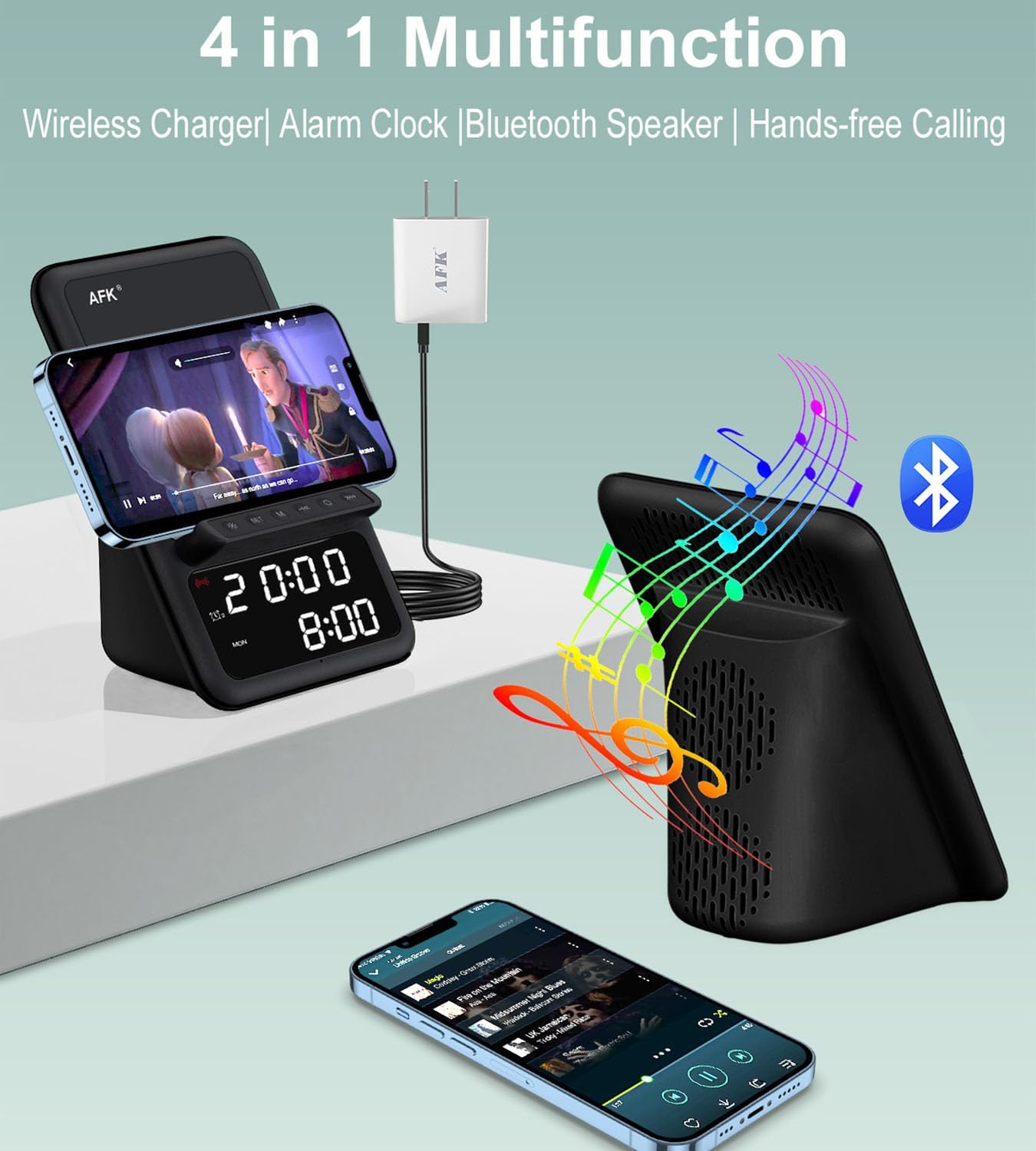
Immagine 1.2: Passoview of the product's four main functions: wireless charging, alarm clock, Bluetooth speaker, and hands-free calling.
2. Informazioni sulla sicurezza
- Non esporre il dispositivo a temperature estreme, alla luce solare diretta o a elevata umidità.
- Evitare di far cadere o sottoporre il dispositivo a forti impatti.
- Tenere il dispositivo lontano da acqua o altri liquidi.
- Non tentare di smontare o riparare il dispositivo da soli. Contattare personale di assistenza qualificato.
- Utilizzare solo l'adattatore di alimentazione fornito o un equivalente certificato.
- Assicurare una ventilazione adeguata attorno al dispositivo durante il funzionamento.
3. Contenuto della confezione
Si prega di controllare la confezione per verificare la presenza dei seguenti elementi:
- AFK Wireless Charging Station
- Adattatore di alimentazione
4. Prodotto finitoview
Familiarize yourself with the various components of your AFK Wireless Charging Station.
Pannello frontale
- Display digitale: Mostra l'ora, lo stato della sveglia e altri indicatori.
- Pulsanti di controllo: For setting time, alarms, and controlling speaker functions.
Pannello superiore
- Pad di ricarica wireless: Place your compatible smartphone here for wireless charging.
Pannello posteriore
- Porta di ingresso alimentazione: Collegare l'adattatore di alimentazione fornito.
- Griglia dell'altoparlante: Per l'uscita audio.
5. Impostazione
5.1 Collegamento di alimentazione
- Connect the USB Type-C end of the power adapter cable to the Power Input Port on the back of the charging station.
- Collegare l'altra estremità dell'adattatore di alimentazione a una presa a muro standard.
- Il display digitale si illuminerà, indicando che il dispositivo è acceso.
5.2 Impostazione iniziale dell'ora
Upon first power-up, you may need to set the correct time.
- Press and hold the 'Time Set' button (refer to product diagram for exact button location).
- Use the '+' and '-' buttons to adjust the hour. Press 'Time Set' again to confirm.
- Use the '+' and '-' buttons to adjust the minute. Press 'Time Set' again to confirm.
- L'ora è ora impostata.
6. Istruzioni per l'uso
6.1 Ricarica wireless
The charging station supports wireless charging for compatible smartphones.
- Assicurati che il tuo smartphone supporti la ricarica wireless.
- Place your smartphone directly onto the wireless charging pad on the top of the station.
- The charging indicator on your phone or the station (if available) will confirm charging has begun.
- Nota: The charging station can charge through phone cases up to 5mm thick. Magnetic, metal accessories, or other foreign objects on the back of your phone may interfere with charging and should be removed.
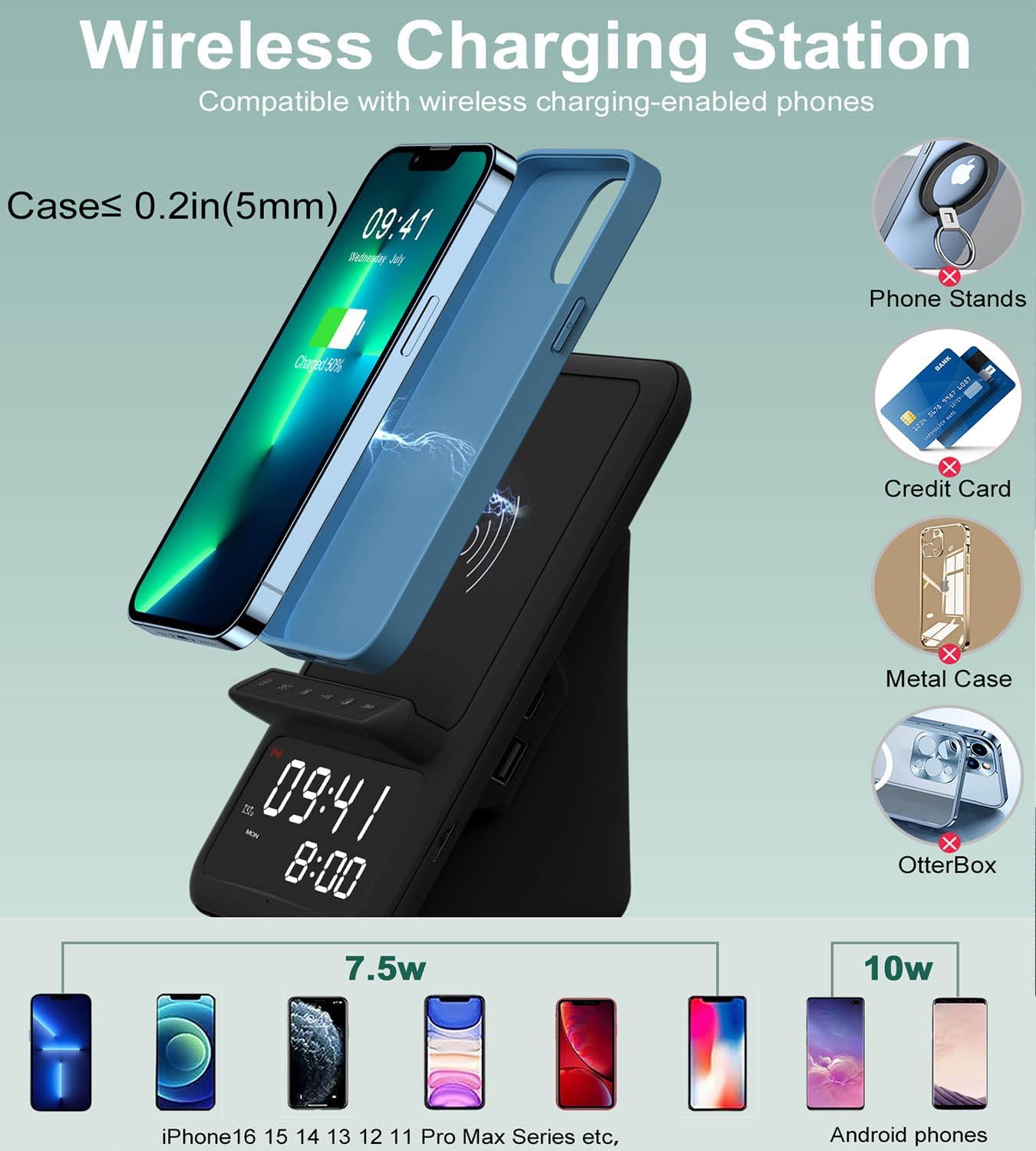
Image 6.1: Illustration of wireless charging, indicating compatibility with various phone models and the maximum case thickness for effective charging.
6.2 Bluetooth Speaker
Connect your device via Bluetooth to play audio through the integrated speaker.
- Press the 'Bluetooth' button on the charging station to enter pairing mode. The Bluetooth indicator will flash.
- Attiva il Bluetooth sul tuo smartphone, tablet o laptop e cerca i dispositivi disponibili.
- Select "AFK Charging Station" (or similar name) from the list of devices to pair.
- Once paired, the Bluetooth indicator will become solid, and you can now play audio through the speaker.
- Use the volume buttons on the charging station or your connected device to adjust the sound level.

Image 6.2: The AFK Charging Station functioning as a Bluetooth speaker, connected to a laptop for audio playback.
6.3 Sveglia
Imposta fino a due allarmi indipendenti.
- Impostazione dell'allarme 1: Press and hold the 'Alarm 1' button. Use '+' and '-' to set the hour, then press 'Alarm 1' to confirm. Use '+' and '-' to set the minute, then press 'Alarm 1' to confirm.
- Impostazione dell'allarme 2: Repeat the process using the 'Alarm 2' button.
- Attivazione/disattivazione degli allarmi: Briefly press the 'Alarm 1' or 'Alarm 2' button to toggle the respective alarm on or off. An icon on the display will indicate active alarms.
- Funzione snooze: When an alarm sounds, press any button (except 'Off') to activate snooze. The alarm will sound again after a set interval (e.g., 9 minutes).
- Arresto allarme: To turn off an alarm completely, press the designated 'Alarm Off' button (refer to product diagram).

Image 6.3: The charging station positioned on a bedside table, illustrating the dual alarm functionality with two distinct alarm times displayed.
6.4 Chiamate in vivavoce
Utilize the built-in microphone for hands-free communication when connected via Bluetooth.
- Ensure your phone is paired with the charging station via Bluetooth.
- When a call comes in, the speaker will ring. Press the 'Call Answer' button (refer to product diagram) to answer the call.
- Speak towards the device's microphone for clear communication.
- To end a call, press the 'Call End' button.

Image 6.4: The charging station facilitating a hands-free video conference call, showcasing its integrated microphone and speaker capabilities.
7. Specifiche
| Caratteristica | Descrizione |
|---|---|
| Marca | Fuori servizio |
| Tipo di connettore | USB tipo C |
| Dispositivi compatibili | Phones that support wireless charging |
| Caratteristica speciale | Wireless Charger, Bluetooth Speaker, Alarm Clock, Hands-Free Calling |
| Colore | Nero |
| Materiale | Acrilonitrile-butadiene-stirene |
| Fonte di alimentazione | USB |
8. Manutenzione
To ensure the longevity and optimal performance of your AFK Wireless Charging Station, follow these maintenance guidelines:
- Pulizia: Use a soft, dry cloth to wipe the surface of the device. Do not use abrasive cleaners, solvents, or chemical sprays.
- Magazzinaggio: Quando non viene utilizzato per lunghi periodi, conservare il dispositivo in un luogo fresco e asciutto, lontano dalla luce solare diretta.
- Evitare ostacoli: Ensure the speaker grille and charging pad are free from dust and debris.
9. Risoluzione Dei Problemi
Se riscontri problemi con il tuo dispositivo, fai riferimento ai seguenti problemi comuni e alle relative soluzioni:
| Problema | Possibile soluzione |
|---|---|
| Il dispositivo non si accende. | Assicurati che l'adattatore di alimentazione sia collegato saldamente sia al dispositivo sia a una presa di corrente funzionante. Prova una presa diversa. |
| La ricarica wireless non funziona. | Verify your phone supports wireless charging. Remove any metal objects, magnetic accessories, or overly thick cases (over 5mm) from your phone. Ensure the phone is centered on the charging pad. |
| Bluetooth speaker cannot pair. | Ensure the charging station is in Bluetooth pairing mode (indicator flashing). Make sure Bluetooth is enabled on your device and it's within range. Try restarting both devices. |
| L'allarme non suona. | Check if the alarm is activated (icon visible on display). Ensure the volume is not set to minimum. Verify the time is set correctly. |
| Scarsa qualità del suono dall'altoparlante. | Ensure the device is within Bluetooth range. Check for obstructions around the speaker grille. Adjust volume on both the station and your connected device. |
10. Garanzia e supporto
This product comes with a standard manufacturer's warranty. For specific warranty details, please refer to the documentation included with your purchase or contact AFK customer support.
If you require further assistance or have questions not covered in this manual, please contact AFK customer support through the retailer's platform or the official AFK websito.
Ask a question about this manual
Ask about setup, troubleshooting, compatibility, parts, safety, or missing instructions. Manuals+ will review the question and use this page’s manual context to help answer it.