
Introduzione
This manual provides detailed instructions for the LIGE Military Smart Watch EF13-A. Please read this manual thoroughly before using the device to ensure proper operation and to maximize its features. Keep this manual for future reference.
Cosa c'è nella scatola
Dopo aver aperto la confezione, verificare che siano presenti tutti i seguenti elementi:
- LIGE Smartwatch EF13-A
- Black Orange Silicone Strap
- Cinturino in silicone nero
- Manuale del prodotto
- Customer Card
- Cavo di ricarica magnetico
- Cinturino di regolazione
Prodotto finitoview
The LIGE EF13-A Smart Watch features a robust design with a 1.85-inch HD AMOLED touchscreen display. It includes mechanical side buttons for navigation and interaction.

Immagine: lo Smart Watch LIGE EF13-A mostraasing its 1.85-inch Ultra HD display with 360x360 pixel resolution and full touch screen capabilities. The image also compares its screen size to a 1.43-inch screen.
The watch is designed for durability, having undergone military tests for extreme temperatures, low pressure, and drilling, offering scratch and shock resistance. The sandblasted metal design contributes to its robust build.
Configurazione e abbinamento
To begin using your LIGE EF13-A Smart Watch, follow these steps to connect it with your smartphone:
- Scarica l'App: Cercare "GloryFit Pro APP" on the App Store (iOS) or Google Play Store (Android) and install it on your smartphone.
- Abilita Bluetooth: On your phone, go to settings and ensure Bluetooth is turned on.
- Aggiungi dispositivo: Open the GloryFit Pro APP. Tap "Add New Device" and search for "EF13".
- Accoppia dispositivo: Select "EF13" from the list. Confirm the pairing request on both your phone and the smartwatch.
- Concedi permessi: Follow the on-screen prompts in the app to grant necessary permissions for notifications, such as SMS, Facebook, WhatsApp, and InstagRAM.
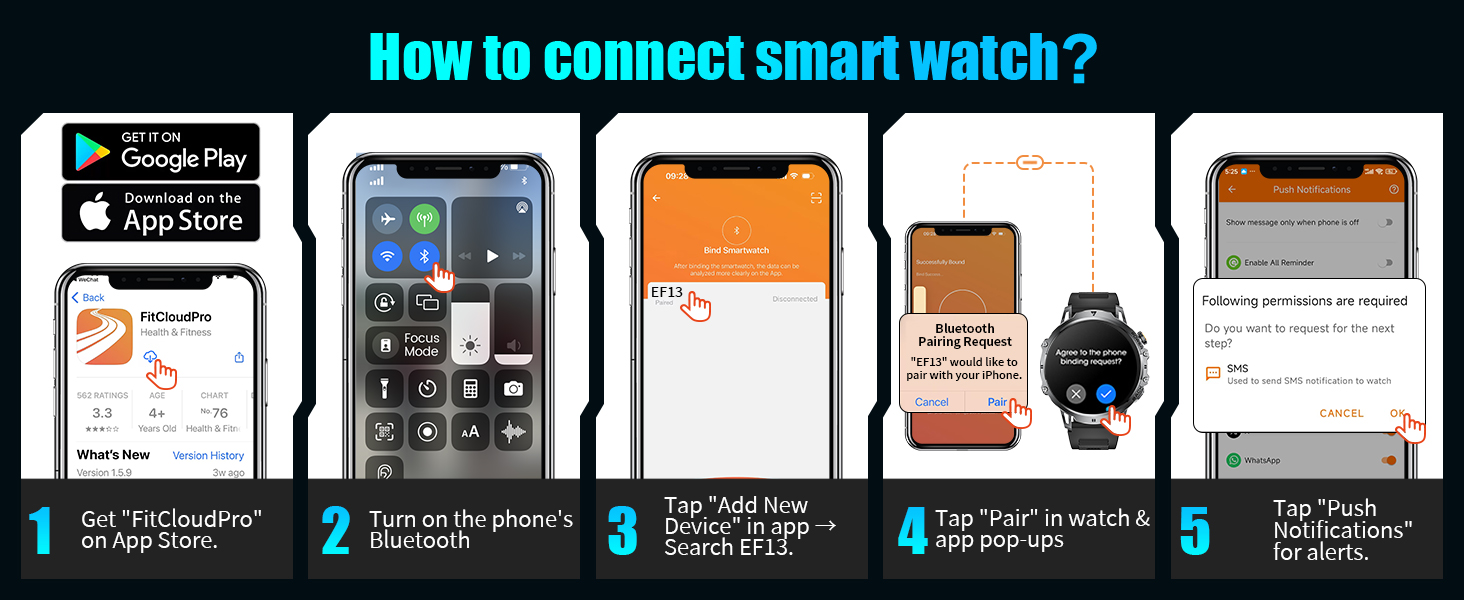
Image: A visual guide demonstrating the five steps to connect the LIGE Smart Watch to a smartphone, including downloading the app, enabling Bluetooth, adding the device, pairing, and granting notification permissions.
Istruzioni per l'uso
Navigazione di base
The watch features a full touch screen for navigation. Swipe across the screen to access different functions and menus. Use the mechanical side buttons for additional controls, such as power or back functions.
Notifiche di chiamate e messaggi Bluetooth
Once connected via Bluetooth, the watch allows you to manage calls and receive notifications directly:
- Rispondere/effettuare chiamate: Use the built-in microphone and speaker to answer, make, or reject calls directly from the watch. Access call logs and a numeric keypad for dialing.
- Elenco dei contatti: Sync your important contacts to the watch for quick dialing.
- Avvisi sui messaggi: Receive notifications for SMS, Facebook, WhatsApp, Instagram, and other phone messages.
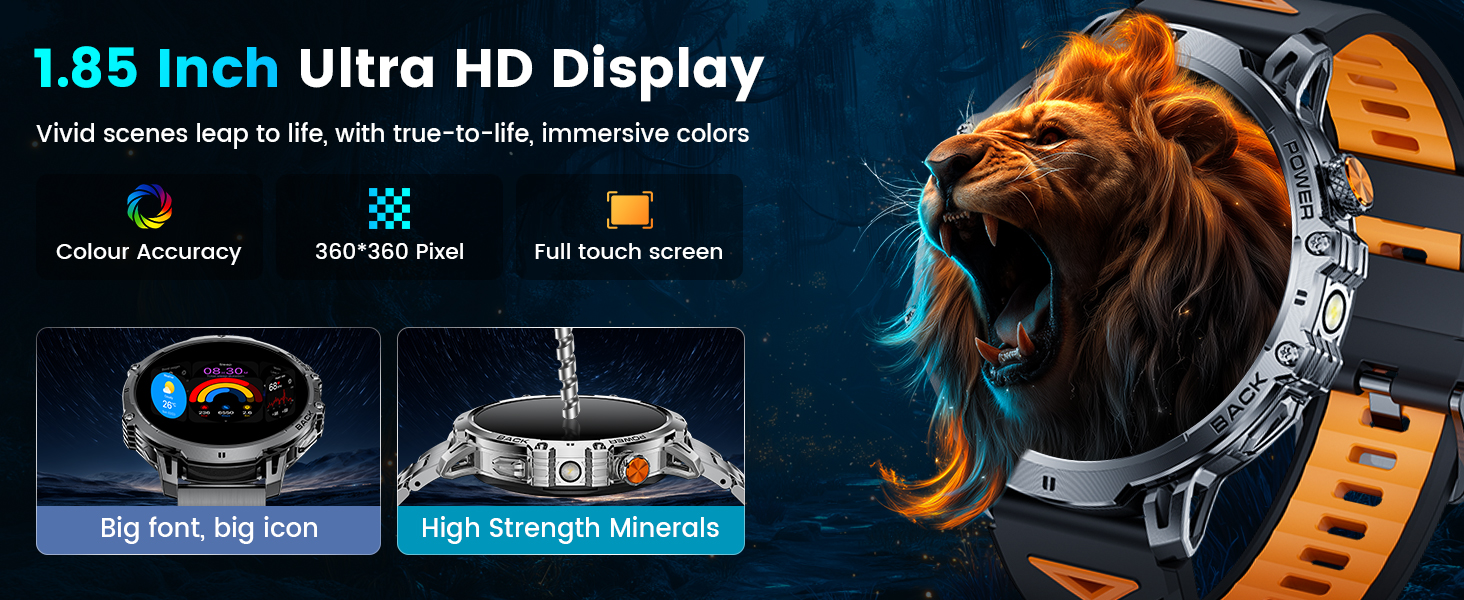
Image: The LIGE Smart Watch displaying its AI Voice Assistant, message alerts from various social media platforms, and options for answering, making, or rejecting calls, along with a dial pad and contact list.
Torcia LED
The watch includes a high-brightness LED flashlight with an illumination range of up to 20 meters. Activate it from the watch's menu for use in low-light conditions or emergencies.

Image: The LIGE Smart Watch illustrating its powerful LED flashlight activated, depicting its utility in various scenarios such as outdoor adventures, power outages, night walks, and finding items in the dark.
Altre caratteristiche
The EF13-A offers a range of additional functions:
- Blocco password: Per la tutela della privacy.
- Previsioni del tempo: Ottieni informazioni meteo aggiornate.
- Assistente vocale: Interagisci con il tuo orologio tramite comandi vocali.
- Sveglia, cronometro, timer: Strumenti essenziali per la misurazione del tempo.
- Controllo della musica: Controlla la riproduzione musicale sul tuo telefono connesso.
- Controllo della telecamera: Attiva da remoto la fotocamera del tuo telefono.
- Promemoria per sedentarietà e idratazione: Stimola a rimanere attivi e idratati.
- Multi-language Switching: Supports various languages.
- Trova telefono: Trova il tuo telefono smarrito.
- Regolazione della luminosità: Personalizza la luminosità dello schermo.
- Modalità Non disturbare: Disattiva le notifiche quando necessario.
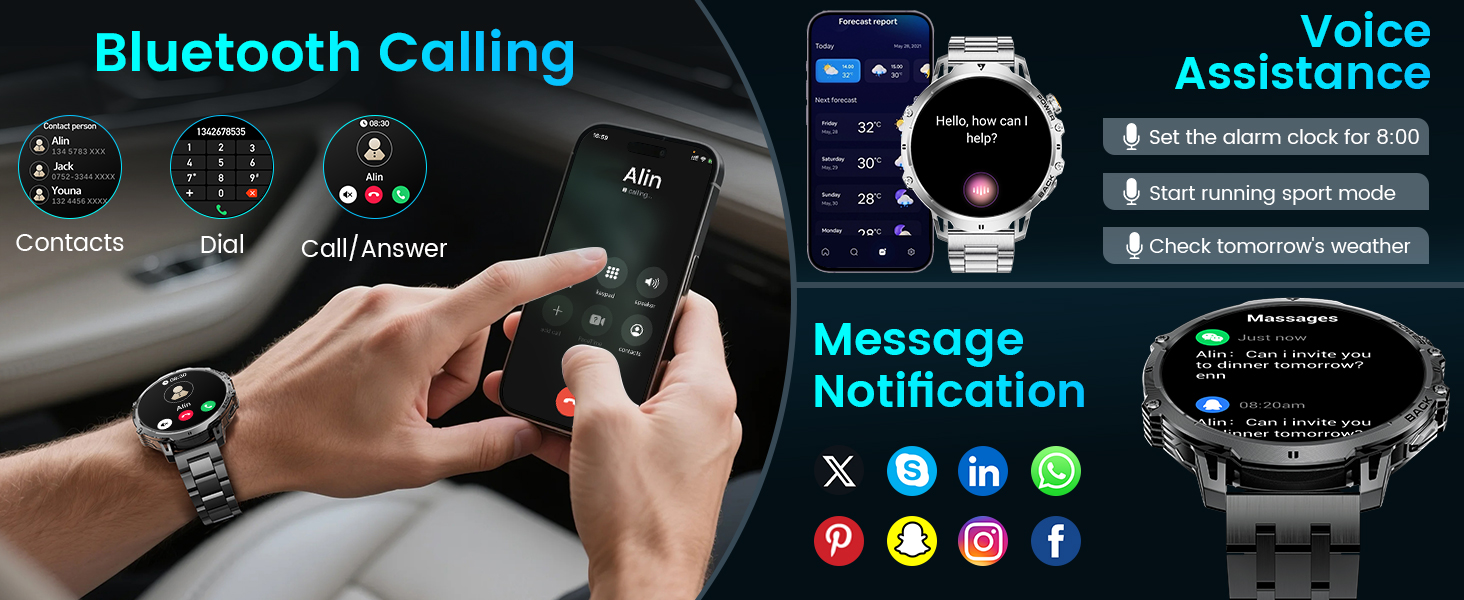
Image: The LIGE Smart Watch displaying various practical features including camera control, stopwatch, find phone, weather, music control, calculator, flashlight, and alarm clock.
Monitoraggio della salute
The LIGE EF13-A Smart Watch is equipped with built-in sensors for continuous health tracking:
- Monitoraggio della frequenza cardiaca: Provides all-day real-time heart rate data. View metrics directly on the smartwatch or through the GloryFit Pro APP.
- Monitoraggio del sonno: Monitors different sleep stages (REM, light sleep, deep sleep) and records wake times to provide insights into sleep quality.

Image: The LIGE Smart Watch illustrating its 24/7 health monitoring capabilities, including heart rate tracking with a detailed graph and sleep monitoring showing deep, light, and awake times.
Modalità Sportive
The watch supports over 110 different sports modes for various activities, including daily training, outdoor sports, indoor exercises, fitness, and ball sports. It records real-time exercise data such as:
- Frequenza cardiaca
- Passi (contapassi)
- Calorie bruciate
- Distanza
- Durata dell'attività

Image: The LIGE Smart Watch displaying its 100+ sports modes, showing metrics like steps, distance, calories, and heart rate, with icons for various activities such as running, climbing, surfing, and weightlifting.
Informazioni sulla batteria
The LIGE EF13-A is equipped with a 1000mAh lithium-ion battery, providing extended usage times:
- Condizioni operative normali: Up to 14+ days on a single charge.
- Tempo massimo di attesa: Up to 50+ days.
- Ricarica: Uses magnetic charging technology. A full charge takes approximately 2.5 hours.
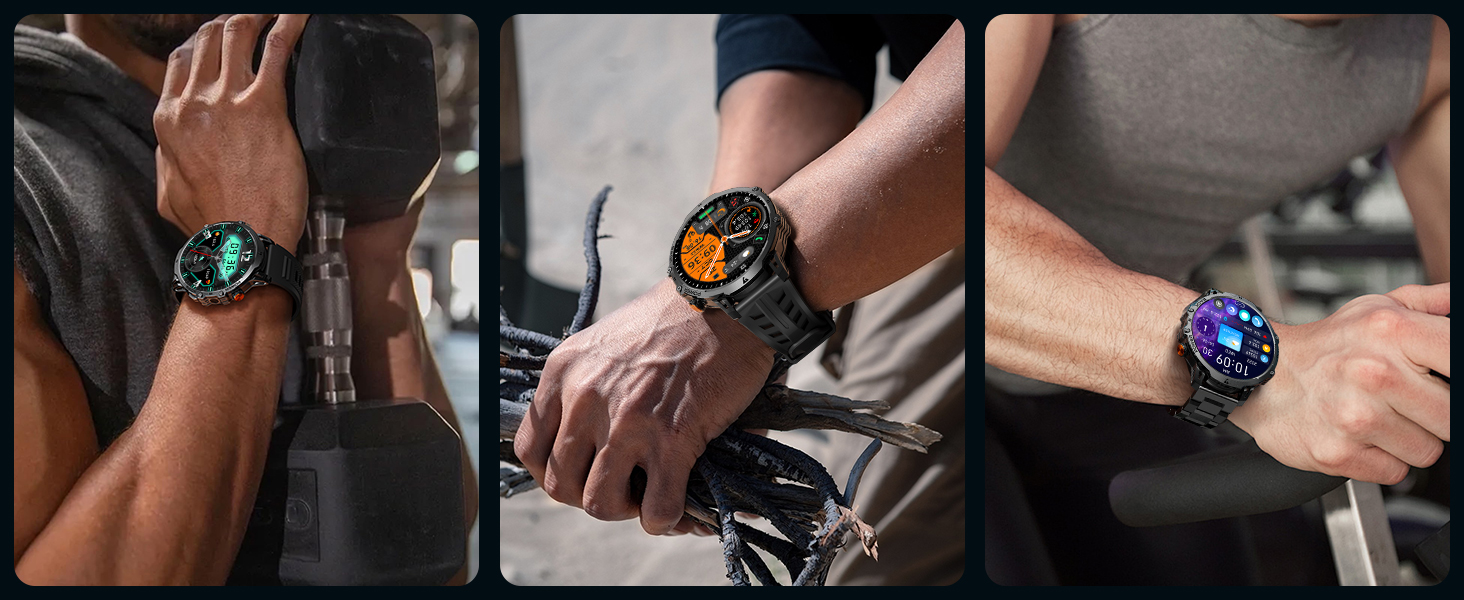
Image: An illustration highlighting the 1000mAh battery capacity of the LIGE Smart Watch, showing estimated daily use of 15 days and standby time of 45 days, compared to watches with smaller batteries.
Grado di impermeabilità
The LIGE EF13-A Smart Watch has an IP68 waterproof rating. This means it is protected against dust ingress and can withstand immersion in water up to 1.5 meters for up to 30 minutes. It is suitable for:
- Nuoto
- Lavaggio delle mani
- Esposizione alla pioggia
- Sweatproof activities
Nota: While IP68 rated, it is not recommended for hot water activities, diving, or prolonged submersion in deep water.
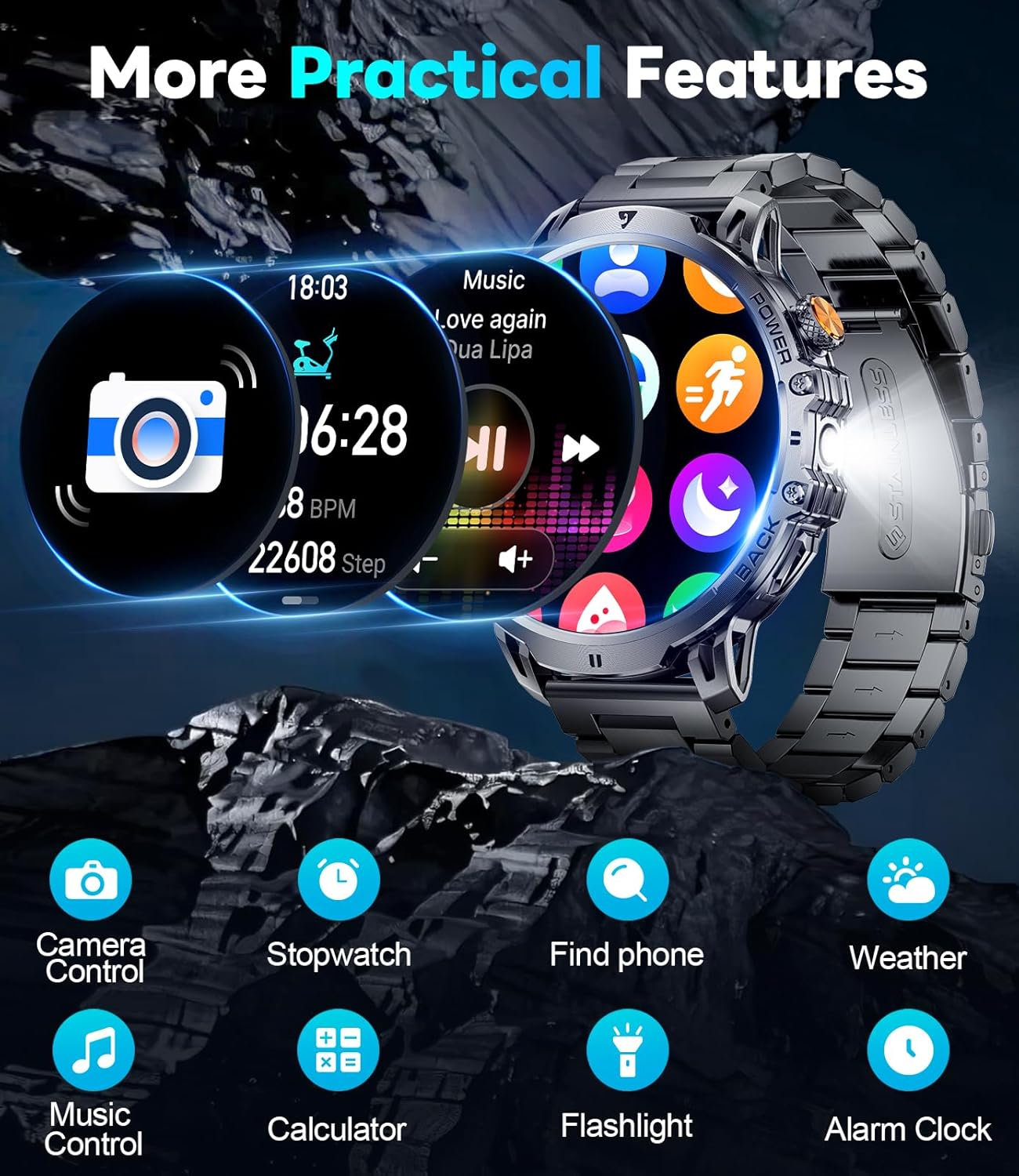
Image: A person swimming while wearing the LIGE Smart Watch, demonstrating its IP68 waterproof capability for water-related activities.
Specifiche
| Caratteristica | Dettaglio |
|---|---|
| Numero di modello | EF13-A |
| Dimensioni dello schermo | 1.85 pollici HD AMOLED |
| Capacità della batteria | Polimeri di litio da 1000 mAh |
| Grado di impermeabilità | Grado di protezione IP68 |
| Connettività | Bluetooth |
| Compatibilità del sistema operativo | Android 5.0+ e iOS 11.0+ |
| Capacità di archiviazione della memoria | 128 MB |
| Peso dell'articolo | 7.8 once |
| Dimensioni del prodotto | 2.36 x 0.79 x 1.18 pollici |
| Caratteristiche speciali | LED flashlight, 2 straps, activity tracker, SMS reminder, exercise recording, sleep monitoring, sedentary reminder, calorie calculation, low battery warning, fast charging, ultra-low power consumption, heart rate, vibration, sports mode, music control, smart alarm, weather forecast. |
Risoluzione dei problemi
If you encounter issues with your LIGE EF13-A Smart Watch, refer to the following common problems and solutions:
- L'orologio non si connette al telefono:
- Assicurati che il Bluetooth sia abilitato sul tuo telefono.
- Assicurarsi che l'orologio sia carico.
- Riavvia sia l'orologio che il telefono.
- Re-attempt pairing through the GloryFit Pro APP.
- Controlla se l'app ha tutte le autorizzazioni necessarie.
- Notifiche non visualizzate:
- Verify that notification permissions are granted in the GloryFit Pro APP.
- Controlla le impostazioni di notifica del tuo telefono per assicurarti che l'app sia autorizzata a inviare notifiche.
- Assicurati che la modalità "Non disturbare" non sia attiva sull'orologio o sul telefono.
- Breve durata della batteria:
- Ridurre la luminosità dello schermo.
- Limitare l'uso frequente di funzioni che consumano molta energia, come il monitoraggio continuo della frequenza cardiaca o la torcia.
- Assicurarsi che l'orologio sia completamente carico utilizzando il cavo di ricarica magnetico in dotazione.
- Lo schermo è nero/non risponde:
- Try pressing and holding the power button to restart the watch.
- Assicurati che l'orologio sia carico. Collegalo al caricabatterie per almeno 30 minuti.
- Bluetooth audio takes over phone audio:
- On your phone, go to Bluetooth settings and disconnect or unpair the watch when you want audio to play through your phone's speakers or other connected devices.
- Some phones allow you to specify which audio profiles (e.g., media audio, call audio) are used by a Bluetooth device. Adjust these settings if available.
Garanzia e supporto
The LIGE EF13-A Smart Watch comes with a 24-month (365 days) after-sales service. If you have any questions or require assistance with your smart watch, please contact customer support. We aim to provide quick responses within 24 hours to resolve any issues.
For support, refer to the contact information provided on the Customer Card included in your package or visit the official LIGE websito.