
Introduzione
This manual provides comprehensive instructions for the safe and efficient operation of your STF Allure Portable Speaker, model ST-S12629. Please read this manual thoroughly before using the device and retain it for future reference.
Informazioni sulla sicurezza
- Non esporre l'altoparlante all'acqua o a umidità eccessiva.
- Evitare temperature estreme.
- Non smontare o tentare di riparare l'altoparlante da soli. Ciò invaliderà la garanzia.
- Tenere fuori dalla portata dei bambini.
- Utilizzare solo il cavo di ricarica fornito.
Contenuto della confezione
Si prega di controllare la confezione per verificare la presenza dei seguenti elementi:
- STF Allure Portable Speaker (ST-S12629)
- Cavo di ricarica USB
- Manuale dell'utente (questo documento)
Note: No additional components are included beyond the speaker, charging cable, and manual.
Prodotto finitoview
The STF Allure Portable Speaker (ST-S12629) features powerful audio output, versatile connectivity, and dynamic RGB lighting. Below are key components and controls.
Davanti View

Immagine: Frontale view of the STF Allure Portable Speaker, showcasing the dual 5-inch speakers with RGB lighting and the included USB charging cable.
Controlli del pannello superiore
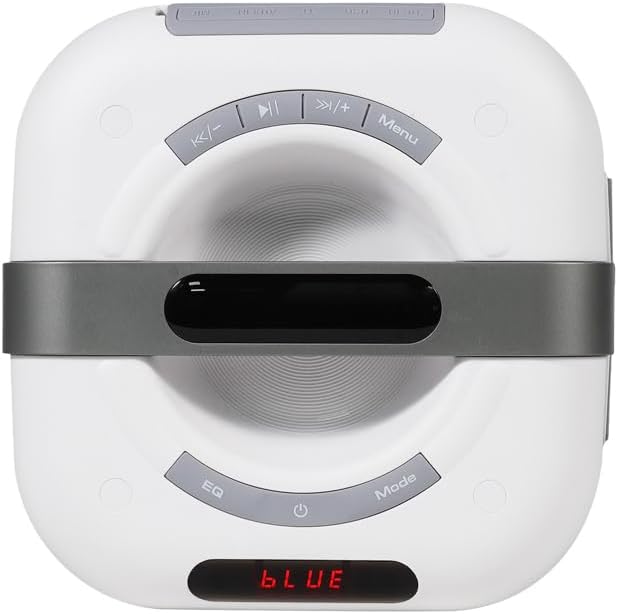
Image: Close-up of the top panel of the STF Allure Portable Speaker, showing control buttons for playback, volume, EQ, mode selection, and power.
- Pulsante di accensione: Press and hold to turn on/off. Short press to toggle LED lights.
- Pulsante Modalità: Premere brevemente per passare tra le modalità Bluetooth, Radio FM, USB, Micro SD e AUX.
- Pulsante EQ: Premere brevemente per scorrere le preimpostazioni dell'equalizzatore.
- Pulsante Play/Pausa: Play or pause audio. In FM mode, short press to auto-scan.
- Pulsante Precedente/Volume Giù: Pressione breve per la traccia precedente. Pressione prolungata per diminuire il volume.
- Pulsante Avanti/Volume su: Premere brevemente per la traccia successiva. Premere a lungo per aumentare il volume.
- Pulsante Menu: (Functionality may vary by mode, typically for settings or TWS pairing).
Porte del pannello posteriore
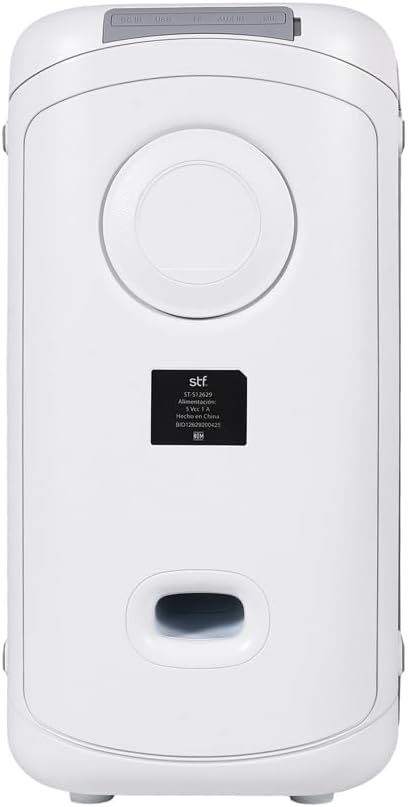
Immagine: Posteriore view of the STF Allure Portable Speaker, highlighting the various input ports including DC IN, USB, Micro SD, AUX, and Microphone.
- Porta CC IN: Per caricare l'altoparlante tramite il cavo USB in dotazione.
- Porta USB: For playing audio from a USB flash drive (up to 32 GB).
- Slot per scheda microSD: For playing audio from a Micro SD card (up to 32 GB).
- Ingresso AUX (3.5 mm): Per collegare dispositivi audio esterni tramite un cavo ausiliario.
- Ingresso microfono (6.3 mm): Per collegare un microfono.
Impostare
- Ricarica dell'altoparlante:
Before first use, fully charge the speaker. Connect the provided USB charging cable to the DC IN port on the speaker and the other end to a USB power adapter (not included) or a computer's USB port. The charging indicator will illuminate. A full charge takes approximately 3 hours.
- Accensione/spegnimento:
Press and hold the Power button on the top panel for a few seconds to turn the speaker on or off.
Istruzioni per l'uso
Modalità Bluetooth
- Accendi l'altoparlante. Entrerà automaticamente in modalità di associazione Bluetooth, indicata da una scritta "BLU" lampeggiante sul display e da un segnale acustico.
- Abilita il Bluetooth sul tuo dispositivo (smartphone, tablet, ecc.).
- Cercare "STF Allure" in your device's Bluetooth list and select it to pair.
- Once paired, the speaker will emit an audible confirmation, and "BLUE" will stop flashing. You can now play audio from your device.
- Use the Play/Pause, Previous/Volume Down, and Next/Volume Up buttons on the speaker or your device to control playback.
Funzione True Wireless Stereo (TWS)
The TWS function allows you to connect two STF Allure speakers for a stereo sound experience.
- Ensure both STF Allure speakers are turned on and in Bluetooth mode, but not connected to any device.
- On one of the speakers (this will be the primary speaker), press and hold the "Menu" button (or the designated TWS button if available, refer to specific model markings) until you hear a pairing tone.
- I due altoparlanti si connetteranno automaticamente tra loro. Una volta effettuata la connessione, sentirai un tono di conferma.
- Now, connect your Bluetooth device to the primary speaker as described in the "Bluetooth Mode" section. Both speakers will play audio in stereo.
Modalità radio FM
- Premere ripetutamente il pulsante "Mode" finché sul display non appare "FM".
- Press the "Play/Pause" button once to start an automatic scan for available FM stations. The speaker will save the found stations.
- Use the "Previous/Volume Down" and "Next/Volume Up" buttons to navigate between saved stations.
Modalità scheda USB/Micro SD
- Insert a USB flash drive or a Micro SD card (up to 32 GB, formatted to FAT32) containing MP3 audio files nella rispettiva porta sul pannello posteriore.
- The speaker will automatically switch to USB or Micro SD mode and begin playing audio. If not, press the "Mode" button until the correct mode is selected.
- Use the Play/Pause, Previous/Volume Down, and Next/Volume Up buttons to control playback.
Modalità ingresso AUX
- Connect one end of a 3.5mm auxiliary cable (not included) to the AUX input port on the speaker.
- Connect the other end of the auxiliary cable to the audio output jack of your external device.
- Premere ripetutamente il pulsante "Mode" finché sul display non compare la scritta "AUX".
- Controlla la riproduzione audio direttamente dal tuo dispositivo esterno collegato.
Ingresso microfono
- Connect a 6.3mm microphone (not included) to the Microphone input port on the rear panel.
- Adjust the microphone volume using the controls on the microphone itself or the speaker's main volume control.
Illuminazione LED RGB
The speaker features dynamic RGB lighting. Short press the Power button to cycle through different lighting modes or turn the lights off.
Manutenzione
- Pulire l'altoparlante con un panno morbido e asciutto. Non utilizzare detergenti abrasivi o solventi.
- Conservare l'altoparlante in un luogo fresco e asciutto quando non viene utilizzato.
- Evitare di far cadere l'altoparlante o di sottoporlo a forti urti.
- If the speaker will not be used for an extended period, charge it periodically to maintain battery health.
Risoluzione dei problemi
| Problema | Possibile causa | Soluzione |
|---|---|---|
| L'altoparlante non si accende. | Batteria scarica. | Caricare completamente l'altoparlante. |
| Nessun suono. | Volume too low; incorrect mode selected; device not paired. | Aumentare il volume; premere il pulsante "Modalità" per selezionare l'ingresso corretto; riassociare il dispositivo Bluetooth. |
| L'associazione Bluetooth non riesce. | Speaker too far from device; other devices connected; speaker not in pairing mode. | Ensure speaker and device are within 10 meters; disconnect from other devices; ensure speaker is flashing "BLUE". |
| L'associazione TWS non riesce. | Speakers not in Bluetooth mode; one speaker already paired to a device. | Prima di avviare l'associazione TWS, assicurarsi che entrambi gli altoparlanti siano in modalità Bluetooth e non connessi ad alcun dispositivo. |
| USB/Micro SD not playing. | Non corretto file format; card/drive not formatted correctly; card/drive capacity too large. | Garantire files are MP3; format to FAT32; use cards/drives up to 32 GB. |
Specifiche
| Caratteristica | Dettaglio |
|---|---|
| Nome del modello | ST-S12629 |
| Tipo di altoparlante | Portable with Bluetooth |
| Dimensioni dell'altoparlante | Doppi altoparlanti da 5 pollici |
| Potenza di uscita | 20W |
| Pressione sonora | 86 dB |
| Versione Bluetooth | 5.3 |
| wireless Range | Fino a 10 metri (33 piedi) |
| Capacità della batteria | 3000 mAh |
| Tempo di riproduzione | Fino a 3 ore |
| Tempo di ricarica | Circa 3 ore |
| Opzioni di connettività | Bluetooth 5.3, USB, Micro SD, FM Radio, Aux 3.5mm, Microphone 6.3mm |
| Max USB/Micro SD Capacity | 32 GB |
| Metodo di controllo | Pulsanti tattili |
| Colore | Bianco |
Garanzia e supporto
The STF Allure Portable Speaker (ST-S12629) comes with a 5-year warranty. For warranty claims or technical support, please contact STF customer service.
For further assistance, please visit the official STF website or contact their support channels. Keep your purchase receipt as proof of purchase for warranty purposes.
Note: Warranty terms and conditions may vary by region. Please refer to the official STF warranty policy for detailed information.