
1. Introduzione
Thank you for choosing the STF G Track Ultra Portable Speaker. This manual provides essential information for the safe and efficient operation of your device. Please read it thoroughly before use and retain it for future reference. This portable speaker features a 4-inch driver, 20W output, RGB LED lighting, True Wireless Stereo (TWS) functionality, Bluetooth 5 connectivity, and multiple playback options including USB, Micro SD, Aux, FM radio, and microphone input.
2. Contenuto della confezione
Verificare che tutti gli articoli siano presenti nel pacco:
- STF G Track Ultra Portable Speaker
- Cavo di ricarica USB di tipo C.
- Auxiliary 3.5mm Audio Cable
- Manuale d'uso
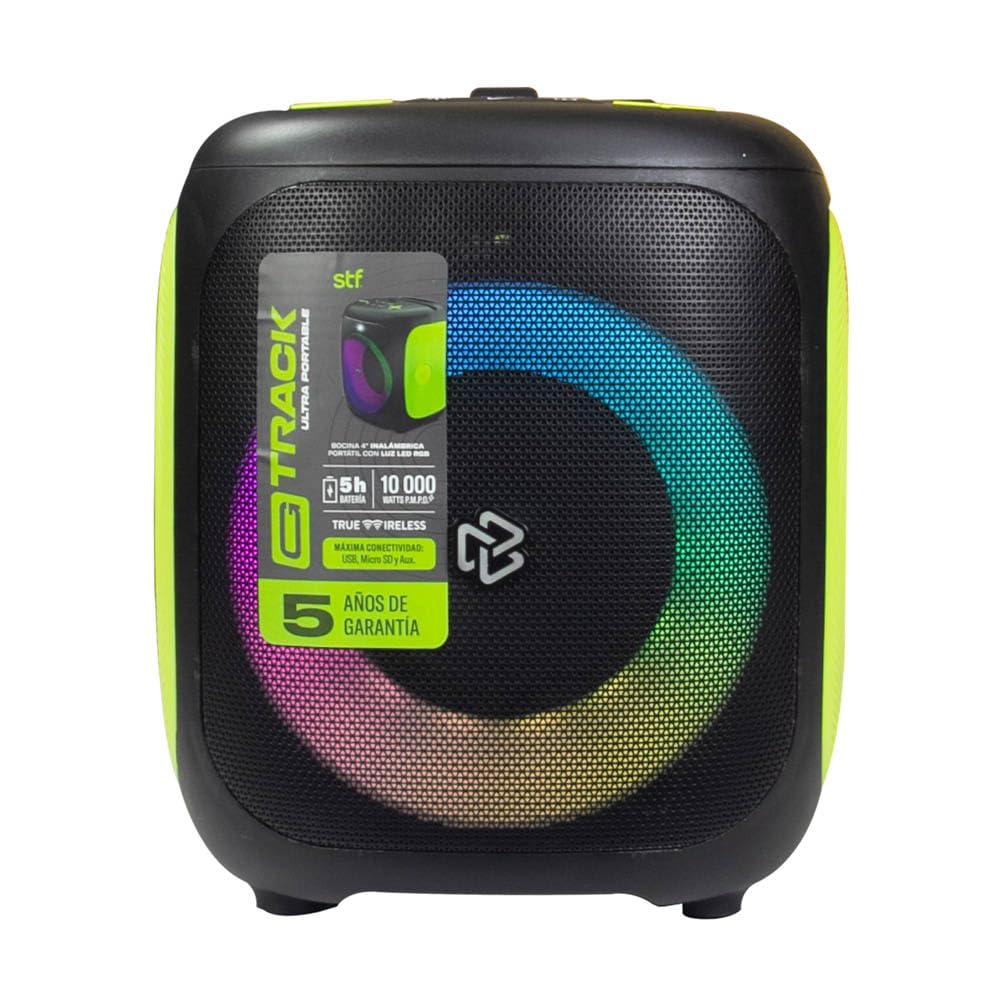
Image 2.1: STF G Track Ultra Portable Speaker with its charging cable, auxiliary cable, and user manual.
3. Prodotto finitoview
3.1 Pannello di controllo
The control panel is located on the top of the speaker and provides access to all primary functions.

Image 3.1: Top control panel with buttons for mode, menu, power, volume, LED, play/pause, and EQ.
- Pulsante M (Modalità): Switches between Bluetooth, USB, Micro SD, Aux, and FM radio modes.
- Pulsante MENU: Accesses additional settings or functions depending on the mode.
- Pulsante di accensione (⑁): Press and hold to power on/off. Short press to play/pause in music modes.
- Volume giù (-) / Traccia precedente: Pressione breve per la traccia precedente, pressione prolungata per diminuire il volume.
- Volume su (+) / Traccia successiva: Premere brevemente per la traccia successiva, premere a lungo per aumentare il volume.
- LED Button (☀): Controlla gli effetti di illuminazione RGB.
- Pulsante Play/Pausa (▶): Riproduce o mette in pausa la riproduzione audio.
- EQ Button (EQ 1.2.3): Scorre i preset dell'equalizzatore.
3.2 Porte e connessioni
The connection ports are typically located on the rear or side of the speaker.

Immagine 3.2: posteriore view of the speaker, highlighting the bass port and potential charging/input ports (not visible in this specific image, but typically located near the bottom or side).
- Porta USB: Per la riproduzione tramite unità flash USB.
- Slot per scheda microSD: Per la riproduzione su scheda Micro SD.
- Ingresso AUX (3.5 mm): Per collegare dispositivi audio esterni tramite un cavo ausiliario.
- Ingresso microfono: Per collegare un microfono cablato.
- Porta di ricarica USB di tipo C: Per caricare la batteria interna dell'altoparlante.
4. Impostazione
4.1 Ricarica dell'altoparlante
- Collegare il cavo USB Type-C in dotazione alla porta di ricarica dell'altoparlante.
- Connect the other end of the USB cable to a compatible USB power adapter (5V/1A recommended, not included) or a computer's USB port.
- Durante la ricarica, la spia di carica si illumina, in genere in rosso.
- Once fully charged, the indicator light will change color or turn off (refer to specific product LED behavior). A full charge provides approximately 5 hours of playback.
4.2 Accensione/spegnimento
- To power on, press and hold the Power button (⑁) for approximately 2-3 seconds until you hear an audible prompt or see the LED lights activate.
- To power off, press and hold the Power button (⑁) again for approximately 2-3 seconds.
4.3 Associazione Bluetooth
- Ensure the speaker is powered on and in Bluetooth mode. If not, press the 'M' (Mode) button until you hear the Bluetooth prompt. The LED indicator will typically flash, indicating it's in pairing mode.
- Sul tuo dispositivo mobile (smartphone, tablet, computer), attiva il Bluetooth e cerca i dispositivi disponibili.
- Select "STF G Track" from the list of found devices.
- Una volta effettuato l'abbinamento, sentirai un suono di conferma e l'indicatore LED smetterà di lampeggiare e rimarrà fisso.
- L'altoparlante si riconnetterà automaticamente all'ultimo dispositivo associato quando viene acceso, se il Bluetooth del dispositivo è attivo e nel raggio d'azione.
4.4 Accoppiamento True Wireless Stereo (TWS)
TWS allows you to connect two STF G Track speakers for a stereo sound experience.
- Ensure both STF G Track speakers are powered on and in Bluetooth mode, but not yet connected to any device.
- On one of the speakers (this will be the primary speaker), press and hold the 'M' (Mode) button for approximately 3-5 seconds. You should hear a pairing tone.
- I due altoparlanti si cercheranno e si connetteranno automaticamente. Una volta stabilita la connessione, sentirai un suono di conferma.
- Now, on your mobile device, search for Bluetooth devices and connect to the primary speaker (e.g., "STF G Track"). Both speakers will now play audio in stereo.
5. Istruzioni per l'uso
5.1 Music Playback (USB, Micro SD, Aux)
- USB/MicroSD: Insert a USB flash drive or Micro SD card (with supported audio files) into the corresponding port. The speaker will automatically switch to USB/Micro SD mode and begin playback. Use the Play/Pause, Next, and Previous buttons to control playback.
- Ingresso ausiliario: Connect an external audio device (e.g., MP3 player, smartphone) to the speaker's 3.5mm AUX input using the provided auxiliary cable. Press the 'M' (Mode) button until you select AUX mode. Control playback from your connected device.
5.2 Radio FM
- Press the 'M' (Mode) button repeatedly until you select FM radio mode.
- To automatically scan and save available stations, press and hold the Play/Pause button (▶). The speaker will scan and store stations.
- Use the Next (+) and Previous (-) buttons to navigate between saved FM stations.
5.3 Utilizzo del microfono
- Connect a wired microphone (not included) to the microphone input port on the speaker.
- Adjust the microphone volume using the speaker's volume controls or any dedicated microphone volume knob if available.
5.4 Controllo della luce a LED
- Press the LED button (☀) to cycle through different RGB lighting modes or to turn the lights off.
5.5 Equalizzatore (EQ)
- Press the EQ button (EQ 1.2.3) to switch between available equalizer presets (e.g., Pop, Rock, Jazz, Classic, Flat) to optimize the sound for different music genres.
6. Manutenzione
- Pulizia: Utilizzare un panno morbido e asciutto per pulire l'esterno dell'altoparlante. Non utilizzare detergenti abrasivi, cere o solventi.
- Magazzinaggio: Conservare l'altoparlante in un luogo fresco e asciutto, lontano dalla luce solare diretta e da temperature estreme.
- Cura della batteria: Per prolungare la durata della batteria, evitare di scaricarla completamente frequentemente. Caricare regolarmente l'altoparlante, anche se non lo si utilizza per lunghi periodi.
- Resistenza all'acqua: Questo altoparlante non è impermeabile. Evitare l'esposizione all'acqua o a umidità eccessiva.
7. Risoluzione Dei Problemi
| Problema | Possibile causa | Soluzione |
|---|---|---|
| L'altoparlante non si accende. | Batteria scarica. | Caricare l'altoparlante utilizzando il cavo USB Type-C in dotazione. |
| Nessun suono. | Volume troppo basso; modalità selezionata non corretta; dispositivo non connesso. | Increase volume; press 'M' to select correct input mode; ensure Bluetooth device is paired or AUX cable is fully inserted. |
| L'associazione Bluetooth non riesce. | Altoparlante non in modalità di associazione; dispositivo troppo lontano; interferenza. | Ensure speaker is in Bluetooth pairing mode (flashing LED); move device closer to speaker; turn off other Bluetooth devices. |
| L'associazione TWS non riesce. | Altoparlanti già collegati a un dispositivo; procedura di associazione errata. | Scollegare entrambi gli altoparlanti da qualsiasi dispositivo Bluetooth. Seguire attentamente i passaggi per l'associazione TWS. |
| La ricezione della radio FM è scarsa. | Segnale debole; interferenza ambientale. | Spostare l'altoparlante in una zona con una ricezione migliore. |
8. Specifiche
| Nome del modello | ST-S49667 |
| Tipo di altoparlante | Portatile |
| Dimensioni dell'altoparlante | 4 pollici |
| Potenza massima in uscita | 20 Watt |
| Risposta in frequenza | 100 Hz - 20 kHz |
| Livello di pressione sonora (SPL) | 95 dBSPL |
| Versione Bluetooth | Bluetooth 5 |
| wireless Range | Fino a 10 metri (33 piedi) |
| Capacità della batteria | 3000 mAh |
| Durata media della batteria | Fino a 5 ore (a volume moderato) |
| Porta di ricarica | USB di tipo C |
| Opzioni di connettività | Bluetooth, USB, Micro SD, Aux 3.5mm, FM Radio, Microphone Input |
| Metodo di controllo | Pulsanti tattili |
| Caratteristiche speciali | RGB LED Lighting, True Wireless Stereo (TWS) |
9. Garanzia e supporto
This product comes with a standard warranty. Please refer to the warranty card included in your package for detailed terms and conditions. For technical support, troubleshooting assistance, or warranty claims, please contact STF customer service through their official website or the contact information provided on your warranty documentation.
Tipo di garanzia: Standard
10. Video del prodotto finitoview
Video 10.1: An official product video providing a general overview of the STF G Track Ultra Portable Speaker's features and design.