
Pinmoco L103880Y-YBLK
Pinmoco 70 Inch High Gloss TV Stand
Gaming Entertainment Center with LED Lights
Model: L103880Y-YBLK
1. Introduzione
Grazie per l'acquistoasing the Pinmoco 70 Inch High Gloss TV Stand. This entertainment center is designed to provide a sleek, modern, and functional solution for your media and gaming setup. Featuring a high-gloss finish, integrated RGB LED lighting, and ample storage, it enhances any living space while keeping your devices organized.
Please read this manual thoroughly before assembly and use to ensure proper setup, operation, and maintenance of your new TV stand.
2. Istruzioni di sicurezza
- Montare sempre l'unità su una superficie morbida e pulita per evitare graffi.
- Assicurarsi che tutte le viti e gli elementi di fissaggio siano ben serrati prima dell'uso. Controllare periodicamente e serrare nuovamente se necessario.
- Do not exceed the maximum weight capacity of 100 lbs (45 kg) for the top surface and 33 lbs (15 kg) for each shelf.
- Tenere le parti di piccole dimensioni e i materiali di imballaggio lontano dalla portata dei bambini e degli animali domestici per evitare rischi di soffocamento.
- Non salire o salire sul supporto del televisore.
- Posizionare il supporto TV su una superficie piana e stabile per evitare che si ribalti.
- For LED lights, use only the provided power adapter. Do not expose LED components to water or excessive moisture.
- If any parts are missing or damaged, do not attempt to assemble. Contact customer support immediately.
3. Contenuto della confezione
Before beginning assembly, verify that all parts listed below are present and undamaged. If anything is missing or damaged, please contact Pinmoco customer support.
- P2 Board Panels (various sizes for top, sides, bottom, and dividers)
- Tempered Glass Shelves (adjustable)
- LED Light Strip with Remote Control and Power Adapter
- Ferramenta di montaggio (viti, tasselli, serrature a camma, ecc.)
- Assembly Tools (basic tools may be included, but a screwdriver is generally required)
- Manuale di istruzioni (questo documento)
4. Assemblaggio e configurazione
Assembly of the Pinmoco TV Stand is designed to be straightforward. Follow the step-by-step instructions provided in the separate assembly guide included with your package. Ensure you have adequate space and a clean, soft surface to prevent damage during assembly.
Punti chiave di assemblaggio:
- Connessione al pannello: Securely connect all P2 board panels using the provided hardware. Do not overtighten screws.
- Installazione del ripiano in vetro: The tempered glass shelves are adjustable to 3 different heights within the open compartments. Insert the shelf pins into the desired holes before placing the glass shelves.
- Installazione luci LED: Carefully attach the LED light strip to the designated areas, typically along the inner edges of the compartments. Connect the light strip to the power adapter and plug it into a standard electrical outlet.
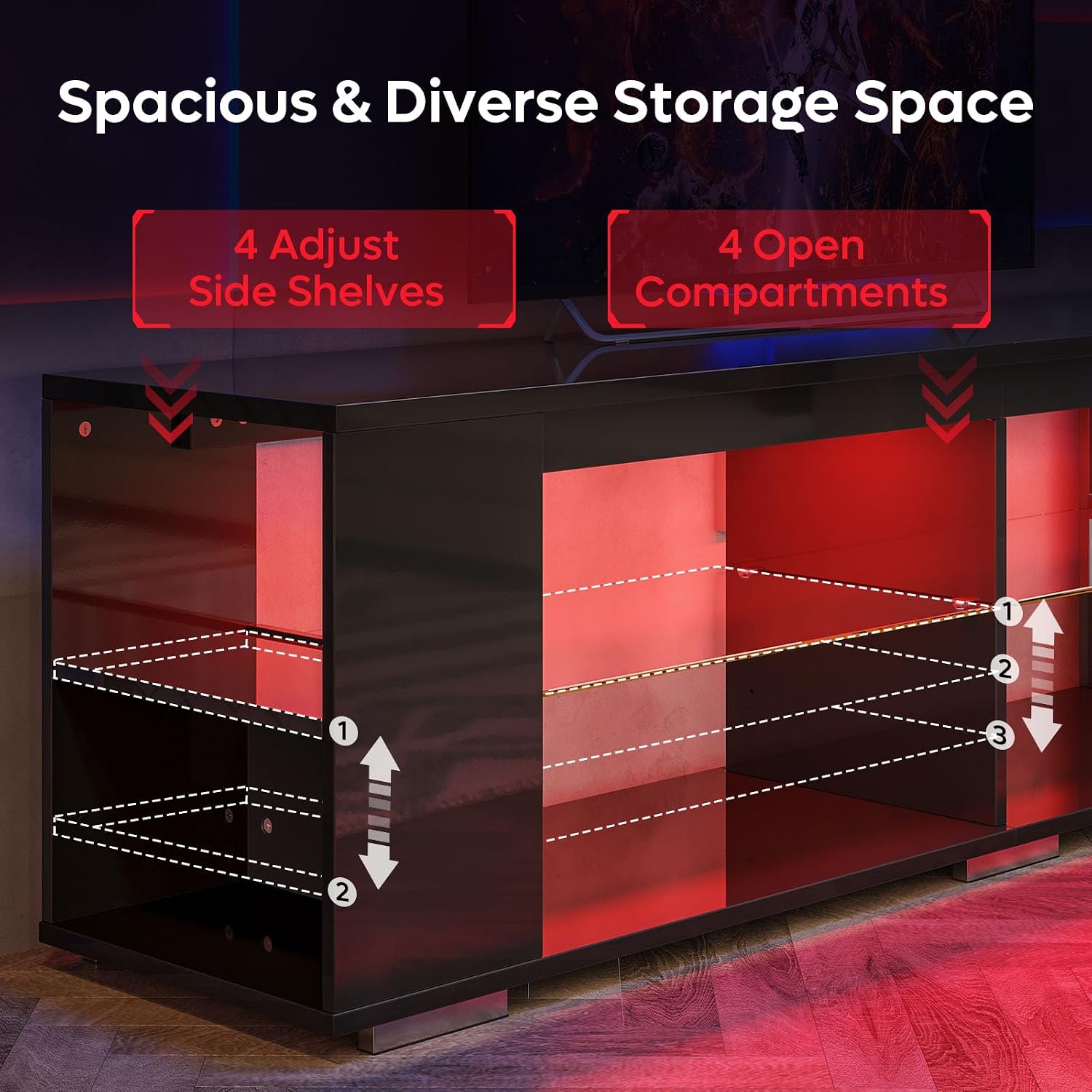
Figure 4.1: Illustration of adjustable glass shelves and open compartments, highlighting the 3-height adjustment options.

Figure 4.2: Detailed dimensions and weight capacities for the TV stand, including the top surface (100 lbs) and individual shelves (33 lbs).
5. Funzionamento delle luci LED
Your Pinmoco TV Stand features integrated RGB LED lighting with remote control for customizable ambiance.
Funzioni del telecomando:
- Pulsante di accensione: Accende/spegne le luci LED.
- Selezione del colore: Choose from 7 distinct colors (e.g., Red, Green, Blue, White, Yellow, Cyan, Purple).
- Selezione della modalità: Cycle through 22 dynamic lighting modes (e.g., fade, jump, strobe, flash).
- Regolazione della luminosità: Aumentare o diminuire l'intensità delle luci.
- Regolazione della velocità: For dynamic modes, adjust the speed of the light transitions.
Ensure the remote control has working batteries and is pointed towards the LED receiver for optimal operation.
6. Manutenzione
Una cura adeguata garantirà la longevità e l'aspetto del tuo supporto TV.
- Pulizia: Pulire le superfici con un panno morbido, damp cloth. Avoid abrasive cleaners or harsh chemicals that may damage the high-gloss finish. For glass shelves, use a glass cleaner.
- Fuoriuscite: Asciugare immediatamente eventuali fuoriuscite per evitare macchie o danni al materiale in legno.
- Esposizione alla luce solare: Evitare l'esposizione prolungata alla luce solare diretta, che può causare sbiadimento o scolorimento nel tempo.
- Controllo hardware: Controllare periodicamente tutte le viti e gli elementi di fissaggio per assicurarsi che siano ben serrati. Serrarli nuovamente se necessario.
7. Risoluzione Dei Problemi
| Problema | Possibile causa | Soluzione |
|---|---|---|
| Le luci LED non si accendono. |
|
|
| Il telecomando non risponde. |
|
|
| Il supporto sembra traballante o instabile. |
|
|
8. Specifiche
| Marca | Pinmoco |
| Numero di modello | L103880Y-YBLK |
| Materiale | Wood (P2 Board), Tempered Glass |
| Colore | Black (High Gloss Finish) |
| Dimensioni del prodotto (L x P x A) | 71 x 15 x 20 pollici (180.34 x 38.1 x 50.8 cm) |
| Peso dell'articolo | 74 libbre (33.57 kg) |
| Capacità di peso (superficie superiore) | 100 libbre (45 kg) |
| Capacità di peso (ogni ripiano) | 33 libbre (15 kg) |
| Caratteristica speciale | Adjustable Shelves, RGB LED Lights with Remote Control |
| ASIN | B0FF4D989M |
| Codice GTIN | 00810187172915 |

Figure 8.1: The Pinmoco 70 Inch High Gloss TV Stand, showcasing its sleek design and integrated LED lighting.
9. Garanzia e supporto
Pinmoco stands behind the quality of its products. For specific warranty information regarding your 70 Inch High Gloss TV Stand, please refer to the warranty card included with your purchase or contact the seller directly.
For technical support, missing parts, or any questions regarding assembly or operation, please contact Pinmoco Direct customer service through the platform where you made your purchase or visit the official Pinmoco store page.
Venditore: Pinmoco Direct
We recommend keeping your purchase receipt as proof of purchase for any warranty claims.
Ask a question about this manual
Ask about setup, troubleshooting, compatibility, parts, safety, or missing instructions. Manuals+ will review the question and use this page’s manual context to help answer it.