
1. Introduzione
Grazie per l'acquistoasing the ZEBRONICS Zeb Paradise Neo Wireless Headphones. This manual provides detailed instructions for setup, operation, and maintenance of your device. Please read this manual carefully before use to ensure proper functionality and to maximize your listening experience.
Key features of your Zeb Paradise Neo headphones include 40mm drivers for clear audio, up to 50 hours of playback, rapid charging, a dedicated gaming mode with low latency, three EQ modes, Environmental Noise Cancellation (ENC), and dual pairing capability.

Image 1.1: ZEBRONICS Zeb Paradise Neo Wireless Headphones. This image shows a front-side view of the black ZEBRONICS Zeb Paradise Neo wireless headphones, highlighting their sleek design and on-ear form factor.
2. Contenuto della confezione
Assicurarsi che tutti gli articoli siano presenti nel pacco:
- ZEBRONICS Zeb Paradise Neo Wireless Headphones (1 Unit)
- USB Type-C Charging Cable (1 Unit)
- AUX Cable (1 Unit)
- QR Code Guide (1 Unit)
3. Prodotto finitoview
Familiarizzare con i componenti delle cuffie:
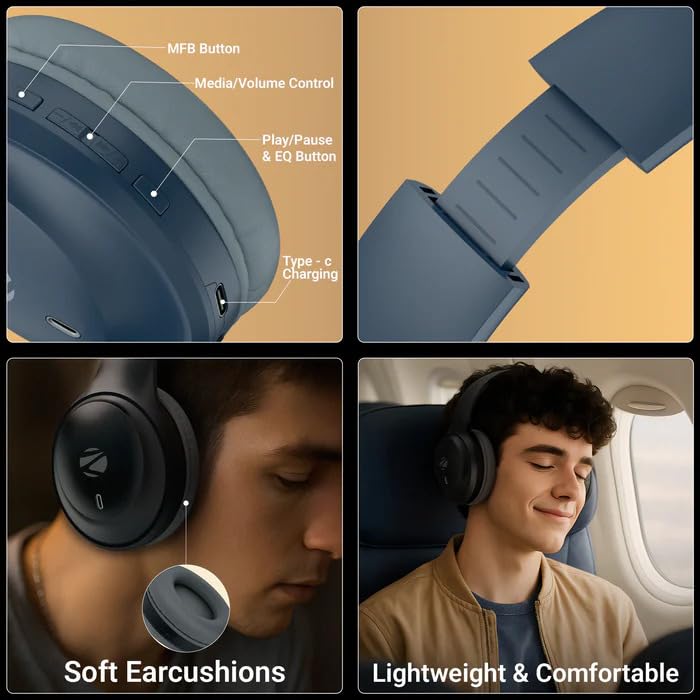
Image 3.1: Headphone Controls and Features. This image displays the various control buttons and features on the ZEBRONICS Zeb Paradise Neo headphones. It highlights the MFB (Multi-Function Button), Media/Volume Control buttons, Play/Pause & EQ Button, and the Type-C Charging port. It also shows the soft ear cushions and the lightweight, comfortable design.
- Pulsante MFB: Multi-Function Button for power, pairing, and call management.
- Media/Volume Control: Buttons for adjusting volume and navigating tracks.
- Play/Pause & EQ Button: Controls playback and switches between EQ modes.
- Porta di ricarica di tipo C: Per collegare il cavo di ricarica.
- Porta AUX: Per la connessione audio cablata.
- Microfono: For call function and voice assistant.
4. Configurazione e ricarica
4.1 Carica iniziale
Before first use, fully charge the headphones. Connect the supplied USB Type-C charging cable to the headphone's charging port and the other end to a USB power adapter (not included) or a computer's USB port.
- Durante la ricarica si illuminerà un indicatore LED rosso.
- The LED indicator will turn off once charging is complete.
- Il tempo di ricarica è di circa 1.5 ore.
- Rapid charging provides approximately 7 hours of use from a 10-minute charge.
4.2 Accensione/Spegnimento
- Accensione: Press and hold the MFB button for approximately 3 seconds until the LED indicator flashes blue.
- Spegni: Press and hold the MFB button for approximately 5 seconds until the LED indicator flashes red and then turns off.
5. Istruzioni per l'uso
5.1 Associazione Bluetooth
- Assicurarsi che le cuffie siano completamente cariche e spente.
- Press and hold the MFB button for approximately 5-7 seconds until the LED indicator flashes red and blue alternately. This indicates pairing mode.
- Sul tuo dispositivo mobile, attiva il Bluetooth e cerca i dispositivi disponibili.
- Select "ZEB-PARADISE NEO" from the list of found devices.
- Once paired, the LED indicator will flash blue intermittently.
All'accensione, le cuffie tenteranno automaticamente di connettersi all'ultimo dispositivo associato.
5.2 Doppio accoppiamento
The Zeb Paradise Neo supports dual pairing, allowing connection to two Bluetooth devices simultaneously.
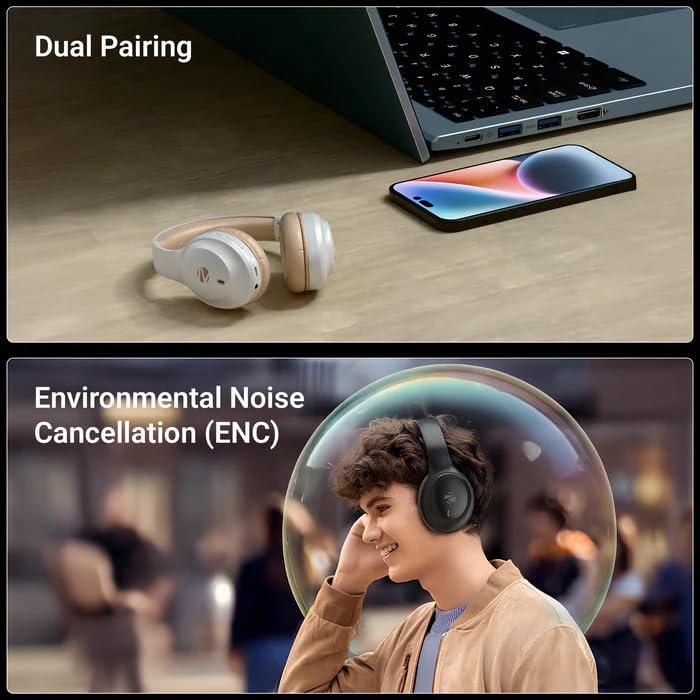
Image 5.1: Dual Pairing Capability. This image illustrates the dual pairing feature of the ZEBRONICS Zeb Paradise Neo headphones, showing them connected to both a laptop and a smartphone simultaneously. This allows seamless switching between audio sources.
- Associare le cuffie al primo dispositivo (ad esempio, uno smartphone) come descritto nella Sezione 5.1.
- Disattiva il Bluetooth sul primo dispositivo. Le cuffie torneranno in modalità di associazione.
- Pair the headphones with the second device (e.g., laptop).
- Riattiva il Bluetooth sul primo dispositivo. Le cuffie dovrebbero ora essere connesse a entrambi i dispositivi.
Audio will play from the device that is actively transmitting sound. You may need to manually select the headphones as the output device on one of the connected sources.
5.3 Funzione di chiamata
- Rispondi/Termina chiamata: Premere una volta il pulsante MFB.
- Rifiuta chiamata: Press and hold the MFB button for approximately 2 seconds.
- Ricomponi l'ultimo numero: Premere due volte il pulsante MFB.
5.4 modalità EQ
The headphones feature 3 Equalizer (EQ) modes to customize your audio experience. Press the Play/Pause & EQ button to cycle through the available modes (e.g., Bass Boost, Balanced, Treble Boost).
5.5 Modalità di gioco (bassa latenza)
Activate Gaming Mode for reduced audio latency, ideal for gaming. Refer to the QR code guide for specific instructions on activating and deactivating Gaming Mode, as this may vary.
5.6 Modalità AUX (connessione cablata)
To use the headphones with a wired connection, connect the supplied 3.5mm AUX cable to the headphone's AUX port and the other end to your audio source's 3.5mm audio jack. The headphones will automatically switch to AUX mode.
6. Manutenzione
- Pulizia: Per pulire le cuffie, utilizzare un panno morbido e asciutto. Non utilizzare prodotti chimici aggressivi o materiali abrasivi.
- Magazzinaggio: Conservare le cuffie in un luogo fresco e asciutto, lontano dalla luce solare diretta e da temperature estreme.
- Cura della batteria: Per prolungare la durata della batteria, evitare di scaricare completamente le cuffie frequentemente. Ricaricarle regolarmente, anche se non vengono utilizzate per periodi prolungati.
- Esposizione all'acqua: These headphones are not waterproof. Avoid exposure to water or moisture.
7. Risoluzione Dei Problemi
| Problema | Possibile soluzione |
|---|---|
| Le cuffie non si accendono. | Assicurati che le cuffie siano cariche. Collegale a una fonte di alimentazione e riprova. |
| Impossibile associare il dispositivo. |
|
| Nessun suono o volume basso. |
|
| Connessione intermittente. |
|
8. Specifiche
| Nome del modello | Paradise Neo (ZEB-WHP 11) |
| Versione Bluetooth | 5.4 |
| wireless Range | 10 metri (senza ostacoli) |
| Dimensioni del conducente | 40mm |
| Impedenza dell'altoparlante | 32Ω |
| Risposta in frequenza | 20 Hz - 20 kHz |
| Sensibilità | 99 dB ± 3dB |
| Impedenza del microfono | 2.2 kΩ |
| Sensibilità del microfono | -38 dB ± 3dB |
| Tempo di ricarica | 1.5 ore |
| Tempo di riproduzione | Up to 50 hours* (at 50% volume) |
| Tempo di conversazione | Fino a 40 ore* |
| Peso netto | 161g |
| Dimensioni del prodotto (L x P x A) | 18.8 x 8.4 x 21.5 cm (Package dimension) |
*Battery life may vary based on usage, volume levels, and environmental factors.
9. Garanzia e supporto
For warranty information and customer support, please refer to the QR code guide included in your package or visit the official ZEBRONICS webluogo. Conserva la ricevuta di acquisto per eventuali richieste di garanzia.
Manufacturer: Zebronics India Pvt Ltd.
Country of Origin: India.