
1. Introduzione
This manual provides essential information for the installation, operation, and maintenance of your Rosewill VSB 650W 80+ Bronze Semi-Modular ATX 3.1 Power Supply (Model VSB650). Please read this manual thoroughly before installation and retain it for future reference.
The Rosewill VSB 650W power supply is designed to deliver stable and efficient power to your computer system. Key features include:
- Intel ATX 3.0 & 3.1 Ready for broad compatibility.
- 80 PLUS Bronze Certified for energy efficiency.
- Semi-Modular design for improved cable management.
- Native PCIe 5.1 / Gen 5 12V-2x6 Connector for next-generation GPUs.
- Optimized Thermal Control with a 120mm ICB Silent Fan.
- Compact chassis (140x150x86mm) for flexible integration.
- Advanced six-protection suite (OCP/OPP/OTP/OVP/SCP/UCP) for system safety.
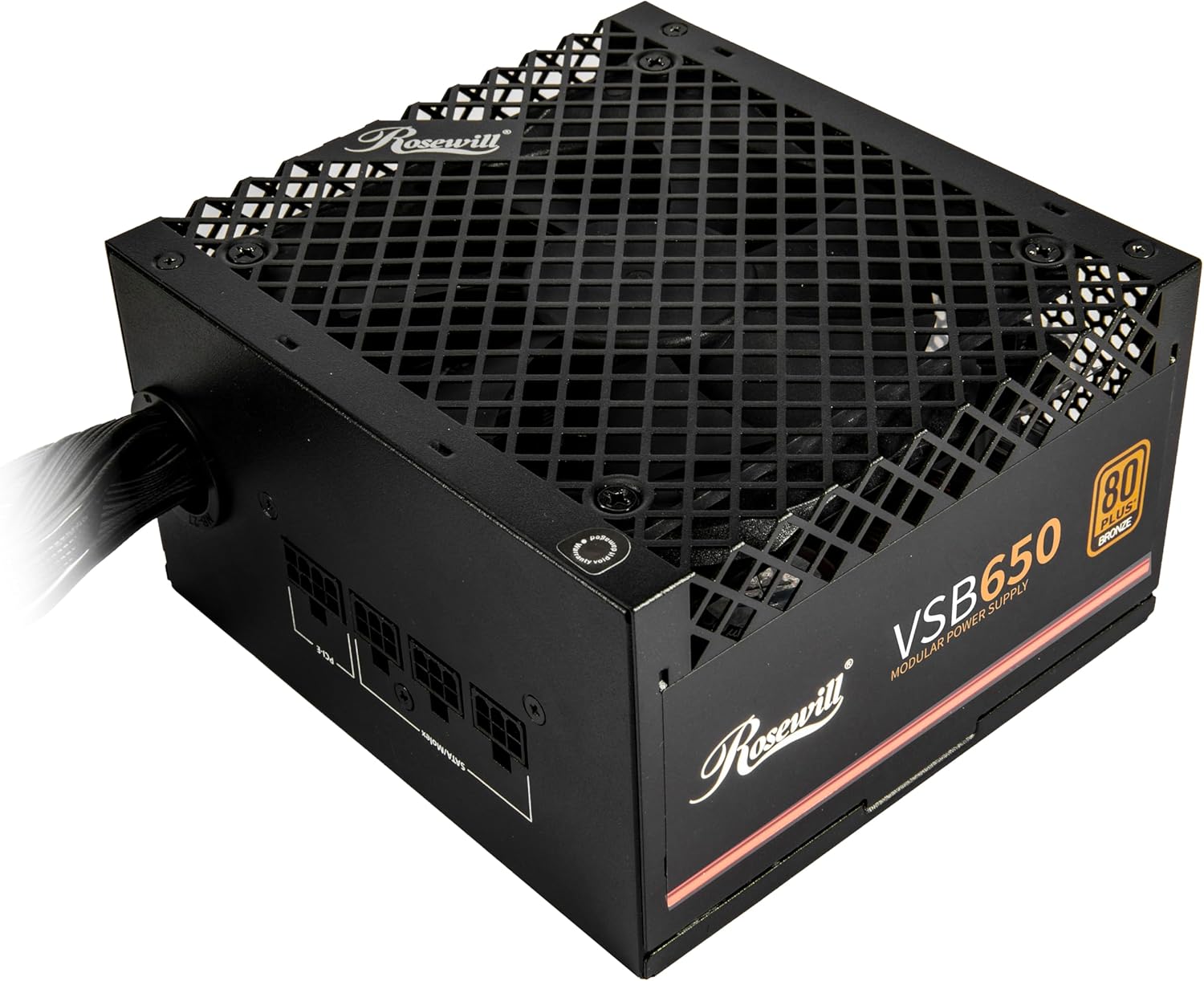
Immagine: Frontale-in alto view of the Rosewill VSB 650W Power Supply, showcasinla sua finitura nera e la griglia della ventola.
2. Informazioni sulla sicurezza
Per evitare lesioni e danni alle apparecchiature, attenersi alle seguenti linee guida di sicurezza:
- Non fare aprire l'alimentatore. Alto vol.tagsono presenti all'interno, anche quando l'unità è scollegata.
- Non fare non inserire alcun oggetto nella griglia della ventola o nelle aperture di ventilazione.
- Assicurarsi che l'alimentatore sia installato in un'area ben ventilata, priva di calore eccessivo, umidità o polvere.
- Use only the cables provided with the power supply. Using incompatible cables may cause damage.
- Collegare l'alimentatore a una presa elettrica dotata di messa a terra.
- Before installing or removing the power supply, ensure the system is powered off and the AC power cord is disconnected from the wall outlet.
The Rosewill VSB 650W power supply incorporates an Advanced Protection Suite to safeguard your system:
- OCP (protezione da sovracorrente): Prevents damage from sudden current surges.
- OPP (protezione da sovratensione): Automatically adjusts power output during overloads.
- OTP (Protezione da sovratemperatura): Guards against critical overheating.
- OVP (oltre voltageProtezione): Stabilizza il volumetage spikes instantly.
- SCP (Protezione da cortocircuito): Neutralizes short-circuit risks.
- UCP (Under Current Protection): Maintains performance during low voltage condizioni.

Image: Visual representation of the advanced protection features integrated into the power supply.
3. Configurazione e installazione
Follow these steps to properly install your Rosewill VSB 650W power supply into your computer system.
3.1 Disimballaggio e ispezione
- Estrarre con cautela l'alimentatore dalla confezione.
- Inspect the unit for any signs of physical damage. If damage is present, contact your retailer.
- Verify that all included cables and accessories are present.
3.2 Installazione fisica
- Ensure your computer system is powered off and unplugged from the wall outlet.
- Aprire il case del computer seguendo le istruzioni del produttore.
- Individuare l'area di montaggio dell'alimentatore, in genere nella parte superiore o inferiore posteriore del case.
- Gently slide the power supply into the designated bay.
- Secure the power supply to the case using the provided screws.

Image: Rear panel of the power supply with the AC power inlet and on/off switch.
3.3 Collegamenti dei cavi
The Rosewill VSB 650W is a semi-modular power supply, meaning some essential cables are permanently attached, while others can be connected as needed.

Immagine: Oltreview of the power supply's modular cable connections and included cables.
- 24-Pin ATX Motherboard Cable: Connect the main 24-pin cable to your motherboard's ATX power connector.
- 4+4 Pin CPU (EPS) Cable: Connect the 4+4 pin CPU cable to your motherboard's CPU power connector. Some motherboards may require only 4 pins, while others require all 8.
- PCIe 5.1 12V-2x6 Connector: For compatible graphics cards, connect the dedicated 12V-2x6 cable directly to the GPU. This cable delivers up to 450W.
- 6+2 Pin PCIe Cables: For graphics cards requiring standard PCIe power, connect the 6+2 pin cables to the modular ports labeled "PCI-E" on the power supply, then to your graphics card.
- Cavi SATA: Connect SATA power cables to your storage drives (HDDs, SSDs) and other SATA-powered devices.
- 4-Pin Molex Cables: Connect Molex cables to peripherals that require this type of power connector.

Image: Close-up of the 12V-2x6 PCIe 5.1 connector, designed for direct power delivery to modern GPUs.
Ensure all connections are firm and correctly seated. Route cables neatly to improve airflow and aesthetics within your case.
4. Istruzioni per l'uso
4.1 Accensione iniziale
- After all internal components are connected and the power supply is secured, close your computer case.
- Collegare il cavo di alimentazione CA all'ingresso dell'alimentatore e quindi a una presa a muro dotata di messa a terra.
- Flip the power switch on the rear of the power supply to the "I" (On) position.
- Premere il pulsante di accensione sul case del computer per avviare il sistema.
4.2 Funzionamento del ventilatore
The Rosewill VSB 650W features a 120mm ICB Silent Fan with optimized thermal control. The fan speed will automatically adjust based on the power supply's temperature and load to maintain optimal cooling while minimizing noise.
4.3 Power Excursion Capabilities
This power supply is designed to handle temporary power spikes, supporting up to 235% power excursion and 300% GPU power excursion, ensuring stability during demanding workloads and transient power demands from modern components.
5. Manutenzione
To ensure the longevity and optimal performance of your power supply, periodic maintenance is recommended.
- Rimozione della polvere: Regularly clean the exterior of the power supply and the fan grille to prevent dust buildup, which can impede airflow and cooling. Use compressed air or a soft brush. Ensure the system is powered off and unplugged before cleaning.
- Condizioni ambientali: Operate the power supply within recommended environmental conditions (temperature and humidity) as specified in the technical specifications.
- Ispezione dei cavi: Controllare periodicamente tutti i collegamenti dei cavi per assicurarsi che siano saldi e privi di danni.
6. Risoluzione Dei Problemi
If you encounter issues with your power supply, refer to the following common troubleshooting steps.
6.1 Nessuna alimentazione / Il sistema non si avvia
- Controllare l'alimentazione CA: Assicurarsi che il cavo di alimentazione CA sia collegato saldamente sia all'alimentatore sia a una presa a muro funzionante.
- Interruttore di alimentazione: Verify that the power switch on the rear of the power supply is in the "I" (On) position.
- Collegamenti interni: Double-check all internal power connections, especially the 24-pin motherboard cable and the 4+4 pin CPU cable, to ensure they are fully seated.
- Corto circuito: Disconnect all modular cables except the essential motherboard and CPU power. If the system powers on, reconnect other components one by one to identify a potential short circuit.
6.2 System Instability / Random Shutdowns
- Sovraccarico: Ensure your system's total power consumption does not exceed the power supply's 650W capacity. Use a power calculator if unsure.
- Surriscaldamento: Check for proper airflow within your computer case. Ensure the power supply's fan is not obstructed and is spinning.
- Problemi con i componenti: Instability can also be caused by other faulty components (RAM, GPU, CPU). Test components individually if possible.
6.3 Rumori insoliti
- Rumore del ventilatore: A slight fan noise is normal. If the noise is excessive or grinding, ensure no cables are obstructing the fan blades.
- Lamento della bobina: Some power supplies may exhibit a faint "coil whine" under certain loads. This is generally harmless and does not indicate a defect.
If troubleshooting steps do not resolve the issue, please contact Rosewill customer support.
7. Specifiche
Detailed technical specifications for the Rosewill VSB 650W 80+ Bronze Semi-Modular ATX 3.1 Power Supply (Model VSB650).
| Caratteristica | Specificazione |
|---|---|
| Nome del modello | VSB650 |
| Uscita Wattage | 650 Watt |
| Certificazione 80 PLUS | Bronzo |
| Fattore di forma | ATX |
| Progettazione dell'alimentatore | Semi-Modulare |
| Standard ATX | ATX 3.0 & 3.1 Compatible |
| Connettore PCIe | Native PCIe 5.1 / Gen 5 12V-2x6 |
| Metodo di raffreddamento | Air (120mm ICB Silent Fan) |
| Dimensioni del prodotto (L x P x A) | 5.51 x 5.9 x 3.38 pollici (140 x 150 x 86 mm) |
| Peso dell'articolo | 4.59 libbre |
| Condensatori | 105°C/221°F Japanese Capacitor |
| Caratteristiche di protezione | OCP, OPP, OTP, OVP, SCP, UCP |

Image: Detailed electrical specifications label for the VSB650 power supply.
8. Garanzia e supporto
8.1 Informazioni sulla garanzia
The Rosewill VSB 650W Power Supply comes with a Garanzia di 5 anno dalla data di acquisto. La presente garanzia copre i difetti di materiali e fabbricazione in condizioni di normale utilizzo. Si prega di conservare la prova d'acquisto per eventuali reclami in garanzia.
La garanzia non copre i danni derivanti da:
- Installazione o funzionamento improprio.
- Accidental damage, abuse, or misuse.
- Riparazioni o modifiche non autorizzate.
- Natural disasters or power surges outside of the unit's protection capabilities.
8.2 Assistenza clienti
For technical assistance, warranty claims, or further inquiries, please visit the official Rosewill websito o contattare il loro team di assistenza clienti.
Rosewill Official Websito: www.rosewill.com