
Introduzione
This manual provides detailed instructions for the installation, operation, and maintenance of your Rosewill VSB 750W 80+ Bronze Semi-Modular Power Supply. Please read this manual thoroughly before installation and use to ensure proper function and safety.
Informazioni sulla sicurezza
WARNING: Power supplies contain high voltage components. Do not open the power supply unit. There are no user-serviceable parts inside. Opening the casing will void the warranty and poses a risk of electric shock.
- Prima dell'installazione o della manipolazione, assicurarsi che l'alimentazione sia scollegata dalla presa di corrente CA.
- Installare l'alimentatore in un'area ben ventilata.
- Utilizzare solo i cavi forniti con l'alimentatore.
- Do not block any ventilation openings on the power supply.
- Questo prodotto è progettato per l'uso con personal computer. Non utilizzarlo per altri scopi.
Configurazione e installazione
1. Disimballaggio
Carefully remove the power supply and all accessories from the packaging. Verify that all components are present:
- Rosewill VSB 750W Power Supply
- Cavo di alimentazione CA
- Modular Cables (PCIe, SATA, Molex)
- Viti di montaggio
- Fascette per cavi
2. Installazione fisica
Install the power supply into the designated PSU bay of your computer case. Secure it with the provided mounting screws.
The Rosewill VSB 750W features a compact 140x150x86mm chassis, which is 35% smaller than many regular ATX PSUs, allowing for flexible integration into various PC builds.
The power supply includes a 120mm ICB silent fan for optimized thermal control and quiet operation.

Figura 1: Dall'alto verso il basso view of the Rosewill VSB 750W Power Supply, highlighting the fan grill and branding.
3. Collegamenti dei cavi
The Rosewill VSB 750W is a semi-modular power supply. Essential cables (24-pin motherboard, 4+4 pin CPU) are permanently attached, while others are modular.
Connect the necessary cables to your motherboard and components.

Figura 2: Oltreview of available connectors for the Rosewill VSB 750W Power Supply.
Connessione alla scheda madre
Connect the 24-pin ATX cable from the power supply to the corresponding port on your motherboard.
CPU Power Connection
Connect the 4+4 pin CPU power cable(s) to the CPU power port(s) on your motherboard. Most motherboards require one 8-pin (4+4) connector, while some high-end boards may require two.
PCIe 5.1 / Gen 5 12V-2x6 Connector
This power supply includes a native PCIe 5.1 / Gen 5 12V-2x6 cable, designed to deliver up to 600W directly to compatible next-generation graphics cards. Connect this cable directly to your PCIe 5.1 GPU if applicable.

Figure 3: The native 12V-2x6 PCIe 5.1 connector for direct GPU power.
Additional PCIe Connections
For other graphics cards requiring 6+2 pin PCIe connectors, use the provided modular cables. Connect one end to the power supply's PCIe ports and the other to your graphics card.
SATA and Molex Connections
Connect the modular SATA power cables to your storage drives (SSDs, HDDs) and optical drives. Use Molex connectors for any peripherals that require them.
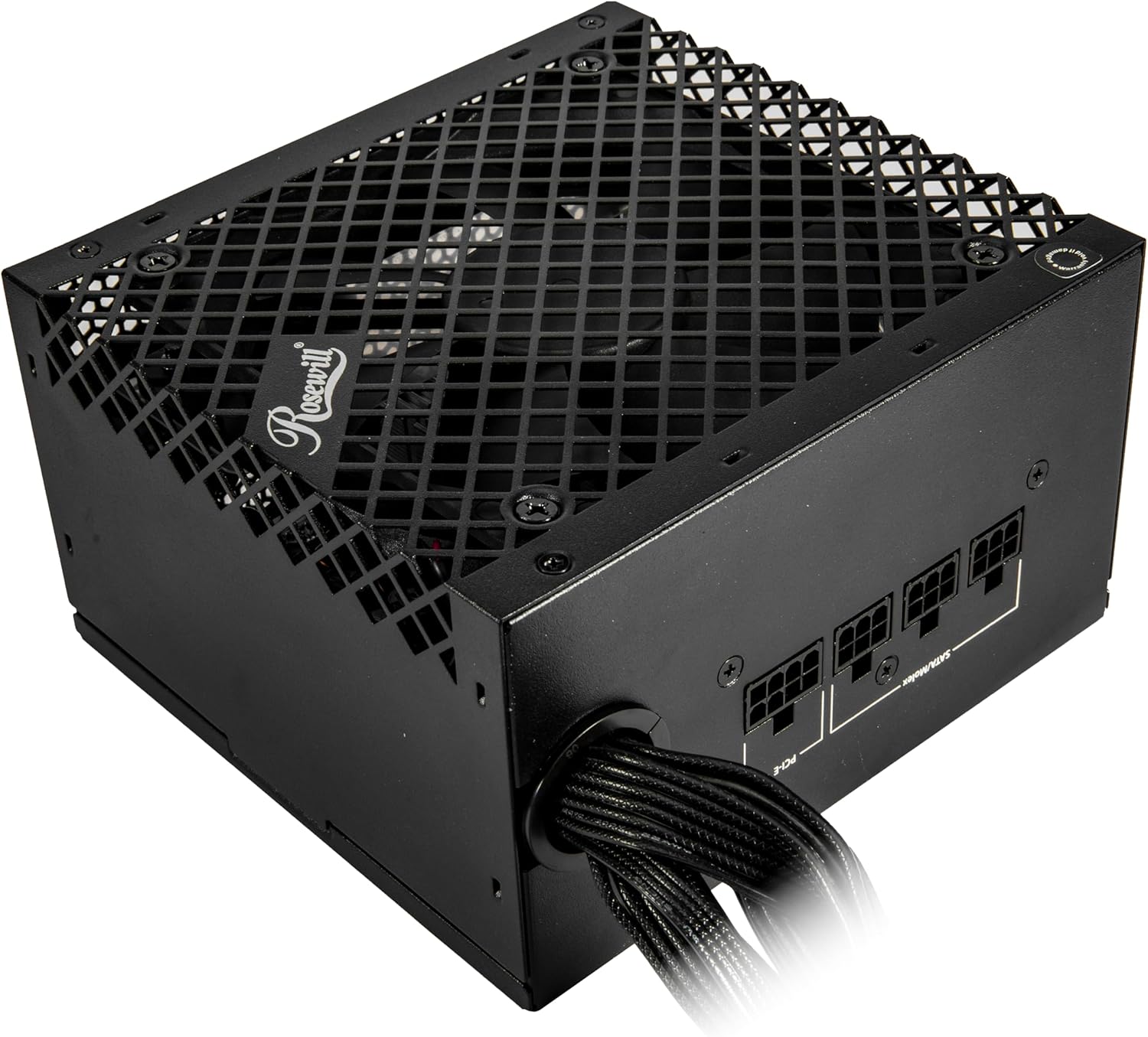
Figure 4: Modular cable connection ports on the power supply.
4. Collegamento elettrico
Once all internal connections are secure, connect the AC power cord to the power supply and then to a wall outlet or surge protector. Ensure the power switch on the back of the PSU is in the "OFF" (0) position before connecting to AC power.
Operazione
After completing all connections, flip the power switch on the back of the power supply to the "ON" (I) position. You can then power on your computer using the case's power button.
The 120mm ICB silent fan operates to maintain optimal temperatures while minimizing noise.
This power supply is Intel ATX 3.0 & 3.1 Ready, supporting up to 235% power excursion and 300% GPU power excursion for stable performance under demanding loads.
Manutenzione
Per garantire la longevità e le prestazioni ottimali del tuo alimentatore:
- Rimozione della polvere: Periodically clean the exterior of the power supply and the fan grill to prevent dust buildup, which can impede airflow and cooling. Use compressed air or a soft brush. Ensure the power supply is disconnected from AC power before cleaning.
- Gestione dei cavi: Proper cable management helps maintain good airflow within your PC case, contributing to better cooling for all components, including the PSU.
- Condizioni ambientali: Operate the power supply within recommended temperature and humidity ranges. Avoid extreme heat or moisture.
Risoluzione dei problemi
Se riscontri problemi con l'alimentatore, fai riferimento ai seguenti problemi comuni e alle relative soluzioni:
- Nessun potere:
- Verificare che il cavo di alimentazione CA sia collegato saldamente sia all'alimentatore sia alla presa a muro.
- Assicurarsi che l'interruttore di alimentazione sul retro dell'alimentatore sia in posizione "ON" (I).
- Verify all internal cables (24-pin ATX, CPU, PCIe) are correctly and securely connected.
- Prova la presa a muro con un altro dispositivo per verificare che sia alimentata.
- Instabilità del sistema o arresti casuali:
- This could indicate an overloaded power supply or a component issue. Ensure your system's power requirements do not exceed the PSU's 750W capacity.
- The Rosewill VSB 750W features an advanced protection suite (OCP, OPP, OTP, OVP, SCP, UCP) designed to prevent damage from various electrical anomalies. If these protections are triggered, the PSU may shut down to protect your components.
- Rumore del ventilatore:
- While designed for silent operation, excessive fan noise could indicate dust buildup. Refer to the Maintenance section for cleaning instructions.
- If the noise persists, ensure the PSU is securely mounted and not vibrating against the case.
If troubleshooting steps do not resolve the issue, contact Rosewill customer support.

Figure 5: The Advanced Protection Suite ensures system safety.
Specifiche
The following table details the technical specifications of the Rosewill VSB 750W Power Supply.
| Caratteristica | Dettaglio |
|---|---|
| Nome del modello | VSB750 |
| Marca | Rosato |
| Uscita Wattage | 750 Watt |
| Fattore di forma | ATX |
| Progettazione dell'alimentatore | Semi-Modulare |
| Certificazione di efficienza | 80 PLUS Bronze |
| Standard ATX | ATX 3.0 & 3.1 Compatible |
| Connettore PCIe | Native PCIe 5.1 / Gen 5 12V-2x6 |
| Metodo di raffreddamento | Air (120mm ICB Silent Fan) |
| Dimensioni (L x P x A) | 5.51 x 5.9 x 3.38 pollici (140 x 150 x 86 mm) |
| Volume massimo in ingressotage | 240 Volt (CA) |
| Volume minimo di ingressotage | 110 Volt (CA) |
| Condensatori | 105°C/221°F Japanese Capacitor |
| Suite di protezione | OCP, OPP, OTP, OVP, SCP, UCP |
| Codice UPC | 840951136058 |
Garanzia
The Rosewill VSB 750W Power Supply comes with a 5-year manufacturer's warranty. For warranty claims or detailed terms and conditions, please refer to the official Rosewill websito o contattare il servizio clienti.
Supporto
For technical assistance, troubleshooting beyond this manual, or warranty inquiries, please visit the official Rosewill support website or contact their customer service department. Keep your purchase receipt and product serial number handy when contacting support.
Puoi trovare maggiori informazioni e risorse di supporto su Negozio Rosewill su Amazon.