
WAVLINK XQAMJP-39PD1-US
WAVLINK 13-In-1 USB C Universal Docking Station User Manual
Model: XQAMJP-39PD1-US
Introduzione
The WAVLINK 13-In-1 USB C Universal Docking Station is designed to expand the connectivity of your laptop or desktop computer, providing a comprehensive solution for multiple displays, power delivery, and various peripheral connections. This docking station is compatible with both Windows and Mac OS systems, offering versatility for your workspace.
Key features include triple display support (up to 4K HDMI, 2K HDMI, and 2K DVI), 65W upstream power delivery to your host device, multiple high-speed USB-A and USB-C ports, Gigabit Ethernet, and audio/microphone jacks. It aims to streamline your setup and enhance productivity.
Contenuto della confezione
Si prega di verificare che tutti gli articoli siano presenti nel pacco:
- 1 x Universal Docking Station
- 1 x 20V/5A 100W Power Adapter
- 1 cavo USB CC
- 1 cavo USB-A
- 1 x DVI-VGA Adapter
- 1 x Guida rapida
- 1 x scheda di collegamento per il download del driver

The image displays the WAVLINK docking station along with its power adapter, USB-C to C cable, USB-A to C cable, and a DVI to VGA adapter, which are all included in the package.
Prodotto finitoview (Porti)
The docking station features a variety of ports to connect your devices. Familiarize yourself with the port layout for optimal use.

This diagram illustrates the front and rear ports of the WAVLINK docking station, including USB-C, USB-A, RJ45 Ethernet, HDMI, DisplayPort, DVI, 4-pole audio jack, DC power input, and a lock hole.
- Pannello frontale:
- LED Indicator (Blue): Indicates power status.
- 2x USB-C 3.0 (5Gbps): For connecting USB-C peripherals.
- 1x USB-A 3.0 (5Gbps): For connecting USB-A peripherals.
- 4-Pole Audio Jack: For headphones or headsets with microphone functionality.
- Pannello posteriore:
- 2x USB-A 3.0 (5Gbps): For connecting USB-A peripherals.
- RJ45 Ethernet (1000/100/10Mbps): For wired network connection.
- Display 1 (HDMI/DP): Video output port.
- Display 2 (HDMI/DP): Video output port.
- DVI Port: Video output port.
- USB-C Host (PD100W): Connects to your laptop for data and power delivery.
- DC IN (20V): Power input for the docking station.
- Lock Hole: For security locking mechanisms.
Istruzioni di installazione
Follow these steps to set up your WAVLINK Universal Docking Station:
- Connetti alimentazione: Connect the included 100W power adapter to the 'DC IN' port on the docking station and then plug it into a power outlet. The blue LED indicator on the front will light up.
- Connetti al dispositivo host: Use the provided USB C-C cable or USB-A cable to connect the 'USB-C Host' port on the docking station to a compatible USB-C or USB-A port on your laptop or desktop computer.
- Installa i driver: For optimal performance and multi-display functionality, especially for DisplayLink-enabled displays, you may need to install the latest DisplayLink drivers. Refer to the 'Driver Download Link Card' included in your package or visit the official WAVLINK support website to download the appropriate drivers for your operating system (Windows or Mac OS).

This image highlights the universal compatibility of the docking station with systems like Android, Ubuntu, Chrome OS, Mac OS, and Windows, and lists compatible devices such as MacBook Pro/Air, Lenovo Yoga, Windows XPS, HP Spectre, Asus ZenBook, and Microsoft Surface. It also emphasizes the importance of installing the latest DisplayLink driver for optimal performance.
- Connetti i display: Connect your external monitors to the HDMI, DisplayPort, or DVI ports on the docking station using appropriate cables. If using a VGA monitor, utilize the included DVI-VGA adapter.
- Connetti le periferiche: Plug in your USB devices (keyboard, mouse, external hard drives, etc.) into the available USB-A and USB-C ports. Connect an Ethernet cable to the RJ45 port for a wired network connection. Connect headphones or speakers to the 4-pole audio jack.
Istruzioni per l'uso
Modalità di visualizzazione
The docking station supports various display configurations, including extended and mirror modes across multiple monitors.
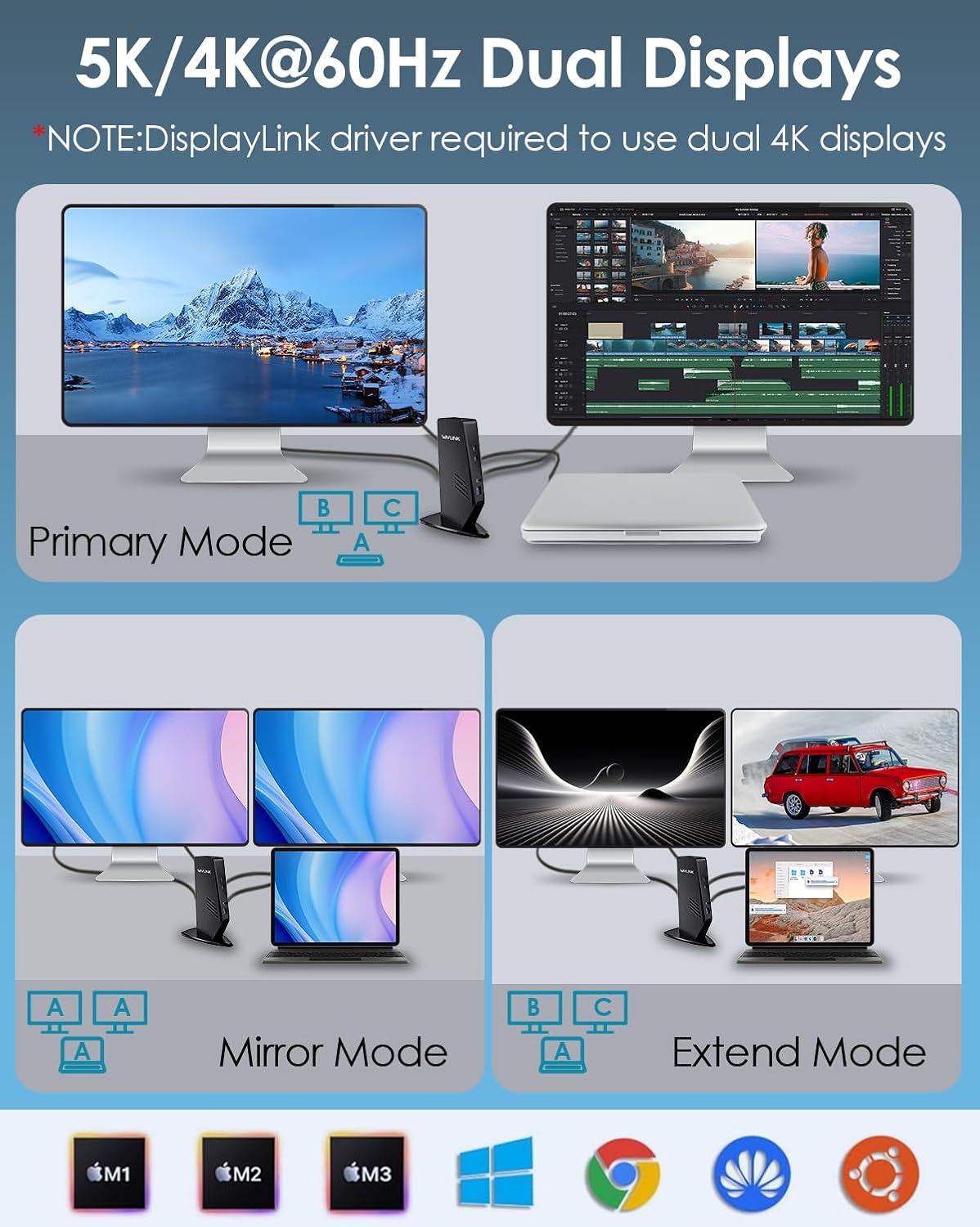
This image demonstrates how to configure your displays in Primary, Mirror, and Extend modes using the docking station, showing a laptop connected to one or more external monitors.
- Triplo display: Connect up to three external monitors simultaneously. One HDMI output via USB-C Alt Mode supports up to 3840x2160@30Hz. The other HDMI and DVI outputs via DisplayLink support up to 2560x1440@50Hz and 2048x1152@60Hz respectively.
- Modalità estesa: Each connected monitor can display different content, expanding your desktop workspace.
- Modalità specchio: All connected monitors display the same content as your primary screen.
For 4K dual display setups, ensure the DisplayLink driver is installed.
Erogazione di potenza
The docking station provides power to your host laptop while connected.

This image illustrates the power delivery capability of the docking station, showing a laptop receiving up to 65W of power from the docking station, which is powered by a 100W adapter.
- The included 100W power adapter allows the docking station to deliver up to 65W of power to your connected laptop via the USB-C host port. This ensures your laptop remains charged while in use.
- Ensure your laptop's USB-C port supports Power Delivery (PD) for this feature to function.
Trasferimento dati
Utilize the high-speed USB ports for quick data transfers.
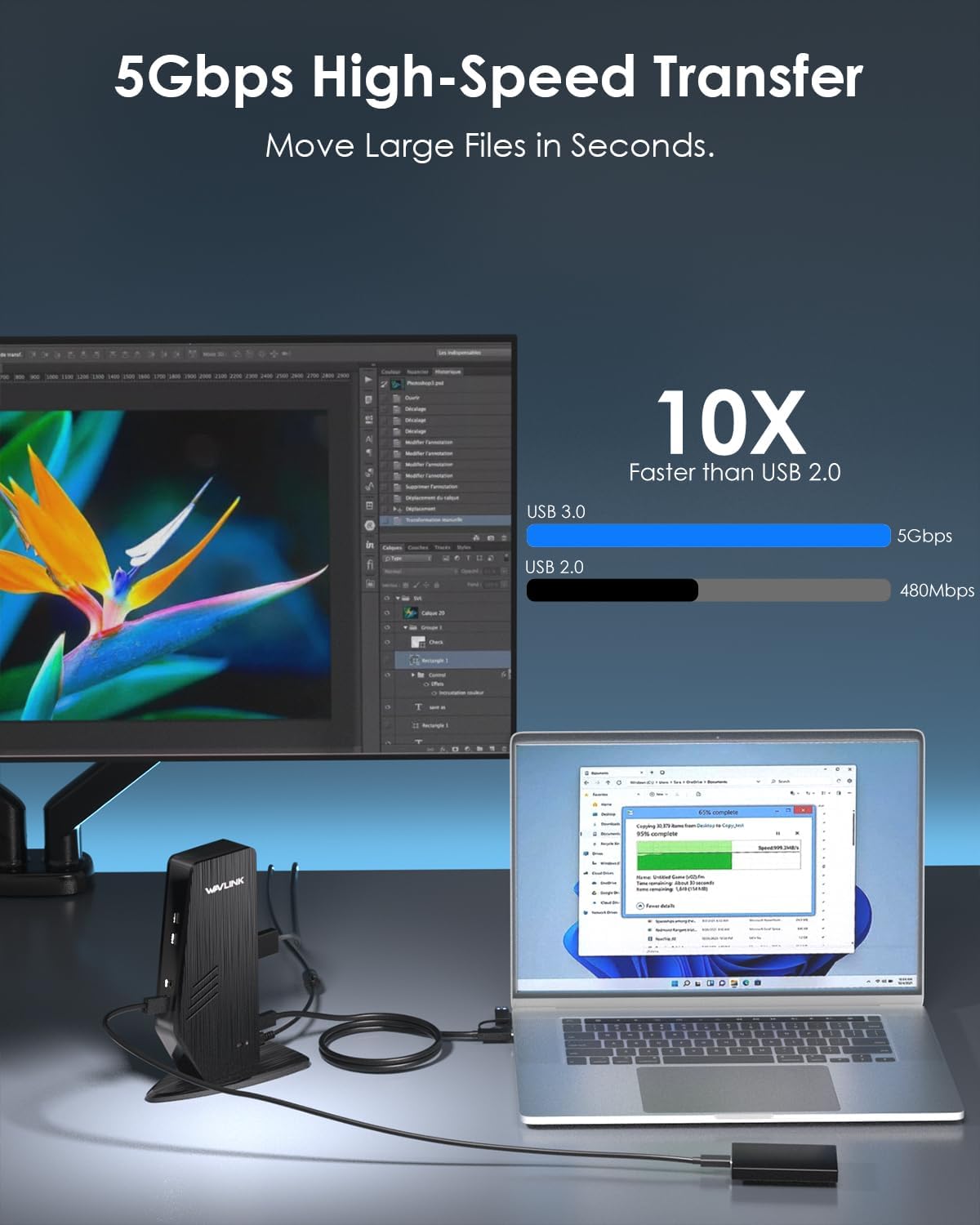
This image visually represents the high-speed data transfer capabilities of the docking station, comparing USB 3.0 (5Gbps) which is 10 times faster than USB 2.0 (480Mbps), and shows a file transfer in progress.
- The 4x USB-A 3.0 ports and 2x USB-C 3.0 ports support data transfer speeds of up to 5Gbps, allowing for rapid transfer of large files.
- One of the USB 3.0 ports also supports BC 1.2 for fast charging of smartphones and other compatible devices.
Connessione di rete
The Gigabit Ethernet port provides a stable and fast wired internet connection.
- Connect an Ethernet cable from your router or modem to the RJ45 port on the docking station for speeds up to 1000Mbps.
Connessione audio
Use the 4-pole audio jack for audio input and output.
- Plug in your headphones, speakers, or headset (with microphone) into the 4-pole audio jack for integrated audio functionality.
Manutenzione
Per garantire la longevità e le prestazioni ottimali della tua docking station, segui queste linee guida per la manutenzione:
- Pulizia: Use a soft, dry cloth to clean the exterior of the docking station. Avoid using liquid cleaners, aerosols, or solvents.
- Ambiente: Keep the docking station in a cool, dry place away from direct sunlight, heat sources, and excessive moisture.
- Gestione: Evitare di far cadere o sottoporre il dispositivo a forti urti. Non tentare di smontare o riparare l'unità autonomamente, poiché ciò invaliderebbe la garanzia.
- Gestione dei cavi: Assicurarsi che i cavi non siano piegati o tesi, perché ciò potrebbe causare danni nel tempo.
Risoluzione dei problemi
Se riscontri problemi con la docking station, fai riferimento ai seguenti problemi comuni e alle relative soluzioni:
| Problema | Possibile soluzione |
|---|---|
| Nessuna visualizzazione sui monitor esterni |
|
| Laptop is not charging |
|
| USB devices are not recognized |
|
| Nessuna connessione Internet tramite Ethernet |
|
| L'audio non funziona |
|
Specifiche
| Marca | WAVLINK |
| Modello | XQAMJP-39PD1-US |
| Colore | Nero |
| Interfaccia Hardware | USB |
| Dispositivi compatibili | PC (Windows, Mac OS, Chrome OS, Ubuntu, Android) |
| Totale porte | 13 |
| Porte USB | 4x USB-A 3.0 (5 Gbps), 2x USB-C 3.0 (5 Gbps) |
| Uscita video | 1x HDMI (4K@30Hz via USB-C Alt Mode), 1x HDMI (2K@50Hz via DisplayLink), 1x DVI (2K@60Hz via DisplayLink) |
| Etereo | Gigabit (10/100/1000 Mbps) |
| Audio | 1x 4-Pole Audio Jack (Audio In/Out) |
| Erogazione di potenza | Up to 65W to host laptop (via USB-C Host port) |
| Adattatore di alimentazione | 20V/5A (100W) |
| Dimensioni del prodotto (L x P x A) | Dimensioni: 14.7 x 8 x 19 cm |
| Peso del prodotto | 1.32 kg |
Informazioni sulla garanzia
This WAVLINK product comes with a garanzia di un anno dalla data di acquisto. Conservare la prova d'acquisto per eventuali reclami in garanzia.
Supporto
For technical support, troubleshooting assistance, or any inquiries regarding your WAVLINK 13-In-1 USB C Universal Docking Station, please contact WAVLINK customer service. Refer to the contact information provided in your Quick Start Guide or visit the official WAVLINK support websito.