
1. Prodotto finitoview
The AOOEPU WiFi Extender Signal Booster is designed to expand your existing wireless network coverage, eliminate Wi-Fi dead zones, and provide stable, high-speed internet access throughout your home or outdoor areas. This dual-band device supports both 2.4GHz and 5GHz frequencies, ensuring broad compatibility with various devices.
Caratteristiche principali:
- Connettività doppia banda: Operates on both 2.4GHz and 5GHz frequencies for versatile network extension.
- Copertura estesa: Features four external antennas to penetrate walls and floors, extending Wi-Fi coverage up to 12880 sq. ft.
- Alta compatibilità: Supports up to 105 devices, including phones, tablets, laptops, smart TVs, security cameras, and printers.
- Prestazioni ad alta velocità: Boosts internet speeds up to 1200 Mbps, ideal for streaming, gaming, and video conferencing.
- Connessione stabile: Provides a super stable signal, even through thick walls and appliances, ensuring uninterrupted online activities.
- Porta Ethernet: Includes RJ45 Ethernet ports for reliable wired connections to devices like game consoles and smart TVs.
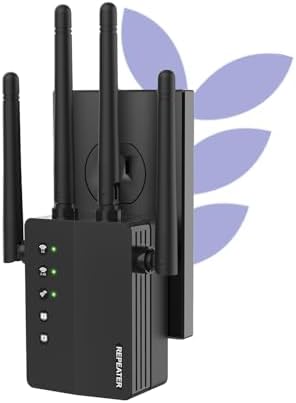
Figure 1: The AOOEPU WiFi Extender Signal Booster, a compact device with four external antennas, designed to plug directly into a standard wall outlet. Green indicator lights are visible, signifying active connections.
2. Configurazione e installazione
The AOOEPU WiFi Extender offers multiple modes for flexible network setup. Follow these steps for quick and easy installation.
2.1. Configurazione rapida tramite pulsante WPS
- Accensione: Plug the WiFi Extender into a power outlet within the range of your existing main Wi-Fi router.
- Premere WPS sull'Extender: Locate and press the WPS button on the AOOEPU WiFi Extender. The WPS indicator light should start blinking.
- Premere WPS sul router: Entro due minuti, premi il pulsante WPS sul router Wi-Fi principale.
- Conferma della connessione: Wait for the indicator lights on the extender to become solid, indicating a successful connection. The extender will automatically pair with your router.

Figure 2: Visual guide for the WPS (Wi-Fi Protected Setup) method, demonstrating how to quickly connect the extender to your existing router by pressing the WPS buttons on both devices.
2.2. Configurazione manuale (Web (navigatore)
- Accensione: Collegare l'Extender WiFi a una presa di corrente.
- Connettiti alla rete dell'Extender: On your computer or mobile device, connect to the extender's default Wi-Fi network (e.g., "AOOEPU_Extender" or similar, check the device label for the exact name). No password is required initially.
- Accedi alla pagina di configurazione: Aprire un web browser and enter the default IP address or web indirizzo (ad esempio, 192.168.10.1 or repea.ter, refer to the manual for exact details).
- Login: Inserisci il nome utente e la password predefiniti (solitamente "admin" per entrambi, controlla l'etichetta del dispositivo).
- Seleziona modalità: Scegli la modalità operativa desiderata (ripetitore, AP o router).
- Configura rete: Follow the on-screen instructions to select your existing Wi-Fi network and enter its password. You can also set a new name and password for the extended network.
- Applica impostazioni: Salvare le impostazioni e attendere il riavvio dell'extender.
- Riconnetti: Reconnect your devices to the newly configured extended Wi-Fi network.
3. Modalità operative
The AOOEPU WiFi Extender supports three primary operating modes to suit various networking needs:
- Modalità ripetitore: Estende la copertura di una rete wireless esistente. Questa è la modalità più comune per eliminare le zone morte del Wi-Fi.
- Modalità AP (punto di accesso): Transforms a wired network connection into a wireless one. Ideal for adding Wi-Fi capability to a wired-only router.
- Modalità router: Funziona come router autonomo, creando una nuova rete wireless privata.

Figure 3: An illustration of the three distinct operating modes: AP Mode, Repeater Mode, and Router Mode, detailing their respective network configurations and applications.
4. Connettività e compatibilità
This WiFi Extender is designed for broad compatibility and robust connectivity, supporting a wide array of devices and providing stable connections for various activities.
4.1. Compatibilità del dispositivo
The extender can connect up to 105 devices simultaneously, ensuring all your smart devices, from entertainment systems to smart home gadgets, stay connected.

Figure 4: The extender's wide compatibility, illustrated with icons of common devices such as game consoles, cameras, computers, smartphones, and smart TVs, all capable of connecting to the extended network.
4.2. Utilizzo della porta Ethernet
The integrated RJ45 Ethernet ports allow for stable wired connections, which are ideal for devices requiring maximum speed and reliability, such as gaming consoles, desktop computers, and smart televisions.

Figura 5: Un dettaglio view of the Ethernet ports on the extender, demonstrating how wired devices can be connected for enhanced stability and speed.
5. Risoluzione Dei Problemi
If you encounter issues with your AOOEPU WiFi Extender, please refer to the following common troubleshooting steps:
- Nessun accesso a Internet dopo l'installazione:
- Ensure the extender is within the effective range of your main router.
- Verificare che la password Wi-Fi immessa durante la configurazione sia corretta.
- Try restarting both your main router and the extender.
- Bassa velocità su rete estesa:
- Relocate the extender closer to your main router to ensure a strong signal for the extender itself.
- Evitare di posizionare l'extender vicino a grandi oggetti metallici, pareti di cemento o altri dispositivi elettronici che potrebbero causare interferenze.
- Assicurati che il router principale fornisca una velocità adeguata.
- Impossibile accedere alla pagina di configurazione:
- Ensure your device is connected to the extender's default Wi-Fi network (not your main router's network).
- Cancella la cache e i cookie del browser oppure prova un'altra opzione web browser.
- Verify the IP address or web address is entered correctly.
- Connessione intermittente:
- Check for firmware updates for the extender on the AOOEPU official websito.
- Ensure there are no physical obstructions or sources of interference between the extender and your devices.
- Consider resetting the extender to factory defaults and reconfiguring it.
6. Specifiche
| Attributo | Dettaglio |
|---|---|
| Marca | AOEPU |
| Numero di modello | AOOEPU-0630-1 |
| Dimensioni del prodotto | 7.48 x 3.74 x 2.4 pollici |
| Peso dell'articolo | 5.6 once |
| Standard di comunicazione wireless | 2.4 GHz Radio Frequency, 5 GHz Radio Frequency (Dual Band) |
| Velocità di trasferimento dati | Fino a 1200 Megabyte al secondo |
| Tipo di connettore | Porta Ethernet RJ45 |
| Caratteristiche speciali | 1-Tap Setup, 360 Degree Coverage, Directional Antenna, Firewall, WiFi Mesh (compatible) |
| Area di copertura | Fino a 12880 mq. piedi |
| Numero massimo di dispositivi supportati | 105 Dispositivi |
7. Manutenzione
To ensure optimal performance and longevity of your AOOEPU WiFi Extender, consider the following maintenance tips:
- Riavvio regolare: Periodically restart the extender (unplug and plug back in after 10 seconds) to clear its memory and refresh its connection.
- Aggiornamenti del firmware: Check the official AOOEPU websito per eventuali aggiornamenti firmware disponibili. Mantenere il firmware aggiornato può migliorare prestazioni, stabilità e sicurezza.
- Posizionamento ottimale: Ensure the extender is placed in an open area, away from obstructions and sources of electromagnetic interference (e.g., microwaves, cordless phones, large metal objects).
- Pulizia: Gently wipe the exterior of the device with a soft, dry cloth to remove dust. Do not use liquid cleaners or aerosols.
- Condizioni ambientali: Operate the extender within recommended temperature and humidity ranges to prevent damage.
8. Garanzia e supporto
AOOEPU is committed to providing high-quality products and customer satisfaction. For detailed warranty information and technical support, please refer to the following resources:
- Informazioni sulla garanzia: Please refer to the warranty card included in your product packaging for specific terms and conditions. Standard warranty typically covers manufacturing defects for a period specified at purchase.
- Supporto tecnico: For technical assistance, setup guidance, or troubleshooting beyond this manual, please visit the official AOOEPU support websito o contattare il loro servizio clienti.
- Risorse online: Additional FAQs, video tutorials, and updated manuals may be available on the AOOEPU brand store or product page.
Note: Protection plans are available for purchase separately through Amazon, offering extended coverage beyond the manufacturer's warranty.