
1. Introduzione
This manual provides essential information for setting up, operating, maintaining, and troubleshooting your GMKtec K11 Mini PC. Please read this guide thoroughly before using the device to ensure optimal performance and longevity.
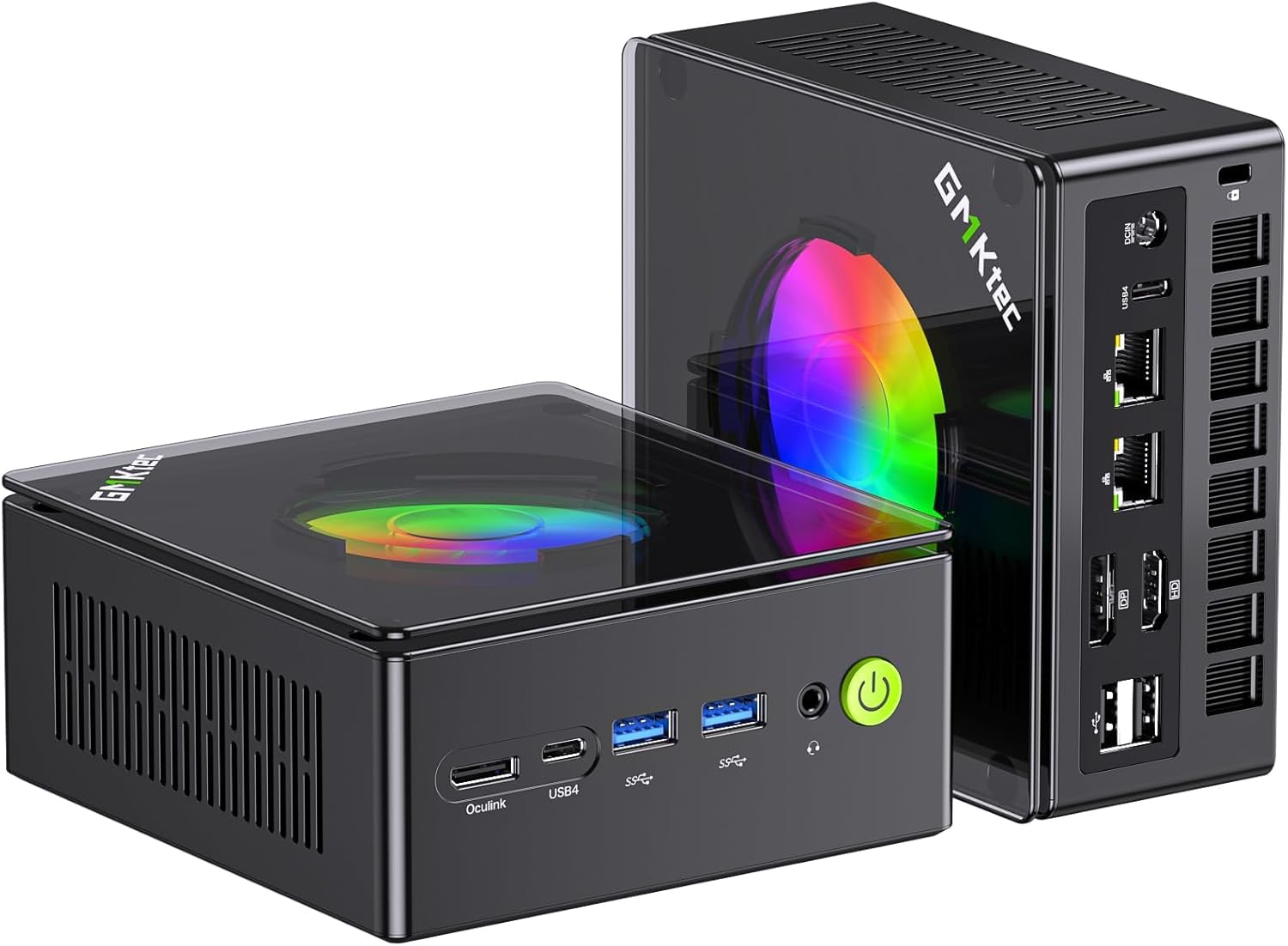
Figure 1: GMKtec K11 Mini PC, a compact desktop computer.
2. Prodotto finitoview
The GMKtec K11 is a high-performance mini PC designed for demanding tasks, including gaming and content creation. It features advanced processing power, ampmemoria e archiviazione di grandi dimensioni e opzioni di connettività versatili.
2.1 Caratteristiche principali
- Processore: AMD Ryzen 9 8945HS (8 core, 16 thread, fino a 5.4 GHz)
- Grafica: Integrated AMD Radeon 780M (RDNA 4 architecture)
- Memoria: 32GB DDR5 RAM (5600 MT/s, dual channel, expandable to 64GB)
- Magazzinaggio: 512GB M.2 2280 PCIe 4.0 SSD (supports two Gen4 x4 SSDs, expandable up to 8TB)
- Supporto display: Quad 4K display output via HDMI 2.1, DisplayPort 2.1, and two USB4 ports
- Rete: Dual Intel i226V 2.5 Gigabit LAN, Wi-Fi 6, Bluetooth 5.2
- Raffreddamento: Upgraded Hyper Ice Chamber 2.0 with dual fans
- Modalità di alimentazione: Silent (35W), Balanced (54W), Performance (65W)
- Porto speciale: Oculink connector for external GPU expansion
2.2 Processor Details
The K11 is equipped with an AMD Ryzen 9 8945HS processor, offering robust performance for multitasking and demanding applications. The integrated AMD Radeon 780M graphics provide strong visual capabilities.

Figure 2: Diagram illustrating the AMD Ryzen 9 8945HS processor with its core, thread, cache, and clock speed specifications, alongside performance benchmarks.
2.3 Porte e connettori
The GMKtec K11 Mini PC provides a comprehensive set of ports for various peripherals and displays.

Figure 3: Front panel of the K11 Mini PC, showing the power button, USB 3.2 (Gen2) ports, USB4 port, and Oculink port.

Figure 4: Rear panel of the K11 Mini PC, displaying USB 2.0 ports, HDMI 2.1, DisplayPort 2.1, dual 2.5G LAN ports, USB4 port, and DC power input.
3. Istruzioni per l'installazione
Follow these steps to set up your GMKtec K11 Mini PC:
- Contenuto della confezione: Carefully remove the Mini PC and all accessories from the packaging. Verify that all components listed in the 'What's in the Box' section are present.
- Connetti Display: Connect your monitor(s) to the Mini PC using an HDMI, DisplayPort, or USB4 cable. The K11 supports up to four 4K displays simultaneously.
- Connetti le periferiche: Collega la tastiera, il mouse e qualsiasi altro dispositivo USB alle porte USB disponibili.
- Connetti rete: For a wired connection, connect an Ethernet cable from your router or modem to one of the 2.5G LAN ports. For wireless, ensure your Wi-Fi network is available.
- Connetti alimentazione: Connect the power adapter to the DC IN port on the Mini PC, then plug the power cable into an electrical outlet.
- Accensione: Premere il pulsante di accensione situato sul pannello frontale del Mini PC.
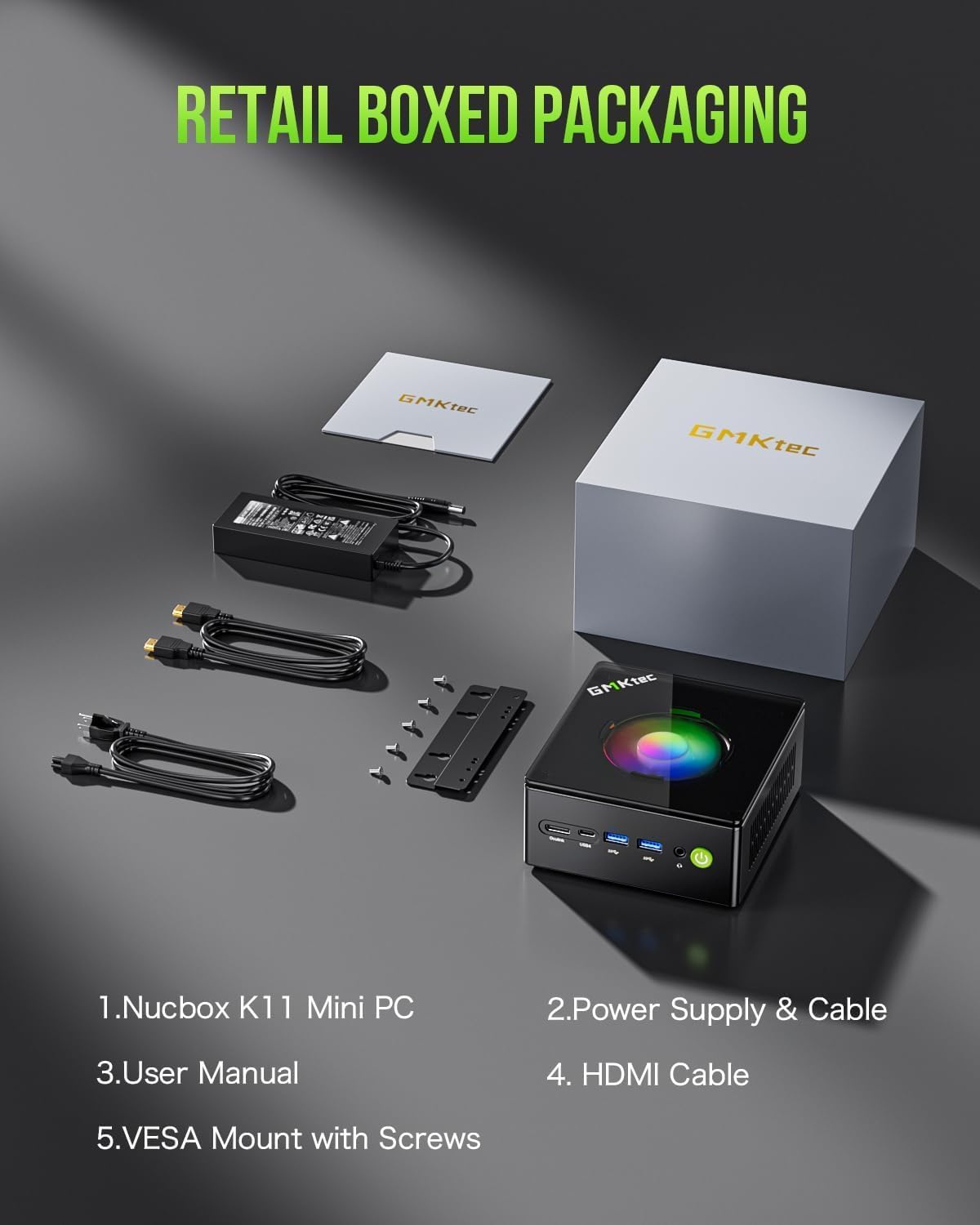
Figure 5: Contents of the GMKtec K11 Mini PC retail box, including the Mini PC, power supply, HDMI cable, and VESA mount with screws.
4. Istruzioni per l'uso
4.1 Avvio iniziale e sistema operativo
Upon first power-on, the Mini PC will boot into the pre-installed Windows operating system. Follow the on-screen instructions to complete the initial setup, including language selection, network configuration, and user account creation.
4.2 Gestione dell'alimentazione
The K11 Mini PC offers three power modes to optimize performance and energy consumption:
- Modalità silenziosa (TDP 35 W): For quiet operation and basic tasks.
- Balanced Mode (54W TDP): Standard performance for everyday use.
- Modalità Performance (TDP 65-70 W): Maximum performance for demanding applications and gaming.
These modes can typically be adjusted within the BIOS/UEFI settings or through the operating system's power options. VRAM allocation can also be adjusted up to 16GB.

Figure 6: Illustration of the K11's power consumption modes (Silent, Balanced, Performance) and their corresponding CPU temperatures and noise levels, along with a diagram of the cooling system.
4.3 Utilizzo della porta Oculink
The Oculink port provides enhanced connectivity for external graphics cards, offering higher bandwidth and lower latency compared to Thunderbolt. This allows for significant graphics performance upgrades.
Attenzione: The Oculink interface does not support hot-swapping. Please plug and unplug this interface only when the PC is powered off.

Figure 7: The Oculink port on the K11 Mini PC connected to an external graphics card, demonstrating its use for enhanced graphical performance.
5. Manutenzione
5.1 Pulizia
To maintain optimal performance, regularly clean the exterior of the Mini PC with a soft, dry cloth. Use compressed air to clear dust from the ventilation grilles and ports. Ensure the device is powered off and unplugged before cleaning.
5.2 Aggiornamenti di RAM e SSD
The GMKtec K11 features an easily disassembled design for convenient RAM and SSD upgrades. It supports dual-channel DDR5 SO-DIMM memory, expandable up to 64GB (32GB per slot), and two M.2 2280 PCIe 4.0 SSD slots, expandable up to 8TB (4TB per slot).

Figura 8: Interno view of the K11 Mini PC showing the accessible slots for DDR5 RAM and M.2 2280 SSDs, highlighting the ease of installation and upgrade.
6. Risoluzione Dei Problemi
If you encounter issues with your GMKtec K11 Mini PC, refer to the following common problems and solutions:
- Nessun potere:
- Assicurarsi che l'adattatore di alimentazione sia collegato saldamente sia al Mini PC sia a una presa elettrica funzionante.
- Controllare il cavo di alimentazione per eventuali danni.
- Nessuna visualizzazione:
- Verify that the display cable (HDMI, DisplayPort, or USB4) is firmly connected to both the Mini PC and the monitor.
- Assicurarsi che il monitor sia acceso e impostato sulla sorgente di input corretta.
- Se possibile, provare un cavo di visualizzazione o un monitor diverso.
- Nessuna connessione internet:
- Per le connessioni cablate, controllare lo stato del cavo Ethernet e del router.
- Per quanto riguarda il Wi-Fi, assicurati che il Wi-Fi sia abilitato nelle impostazioni di Windows e che tu sia connesso alla rete corretta.
- Riavvia il router/modem e il Mini PC.
- Prestazioni lente:
- Check the power mode settings (refer to section 4.2) and ensure it's set to Balanced or Performance for demanding tasks.
- Chiudere le applicazioni non necessarie in esecuzione in background.
- Ensure the cooling system is not obstructed and is functioning correctly.
7. Specifiche
| Caratteristica | Specificazione |
|---|---|
| Marca | GMKtec |
| Nome del modello | K11 (NucBox K11) |
| Processore | AMD Ryzen 9 8945HS (8 core, 16 thread, fino a 5.4 GHz) |
| Coprocessore grafico | AMD Radeon 780M integrata |
| Memoria RAM | 32GB DDR5 (5600 MT/s), expandable to 64GB |
| Magazzinaggio | 512GB M.2 2280 PCIe 4.0 SSD, expandable up to 8TB |
| Sistema operativo | Finestre |
| Interfaccia di uscita video | HDMI 2.1, DisplayPort 2.1, USB4 (x2) |
| Risoluzione massima dello schermo | 3840x2160 (4K) |
| Connettività | Dual 2.5G LAN (Intel i226V), Wi-Fi 6 (802.11ax), Bluetooth 5.2 |
| Porte USB | 4 (USB 3.2 Gen2 x2, USB 2.0 x2, USB4 x2) |
| Porti speciali | Oculink (PCIe 4.0 x4) |
| Metodo di raffreddamento | Air (Hyper Ice Chamber 2.0) |
| Modalità di alimentazione | Silent (35W), Balanced (54W), Performance (65-70W) |
8. Garanzia e supporto
GMKtec offers a limited one-year warranty for each Mini PC from the date of purchase, covering design and manufacturing defects. For any inquiries or support needs, please refer to the following options:
- Assistenza Amazon: Contact us through your Amazon account by navigating to 'Your Orders' and selecting 'Ask Product Question'.
- Supporto post-vendita: For direct assistance, send an email to the After-Sales Team at eu-cs@gmktec.comL'assistenza clienti è disponibile 24 ore su 24, 7 giorni su 7.

Figure 9: Image showing a computer setup, representing the user experience and the availability of support.
9. Video del prodotto finitoview
Watch this official product video for a visual guide to the GMKtec K11 Mini PC's features and capabilities.
Video 1: Un'animazioneview of the GMKtec K11 Mini PC, showcasing its AMD Ryzen 9 8945HS processor, AMD Radeon 780M graphics, cooling system, memory and storage upgrade options, front and rear ports, Oculink external GPU support, dual 2.5G LAN, Wi-Fi 6, Bluetooth 5.2, 4K quad display capabilities, and gaming entertainment potential.


