
Introduzione
Grazie per l'acquistoasing the SpaceInside OJD-126 4-in-1 device. This product integrates a Bluetooth speaker, a 15W magnetic wireless charger, a bedside night light, and a phone stand into a single compact unit. This manual provides detailed instructions for safe and efficient use of your device. Please read it thoroughly before operation and retain it for future reference.
Contenuto della confezione
- SpaceInside OJD-126 4-in-1 Device
- Cavo di alimentazione
- Manuale d'uso
Prodotto finitoview
The SpaceInside OJD-126 is designed for versatility and convenience, combining multiple essential functions for your bedside or desk. It features a sleek, modern design with intuitive controls.

Image: The SpaceInside OJD-126 device showcasing its four main functions: magnetic wireless charging, Bluetooth speaker, music-sync and color modes, and mobile phone stand.
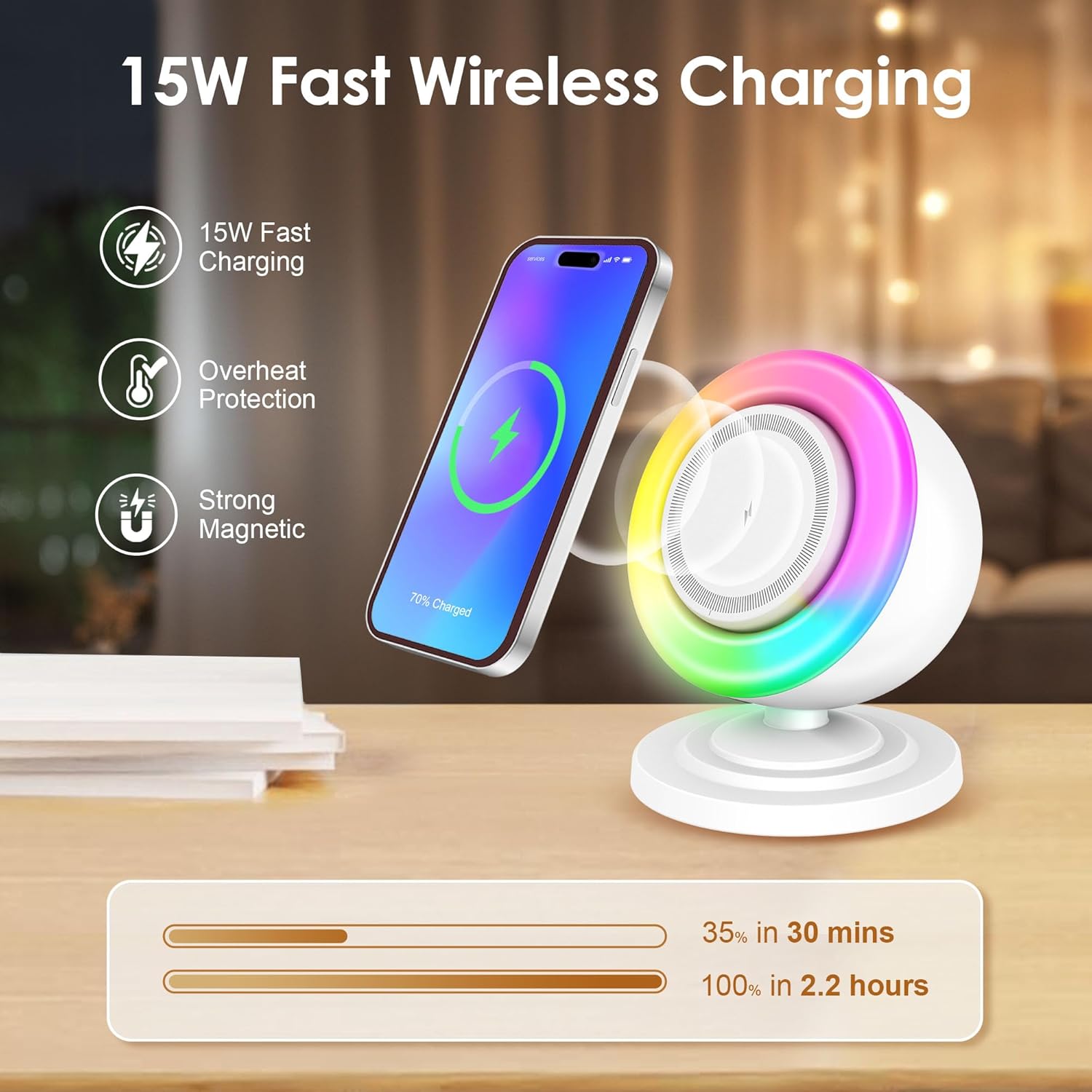
Image: Illustration of the 15W fast wireless charging capability, highlighting overheat protection and strong magnetic attachment for a smartphone.

Image: Depiction of the device's simple and stable Bluetooth 5.3 connection, showing a smartphone paired and playing music.
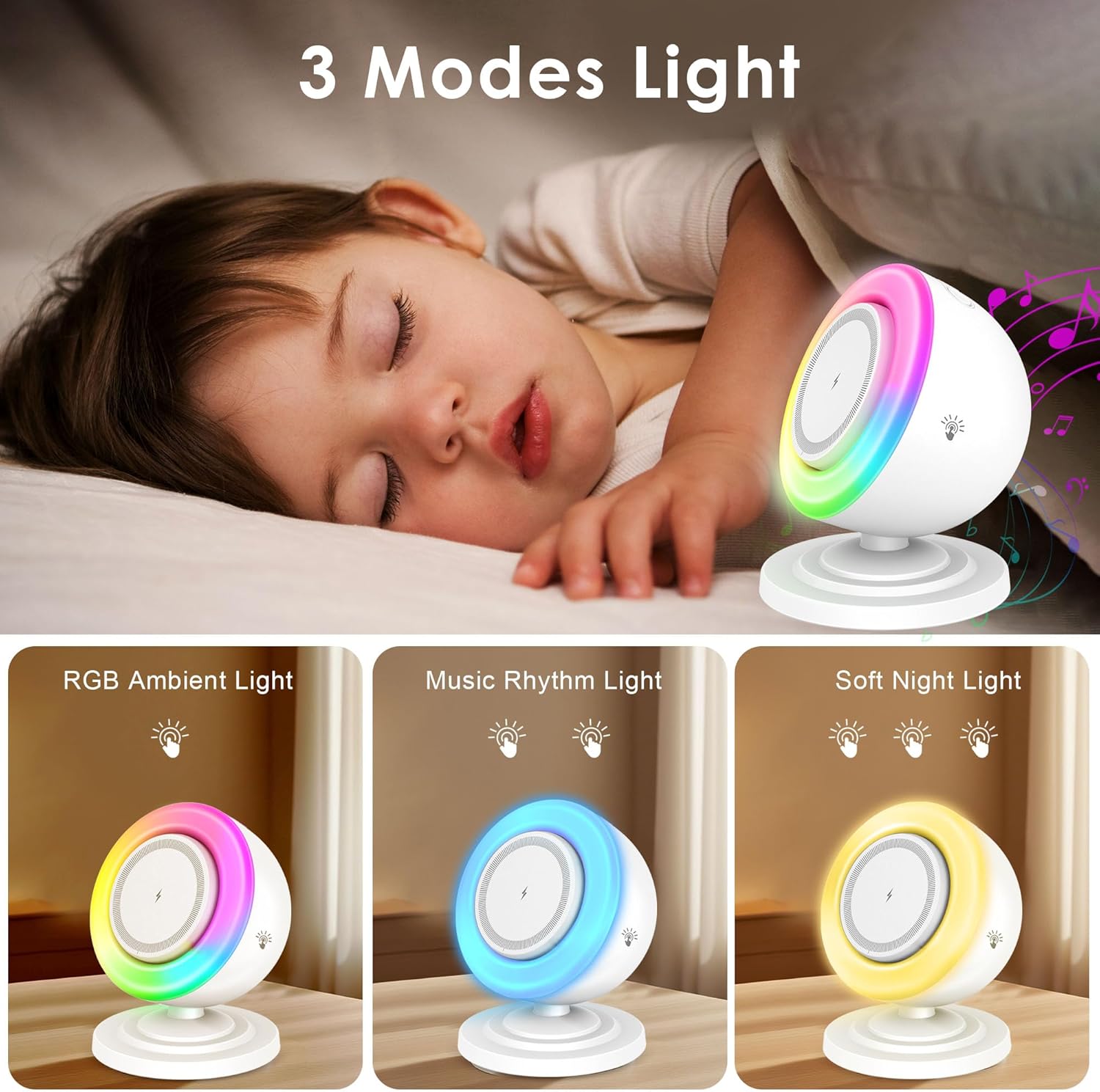
Image: Visual representation of the three available lighting modes: RGB Ambient Light, Music Rhythm Light, and Soft Night Light.

Image: Illustrates the sleep assistant features, including brightness adjustment and white noise for sleep, with a person sleeping peacefully.

Image: Shows the device being used as a phone stand in both vertical and horizontal orientations, allowing hands-free viewdurante la ricarica.
Video ufficiale del prodotto
Video: Un oltreview of the Bluetooth Speaker with 15W Magnetic Charger and Night Light features, demonstrating its functionality and design.
Impostare
- Disimballare: Rimuovere con attenzione tutti i componenti dalla confezione.
- Connetti alimentazione: Insert the provided power cable into the USB-C port on the back of the device and connect the other end to a suitable power adapter (not included) and wall outlet.
- Posizionamento: Place the device on a stable, flat surface, such as a nightstand or desk.
Istruzioni per l'uso
Accensione/spegnimento
- Il dispositivo si accende automaticamente quando è collegato a una fonte di alimentazione.
- To turn off the light, press and hold the touch button on the device. The speaker function will remain active.
Accoppiamento Bluetooth
- Attiva Bluetooth: Ensure the device is powered on. It will automatically enter Bluetooth pairing mode.
- Cerca sul dispositivo: Sul tuo smartphone, tablet o laptop, vai alle impostazioni Bluetooth e cerca i dispositivi disponibili.
- Collegare: Select "OJD-126" (or similar name) from the list to pair. A confirmation sound will indicate successful pairing.
- Connessione automatica: The device will automatically connect to the last paired device when powered on, if within range.
Ricarica wireless
- Posizionamento: Place your compatible smartphone onto the magnetic charging pad. Ensure proper alignment for optimal charging.
- Tenuta magnetica: The strong magnetic attraction will secure your phone in place.
- Indicatore di carica: Your phone's screen will indicate that charging has begun.
- Compatibilità: Supports 15W fast wireless charging for compatible devices (e.g., iPhone, Samsung, Android devices with wireless charging capability).
Funzionamento della luce notturna
- Cambia modalità: Tap the touch button on the device to cycle through the three lighting modes: RGB colors, music-sync lighting, and warm light.
- Regola luminosità: Press and hold the touch button to adjust the brightness of the selected light mode.
Phone Stand Usage
- The magnetic charging pad also functions as a stable phone stand.
- Position your phone vertically or horizontally on the magnetic pad for hands-free viewdurante la ricarica.
Manutenzione
- Pulizia: Utilizzare un panno morbido e asciutto per pulire il dispositivo. Non utilizzare detergenti abrasivi o solventi.
- Magazzinaggio: Conservare il dispositivo in un luogo fresco e asciutto quando non viene utilizzato per lunghi periodi.
- Evitare l'acqua: Tenere il dispositivo lontano dall'acqua e dall'umidità eccessiva.
Risoluzione dei problemi
| Problema | Possibile causa | Soluzione |
|---|---|---|
| Il dispositivo non si accende. | Nessuna connessione di alimentazione o cavo difettoso. | Ensure the power cable is securely connected to the device and a working power outlet. Try a different power adapter or cable. |
| La ricarica wireless non funziona. | Phone not aligned, not compatible, or foreign object interference. | Realign phone on the charging pad. Ensure your phone supports wireless charging. Remove any metal objects or thick cases. |
| L'altoparlante Bluetooth non si associa. | Dispositivo non in modalità di associazione o troppo lontano dalla sorgente. | Ensure the device is powered on. Check Bluetooth settings on your audio source. Move the device closer to the audio source (within 10 meters). |
| Night light not changing modes/brightness. | Incorrect touch input. | Ensure you are tapping or pressing and holding the designated touch button correctly. |
Specifiche
- Modello: GUD-126
- Marca: SpaceInside
- Funzioni: Bluetooth Speaker, 15W Magnetic Wireless Charger, Night Light, Phone Stand
- Versione Bluetooth: 5.3
- Uscita di ricarica wireless: 15W max
- Ingresso volumetage: 9 Volt
- Ampera: 2 Amps
- Modalità di illuminazione: RGB Colors, Music-Sync, Warm Light
- Materiale: Plastica
- Dimensioni: 3.81 x 4.79 x 4.01 pollici
- Peso dell'articolo: 13.7 once
- Fonte di energia: Corded Electric (USB Type C)
Garanzia e supporto
For warranty information and customer support, please refer to the contact details provided on the product packaging or the official SpaceInside websito. Conserva la ricevuta d'acquisto come prova d'acquisto.