
1. Finitaview
The Srhythm NiceComfort 35 (2nd Gen) headphones offer an immersive audio experience with advanced features designed for comfort and superior sound quality. These headphones integrate hybrid active noise cancellation, Bluetooth 6.0 connectivity, and spatial audio technology to deliver clear sound and effective noise reduction.

Image: The Srhythm NiceComfort 35 (2nd Gen) headphones in black, showcasinil loro design elegante.
2. Cosa c'è nella scatola
Your Srhythm NiceComfort 35 package includes the following items:
- 1 confezione regalo
- 1 x NC35 Headphone
- 1 x Guida rapida
- 1 x Quick Start Guide with Srhythm APP information
- 1 x 1m Type-C Charging Cable with Audio Function
- 1 x 1.2m 3.5mm Audio Cable
- 1 x Airplane Adaptor (for airplane use only)

Image: All items included in the Srhythm NiceComfort 35 headphone package, neatly arranged.
3. Impostazione
3.1. Accensione/Spegnimento
- Per accendere: Press and hold the Power button located on the right earcup until the indicator light illuminates.
- Per spegnere: Premere e tenere premuto il pulsante di accensione finché la spia non si spegne.
3.2. Accoppiamento Bluetooth
- Assicurati che le cuffie siano spente.
- Tenere premuto il pulsante di accensione per circa 5 secondi finché la spia luminosa non lampeggia in blu e rosso, indicando la modalità di associazione.
- Sul tuo dispositivo (smartphone, tablet, computer), attiva il Bluetooth e cerca i dispositivi disponibili.
- Select "Srhythm NC35" from the list of available devices to connect.
- Una volta effettuata la connessione, la spia luminosa diventerà blu fissa.
3.3. Connessione cablata
For a wired connection, use the provided 1.2m 3.5mm audio cable or the 1m Type-C charging cable with audio function. Plug one end into the headphone's audio port and the other into your audio source. The headphones can be used in wired mode even if the battery is depleted or powered off.
3.4. Srhythm App Installation
To unlock full customization features, download the official Srhythm App from your device's app store (App Store for iOS or Google Play Store for Android). Follow the in-app instructions to connect your headphones and access custom EQ settings, ambient sound modes, and more.
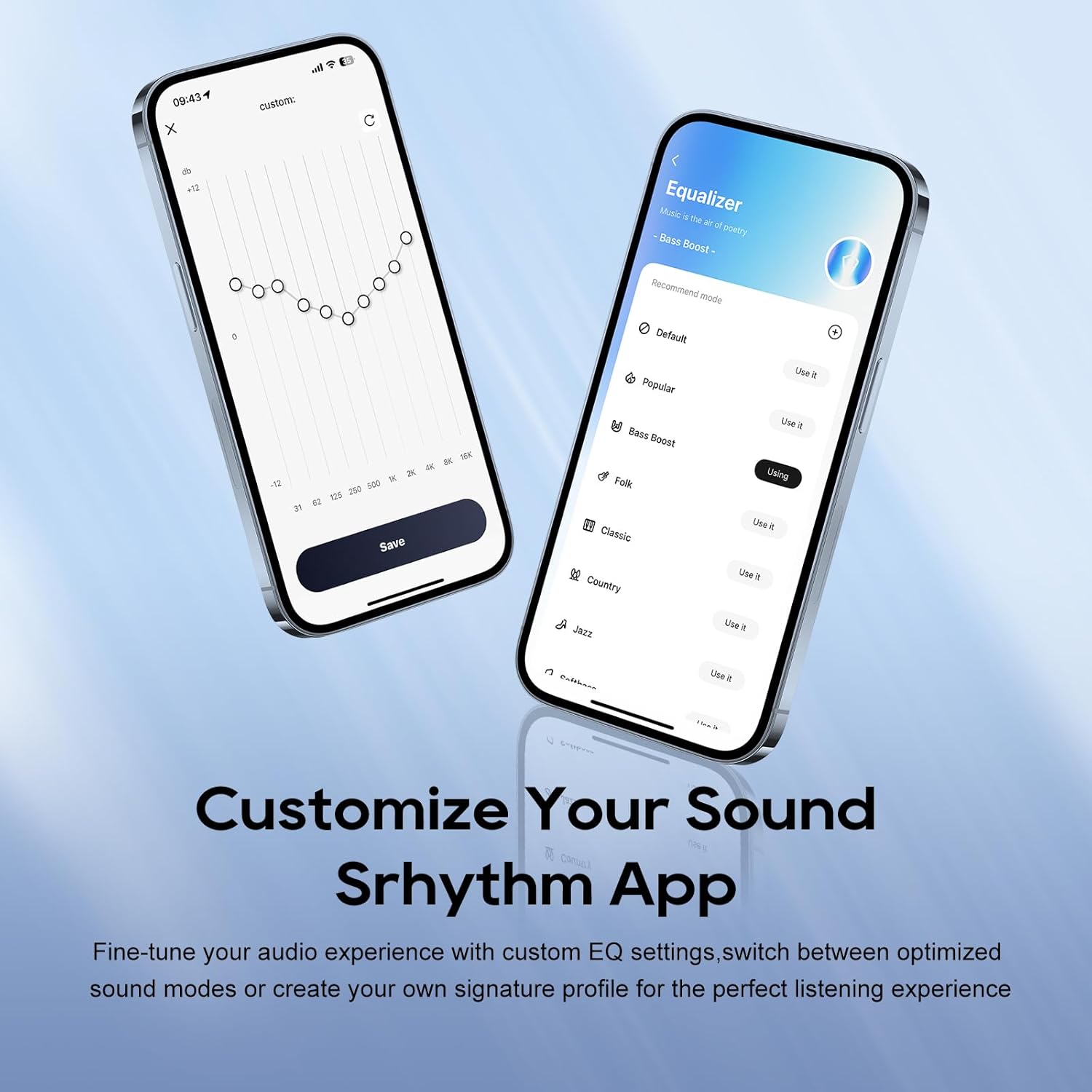
Image: A smartphone screen displaying the Srhythm App interface, highlighting equalizer and ambient sound customization options.
4. Utilizzo delle cuffie
4.1. Controlli di base
- Volume su/giù: Utilizzare i pulsanti del volume dedicati sul padiglione auricolare.
- Riproduci/Pausa: Premi una volta il pulsante multifunzione.
- Traccia successiva: Premere due volte il pulsante multifunzione.
- Traccia precedente: Premere tre volte il pulsante multifunzione.
- Rispondi/Termina chiamata: Premere una volta il pulsante multifunzione durante una chiamata in arrivo o una chiamata attiva.
- Rifiuta chiamata: Durante una chiamata in arrivo, tenere premuto il pulsante multifunzione per 2 secondi.
4.2. Noise Cancellation and Ambient Sound Modes
The headphones feature Hybrid Active Noise Cancellation (ANC) and Transparency Mode. These modes can be toggled using the dedicated ANC button on the earcup or through the Srhythm App.
- Cancellazione del rumore (ANC): Blocks up to 98% of ambient noise, ideal for travel or focused work.
- Modalità normale: ANC is inactive.
- Modalità trasparenza: Ti consente di sentire l'ambiente circostante mentre ascolti l'audio, migliorando la consapevolezza della situazione.
You can adjust the noise cancellation depth and select specific modes (Commuting, Indoor, Outdoor) via the Srhythm App for optimized performance.

Image: A man wearing the Srhythm NiceComfort 35 headphones, illustrating the 98% noise cancellation feature in a busy environment.
4.3. AI-Powered Call Clarity
Equipped with 5 advanced microphones and Environmental Noise Cancellation (ENC), the headphones ensure your voice is clear during calls, even in noisy environments. This technology reduces background distractions for flawless communication.

Image: A man smiling while using the Srhythm NiceComfort 35 headphones with a smartphone, highlighting the AI-Powered Call Clarity feature.
4.4. Audio spaziale
Experience immersive sound with 4-speaker spatial audio technology. This feature delivers precision-tuned sound with distinct highs, deep bass, and stunning clarity across an ultra-wide 40kHz frequency range, creating a 3D audio experience for music, movies, and games.

Immagine: Un esploso view diagram illustrating the 4-speaker spatial audio technology inside the Srhythm NiceComfort 35 headphones.
4.5. Custom EQ via App
The Srhythm App allows you to fine-tune your audio experience with custom Equalizer (EQ) settings. You can switch between optimized sound modes (e.g., Bass Boost, Folk, Classic, Country, Jazz, Softbass, Softpitch) or create your own signature profile for personalized listening.
5. Manutenzione
5.1. Pulizia
- Utilizzare un panno morbido e asciutto per pulire le superfici esterne delle cuffie.
- Per i padiglioni auricolari, pulire delicatamente con un panno leggermente damp panno e sapone neutro se necessario, quindi asciugare accuratamente. Evitare l'eccessiva umidità.
- Non utilizzare prodotti chimici aggressivi, solventi per la pulizia o detergenti aggressivi.
5.2. Conservazione
- Conservare le cuffie in un luogo fresco e asciutto, lontano dalla luce solare diretta e da temperature estreme.
- The headphones feature a space-saving foldable design, allowing them to be folded for compact storage and transport.
- Evitare di posizionare oggetti pesanti sopra le cuffie.
5.3. Cura della batteria
- Per preservare la salute della batteria, caricare regolarmente le cuffie, anche se non vengono utilizzate frequentemente.
- Evitare di scaricare completamente la batteria frequentemente.
6. Risoluzione Dei Problemi
- Nessun potere: Ensure the headphones are fully charged. Connect the Type-C charging cable and allow sufficient time for charging.
- Impossibile effettuare l'accoppiamento tramite Bluetooth: Ensure the headphones are in pairing mode (flashing blue and red light). Turn off and on your device's Bluetooth, then try re-pairing. Make sure the headphones are not connected to another device.
- Nessun suono: Controlla il volume delle cuffie e del dispositivo collegato. Assicurati che le cuffie siano correttamente associate o che il cavo audio sia collegato saldamente.
- Scarsa qualità del suono: Ensure the audio source is of good quality. If using Bluetooth, try moving closer to your device to avoid interference. Adjust EQ settings via the Srhythm App.
- Cancellazione del rumore non efficace: Ensure the earcups form a tight seal around your ears. Adjust ANC settings via the Srhythm App.
- Finding Lost Headphones: Use the "Find It" feature within the Srhythm App, which can play a loud sound to help locate your headphones if they are within Bluetooth range.
7. Specifiche
| Nome del modello | NC35 |
| Controllo del rumore | Cancellazione ibrida del rumore |
| Risposta in frequenza | 40KHz |
| Sensibilità | 97 dB |
| Presa per cuffie | 3.5 mm Jack |
| Tecnologia di connettività | Cablato, senza fili |
| Tecnologia di comunicazione wireless | Bluetooth |
| Versione Bluetooth | 6.0 |
| Portata Bluetooth | 10 metri |
| Durata della batteria | 140 Hours (ANC OFF, 40% Volume), 70 Hours (ANC ON, 40% Volume) |
| Tempo di ricarica | 2.5 ore |
| Tipo di driver audio | Driver dinamico |
| Dimensioni del driver audio | 40 millimetri |
| Peso dell'articolo | 276 grammi (9.7 once) |
| Dimensioni del prodotto | 5.91 x 3.94 x 2.36 pollici |
| Materiale | Acrylonitrile Butadiene Styrene (ABS), Faux Leather, Metal, Polycarbonate (PC) |
| Caratteristiche speciali | Adjustable Headband, Built-In Voice Assistant, Foldable, Microphone Included, Noise Cancellation |

Image: A woman running outdoors wearing the Srhythm NiceComfort 35 headphones, illustrating the long battery life.
8. Garanzia e supporto
Each Srhythm product comes with an 18-month aftersales warranty. For any inquiries or assistance, our 7*24-hour online service is available to provide support and address any concerns you may have.
For further assistance, please refer to the contact information provided in your Quick Start Guide or visit the official Srhythm websito.


