
1. Introduzione
Thank you for choosing the roborock Q10 S5 Robot Vacuum and Mop Cleaner. This manual provides essential information for setting up, operating, and maintaining your device to ensure optimal performance and longevity. Please read this manual thoroughly before using the product and keep it for future reference.
2. Informazioni sulla sicurezza
To reduce the risk of injury, electric shock, fire, or damage, please observe the following safety precautions:
- Questo apparecchio può essere utilizzato da bambini di età pari o superiore a 8 anni e da persone con capacità fisiche, sensoriali o mentali ridotte o prive di esperienza e conoscenza, solo se sorvegliati o istruiti sull'uso sicuro dell'apparecchio e se comprendono i pericoli connessi.
- I bambini devono essere sorvegliati per assicurarsi che non giochino con l'apparecchio.
- La pulizia e la manutenzione da parte dell'utente non devono essere eseguite da bambini senza supervisione.
- Non utilizzare il robot in aree con fiamme libere o oggetti fragili.
- Assicurarsi che la base di ricarica sia posizionata su una superficie piana contro una parete.
- Utilizzare solo l'adattatore di alimentazione originale fornito con il dispositivo.
- Do not expose the robot to direct sunlight or moisture.
- Prima di pulire, rimuovere dal pavimento cavi di alimentazione, piccoli oggetti e oggetti fragili.
3. Prodotto finitoview
Familiarize yourself with the components of your roborock Q10 S5 robot vacuum.
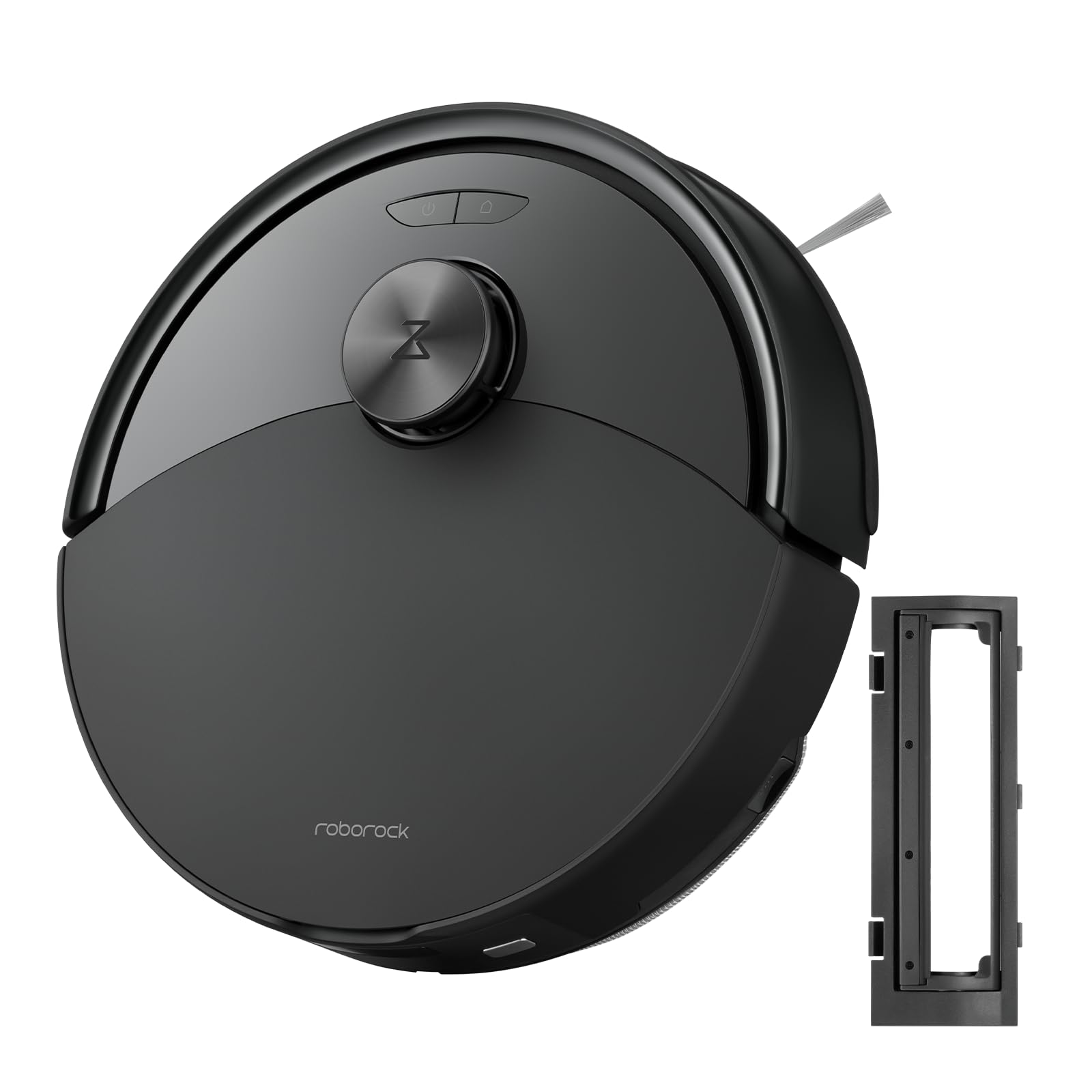
Figura 1: The roborock Q10 S5 Robot Vacuum and Mop Cleaner. This image shows the top view of the robot, highlighting its sleek black design and main control buttons.
Componenti del robot:
- Coperchio superiore: Lifts to reveal the dustbin and Wi-Fi indicator.
- Pulsante di accensione/pulizia: Press to start/pause cleaning, hold to turn on/off.
- Dock/Spot Clean Button: Press to send the robot back to the dock, hold for spot cleaning.
- LDS Sensor: Per la navigazione e la mappatura.
- Paraurti: Rileva gli ostacoli.
- Spazzola laterale: Spazza via i detriti dai bordi e dagli angoli.
- Spazzola principale: Collects dirt and debris from floors. Features a floating design for better contact.
- Ruota omnidirezionale: Per il movimento.
- Contatti di ricarica: Si collega alla base di ricarica.
- Sensori di scogliera: Impedisce al robot di cadere dalle scale.
- Serbatoio dell'acqua e panno per mocio: Per la funzionalità di lavaggio.
Stazione di ricarica:
- Dock Location Beacon: Helps the robot locate the dock.
- Contatti di ricarica: Trasferisce potenza al robot.
- Porta del cavo di alimentazione: Collega l'alimentatore.
4. Impostazione
- Disimballare il robot: Carefully remove the robot and all accessories from the packaging. Remove any protective films or shipping materials.
- Install the Side Brush: Press the side brush onto its post until it clicks into place.
- Posizionare la base di ricarica:
- Posizionare la base di ricarica su una superficie dura e piana, contro una parete.
- Assicurarsi che vi siano almeno 0.5 metri (1.6 piedi) di spazio libero su entrambi i lati e 1.5 metri (4.9 piedi) davanti al molo.
- Connect the power cable to the charging dock and plug it into a wall outlet.
- Carica iniziale: Place the robot on the charging dock. The robot will automatically turn on and begin charging. For first-time use, fully charge the robot before operation (approximately 4-6 hours). The power indicator light will breathe white during charging and turn solid white when fully charged.
- Scarica l'App: Cercare "Roborock" in the App Store or Google Play Store, or scan the QR code on the packaging to download and install the app.
- Connettiti al Wi-Fi:
- Open the Roborock app and follow the on-screen instructions to add your device.
- Assicurati che il telefono sia connesso a una rete Wi-Fi da 2.4 GHz.
- Premere e tenere premuto il tasto Attracco E Energia buttons simultaneously for 3 seconds until you hear the "Resetting Wi-Fi" voice alert.
- Follow the app's instructions to complete the connection.
5. Istruzioni per l'uso
Inizio della pulizia:
- Da Robot: Premere il tasto Energia button once. The robot will start cleaning.
- Dall'app: Open the Roborock app and tap the "Clean" button.
Pausing/Resuming/Stopping:
- Pausa: Press any button on the robot or tap "Pause" in the app.
- Riprendere: Premere il tasto Energia button or tap "Resume" in the app.
- Stop: To stop a cleaning cycle, press the Attracco button to send the robot back to the charging dock, or tap "Stop" in the app.
Funzione di lavaggio:
- Riempire il serbatoio dell'acqua: Open the water tank cover, fill with clean water, and close securely.
- Applicare il panno per mocio: Wet the mop pad and wring it out. Slide it into the mop pad slot until it is securely attached.
- Start Mopping: The robot will automatically detect the mop module and switch to mopping mode. You can adjust water flow levels in the app.
Caratteristiche dell'app:
- Gestione delle mappe: Create and save maps, set no-go zones, virtual walls, and invisible barriers.
- Pulizia selettiva delle stanze: Choose specific rooms to clean.
- Pulizia programmata: Impostare programmi di pulizia per orari e giorni diversi.
- Modalità di pulizia personalizzate: Regolare la potenza di aspirazione e i livelli del flusso d'acqua.
- Telecomando: Controllare manualmente il movimento del robot.
6. Manutenzione
Regular maintenance ensures your roborock Q10 S5 operates efficiently. Always turn off the robot and unplug the charging dock before performing any maintenance.
Dustbin and Filter (Weekly):
- Lift the top cover of the robot.
- Rimuovere la pattumiera.
- Aprire il coperchio del contenitore della polvere e svuotarne il contenuto nel cestino della spazzatura.
- Remove the filter. Tap it gently to remove dust. The filter can be rinsed with water; ensure it is completely dry before reinstallation (allow 24 hours).
- Rinse the dustbin with water if necessary and allow it to dry completely.
- Reinstall the dry filter and dustbin.
Main Brush (Weekly):
- Capovolgi il robot.
- Premere le linguette per rimuovere il coperchio della spazzola principale.
- Sollevare la spazzola principale.
- Utilizzare lo strumento di pulizia (se fornito) o le forbici per tagliare e rimuovere eventuali peli o detriti aggrovigliati attorno alla spazzola.
- Reinstall the main brush and cover, ensuring it clicks into place.
Side Brush (Monthly):
- Svitare la spazzola laterale.
- Rimuovere eventuali peli o detriti.
- Reattach and tighten the screw.
Sensors and Charging Contacts (Monthly):
- Pulisci tutti i sensori (sensori di scogliera, sensore a parete, finestra del sensore LDS) e i contatti di ricarica sia sul robot che sulla base con un panno morbido e asciutto.
Mop Pad (After Each Use):
- Rimuovere il panno dal serbatoio dell'acqua.
- Rinse thoroughly with water and allow it to air dry completely before next use.
7. Risoluzione Dei Problemi
If you encounter issues with your robot, please refer to the following table before contacting support.
| Problema | Possibile causa | Soluzione |
|---|---|---|
| Il robot non si accende. | Batteria scarica o non carica. | Posizionare il robot sulla base di ricarica e assicurarsi che sia in carica. |
| Il robot non riesce a connettersi al Wi-Fi. | Password Wi-Fi errata, rete a 5 GHz o segnale scarso. | Ensure correct 2.4GHz Wi-Fi, reset Wi-Fi on robot, move closer to router. |
| Il robot si blocca spesso. | Ostacoli, cavi aggrovigliati o sensori sporchi. | Clear floor, clean sensors, use no-go zones in app. |
| Scarsa efficienza di pulizia. | Full dustbin, dirty filter, tangled brushes. | Empty dustbin, clean/replace filter, clean main/side brushes. |
| Il robot fa un rumore insolito. | Debris in main brush, side brush, or wheels. | Ispezionare e pulire tutte le spazzole e le ruote per individuare eventuali ostruzioni. |
If the problem persists, please refer to the Roborock app for more detailed error messages or contact customer support.
8. Specifiche
| Caratteristica | Dettaglio |
|---|---|
| Modello | Q10 S5 |
| Dimensioni | Circa 353 x 350 x 96.5 mm (13.9 x 13.8 x 3.8 pollici) |
| Peso | Circa 3.7 kg (8.16 libbre) |
| Batteria | Lithium-Ion (Capacity not specified, typical for robot vacuums) |
| Potenza nominale | Approx. 60W (Typical for robot vacuums) |
| Capacità del bidone della spazzatura | Approx. 470 ml (Typical for robot vacuums) |
| Capacità del serbatoio dell'acqua | Approx. 300 ml (Typical for robot vacuums) |
| Potenza di aspirazione | Up to 10,000 Pa (HyperForce Suction Power from feature bullets) |
| Connettività Wi-Fi | 2.4 GHz |
Nota: le specifiche sono soggette a modifiche senza preavviso.
9. Garanzia e supporto
roborock products are manufactured to the highest quality standards. For detailed warranty information, please refer to the warranty card included in your product packaging or visit the official roborock website. For technical support, troubleshooting assistance, or to purchase replacement parts, please contact roborock customer service through the app or their official websito.
Ufficiale Websito: www.roborock.com