
Introduzione
Thank you for choosing the T'nB FMCT10 Bluetooth FM Transmitter. This device allows you to stream music from your smartphone, make hands-free calls, and charge your devices directly through your vehicle's audio system. It features Bluetooth 5.0, multiple charging ports (USB-C 30W, USB-A 18W, USB-A 5W), and a noise-cancelling microphone for clear communication. Please read this manual carefully before use to ensure proper operation and to maximize your experience.
Informazioni sulla sicurezza
- Non smontare o modificare il dispositivo.
- Tenere lontano da acqua, umidità e temperature estreme.
- Evitare di esporre il dispositivo alla luce solare diretta per periodi prolungati.
- Non utilizzare prodotti chimici aggressivi o detergenti abrasivi.
- Ensure the device is securely plugged into the cigarette lighter socket to prevent dislodgement during driving.
- Dai sempre priorità alla guida sicura. Non utilizzare il dispositivo in modo da distrarti dalla strada.
Contenuto della confezione
- T'nB FMCT10 Bluetooth FM Transmitter
- Manuale d'uso
Prodotto finitoview
The T'nB FMCT10 is designed to enhance your in-car audio experience and connectivity. It integrates several functions into one compact device.
Caratteristiche principali:
- Bluetooth 5.0 per una connessione wireless stabile.
- Hands-free calling with noise-cancelling microphone.
- Multiple charging ports: USB-C (30W PD), USB-A (18W QC3.0), USB-A (5W).
- Music playback via Bluetooth, USB drive (up to 64GB), or AUX input.
- Automatic FM station search (87.6-107.8 MHz).
- Bass Boost function for enhanced audio.

Immagine: Sopraview of the T'nB FMCT10 FM Transmitter, showing the cigarette lighter plug, the central control knob, and the three charging ports (USB-C PD30W, USB QC3.0, and a standard USB port).
Impostare
- Inserire nella presa dell'auto: Plug the FMCT10 into your vehicle's 12V-24V cigarette lighter socket. The device will power on automatically.
- Imposta la frequenza FM:
- Sintonizzate l'autoradio su una frequenza FM libera (ovvero senza un segnale di trasmissione forte).
- On the FMCT10, press the "CH" button (or similar frequency adjustment button) and then use the navigation buttons (or rotary knob) to match the frequency displayed on the transmitter to your car radio's frequency. The device also supports automatic station search.

Immagine: Illustration showing a smartphone pairing with "FMCT10" via Bluetooth, and a hand adjusting the car radio frequency to match the transmitter's display.
- Accoppia Bluetooth:
- Abilita il Bluetooth sul tuo smartphone o altro dispositivo audio.
- Cercare available devices and select "FMCT10" to pair. Once paired, a voice prompt will confirm the connection.
- Posizionamento del microfono: The external magnetic microphone can be attached to a convenient location in your vehicle for optimal voice pickup during calls. Use the adhesive backing to secure it.

Immagine: Close-up of the magnetic noise-cancelling microphone, showing its compact design and indicating its noise reduction capability.
Istruzioni per l'uso
Riproduzione musicale
The FMCT10 supports three modes for music playback: Bluetooth, USB drive, and AUX input.

Immagine: Diagram illustrating the three connection modes: Bluetooth for wireless streaming, USB-A port for music via USB drive, and AUX input for wired audio connection.
- Streaming Bluetooth: Once paired with your smartphone, music will automatically stream through your car's speakers via the selected FM frequency. Use your phone or the transmitter's buttons to control playback (play/pause, next/previous track).
- Riproduzione da unità USB: Insert a USB flash drive (up to 64GB) containing MP3/WMA/WAV/FLAC files into the designated USB-A port (often marked with a music note icon). The device will automatically detect and play music from the drive.
- Ingresso AUX: Connect an audio device (e.g., MP3 player) to the AUX port on the FMCT10 using a 3.5mm audio cable.
Chiamata a mani libere
When your phone is connected via Bluetooth, you can manage calls directly through the FMCT10.
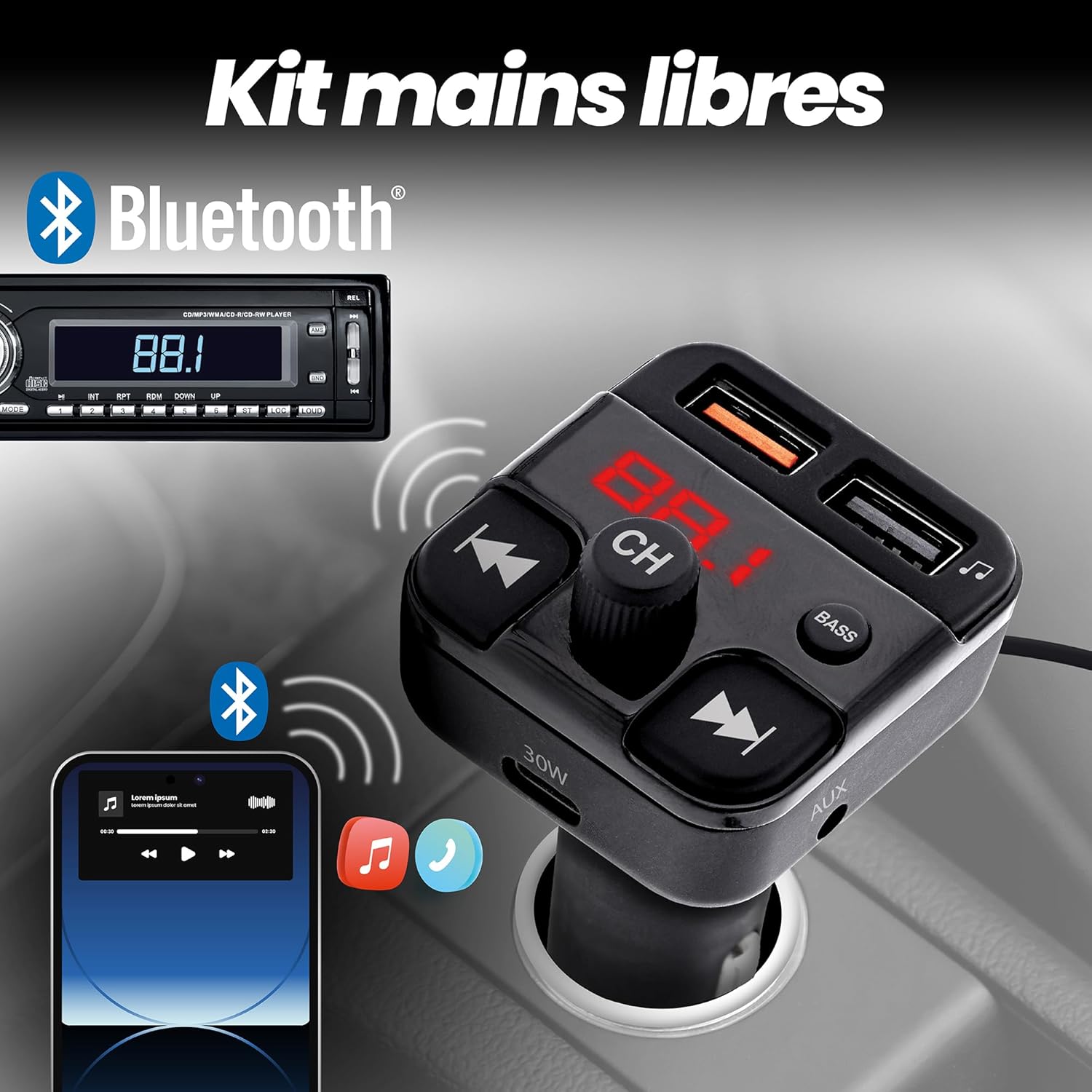
Immagine: Depiction of the FMCT10 in a car, showing a smartphone connected via Bluetooth for hands-free calls and music playback through the car's radio.
- Rispondi/Termina chiamata: Press the multi-function button (usually the central knob or a dedicated phone button) once to answer an incoming call or end an ongoing call.
- Rifiuta chiamata: Tenere premuto il pulsante multifunzione per rifiutare una chiamata in arrivo.
- Ricomposizione: Premere due volte il pulsante multifunzione per ricomporre l'ultimo numero.
Dispositivi di ricarica
The FMCT10 is equipped with three charging ports to power your devices.
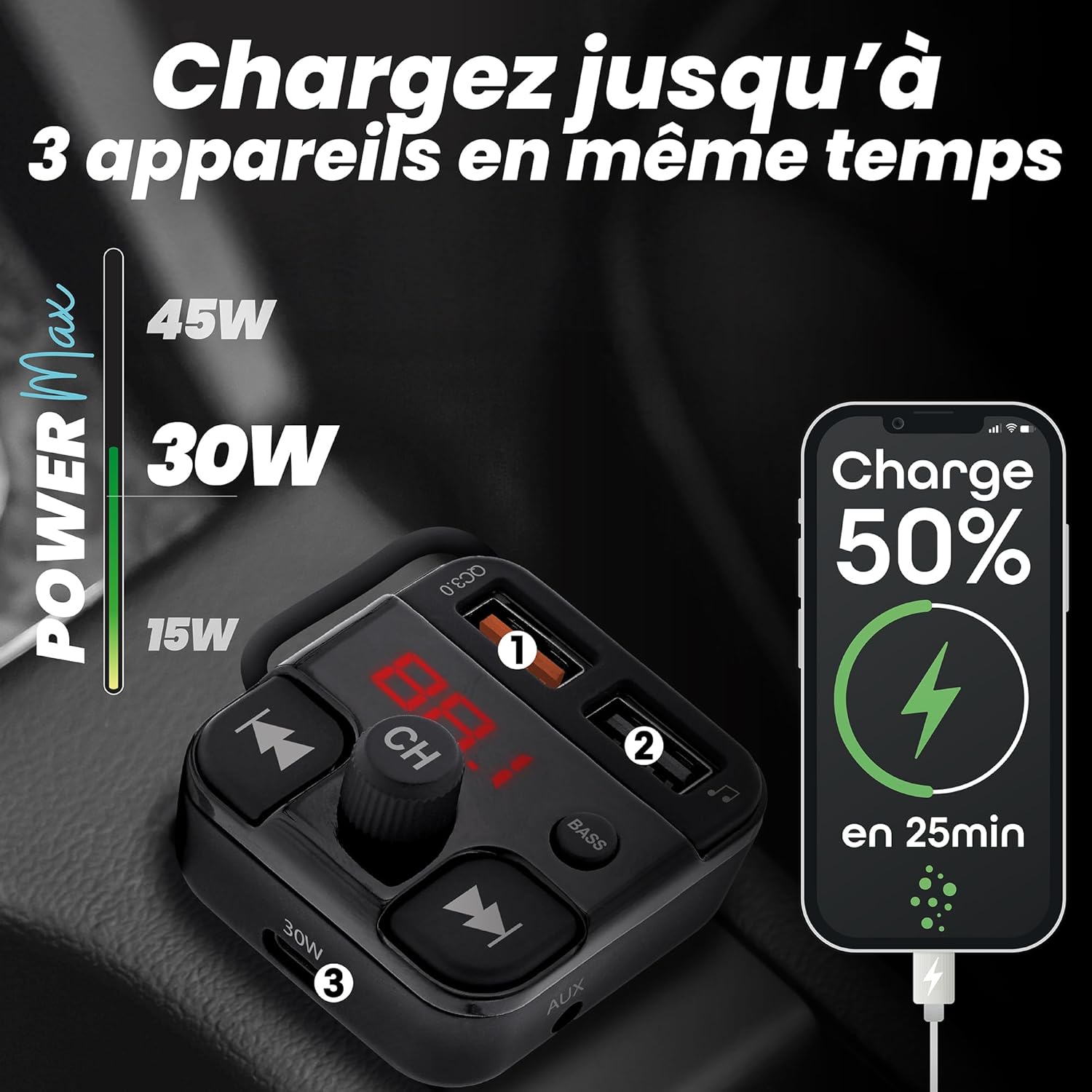
Immagine: Visual representation of the FMCT10 charging three devices simultaneously, highlighting the fast charging capabilities (e.g., 50% charge in 25 minutes).
- USB-C PD 30W: Per dispositivi compatibili con la ricarica rapida.
- USB-A QC 18W: Per dispositivi compatibili con Quick Charge.
- USB-A 5 W: Standard charging port.
All functions of the product can be used while charging your phone.
Funzione Bass Boost
Press the "BASS" button on the transmitter to activate or deactivate the bass boost feature for a more dynamic listening experience.

Immagine: Close-up of the "BASS" button on the FMCT10, with an illustration of sound waves indicating enhanced bass.
Manutenzione
- Pulisci il dispositivo con un panno morbido e asciutto.
- Do not use liquid cleaners or sprays.
- Ensure the cigarette lighter socket and USB ports are free of dust and debris.
Risoluzione dei problemi
| Problema | Possibile causa | Soluzione |
|---|---|---|
| No power to the transmitter. | Loose connection; vehicle's cigarette lighter socket is faulty; vehicle's fuse is blown. | Ensure the transmitter is firmly plugged in. Check if the car's cigarette lighter socket is working with another device. Check the vehicle's fuse box. |
| Scarsa qualità audio/disturbi. | FM frequency interference; volume too low/high; Bluetooth connection issue. | Find a clearer FM frequency on your car radio and transmitter. Adjust volume on both the transmitter and car radio. Re-pair Bluetooth. |
| Il Bluetooth non si connette. | Bluetooth non abilitato sul telefono; dispositivo non in modalità di associazione; interferenza. | Ensure Bluetooth is enabled on your phone. Restart the transmitter and your phone. Try pairing again. |
| La ricarica è lenta o non funziona. | Problema con il cavo; dispositivo non compatibile con la ricarica rapida; malfunzionamento della porta. | Use a different charging cable. Ensure your device supports the fast charging protocols (PD/QC). Try a different charging port. |
Specifiche
- Nome modello: FMCT10
- Marca: T'nB
- Fonte di energia: Electric (12V-24V car cigarette lighter socket)
- Versione Bluetooth: 5.0
- Gamma di frequenza FM: Frequenza 87.6-107.8 MHz
- Uscita USB-C: Erogazione di potenza (PD) da 30 W
- USB-A Output 1 (QC3.0): Ricarica rapida da 18 W
- Uscita USB-A 2: 5W
- Potenza massima totale: 38W
- USB Drive Support: Fino a 64 GB
- Connettività: Bluetooth, USB Type A, USB Type C, AUX
- Numero di porte: 3 (2x USB-A, 1x USB-C)
- Caratteristiche speciali: Hands-free kit, Noise-cancelling microphone, Bass Boost, Automatic station search
- Paese di origine: Cina
Garanzia
Questo prodotto viene fornito con un Garanzia del produttore di 2 anniSi prega di conservare la prova d'acquisto per eventuali reclami in garanzia. La garanzia copre difetti di materiali e fabbricazione in condizioni di normale utilizzo. Non copre danni causati da uso improprio, incidenti, modifiche non autorizzate o normale usura.
Supporto
For technical support, troubleshooting assistance, or warranty inquiries, please contact T'nB customer service. You can typically find contact information on the official T'nB websito o tramite il tuo rivenditore.
T'nB Official Websito: www.tnb.com (Please note: This is a generic placeholder. Refer to your product packaging or official brand channels for the most accurate support contact information.)