
Introduzione
This manual provides detailed instructions for the proper setup, operation, and maintenance of your Nady HT-450 Digital Handheld Microphone. The HT-450 is designed for use with Nady D-Series Wireless Systems, offering reliable and high-quality audio transmission for various applications, including live performances, presentations, and public speaking.
Contenuto della confezione
Assicurarsi che tutti gli articoli siano presenti al momento dell'apertura della confezione:
- Nady HT-450 Digital Handheld Microphone (Channel-A)
Prodotto finitoview
The Nady HT-450 is a robust digital handheld microphone featuring an all-metal construction for durability. It incorporates a cardioid polar pattern for superior sound capture and minimization of background noise. The microphone offers 200 selectable channels and utilizes DQPSK digital modulation for reliable wireless signal transmission.
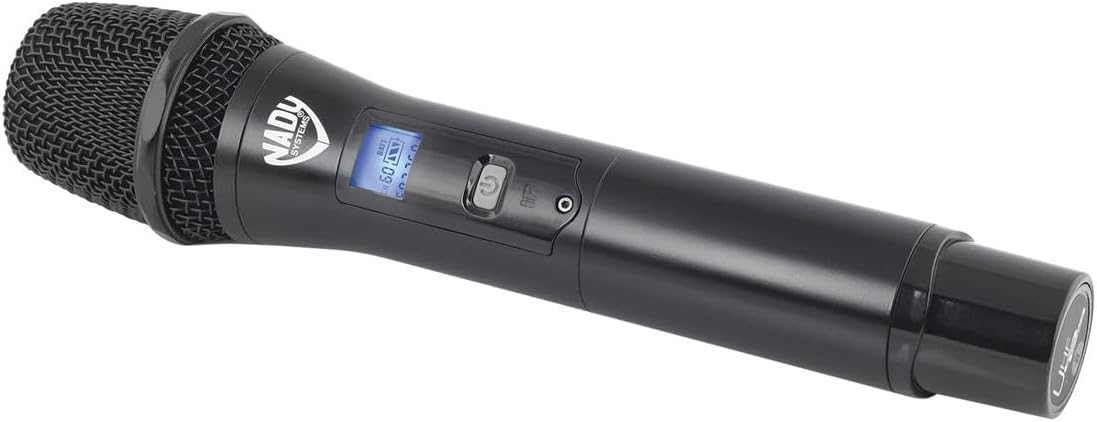
Figura 1: Nady HT-450 Digital Handheld Microphone. This image shows the microphone's main body, including the grille, power button, and backlit LCD display.
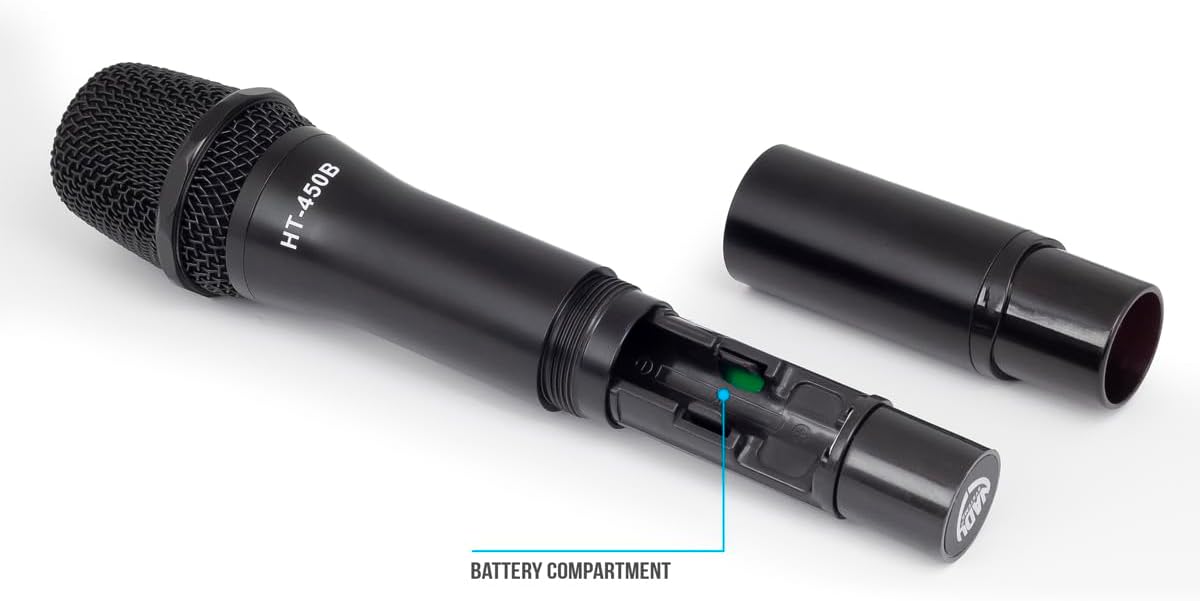
Figura 2: Nady HT-450 Digital Handheld Microphone with battery compartment open. This image illustrates the lower section of the microphone unscrewed, revealing the battery housing.
Impostare
1. Installazione della batteria
- Unscrew the lower part of the microphone body to access the battery compartment (refer to Figure 2).
- Insert two AA alkaline batteries (not included) into the compartment, ensuring correct polarity (+/-).
- Securely screw the lower part of the microphone body back into place.
The microphone provides up to 10 hours of continuous use with fresh AA alkaline batteries.
2. Pairing with D-Series Wireless System
The HT-450 microphone is designed to seamlessly connect with Nady D-Series wireless receivers. Refer to your D-Series receiver's manual for specific pairing instructions. Generally, the process involves:
- Powering on both the microphone and the receiver.
- Selecting a clear channel on the receiver.
- Initiating the sync function on the receiver, then aligning the microphone's IR sensor (if applicable) with the receiver's IR transmitter to establish a connection.
- Confirming successful pairing via the receiver's display and the microphone's LCD.
Istruzioni per l'uso
1. Accensione/spegnimento
- To power on, press and hold the power button located on the microphone body until the LCD illuminates.
- To power off, press and hold the power button again until the LCD display turns off.
2. Display LCD
The backlit LCD provides essential information, including:
- Livello della batteria: Indicates the remaining battery life. Replace batteries when the indicator is low.
- Numero del canale: Displays the currently selected operating channel.
- Potenza del segnale: Shows the strength of the wireless connection to the receiver.
3. Selezione del canale
The HT-450 offers 200 total channels to ensure clear transmission. Channel selection is typically managed through the paired D-Series receiver. Once a channel is selected on the receiver, the microphone will sync to that channel during the pairing process. If interference occurs, select a different channel on your receiver and re-sync the microphone.
Manutenzione
- Pulizia: Per pulire il corpo del microfono, utilizzare un panno morbido e asciutto. Non utilizzare detergenti liquidi o solventi.
- Magazzinaggio: Store the microphone in a cool, dry place away from direct sunlight and extreme temperatures. Remove batteries if storing for extended periods to prevent leakage.
- Cura della griglia: Periodically check the microphone grille for debris. Gently clean with a soft brush if necessary.
Risoluzione dei problemi
| Problema | Possibile causa | Soluzione |
|---|---|---|
| Nessun suono dal microfono |
|
|
| Interferenze o interruzioni |
|
|
| Scarsa qualità del suono |
|
|
Specifiche
- Modello: Nady HT-450
- Tecnologia di connettività: Senza fili
- Caratteristica speciale: Schermo LCD
- Dispositivi compatibili: Audio Interface (with D-Series Receiver)
- Peso dell'articolo: 0.8 libbre (circa 12.8 once)
- Dimensioni del prodotto (L x P x A): 10 x 2.25 x 2.25 pollici
- Fonte di energia: 2 batterie alcaline AA (non incluse)
- Durata della batteria: Fino a 10 ore (circa)
- Canali: 200 total channels
- Modulazione: DQPSK Digital
Garanzia e supporto
For warranty information and technical support, please refer to the official Nady website or contact Nady customer service directly. Keep your purchase receipt as proof of purchase for any warranty claims.
Nady Websito: www.nady.com