
Prodotto finitoview
The BrosTrend AX900 is a versatile 2-in-1 USB adapter designed to upgrade your PC with both WiFi 6 and Bluetooth 5.4 capabilities. This compact dongle eliminates the need for multiple adapters, providing fast internet connectivity and seamless Bluetooth device pairing. It supports dual-band WiFi 6 for optimal performance and includes a pre-loaded driver for easy installation on Windows 10 and Windows 11 systems.
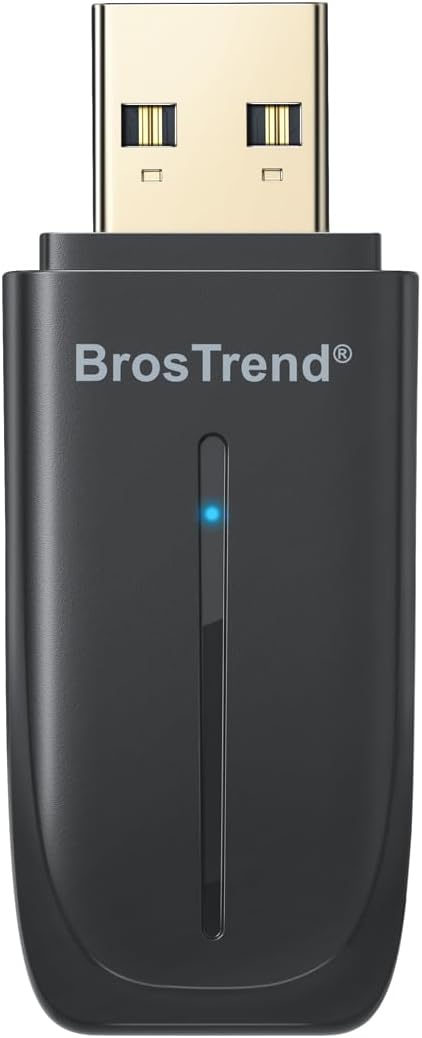
Image: BrosTrend AX900 USB WiFi 6 and Bluetooth 5.4 Adapter, front view.
Caratteristiche principali:
- Funzionalità 2 in 1: Integrates WiFi 6 and Bluetooth 5.4 into a single USB adapter.
- Fast Dual-Band WiFi 6: Achieves speeds up to 600 Mbps on 5 GHz and 287 Mbps on 2.4 GHz, supporting 1024-QAM and OFDMA for smooth streaming and gaming.
- Bluetooth 5.4: Connects up to 5 Bluetooth devices (headphones, mouse, keyboard, speaker, printer) with a stable range of up to 32 feet.
- Configurazione semplice: Features a pre-loaded driver for quick installation on Windows 11/10 without requiring a CD or downloads.
- Design compatto: Small form factor (2.04 × 0.78 × 0.35 inches) with dual-side vent holes for efficient heat dissipation and long-term reliability.
Video: Un oltreview of the BrosTrend AX900 USB WiFi 6 and Bluetooth 5.4 Combo Adapter, highlighting its features and benefits.
Istruzioni di installazione
Before You Start: Disable Built-in Bluetooth (If Applicable)
If your PC already has a built-in Bluetooth adapter, it is recommended to disable it first in Device Manager. This ensures that your system exclusively uses the BrosTrend adapter for Bluetooth connections, preventing potential conflicts.
- Right-click on "This PC" icon on your desktop.
- Select "Manage" or "Show more options" then "Manage".
- In the Computer Management window, navigate to "Device Manager".
- Expand the "Bluetooth" section.
- Right-click on your existing Bluetooth adapter (e.g., "Realtek Bluetooth Adapter") and select "Disable device". Confirm by clicking "Yes".
Video: A step-by-step guide on how to set up the BrosTrend AX900 USB WiFi 6 and Bluetooth 5.4 Adapter, including disabling existing Bluetooth adapters and driver installation.
Passaggio 1: collegare l'adattatore
Insert the BrosTrend AX900 USB WiFi 6 and Bluetooth 5.4 Adapter into an available USB port on your desktop or laptop computer. The adapter is designed to be compact and will not obstruct adjacent ports.

Image: The BrosTrend AX900 USB adapter being inserted into a USB port on a desktop computer, illustrating its compact size and ease of connection.
Passaggio 2: installare il driver
The driver software is pre-loaded directly onto the adapter, eliminating the need for a CD-ROM or external downloads. Once the adapter is inserted, a pop-up notification should appear at the bottom right corner of your screen.
- Click on the pop-up notification to run the pre-loaded driver installer (e.g., "BrosTrend_WiFi_Bluetooth_Install_Setup.exe").
- Seguire le istruzioni visualizzate sullo schermo per completare l'installazione.
- If the pop-up does not appear, open "This PC" (or "My Computer") to locate the "CD Drive (E:) BrosTrend Setup" and double-click to run the driver installer.
- After successful installation, restart your computer to apply the changes.
Istruzioni per l'uso
Step 3: Connect to WiFi and Bluetooth
After installing the driver and restarting your computer, you can now connect to WiFi networks and pair Bluetooth devices.
Connessione al Wi-Fi:
- Click the network icon (usually a globe or WiFi symbol) on the taskbar.
- Select the desired WiFi network from the list (e.g., "MyWiFi_5GHz" or "MyWiFi_2.4GHz").
- Click "Connect" and enter the WiFi password if prompted.
- For best performance, connect your PC to the 5 GHz WiFi band to avoid congestion caused by Bluetooth and WiFi sharing the 2.4 GHz channel.

Image: A laptop displaying WiFi connectivity, indicating the BrosTrend AX900 adapter is providing fast dual-band WiFi 6 speeds.
Collegamento di dispositivi Bluetooth:
- Right-click the Bluetooth icon on the taskbar (or go to Settings > Bluetooth & devices).
- Select "Add a Bluetooth Device" or "Add device".
- Choose "Bluetooth" from the options.
- Assicurati che il tuo dispositivo Bluetooth sia in modalità di associazione.
- Seleziona il tuo dispositivo dall'elenco e segui le istruzioni visualizzate sullo schermo per completare l'associazione.

Image: A laptop with the BrosTrend AX900 adapter connected, showing various Bluetooth devices like headphones, mouse, and keyboard, indicating smooth and lag-free connections.
Manutenzione
The BrosTrend AX900 adapter requires minimal maintenance. Keep the device clean and free from dust. Ensure it is not exposed to extreme temperatures or moisture. Periodically check for driver updates on the BrosTrend official websito per garantire prestazioni e compatibilità ottimali.
Risoluzione dei problemi
- Adattatore non riconosciuto: Try plugging the adapter into a different USB port. Ensure your computer's USB drivers are up to date.
- Problemi di connessione WiFi: Verify that your WiFi network is active and you are entering the correct password. Ensure any built-in WiFi adapters are disabled to prevent conflicts.
- Problemi di accoppiamento Bluetooth: Confirm that your Bluetooth device is in pairing mode and within range (up to 32 feet). Ensure any built-in Bluetooth adapters are disabled. Restart both your computer and the Bluetooth device.
- Velocità basse: For optimal WiFi performance, connect to a WiFi 6 router and use the 5 GHz band. Ensure there are no physical obstructions or interference sources between the adapter and your router/Bluetooth devices.
- Errore di installazione del driver: If the pre-loaded driver does not install automatically, manually navigate to "This PC" and run the installer from the virtual CD drive. If issues persist, download the latest driver from the BrosTrend websito.
Specifiche
| Caratteristica | Dettaglio |
|---|---|
| Numero di modello | AX900 WiFi 6 and Bluetooth USB Adapter |
| Dimensioni del prodotto | 2.04"L x 0.78"W x 0.35"H (5.2 x 2 x 0.9 cm) |
| Peso dell'articolo | 0.229 once (6.5 grammi) |
| Interfaccia Hardware | USB 2.0 |
| Protocollo di collegamento dati | IEEE802.11ax/ac/n/a 5 GHz, IEEE802.11ax/b/g/n 2.4GHz |
| Velocità di trasferimento dati | Up to 900 Megabits Per Second (600 Mbps on 5GHz, 287 Mbps on 2.4GHz) |
| Sistema operativo compatibile | Windows 10, Windows 11 (Mac and Linux NOT supported) |
| Versione Bluetooth | Bluetooth 5.4 |
| Colore | Nero |
Cosa c'è nella scatola
- 1 x AX900 WiFi 6 and Bluetooth 5.4 Combo USB Adapter
- 1 x Guida di installazione rapida
Garanzia e supporto
For warranty information and technical support, please refer to the Quick Installation Guide included in the package or visit the official BrosTrend website. If you require assistance, you can send an email to BrosTrend's support team, and they typically respond within 24 hours.
The product is also "Verified by Transparency," meaning each item has a unique code for authenticity verification using the Amazon Shopping app.