
1. Introduzione
The JDIAG HD10 is a versatile diagnostic scan tool designed for comprehensive analysis of both 12V gasoline/diesel vehicles and 24V diesel heavy-duty trucks. This device supports a wide range of diagnostic functions, including reading and clearing Diagnostic Trouble Codes (DTCs), displaying live data, and performing various system checks. Its ergonomic design and user-friendly interface aim to provide efficient vehicle diagnostics.

Figure 1: JDIAG HD10 Diagnostic Scan Tool with included 6-pin and 9-pin adapters.
2. Informazioni sulla sicurezza
Always observe the following safety precautions when operating the JDIAG HD10 diagnostic tool:
- Ensure the vehicle is in a safe, well-ventilated area.
- Wear appropriate personal protective equipment, such as eye protection.
- Avoid contact with hot engine components or moving parts.
- Do not operate the tool while driving.
- Keep the tool dry and away from extreme temperatures.
- Refer to the vehicle's service manual for specific diagnostic procedures and warnings.
3. Contenuto della confezione
Verificare che tutti gli articoli siano presenti nel pacco:
- HD10 heavy duty scanner tool
- 6-pin adapter (for trucks)
- 9-pin adapter (for trucks)
- Cavo dati USB
- Manuale d'uso
4. Dispositivo suview
The JDIAG HD10 features a 2.4-inch color screen and intuitive button layout for easy navigation. Its robust design includes non-slip grips and a durable integrated cable.

Figure 2: Ergonomic design features including silicone buttons, non-slip sides, durable cable, and OBD2 connector.
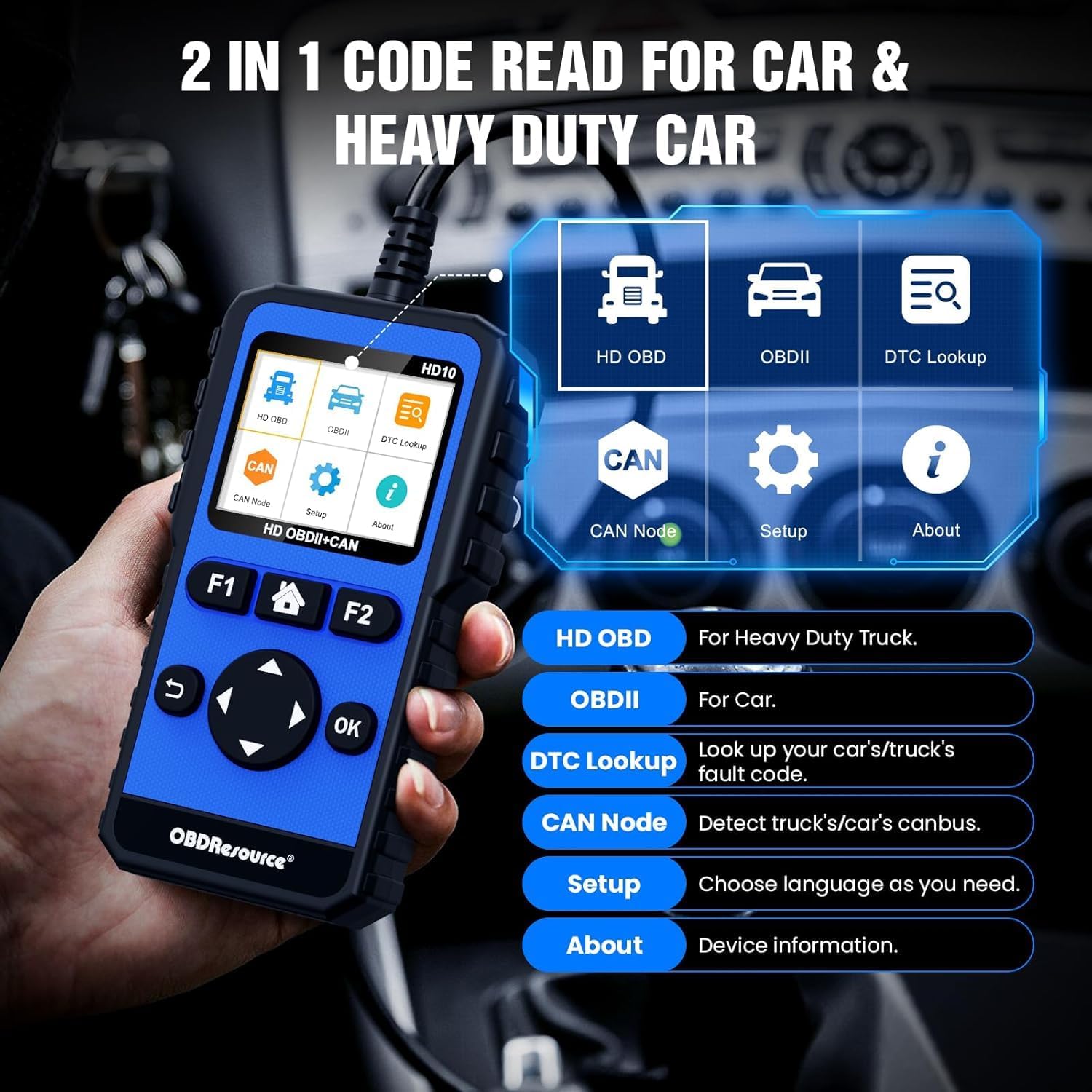
Figure 3: Main menu interface of the HD10 device.
4.1 Caratteristiche fisiche
- Display: 2.4-inch TFT Color Screen (320 x 240 resolution).
- Pulsanti: Clearly arranged silicone physical buttons for high sensitivity and fast response.
- Alloggiamento: Anti-slip design on both sides for secure handling.
- Cavo: Integrated, thick, and durable wire (up to 105 cm).
- Connettori: Standard OBD2 connector, with included 6-pin and 9-pin adapters for heavy-duty vehicles.
5. Impostazione
5.1. Collegamento al veicolo
- Locate the vehicle's Diagnostic Link Connector (DLC). For 12V vehicles, this is typically a 16-pin OBD2 port. For heavy-duty 24V vehicles, it will be a 6-pin or 9-pin connector.
- If diagnosing a heavy-duty vehicle, attach the appropriate 6-pin or 9-pin adapter to the HD10's main cable, then connect to the vehicle's DLC. For 12V vehicles, connect the standard OBD2 connector directly.
- Ensure the connection is secure. The device will power on automatically once connected to the vehicle's power supply.

Figure 4: The HD10 displaying live data, illustrating its 2.4-inch color screen.
5.2. Impostazioni iniziali
Al primo utilizzo o dopo un ripristino, potrebbe essere necessario configurare le impostazioni di base:
- Vai a Impostare menu using the directional buttons and press OK.
- Selezionare Lingua to choose your preferred language.
- Other settings like unit of measurement (e.g., Metric/Imperial) may also be available in the Setup menu.
6. Istruzioni per l'uso
The JDIAG HD10 offers various diagnostic functions accessible through its main menu.
6.1. Navigazione nel menu principale
Utilizzare i pulsanti direzionali (Up, Giù, Sinistra, Giusto) to highlight menu options and press the OK pulsante per confermare una selezione. Il Ritorno button (curved arrow) navigates back to the previous screen.
6.2. HD OBD (Heavy Duty On-Board Diagnostics)
This mode is for diagnosing heavy-duty trucks and supports protocols like SAE J1939, SAE J1587/J1708, ISO15765, ISO 14230, and ISO 9141-2.

Figure 5: Full system diagnostic capabilities for heavy-duty vehicles.
- Leggi i codici: Retrieves Diagnostic Trouble Codes (DTCs) from various vehicle systems (Engine, Transmission, Drivetrain, Suspension, Braking System, Cab Climate, Body Control, Dashboard, Fuel System, etc.).
- Cancella codici: Clears DTCs from the vehicle's computer after repairs have been made.
- Dati in tempo reale: Displays real-time operational parameters of the vehicle's systems.
- Diagnosi completa del sistema: Accesses and diagnoses all supported electronic control units (ECUs) in 24V diesel vehicles.
6.3. OBDII (Standard On-Board Diagnostics)
This mode is for diagnosing 12V gasoline/diesel vehicles and supports standard OBD2 protocols including SAE J1850.

Figura 6: Oltreview of full OBD2 functions available.
- Leggi i codici: Retrieves current, pending, and permanent DTCs.
- Cancella codici: Cancella i DTC e spegne l'indicatore di malfunzionamento Lamp (MIL).
- Prontezza I/M: Verifica la prontezza dei monitor relativi alle emissioni.
- Flusso di dati: Visualizza i dati dei sensori in tempo reale in formato testo o grafico.
- Cornice di congelamento: Records a snapshot of vehicle conditions when an emission-related fault occurs.
- Test sensore O2: Recupera i risultati del test di monitoraggio del sensore O2.
- Monitoraggio di bordo: Recupera i risultati dei test di monitoraggio diagnostico di bordo di componenti/sistemi specifici.
- Test del sistema EVAP: Avvia un test del sistema di controllo delle emissioni evaporative.
- Informazioni sul veicolo: Visualizza il numero di identificazione del veicolo (VIN), l'ID di calibrazione (CALID) e il numero di verifica della calibrazione (CVN).
6.4. Ricerca DTC
The built-in DTC Lookup function allows you to search for definitions of diagnostic trouble codes directly on the device, helping to understand the nature of a fault without external resources.
6.5. CAN Node Detection
This function helps quickly detect CANBUS nodes and identify faulty modules or lines by checking existing nodes, improving diagnostic efficiency.
6.6. BAT Test (Battery Test)
The BAT Test function allows for basic battery voltage checks, providing quick insights into the vehicle's battery health.
6.7. Aggiornamento software
The JDIAG HD10 supports lifetime free software updates. Connect the device to a computer via the USB data cable and follow the instructions on the manufacturer's website to download and install the latest software. This ensures expanded fault coverage and up-to-date functionality.
Video 1: Un overview of the JDIAG HD10's diagnostic capabilities for cars and trucks, demonstrating its interface and functions.
7. Manutenzione
7.1. Pulizia
Pulire il dispositivo con un panno morbido, damp panno. Non utilizzare detergenti abrasivi o solventi. Assicurarsi che il dispositivo sia asciutto prima di riporlo o di utilizzarlo nuovamente.
7.2. Conservazione
Store the JDIAG HD10 in a clean, dry environment, away from direct sunlight and extreme temperatures. Keep it in its original packaging or a protective case when not in use to prevent damage.
8. Risoluzione Dei Problemi
| Problema | Possibile causa | Soluzione |
|---|---|---|
| Il dispositivo non si accende. | Loose connection to vehicle DLC; vehicle battery low; faulty cable. | Ensure the cable is securely connected. Check vehicle battery voltage. Try a different vehicle if possible to rule out a device issue. |
| Errore di comunicazione con il veicolo. | Incorrect protocol selected; vehicle ignition off; faulty vehicle DLC; device software outdated. | Verify vehicle ignition is ON. Ensure the correct vehicle type (12V/24V) and protocol are selected. Check the DLC for damage. Update device software. |
| Impossibile cancellare i DTC. | Underlying fault still present; vehicle ignition off; specific vehicle system requirements. | Ensure the underlying issue causing the DTC has been resolved. Verify ignition is ON. Some vehicles require specific conditions for DTC clearing. |
| Lo schermo è scuro o illeggibile. | Illuminazione ambientale; impostazioni di visualizzazione. | Adjust screen brightness in the Setup menu. Move to an area with less direct sunlight or glare. |
9. Specifiche
- Marca: JDIAG
- Modello: HD10 (Item model number) / CC0147HD10 (Manufacturer Model)
- Sistema operativo: Linux
- Tipo di adattamento automobilistico: Vestibilità universale
- Supported Protocols (Heavy Duty): SAE J1939, SAE J1587/J1708, ISO15765, ISO 14230, ISO 9141-2
- Supported Protocols (OBD2): SAE J1850 (VPW/PWM), ISO9141, ISO14230 (KWP), ISO15765-4 (CAN)
- Display: Schermo TFT a colori da 2.4 pollici
- Peso dell'articolo: 1.15 libbre
- Dimensioni della confezione: 7.48 x 6.69 x 1.57 pollici

Figure 7: Compatibility table for various heavy-duty truck brands and protocols.
10. Informazioni sulla garanzia
For detailed warranty information regarding your JDIAG HD10 diagnostic tool, please refer to the documentation included with your purchase or contact JDIAG customer support directly. Protection plans may be available for extended coverage.
11. Supporto
If you encounter any issues or have questions regarding the operation of your JDIAG HD10, please contact the JDIAG technical support team. They are available to provide assistance and operational guidance.
- Produttore: JDIAG
- Supporto tecnico: Refer to the contact information provided in your product packaging or on the official JDIAG websito.