
1. Introduzione
The FOSSIBOT F114 is a rugged smartphone designed for durability and performance in challenging environments. It features a robust build, a powerful battery, and an advanced camera system, running on the Android 15 operating system. This manual provides essential information for setting up, operating, maintaining, and troubleshooting your device.
2. Cosa c'è nella scatola
Upon opening your FOSSIBOT F114 package, you should find the following items:
- FOSSIBOT F114 Mobile Phone
- Caricabatterie rapido da 18 W
- Cavo USB Type-C
- PIN della scheda SIM
- Manuale d'uso

Video: Unboxing e inizialeview dello smartphone robusto FOSSIBOT F114, mostratoasing the included accessories and the device itself.
3. Dispositivo suview
3.1. Visualizzazione
The FOSSIBOT F114 features a 6.67-inch HD+ IPS display with a resolution of 720 x 1600 pixels and a 60Hz refresh rate. The display is designed to be scratch-resistant, offer high transparency, and include anti-fingerprint properties for clear visibility.

3.2. Processore e memoria
Powered by an octa-core UNISOC T615 processor, the F114 ensures smooth multitasking and gaming. It comes with 16GB of RAM (4GB physical + 12GB virtual RAM) and 128GB of internal storage, expandable up to 2TB via an SD card.

3.3. Sistema di telecamere
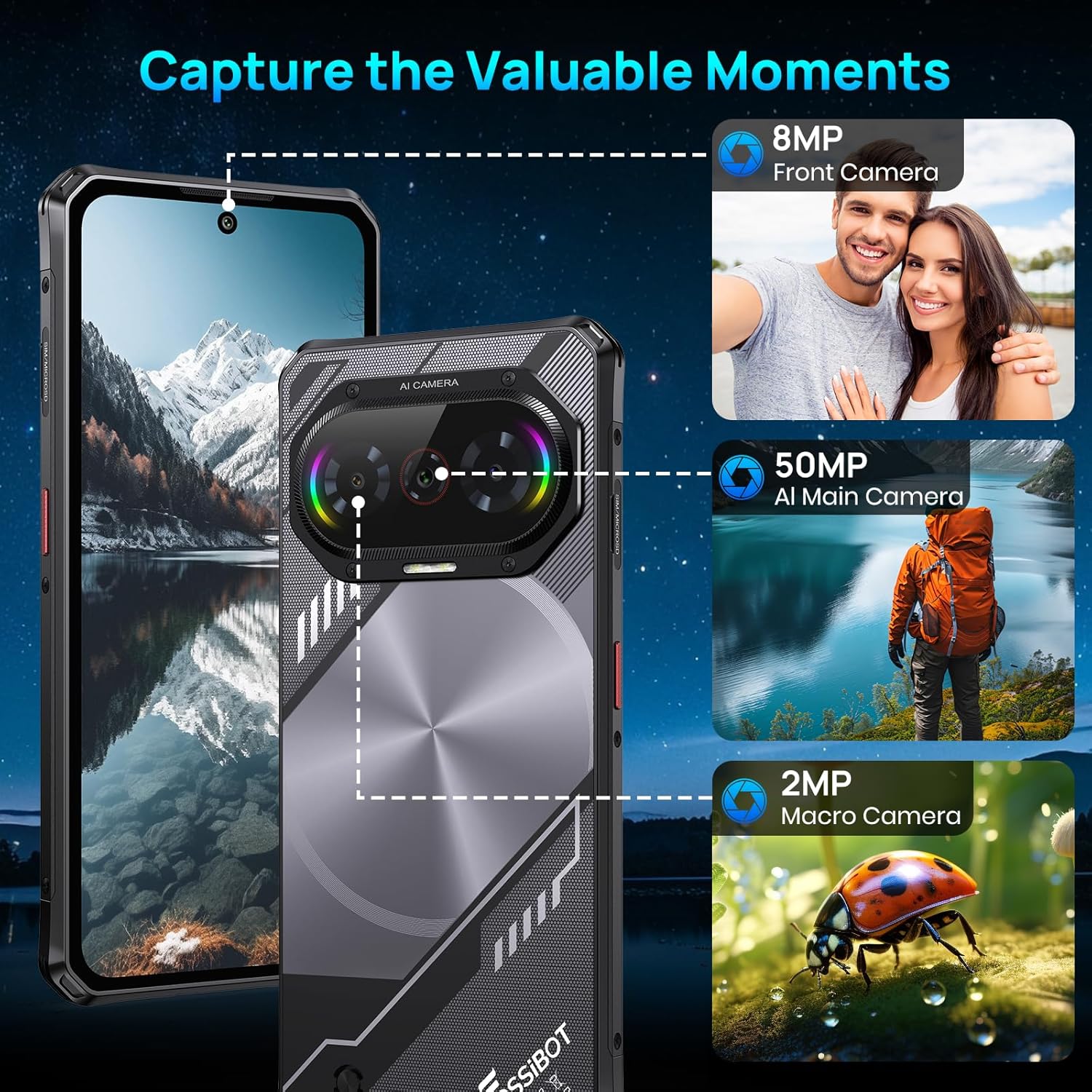
The device is equipped with a versatile camera setup: a 50MP AI main camera, an 8MP front camera, and a 2MP macro camera. This configuration allows for detailed photos, clear selfies, and close-up shots.
3.4. Batteria
A 5000mAh large-capacity battery provides extended usage, complemented by 18W fast charging capabilities to quickly replenish power.

3.5. Durata
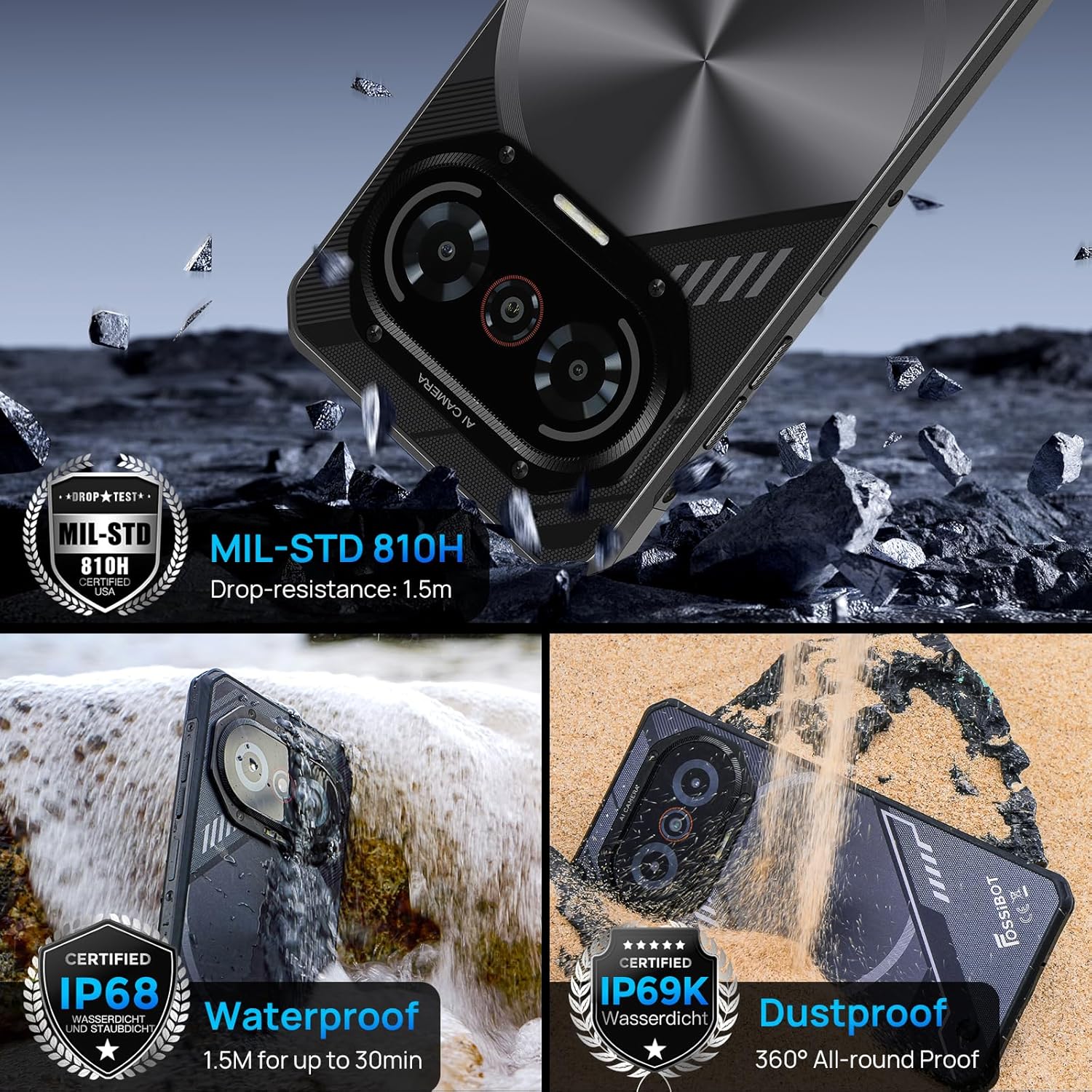
The F114 is certified with IP68/IP69K and MIL-STD-810H standards, making it waterproof, dustproof, and drop-resistant. It is built to withstand harsh outdoor conditions.
3.6. Sistema operativo
The smartphone runs on the latest Android 15 operating system, offering enhanced privacy features, faster app launches, and improved multitasking capabilities.

3.7. Connettività e altre funzionalità
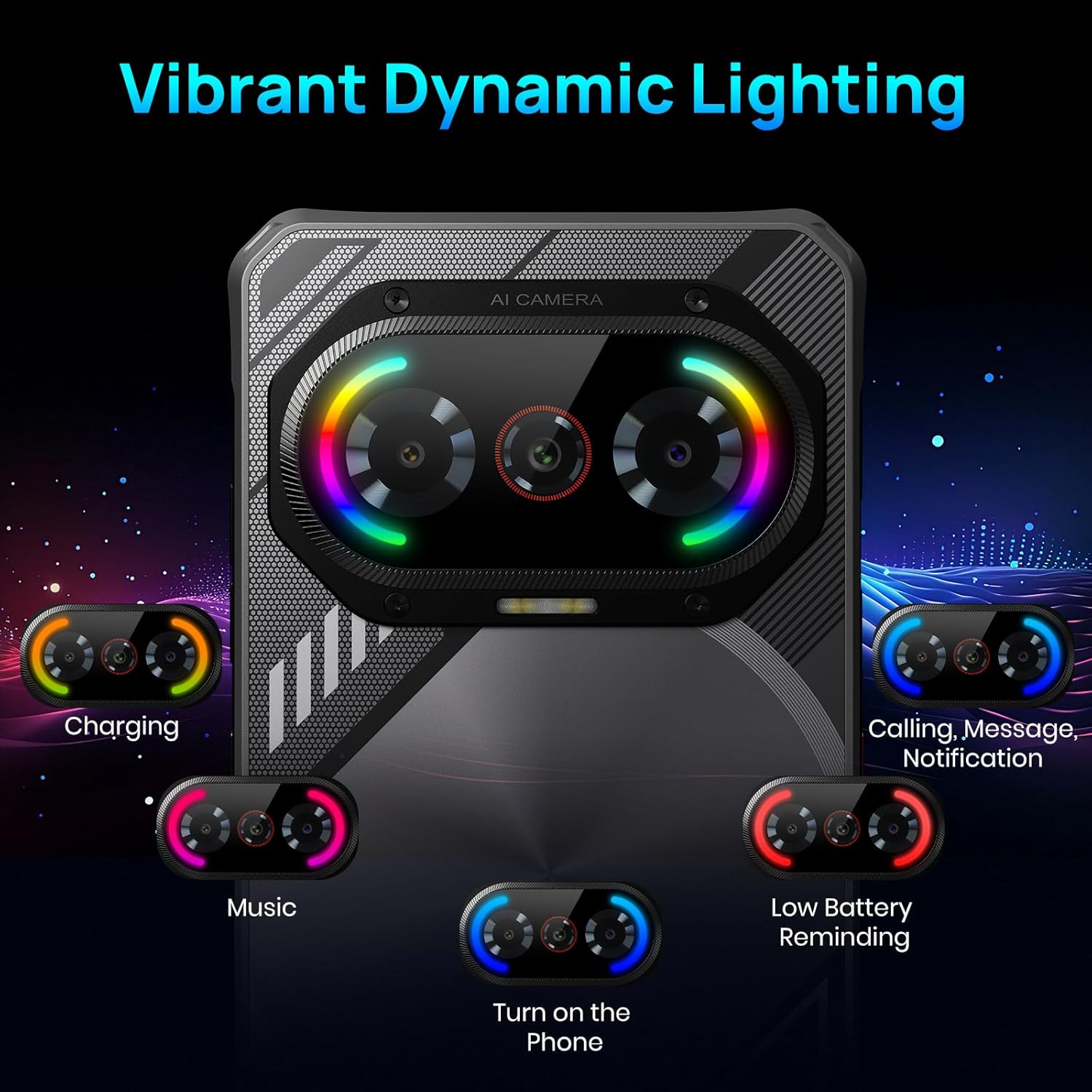
The F114 supports dual 4G SIM cards and includes comprehensive navigation systems (GPS, GLONASS, Galileo, Beidou, QZSS). It also features NFC for contactless payments and data transfer. The device incorporates a dynamic lighting effect on the rear for notifications and charging status.
4. Configurazione iniziale
4.1. Installazione della scheda SIM e della scheda SD
- Individuare il vassoio della scheda SIM sul lato del telefono.
- Inserire il perno della scheda SIM fornito nel piccolo foro accanto al vassoio per espellerla.
- Place your Nano SIM card(s) and/or a microSD card (up to 2TB) into the tray, ensuring correct orientation.
- Reinserire con cautela il vassoio nel telefono.
4.2. Accensione/Spegnimento
- Per accendere: Premere e tenere premuto il pulsante di accensione (solitamente sul lato destro) finché non appare il logo FOSSIBOT.
- Per spegnere: Tenere premuto il pulsante di accensione, quindi selezionare "Spegni" dalle opzioni sullo schermo.
- Ricomincia: Tieni premuto il pulsante di accensione, quindi seleziona "Riavvia" dalle opzioni.
5. Funzionamento di base
5.1. Navigazione dello schermo
- Rubinetto: Tocca un'icona o un'opzione per selezionarla.
- Scorri: Trascina il dito sullo schermo per scorrere o navigare tra le schermate.
- Pizzico: Utilizzare due dita per ingrandire o ridurre le immagini e web pagine.
5.2. Notifiche e impostazioni rapide
- Notifiche: Scorri verso il basso dalla parte superiore dello schermo a view notifiche.
- Impostazioni rapide: Swipe down again from the notification panel to access quick settings for Wi-Fi, Bluetooth, brightness, etc.
6. Funzionamento della fotocamera
The FOSSIBOT F114's camera app offers various modes to enhance your photography:
- Modalità foto: Modalità standard per le foto di tutti i giorni.
- Modalità ritratto: Crea un effetto di profondità di campo, sfocando lo sfondo.
- Modalità professionale: Consente il controllo manuale di impostazioni quali ISO, bilanciamento del bianco ed esposizione.
- Modalità notturna: Ottimizza le impostazioni per condizioni di scarsa illuminazione.
- Immagine HDR: High Dynamic Range for balanced exposure in high-contrast scenes.
- Modalità macro: For extreme close-up photography using the 2MP macro lens.
- Modalità subacquea: Special mode for capturing photos and videos while submerged.
To take a photo, open the Camera app and tap the shutter button. To switch between modes, swipe left or right on the mode selector above the shutter button.
7. Caratteristiche speciali
7.1. Effetti di illuminazione dinamici
The FOSSIBOT F114 features customizable dynamic lighting on the rear panel. These lights can indicate various statuses:
- Stato di carica: Different light patterns/colors for charging levels.
- Incoming Calls/Messages: Visual alerts for new communications.
- Ritmo musicale: Lights can synchronize with music playback.
- Promemoria batteria scarica: A distinct light pattern to indicate low power.
You can configure these lighting effects in the device settings under 'Radiant and agile' or similar menu options, allowing you to choose different rhythm modes like Joyful Movement, Bidirectional streaming light, Musical Pulse, and Rhythmic Pursuit.
Video: A demonstration of the FOSSIBOT F114's various features, including its display, processor, camera capabilities, dynamic mood lights, and fast charging.
7.2. NFC (comunicazione in prossimità)
NFC allows for quick, short-range wireless communication. Use it for:
- Pagamenti contactless: Make payments at compatible terminals using Google Pay.
- Trasferimento dati: Condividere files, photos, and contacts with other NFC-enabled devices.
To enable NFC, go to Settings > Connected devices > Connection preferences > NFC.
7.3. GPS e navigazione
The FOSSIBOT F114 supports multiple global navigation satellite systems (GPS, GLONASS, Galileo, Beidou, QZSS) for accurate location tracking and navigation, ideal for outdoor activities.
8. Manutenzione
- Pulizia: Utilizzare un morbido, damp panno per pulire il dispositivo. Evitare prodotti chimici aggressivi.
- Esposizione all'acqua: While waterproof, ensure all ports are securely closed before exposing the phone to water. After water exposure, dry the phone thoroughly before charging.
- Aggiornamenti software: Controlla e installa regolarmente gli aggiornamenti software per garantire prestazioni e sicurezza ottimali.
- Cura della batteria: Evitare temperature estreme. Non scaricare completamente la batteria frequentemente.
9. Risoluzione Dei Problemi
9.1. Il dispositivo non si accende
- Assicurarsi che la batteria sia carica. Collegare il telefono al caricabatterie per almeno 30 minuti.
- Per forzare il riavvio, tenere premuto il pulsante di accensione per 10-15 secondi.
9.2. Connessione di rete scadente
- Controlla che la tua scheda SIM sia inserita correttamente.
- Verify that your carrier is supported (Note: AT&T, CRICKET, and Verizon are not supported).
- Riavviare il telefono.
- Vai su Impostazioni > Rete e Internet > Rete mobile e assicurati che i dati mobili siano abilitati.
9.3. App che si bloccano o si bloccano
- Cancella la cache dell'app problematica (Impostazioni > App > [Nome app] > Archiviazione e cache > Cancella cache).
- Aggiorna l'app all'ultima versione dal Google Play Store.
- Se il problema persiste, disinstalla e reinstalla l'app.
9.4. La batteria si scarica rapidamente
- Ridurre la luminosità dello schermo.
- Chiudi le app inutilizzate in esecuzione in background.
- Disattivare Wi-Fi, Bluetooth e GPS quando non vengono utilizzati.
- Controlla l'utilizzo della batteria in Impostazioni > Batteria per identificare le app che consumano molta energia.
10. Specifiche
| Caratteristica | Specificazione |
|---|---|
| Marca | FOSSIBOT |
| Nome del modello | F114FT128 |
| Sistema operativo | Androide 15 |
| Dimensione della memoria RAM installata | 16 GB |
| Capacità di archiviazione della memoria | 128 GB (Expandable to 2 TB via SD card) |
| Dimensioni dello schermo | 6.67 pollici |
| Risoluzione | 720x1600 |
| Frequenza di aggiornamento | Frequenza 60 Hz |
| Tecnologia cellulare | 4G |
| Operatore di telefonia mobile | Unlocked (AT&T, CRICKET, and Verizon not supported) |
| Numero di slot per schede SIM | Doppia SIM |
| Tipo di connettore | USB tipo C |
| Livello di resistenza all'acqua | Waterproof (IP68/IP69K) |
| Risoluzione del sensore fotografico anteriore | 8 MP |
| Rear Facing Camera Photo Sensor Resolution | 50 MP (Main) |
| Number of Rear Facing Cameras | 2 (50MP Main + 2MP Macro) |
| Capacità della batteria | 5000 milioneamp Ore |
| Durata media della batteria | 5 days (Standby) |
| Risoluzione di acquisizione video | 1080p a 30 fps |
| Geo GPStagging Functionality | VERO |
11. Garanzia e supporto
FOSSIBOT offre un supporto completo per il tuo smartphone F114:
- Garanzia: A 1-year long-term warranty is provided.
- Resi: È disponibile una garanzia di reso gratuito di 30 giorni.
- Assistenza clienti: Year-round customer support and 24-hour online customer service are provided to assist with any issues.
For further assistance, please refer to the contact information provided with your product documentation or visit the official FOSSIBOT websito.