1. Introduzione
The Preciva LF326 Digital Caliper is a professional-grade measuring instrument designed for precise measurements in various applications, including professional, mechanical, electrical, and DIY tasks. This manual provides detailed instructions on how to set up, operate, maintain, and troubleshoot your digital caliper to ensure accurate and reliable performance.
2. Prodotto finitoview
2.1. Caratteristiche principali
- Misurazione ad alta precisione: Offers a measuring range of 0-150 mm (0-6 inches) with a resolution of 0.01 mm (0.0005 inches) and an accuracy of ±0.01 mm.
- Ampio display LCD: Features a large, backlit digital screen for clear and immediate readings, even in low-light conditions.
- Ricaricabile tramite USB Type-C: Equipped with a Type-C rechargeable battery, providing 3 to 6 months of daily use on a single 50-minute charge.
- Protezione IP54: Constructed from high-quality hardened stainless steel, making it resistant to dust, rust, and water splashes from all directions.
- Modalità di misurazione versatili: Capable of measuring inner diameter, outer diameter, depth, and step measurements.
- Funzioni intuitive: Includes mm/inch conversion, zero-setting at any point, and a locking screw for stable measurements.
2.2. Componenti del prodotto
Fare riferimento al diagramma sottostante per un'overview of the digital caliper's main components.

Immagine: Dettagliato view of the Preciva Digital Caliper showing its components, including inner diameter claw, charging port, LCD display, unit conversion key, power switch, fastening screws, caliper body, roller, zero key, outer measuring jaws, and depth measuring rod.
- Inner Diameter Claw: Utilizzato per misurare le dimensioni interne.
- Porta di ricarica: Porta USB Type-C per ricaricare la batteria interna.
- Schermo LCD: Digital screen showing measurement readings, units, and battery status.
- Unit Conversion Key: Button to switch between millimeters (mm) and inches (in).
- Interruttore di alimentazione: Button to turn the caliper ON/OFF.
- Viti di fissaggio: Secures the display unit to the main body.
- Caliper Body: The main frame of the measuring tool.
- Rullo: Thumb roller for fine adjustment of the measuring jaws.
- Zero Key: Button to reset the display to zero at any position.
- Outer Measuring Jaws: Utilizzato per misurare le dimensioni esterne.
- Depth Measuring Rod: Extends from the end of the caliper for depth measurements.
3. Impostazione
3.1. Disimballaggio e ispezione
Carefully unpack the Preciva Digital Caliper and all accessories. Verify that all items listed below are present and undamaged:
- Preciva Digital Caliper (x1)
- Cavo di ricarica USB di tipo C (x1)
- Hard Protective Case (x1)
- Manuale utente (x1)
Se qualche articolo risulta mancante o danneggiato, contattare l'assistenza clienti.
3.2. Ricarica iniziale
Before first use, it is recommended to fully charge the digital caliper. Connect the provided USB Type-C charging cable to the caliper's charging port and to a standard USB power adapter (5V/3A or lower, not included).

Immagine: The digital caliper being charged via a USB Type-C cable connected to a laptop. The image highlights the charging port and the battery indicator on the LCD screen.
A full charge typically takes approximately 50 minutes and provides 3 to 6 months of usage. The LCD display will show a charging indicator.
4. Istruzioni per l'uso
4.1. Accensione/spegnimento
Premere il tasto ACCESO/SPENTO button to turn the caliper on. The LCD display will illuminate. To turn off the caliper, press and hold the ACCESO/SPENTO button, or it will automatically power off after 5 minutes of inactivity.
4.2. Zero Setting
Before taking a measurement, ensure the jaws are fully closed and clean. Press the ZERO button to set the display to zero. This allows for relative measurements from any point.
4.3. Unit Conversion (mm/inch)
Premere il tasto pollici/mm button to switch between millimeter (mm) and inch (in) units. The selected unit will be displayed on the LCD screen.
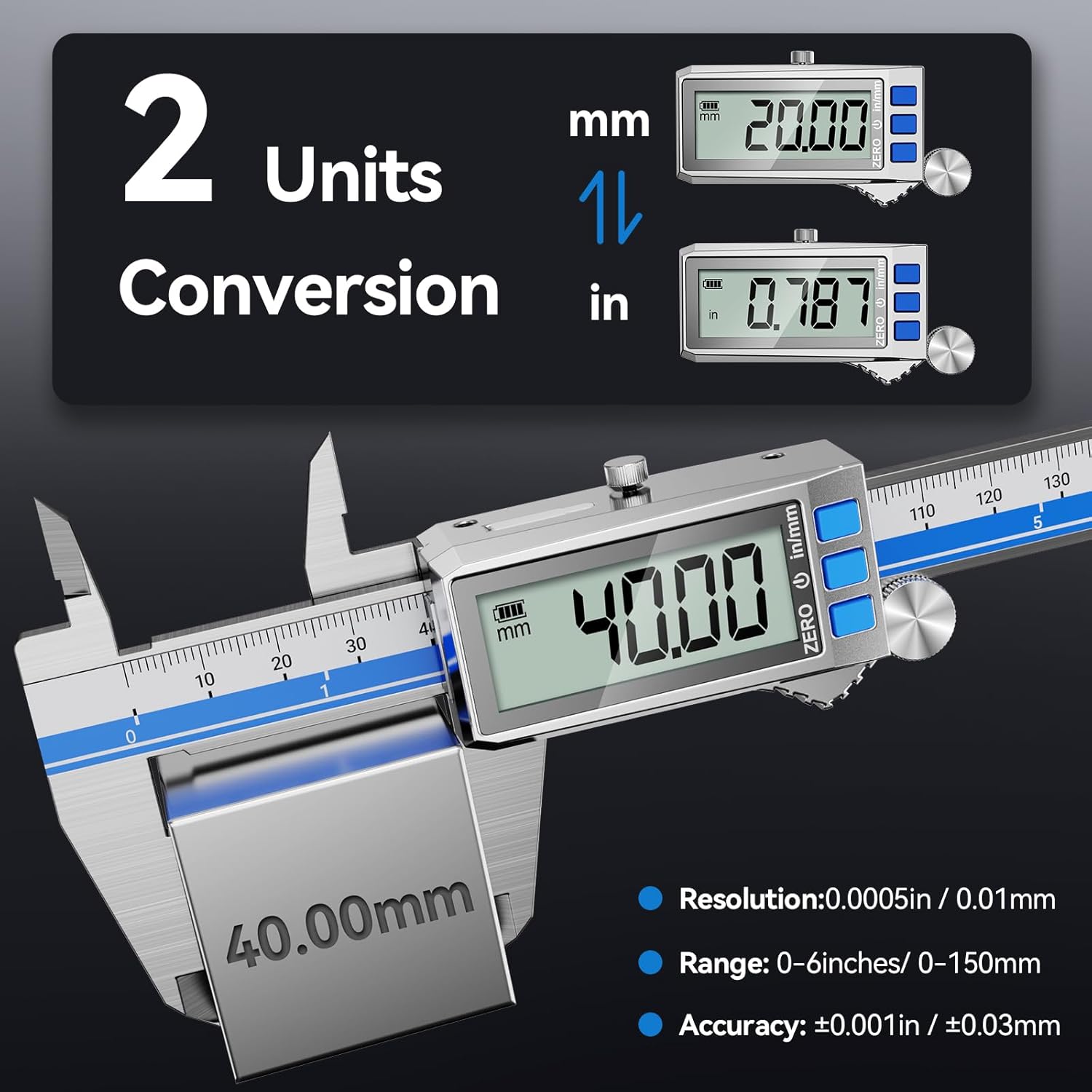
Immagine: The digital caliper's LCD display showing measurements in both millimeters (mm) and inches (in), illustrating the unit conversion feature. The image also highlights the resolution, range, and accuracy.
4.4. Misurazione
The Preciva Digital Caliper can perform four types of measurements:

Immagine: A composite image demonstrating the four primary measurement types: inside measurement using the inner jaws, outside measurement using the outer jaws, depth measurement using the depth rod, and step measurement using the step face.
- Misurazione esterna: Use the large outer jaws to measure external dimensions of objects.
- Misurazione interna: Use the small inner jaws to measure internal dimensions, such as bore diameters.
- Misurazione della profondità: Extend the depth measuring rod into a hole or recess to measure its depth.
- Misurazione del passo: Use the step face at the end of the fixed jaw to measure the height difference between two surfaces.
For stable readings, use the thumb roller for fine adjustments and the locking screw to secure the jaws in place after taking a measurement.
5. Manutenzione
5.1. Pulizia
Regularly clean the measuring surfaces and the main body of the caliper with a clean, dry, lint-free cloth. Avoid using solvents or abrasive cleaners, as they may damage the display or the caliper's finish. Ensure no dust or debris accumulates in the sliding mechanism.
5.2. Conservazione
When not in use, store the digital caliper in its hard protective case to prevent damage from impacts, dust, and moisture. Store in a dry environment at room temperature.
5.3. Cura della batteria
Recharge the caliper when the battery indicator on the LCD display shows low power. Avoid completely draining the battery for extended periods to prolong its lifespan. Use only the provided USB Type-C cable or a compatible cable for charging.
5.4. Funzionalità di protezione

Immagine: The digital caliper showcasing its "Triple Protection" features: IP54 Waterproof, Anti-Rust, and Stainless Steel construction. It also illustrates the slidable mechanism and the lockable screw for securing measurements.
The caliper is designed with IP54 protection, making it resistant to dust and water splashes. Its stainless steel construction provides anti-rust properties. However, it is not fully submersible and should not be exposed to excessive moisture or corrosive substances.
6. Risoluzione Dei Problemi
| Problema | Possibile causa | Soluzione |
|---|---|---|
| Il display non si accende. | Batteria scarica o completamente scarica. | Charge the caliper using the USB Type-C cable. |
| Letture imprecise. | Jaws are not clean or fully closed before zeroing. Debris on measuring surfaces. | Clean the measuring jaws and surfaces. Close jaws completely and press the ZERO button. |
| Display shows "E" or error message. | Measurement range exceeded or internal error. | Ensure measurement is within the 0-150mm range. Turn the caliper off and on again. If the problem persists, contact customer support. |
| Difficulty sliding jaws. | Dust or debris in the sliding mechanism. | Clean the sliding rail thoroughly. Avoid applying excessive force. |
7. Specifiche
| Caratteristica | Specificazione |
|---|---|
| Numero di modello | LF326 |
| Campo di misura | 0 - 150 mm (0 - 6 pollici) |
| Risoluzione | 0.01 mm (0.0005 pollici) |
| Precisione | ±0.01 millimetri |
| Materiale | Acciaio inossidabile temprato |
| Display | Ampio display LCD retroilluminato |
| Fonte di alimentazione | Rechargeable Lithium Battery (USB Type-C) |
| Tempo di ricarica | Circa 50 minuti |
| Durata della batteria | 3 - 6 months (typical daily use) |
| Grado di protezione IP (ingresso) | IP54 (resistente alla polvere e agli schizzi) |
| Spegnimento automatico | Dopo 5 minuti di inattività |
| Dimensioni del prodotto | 24L x 8W cm (approx. 20 x 9 x 0.1 cm) |
| Peso del prodotto | 300 grammi |
8. Garanzia e supporto
Preciva products are manufactured to high-quality standards. For warranty information or technical support, please refer to the contact details provided with your purchase documentation or visit the official Preciva websito.
Conservare la prova d'acquisto per eventuali richieste di garanzia.