
1. Introduzione
The ELEGOO Centauri Carbon 3D Printer is a high-performance FDM (Fused Deposition Modeling) machine designed for both beginners and experienced users. It features a CoreXY motion system for high-speed printing, automatic calibration, and an enclosed build chamber with a 320°C nozzle for compatibility with advanced technical filaments. This manual provides essential information for safe operation, setup, maintenance, and troubleshooting to ensure optimal performance and longevity of your printer.
2. Istruzioni di sicurezza
Please read and understand all safety warnings before operating the printer to prevent injury or damage.
- Always operate the printer in a well-ventilated area to dissipate fumes from heated plastics.
- Keep hands clear of moving parts, such as the print head and build plate, during operation.
- The nozzle and print bed reach high temperatures during operation; avoid direct contact to prevent burns.
- Use only recommended filaments and the original power supply provided with the printer.
- Do not leave the printer unattended during long prints, especially when operating with new materials or settings.
- Tenere la stampante fuori dalla portata di bambini e animali domestici.
- Do not attempt to modify the printer's hardware or software unless instructed by official ELEGOO support.
3. Contenuto della confezione
Verificare che tutti gli articoli siano presenti nel pacco:
- Stampante 3D ELEGOO Centauri Carbon
- Cavo di alimentazione
- Cavo USB
- Tool Kit (e.g., spatula, pliers, nozzle cleaning needle, Allen wrenches)
- Sampil filamento
- Manuale dell'utente (questo documento)
4. Prodotto finitoview
The ELEGOO Centauri Carbon is engineered for efficiency, precision, and versatility in 3D printing.
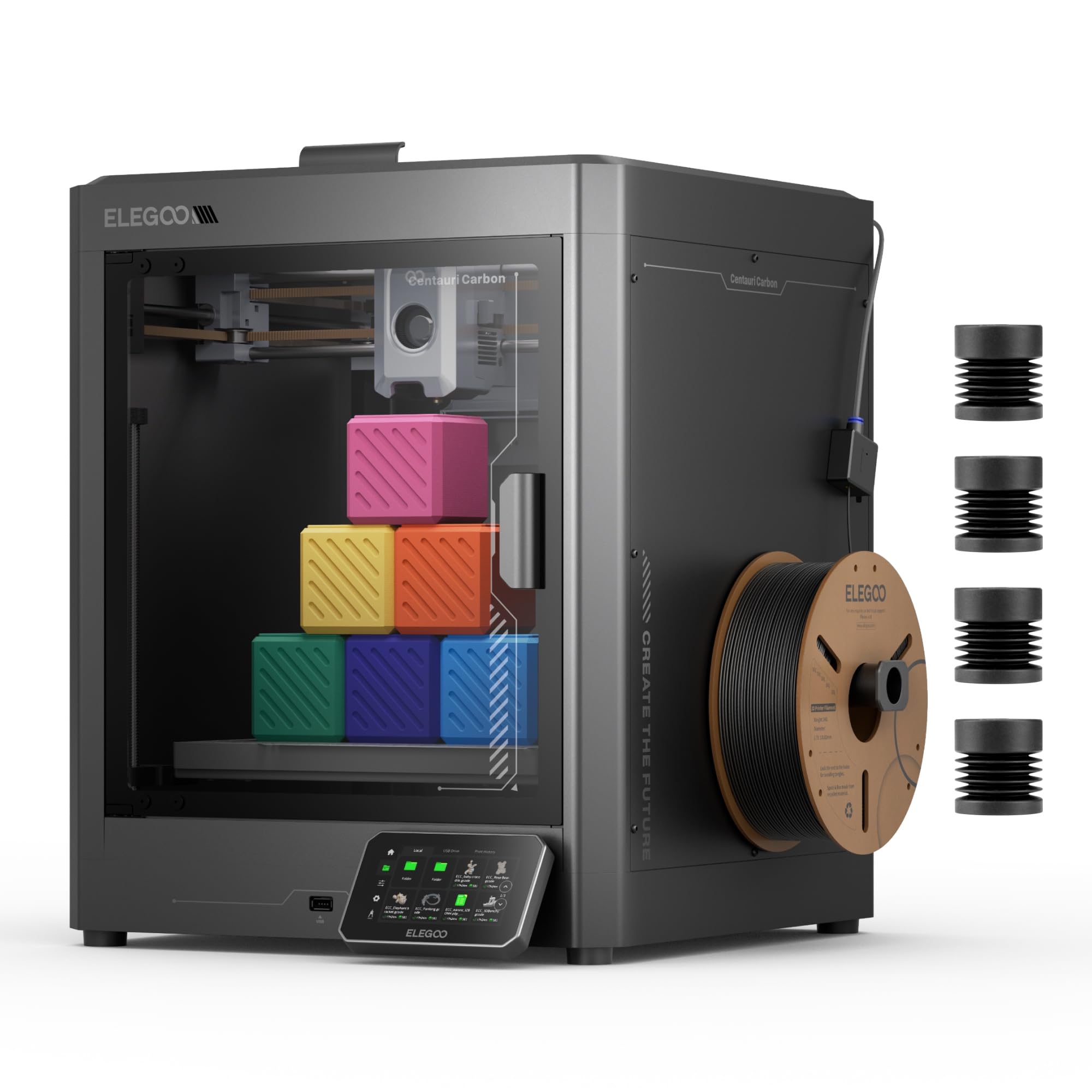
Image: The ELEGOO Centauri Carbon 3D Printer, showcasinil suo design elegante e la camera di stampa chiusa.
Caratteristiche principali:
- Stampa ad alta velocità: Utilizes an advanced CoreXY motion system, achieving impressive print speeds up to 500 mm/s and acceleration of 20,000 mm/s². This allows for rapid production of both large and detailed parts.
- Advanced Material Compatibility: Equipped with a hardened steel and brass nozzle capable of reaching 320°C, and an enclosed chamber with optimized cooling. This design supports printing with high-performance filaments like carbon fiber reinforced materials, enabling the creation of strong, lightweight, and heat-resistant parts.
- Costruzione robusta: Features a rigid molded aluminum frame to minimize vibrations, ensuring stable and consistent print quality even at high speeds. Automatic vibration compensation and pressure advance further contribute to smooth first layers and overall print consistency.
- Calibrazione automatica: The printer comes fully assembled and pre-calibrated. Its automatic leveling system and intuitive touchscreen simplify the setup process, making it ready for use right out of the box.
- Monitoraggio integrato: An integrated camera and dual LED lighting allow for real-time print monitoring, time-lapse video creation, and remote adjustments, providing complete control over your prints.
- Generous Build Volume: Offers a substantial print volume of 256 x 256 x 256 mm (10" x 10" x 10"), accommodating a wide range of projects.

Image: Diagram illustrating the CoreXY motion system and its high-speed capabilities (500 mm/s print speed, 20,000 mm/s² acceleration).

Immagine: Primo piano view of the printer's hotend and the interior of the enclosed build chamber, highlighting its high-temperature capabilities.

Image: The ELEGOO Centauri Carbon printer with an object inside, illustrating its 256x256x256 mm build volume.
5. Impostazione
The Centauri Carbon is designed for quick and easy setup, allowing you to start printing almost immediately.
- Disimballaggio: Carefully remove the printer and all accessories from its packaging. Inspect for any signs of damage during transit.
- Posizionamento: Place the printer on a stable, level, and heat-resistant surface. Ensure there is adequate space around the printer for ventilation and access during operation and maintenance.
- Collegamento elettrico: Connect the provided power cable to the printer's power input and then to a suitable electrical outlet.
- Accensione iniziale: Turn on the printer using the main power switch. The touchscreen will illuminate.
- Calibrazione automatica: The printer is pre-calibrated from the factory. Follow any on-screen prompts for initial setup. The automatic leveling system will perform necessary adjustments to the print bed, ensuring optimal first layer adhesion without manual intervention.

Image: A user interacting with the printer's touchscreen, illustrating the 'Print Out of the Box' readiness.
6. Istruzioni per l'uso
Follow these steps to prepare and start your 3D prints.
- Preparare il modello 3D: Use a compatible slicing software (e.g., Elegoo Cura, PrusaSlicer) to convert your 3D model file (STL, OBJ) into G-code. Ensure your slicing profile matches the Centauri Carbon's specifications and the filament you are using.
- Carica filamento:
- Ensure the nozzle is at room temperature or preheated to the filament's loading temperature (check filament manufacturer's recommendations).
- Posizionare la bobina del filamento nel supporto designato.
- Feed the filament into the extruder's input until it is gripped by the gears.
- Use the touchscreen interface to initiate the filament loading process. The printer will automatically heat the nozzle and extrude a small amount of filament to prime it.
- Avvia la stampa:
- Transfer the prepared G-code file to the printer via USB drive or network connection.
- Selezionare il desiderato file from the printer's intuitive touchscreen interface.
- Confirm the print settings and initiate the print. The printer will automatically heat the print bed and nozzle to the required temperatures before starting the print.
- Monitorare la stampa:
- Utilize the integrated camera for real-time monitoring of the print progress. This allows you to check for issues and ensure a successful print.
- The touchscreen displays print status, current temperatures, and estimated remaining print time.
- Adjust settings such as print speed or fan speed if necessary, directly from the touchscreen or connected software.
- Rimuovi stampa: Once the print is complete and the print bed has cooled down, carefully remove the printed object from the flexible print plate. The plate's design facilitates easy removal of prints.

Image: Close-up of the integrated camera and the flexible, double-sided print plate, highlighting monitoring and print removal features.
7. Manutenzione
Regular maintenance ensures consistent print quality and extends the lifespan of your ELEGOO Centauri Carbon 3D Printer.
- Pulizia del piano di stampa: After each print, allow the print bed to cool and then clean it with isopropyl alcohol to remove any residue and ensure optimal adhesion for future prints.
- Manutenzione degli ugelli: Periodically check the nozzle for clogs. Use the provided cleaning needle to clear any blockages. If printing with abrasive filaments (e.g., carbon fiber reinforced), inspect the hardened steel nozzle for wear and replace it if necessary.
- Extruder Cleaning: Keep the extruder gears free of filament debris to ensure smooth filament feeding. Use a small brush or compressed air if needed.
- Lubrificazione: Apply a small amount of lubricant (e.g., lithium grease) to the Z-axis lead screws and other moving parts as recommended by ELEGOO to maintain smooth motion.
- Aggiornamenti del firmware: Regularly check the official ELEGOO website for any available firmware updates. Keeping your printer's firmware up-to-date can provide performance improvements, new features, and bug fixes.
- Pulizia generale: Keep the printer's exterior and interior free of dust and filament scraps. Use a soft, dry cloth for cleaning.
8. Risoluzione Dei Problemi
Questa sezione affronta i problemi più comuni che potresti incontrare e le loro possibili soluzioni.
| Problema | Possibile causa | Soluzione |
|---|---|---|
| Scarsa adesione del primo strato | Dirty print bed, incorrect Z-offset, insufficient bed temperature. | Clean the print bed with isopropyl alcohol. Re-run auto-calibration or manually adjust Z-offset. Increase bed temperature slightly in slicing software. |
| Filamento non estruso | Clogged nozzle, tangled filament, incorrect extruder temperature. | Clear the nozzle with the provided cleaning needle. Ensure filament is loaded correctly and not tangled. Verify extruder temperature is appropriate for the filament type. |
| Print Quality Issues (e.g., layer shifting, stringing) | Loose belts, excessive print speed, incorrect retraction settings, unstable printer surface. | Check and tighten belt tension. Reduce print speed. Adjust retraction settings in your slicing software. Ensure the printer is on a stable surface to minimize vibrations. |
| La stampante non si accende | Loose power cable, faulty power outlet. | Check all power cable connections. Verify the power outlet is functional. If the issue persists, contact ELEGOO customer support. |
9. Specifiche
Detailed technical specifications for the ELEGOO Centauri Carbon 3D Printer.
| Caratteristica | Dettaglio |
|---|---|
| Marca | ELEGOO |
| Modello | Centauri Carbon (FR-EHJ-3DF-CC) |
| Colore | Nero |
| Tecnologia di stampa | FDM (modellazione a deposizione fusa) |
| Costruisci volume | 256 x 256 x 256 mm (10" x 10" x 10") |
| Max Velocità di stampa | 500 millimetri/secondo |
| Accelerazione massima | 20,000mm/s² |
| Temperatura dell'ugello | Fino a 320°C |
| Materiale dell'ugello | Hardened Steel and Brass |
| Struttura telaio | Molded Aluminum |
| Connettività | USB |
| Dispositivi compatibili | Portatile, PC, Smartphone |
| Supportato File Formati | STL, OBJ, GCODE |
| Peso dell'articolo | 17.5 kg |
| Dimensioni del prodotto | 56P x 47.5l x 48H cm |
10. Garanzia e supporto
For assistance with your ELEGOO Centauri Carbon 3D Printer, please refer to the following information:
- Garanzia del produttore: The ELEGOO Centauri Carbon 3D Printer comes with a 1-year manufacturer warranty. Please retain your proof of purchase for all warranty claims.
- Supporto tecnico: For technical assistance, troubleshooting, or warranty inquiries, please visit the official ELEGOO website for up-to-date contact information and support resources.
- Manuale digitale: Una versione digitale di questo manuale utente è disponibile per il download all'indirizzo: ELEGOO Centauri Carbon User Manual (PDF).


