
1. Introduzione
This manual provides detailed instructions for the installation, operation, and maintenance of your NEWFAST RE516 N300 WiFi Extender. Please read this manual carefully before using the device to ensure proper setup and optimal performance. Keep this manual for future reference.
2. Prodotto finitoview
2.1 Contenuto della confezione
- 1 x NEWFAST RE516 N300 WiFi Extender
- 1 x Multi-language Instruction Manual
2.2 Caratteristiche del dispositivo
The NEWFAST RE516 N300 WiFi Extender is designed to expand your existing Wi-Fi coverage and eliminate dead zones. Key features include:
- N300 Wireless Speed: Provides up to 300 Mbps data transfer rate on the 2.4GHz band.
- Quattro antenne esterne: Enhances signal stability and coverage.
- Molteplici modalità operative: Supports Repeater, Access Point, Router, and Client modes to suit various networking needs.
- Ampia compatibilità: Works with any standard Wi-Fi router or gateway.
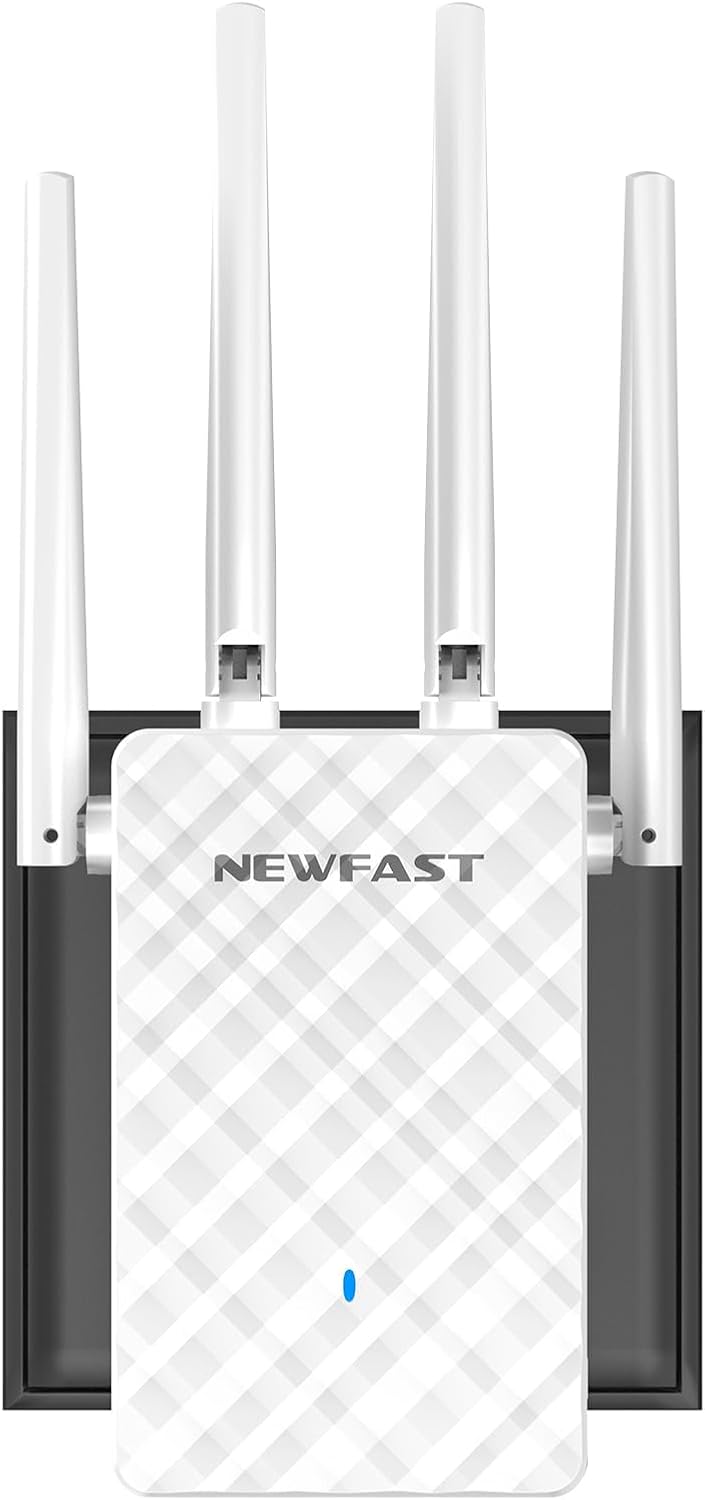
Immagine 1: anteriore view of the NEWFAST RE516 N300 WiFi Extender, showcasing its four external antennas and compact design.

Image 2: A diagram showing how the WiFi extender can improve wireless coverage throughout a house, eliminating dead zones.
3. Istruzioni per l'installazione
Follow these general steps to set up your NEWFAST RE516 WiFi Extender. Specific configuration details may vary based on your chosen operating mode.
3.1 Accensione del dispositivo
- Plug the NEWFAST RE516 into an electrical outlet near your existing Wi-Fi router.
- Wait for the power indicator light to turn on and stabilize.
3.2 Connecting to the Extender
You can connect to the extender via Wi-Fi or an Ethernet cable.
- Connessione Wi-Fi: On your computer or mobile device, search for available Wi-Fi networks. Connect to the network named similar to "NEWFAST_Extender" or "NEWFAST_XXXX" (where XXXX are the last four digits of the MAC address).
- Connessione Ethernet: Connect an Ethernet cable from your computer to the LAN port on the extender.
3.3 Configurazione tramite Web Navigatore
- Aprire un web browser (ad esempio, Chrome, Firefox, Edge).
- Inserisci l'indirizzo IP predefinito (solitamente
192.168.10.1or192.168.0.1) o l'impostazione predefinita web indirizzo (ad esempio,re.newfast.com) into the address bar and press Enter. Refer to the included quick start guide for the exact address. - Accedi utilizzando il nome utente e la password predefiniti (in genere
adminper entrambi). - Follow the on-screen wizard to select your desired operating mode (Repeater, Access Point, or Router) and configure the network settings.
- For Repeater mode, select your existing Wi-Fi network and enter its password.
- Once configured, the extender will restart. Relocate the extender to a suitable position between your router and the desired coverage area.
4. Modalità operative
The NEWFAST RE516 supports four primary operating modes:
- Modalità ripetitore: Extends the range of an existing wireless network. This is the most common mode for eliminating Wi-Fi dead zones.
- Modalità punto di accesso (AP): Transforms a wired network connection into a wireless one. Ideal for adding Wi-Fi capability to a wired-only router.
- Modalità router: Funziona come router primario, creando una nuova rete privata. Questa modalità è in genere utilizzata quando si dispone di un modem ma non di un router.
- Modalità cliente: Allows wired-only devices (like smart TVs or gaming consoles) to connect to a wireless network. The extender acts as a wireless adapter for the wired device.
5. Manutenzione
Regular maintenance helps ensure the longevity and optimal performance of your NEWFAST RE516 WiFi Extender.
- Mantenere pulito: Gently wipe the device with a dry, soft cloth. Avoid using liquid cleaners or aerosols.
- Ventilazione: Ensure the device is placed in a well-ventilated area, free from obstructions that could block airflow.
- Aggiornamenti del firmware: Controllare periodicamente il sito ufficiale NEWFAST webSito per gli aggiornamenti del firmware. L'aggiornamento del firmware può migliorare le prestazioni, aggiungere nuove funzionalità e correggere bug.
- Condizioni ambientali: Evitare di esporre il dispositivo a temperature estreme, umidità o luce solare diretta.
6. Risoluzione Dei Problemi
If you encounter issues with your NEWFAST RE516, refer to the following common problems and solutions:
- Nessun potere:
Soluzione: Ensure the extender is securely plugged into a working electrical outlet. Check if the power indicator light is on. - Impossibile accedere Web Pagina di gestione:
Soluzione: Verify that your device is connected to the extender's Wi-Fi network or via Ethernet. Ensure you are using the correct IP address or web address. Try clearing your browser's cache or using a different browser. - Nessun accesso a Internet dopo l'installazione:
Soluzione: Check if your main router has internet access. Reconfigure the extender, ensuring you selected the correct host network and entered the correct password. Try moving the extender closer to your main router. - Segnale debole o disconnessioni frequenti:
Soluzione: Relocate the extender to a position that is roughly halfway between your main router and the area with poor coverage. Avoid placing it near large metal objects, concrete walls, or other electronic devices that may cause interference. - Password di accesso dimenticata:
Soluzione: Perform a factory reset on the extender. Locate the reset button (usually a small pinhole) and press and hold it for 5-10 seconds until the lights flash. The device will revert to factory default settings, and you can log in withadmin.
7. Specifiche
| Caratteristica | Dettaglio |
|---|---|
| Marca | NUOVO VELOCE |
| Modello | RE516 (NF-RE516) |
| standard wireless | 802.11a/b/g/n |
| Banda di frequenza | 2.4 GHz |
| Velocità di trasferimento dati | Fino a 300 Mbps |
| Antenne | 4 Antenne esterne |
| Modalità operative | Repeater, Access Point, Router, Client |
| Dispositivi compatibili | Wi-Fi devices (routers, smartphones, tablets, laptops, computers, smart TVs, game consoles, printers, security cameras) supporting IEEE802.11a/b/g/n standards |
| Dimensioni | Dimensioni: 20.5 x 9.5 x 6.6 cm |
| Peso | 230 grammi |
| Componenti inclusi | 1 * Multi-language Instruction Manual, 1 * N300 WiFi Repeater |
8. Garanzia e supporto
For warranty information, please refer to the documentation included with your product or visit the official NEWFAST website. For technical support or further assistance, you may visit the Negozio NEWFAST su Amazon or contact NEWFAST customer service directly.