
1. Introduzione
This manual provides detailed instructions for the installation, operation, and maintenance of your PCCOOLER RT500 TC BK CPU Air Cooler. Please read this manual thoroughly before installation and use to ensure proper function and longevity of the product.
The PCCOOLER RT500 TC BK is a high-performance CPU air cooler designed for efficient heat dissipation. It features 5x6mm heat pipes, a 120mm ARGB fan with a hydraulic bearing, and a design optimized for wide CPU compatibility.
2. Contenuto della confezione
Verificare che tutti i componenti siano presenti prima di procedere con l'installazione.
- CPU Cooler (Heatsink and 120mm ARGB Fan)
- Piastra posteriore Intel
- Staffa AMD
- Staffa Intel
- Universal Bolts for Intel & AMD
- Clip a ventaglio
- Pasta termica

Image: Included mounting hardware and accessories for the PCCOOLER RT500 TC BK CPU Air Cooler, showing Intel backplate, AMD and Intel brackets, universal bolts, fan clips, and thermal paste.
3. Configurazione e installazione
This section outlines the general steps for installing the CPU air cooler. Specific steps may vary slightly depending on your motherboard and CPU socket type. Refer to your motherboard manual for additional guidance.
3.1 Preparare la CPU e la scheda madre
- Assicurati che il sistema sia spento e disconnesso dalla fonte di alimentazione.
- Remove any existing CPU cooler and clean off old thermal paste from the CPU surface using an appropriate cleaner.
- For Intel platforms, install the provided backplate onto the motherboard from the rear. For AMD platforms, use the existing motherboard backplate if available, or the provided AMD backplate if necessary.
3.2 Installare le staffe di montaggio
- Attach the appropriate Intel or AMD mounting brackets to the cooler's base using the universal bolts. Ensure they are securely fastened.
- Apply a small amount of thermal paste (included) to the center of the CPU's integrated heat spreader (IHS). Spread it evenly into a thin layer.

Immagine: Primo piano view of the heatpipe composite base, demonstrating its direct contact with both Intel and AMD CPUs for efficient heat transfer.
3.3 Mount the Cooler
- Carefully place the heatsink assembly onto the CPU, aligning the mounting screws with the holes on the backplate/standoffs.
- Tighten the screws in a diagonal pattern (e.g., top-left, bottom-right, top-right, bottom-left) until snug. Do not overtighten.
- Attach the 120mm ARGB fan to the heatsink using the provided fan clips. Ensure the fan is oriented to blow air through the heatsink towards the rear or top of your PC case.

Image: The PCCOOLER RT500 TC BK CPU Air Cooler mounted on a motherboard, showcasing its compact design and heatpipe configuration.
3.4 Connect Fan Cables
- Collegare il cavo della ventola PWM a 4 pin al connettore CPU_FAN sulla scheda madre.
- If your fan has ARGB lighting, connect the ARGB cable to a compatible 3-pin 5V ARGB header on your motherboard. Refer to your motherboard manual for ARGB header locations.
4. Istruzioni per l'uso
Once installed, the PCCOOLER RT500 TC BK operates automatically to cool your CPU. The 120mm ARGB fan's speed is controlled by the motherboard's PWM signal, adjusting based on CPU temperature to maintain optimal cooling and noise levels.
- Velocità della ventola: The fan operates within a speed range of 500-2200 RPM (±10%), dynamically adjusting to CPU load.
- Flusso d'aria: The 7-blade pressure-boosting design delivers up to 73.32 CFM of airflow for effective heat dissipation.
- Livello di rumore: The hydraulic bearing fan is designed for quiet operation, with a maximum noise level of 34.9 dBA.
- Illuminazione ARGB: If connected to an ARGB header, the fan's lighting can be customized via your motherboard's software or a dedicated ARGB controller (not included).
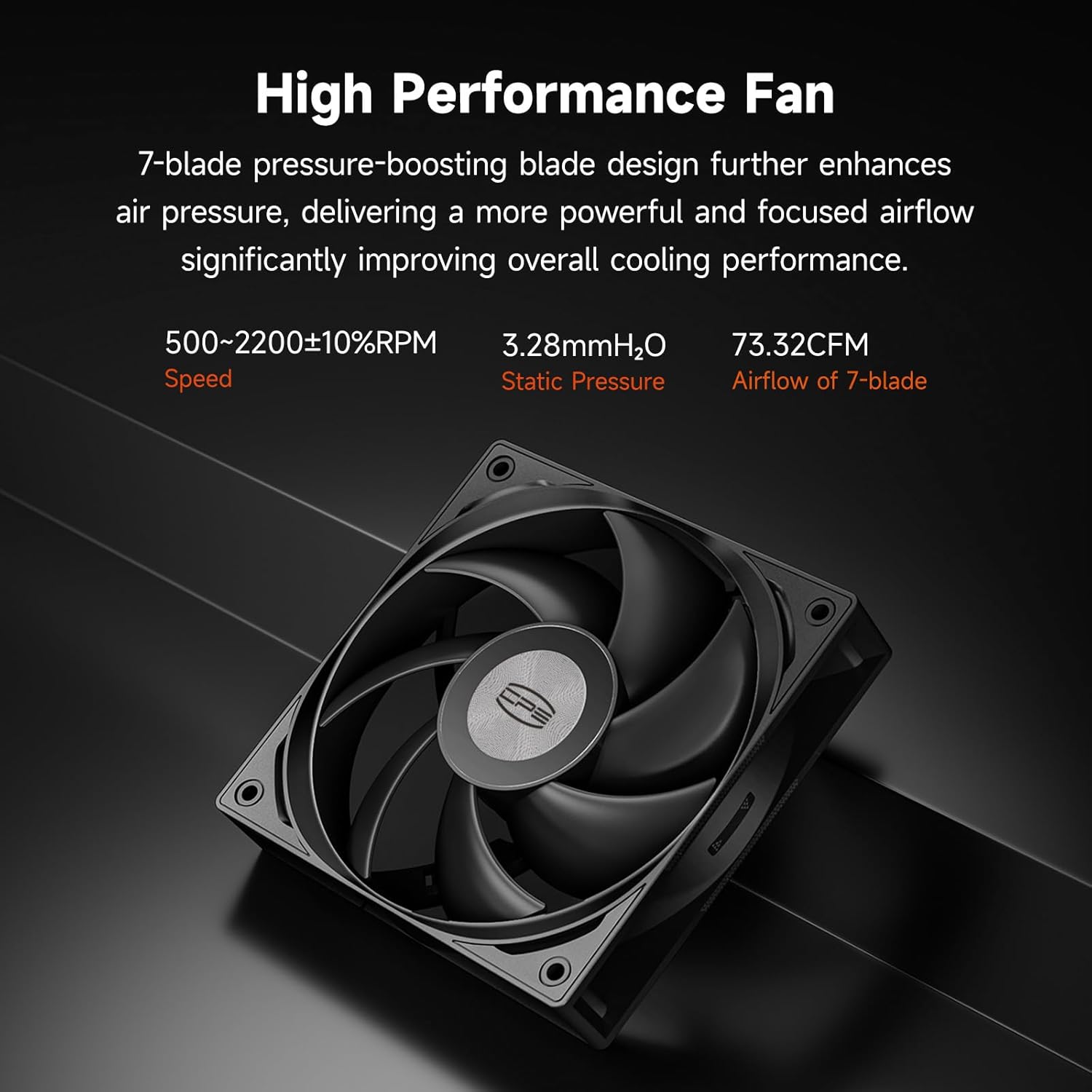
Image: The 120mm ARGB fan of the PCCOOLER RT500 TC BK, highlighting its 7-blade design for high performance and quiet operation.
5. Manutenzione
Una manutenzione regolare contribuisce a garantire prestazioni di raffreddamento ottimali e prolunga la durata del dissipatore della CPU.
- Rimozione della polvere: Periodically clean dust from the heatsink fins and fan blades using compressed air or a soft brush. Ensure the system is powered off before cleaning.
- Pasta termica: Over time, thermal paste can dry out and lose effectiveness. Consider reapplying thermal paste every 2-3 years, or if you notice a significant increase in CPU temperatures. This requires removing the cooler, cleaning old paste, and applying new paste.
- Ispezione della ventola: Check the fan for any obstructions or unusual noises. Ensure fan cables are securely connected.
6. Risoluzione Dei Problemi
If you encounter issues with your PCCOOLER RT500 TC BK, refer to the following common problems and solutions:
| Problema | Possibile causa | Soluzione |
|---|---|---|
| Temperature elevate della CPU |
|
|
| Fan Not Spinning / ARGB Not Lighting Up |
|
|
| Rumore eccessivo |
|
|
7. Specifiche
| Caratteristica | Dettaglio |
|---|---|
| Modello | RT500 TC BK |
| Dimensioni del prodotto (L x P x A) | 4.92" x 5.31" x 6.1" (125 mm x 135 mm x 155 mm circa) |
| Tubi di calore | 5 x 6mm |
| Dimensioni della ventola | 120mm |
| Tipo di ventola | ARGB, Hydraulic Bearing |
| Velocità della ventola | 500-2200 giri/min (±10%) |
| Capacità del flusso d'aria | 73.32 piedi cubi |
| Livello di rumore | Massimo 34.9 dBA |
| Connettore di alimentazione | 4-Pin PWM |
| Voltage | 12 Volt |
| Cosatage | 265 watts (TDP rating) |
| Metodo di raffreddamento | Aria |
| Materiale | Alluminio |
| Socket CPU compatibili | Intel LGA115X/1200/1700/1851, AMD AM4/AM5 |
| Peso dell'articolo | 2 libbre |

Image: Dimensional drawing of the PCCOOLER RT500 TC BK CPU Air Cooler, showing its height (152mm), width (120mm), and depth (70mm).
8. Garanzia e supporto
PCCOOLER products are backed by a manufacturer's warranty to ensure customer satisfaction and product reliability.
- Periodo di garanzia: Questo prodotto è coperto da una garanzia del produttore di 2 anni.
- Contatta l'assistenza: For technical assistance, warranty claims, or any product-related inquiries, please visit the official PCCOOLER websito o contattare il rivenditore.