
1. Introduzione
The EcoVolt IEE P3200 Portable Power Station is a versatile and robust power solution designed for various applications, from home emergency backup to outdoor adventures. Featuring a 2048Wh LiFePO4 battery and a 3200W (6400W peak) output, it can power a wide range of appliances. Its portable design includes movable wheels and a telescoping handle for easy transport.

Figure 1: EcoVolt IEE P3200 providing power in an outdoor campscenario di ing.
2. Caratteristiche del prodotto
2.1. Battery Technology
Equipped with a top-grade Lithium Iron Phosphate (LiFePO4) battery, the P3200 offers an extended lifespan of over 4000 charge/discharge cycles, lasting significantly longer than conventional batteries. An integrated Battery Management System (BMS) ensures optimal cell voltage and temperature management for safety and longevity.

Figure 2: Internal structure highlighting the LiFePO4 battery cells.
2.2. Opzioni di ricarica
The P3200 supports ultra-fast charging with multiple input methods:
- Ricarica CA: Recharges 0-100% in 1.2 hours via 1800W AC fast charge.
- Ricarica solare: Supports up to 1000W solar input, achieving 0-80% charge in approximately 1.6 hours.
- Combined AC + Solar: For even faster recharge times.
- Ricarica auto: Also supported.
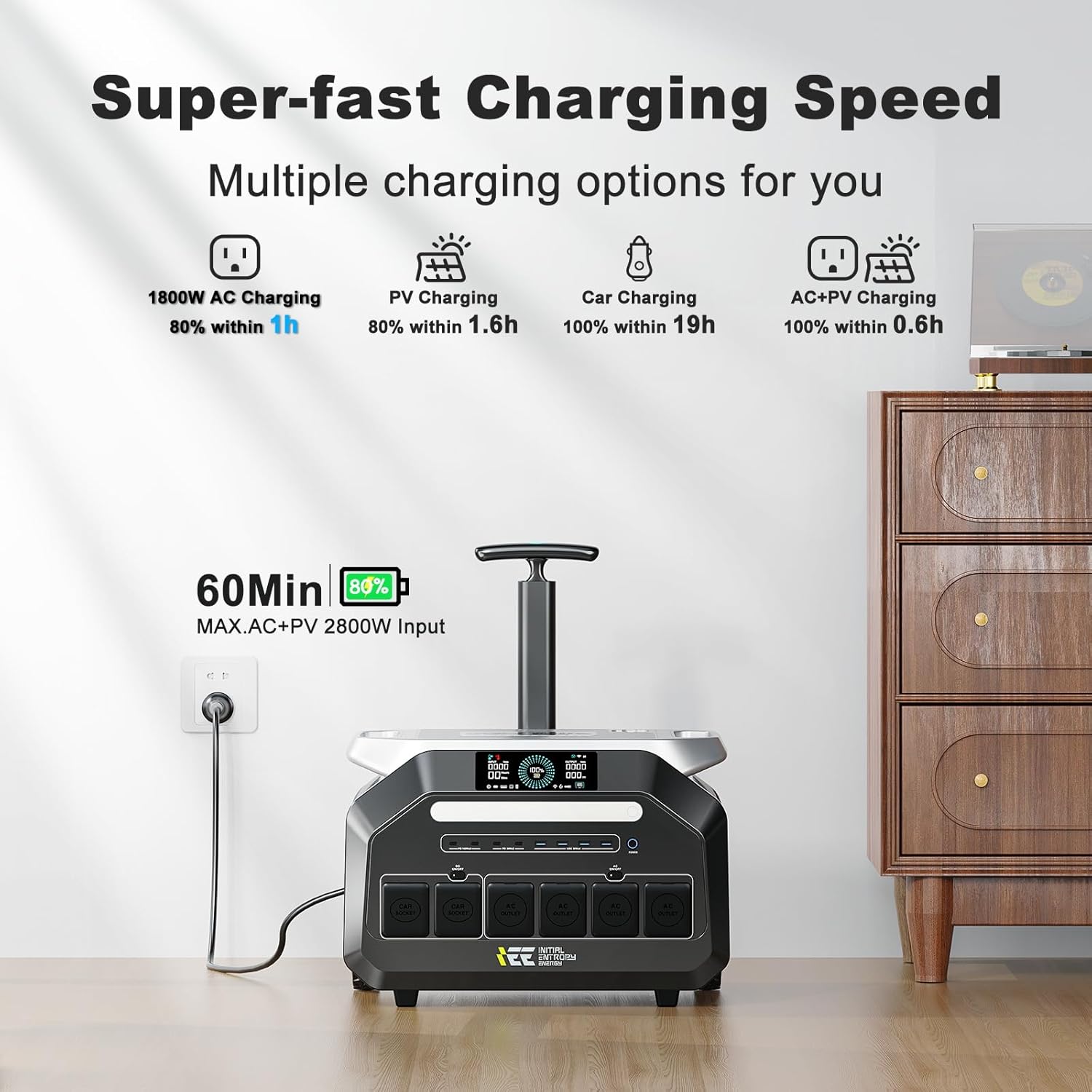
Figure 3: Multiple charging options for the P3200.

Figure 4: Solar charging the P3200 with a portable solar panel.
2.3. Porte di uscita
Power up to 16 devices simultaneously with a comprehensive array of output ports:
- 4 AC Outlets (3200W total output)
- 4 USB-A Ports (30W each)
- 4 Type-C PD Ports (2x 100W, 2x 30W)
- 2 Car Lighter Sockets
- 2 DC5525 Ports

Figure 5: The P3200 powering common electrical appliances.
2.4. Portabilità
Weighing only 24kg (52lb), the P3200 is designed for easy portability, featuring movable wheels and a telescoping handle, similar to luggage.

Figure 6: Easy portability with built-in wheels and handle.
2.5. EPS Auto Switchover
The P3200 includes an Ultra-fast EPS (Emergency Power Supply) function. When connected to your home's power supply, it operates in EPS mode. In the event of a power outage, it activates within 0.01 seconds, ensuring uninterrupted power to connected equipment.
2.6. Controllo APP intelligente
Monitor and control the power station remotely using the dedicated mobile phone application. View input/output power, remaining battery, and other device statuses.

Figura 7: Monitoraggio e controllo remoto tramite l'app per smartphone.
Prodotto finitoview Video
Video 1: Dettagliatoview and demonstration of the IEE 3200W 2048Wh Power Station P3200 by ECOVOLT.
3. Cosa c'è nella scatola
Il pacchetto include:
- 1x EcoVolt IEE P3200 Portable Power Station
- 1x cavo di ricarica CA
- 1x cavo di ricarica per auto
- 1x cavo di ricarica solare
- 1x Manuale utente
- 1 cavo di ricarica 4 in 1
4. Impostazione
- Disimballaggio: Carefully remove the EcoVolt IEE P3200 from its packaging. Verify all included components are present using the 'What's in the Box' list.
- Carica iniziale: For optimal performance, fully charge the power station before first use. Connect the AC charging cable to a wall outlet and the AC input port on the rear of the unit. The display will show charging status.
- Familiarizzazione: Review the front panel display and all input/output ports. Understand the function of each button and indicator light.
5. Istruzioni per l'uso
5.1. Accensione/spegnimento
Press and hold the main Power button for a few seconds to turn the unit on or off. A quick press will illuminate the display.
5.2. AC Output Usage
Press the 'AC ON/OFF' button to activate the AC outlets. Connect your AC-powered devices. Ensure the total wattage of connected devices does not exceed the 3200W continuous output limit.
5.3. DC Output Usage
Press the 'DC ON/OFF' button to activate the DC output ports (USB-A, Type-C, Car Sockets, DC5525). Connect your DC-powered devices.
5.4. Modalità di ricarica
- Ricarica CA: Use the provided AC charging cable. The rear panel features a 'Super Charge' switch to select between standard (approx. 800W) and fast (1800W) charging modes.
- Ricarica solare: Connect compatible solar panels (12-80V, max 1000W) to the XT60 input port on the rear using the provided solar charging cable. Position panels for maximum sunlight exposure.
- Ricarica auto: Use the provided car charging cable to charge from your vehicle's 12V outlet via the XT60 input port.
5.5. EPS Function
When the P3200 is connected to an AC power source and has devices plugged into its AC outlets, it will automatically enter EPS mode. In case of a power failure, the unit will seamlessly switch to battery power within 10 milliseconds.
5.6. Controllo APP
Download the 'Land Book' application (for US customers) on your mobile device. Follow the in-app instructions to connect your P3200 via Bluetooth or Wi-Fi for remote monitoring and control.
6. Manutenzione
- Ricarica regolare: For long-term battery health, fully charge the P3200 at least once every 3-6 months, even if not in use.
- Magazzinaggio: Conservare l'unità in un luogo fresco e asciutto, lontano dalla luce solare diretta e da temperature estreme.
- Pulizia: Utilizzare un panno asciutto e morbido per pulire l'esterno. Evitare l'uso di prodotti chimici aggressivi o materiali abrasivi.
- Ventilazione: Assicurarsi che le prese d'aria siano libere da ostruzioni durante il funzionamento per evitare il surriscaldamento.
7. Risoluzione Dei Problemi
If you encounter any issues with your EcoVolt IEE P3200, please refer to the following general advice:
- Nessuna potenza in uscita: Check if the AC/DC output buttons are activated. Ensure the battery has sufficient charge.
- Problemi di ricarica: Verify all charging cables are securely connected. Check the power source (wall outlet, solar panel, car). Ensure the 'Super Charge' switch is in the desired position.
- Protezione da sovraccarico: If the unit shuts down due to overload, disconnect some devices and restart the unit.
- Il display non risponde: Try restarting the unit by holding the main power button.
- For persistent problems, contact EcoVolt customer support.
8. Specifiche
| Caratteristica | Dettaglio |
|---|---|
| Marca | Eco Volt |
| Nome del modello | P3200 |
| Cosatage (Continuo) | 3200 watt |
| Cosatage (Peak/Surge) | 6400 watt |
| Capacità della batteria | 2048 Wh (LiFePO4) |
| Tipo di carburante | Solare, alimentato a batteria |
| Ingresso di ricarica CA | 1800W max |
| Ingresso di ricarica solare | 1000 W massimo (12-80 V) |
| Porte di uscita CC | 4x USB-A (30W), 2x Type-C (100W), 2x Type-C (30W), 2x Car Socket, 2x DC5525 |
| Porte di uscita CA | 4x AC Outlets (100-120Vac, 60Hz) |
| Peso dell'articolo | 53 libbre (circa 24 kg) |
| Dimensioni del prodotto | 11.7 cm L x 14.4 cm P x 17.5 cm A |
| Caratteristiche speciali | Fast Charging, Overload Protection, Portable, USB Port, EPS Auto Switchover, Smart APP Control |
9. Garanzia e supporto
The EcoVolt IEE P3200 Portable Power Station comes with a 5-year warranty. For warranty claims, technical support, or any inquiries, please refer to the contact information provided in your user manual or visit the official EcoVolt websito.