
1. Introduzione
This manual provides detailed instructions for the installation, operation, and maintenance of your DewinLVD 3-Phase 4-Line WiFi Smart Energy Meter Circuit Breaker. Please read this manual thoroughly before installation and use to ensure safe and efficient operation of the device. This smart energy meter is designed for monitoring and protecting electrical systems in various environments, offering advanced features through the Tuya Smart App.
2. Prodotto finitoview
2.1 Caratteristiche principali
- Connettività WiFi intelligente: Remote monitoring and control via the Tuya Smart App, providing real-time data on power consumption, current, voltage, frequency, and cumulative energy.
- Display LCD a colori: Clear and easy-to-read measurement results directly on the device, enhancing user experience and data analysis.
- Ampia gamma di misurazioni: Supports AC voltage from 80-400V, currents from 1-100A, and power display up to 99999.9 kWh.
- Molteplici funzioni di protezione: Include over-voltage, sotto-volumetage, over-current, voltage imbalance, current imbalance, phase failure, and overload protection.
- Installazione su guida DIN: Standard 35mm DIN rail mounting for easy and reliable installation in various electrical systems.
- Materiale ignifugo: Constructed from durable polycarbonate for enhanced safety.
2.2 Componenti
The DewinLVD Smart Energy Meter Circuit Breaker consists of the main unit and a user manual. Key components include the color LCD display, physical control buttons, WiFi module, and connection terminals.

Figure 1: DewinLVD Smart Energy Meter highlighting key features like Tuya integration, WiFi monitoring, DIN rail installation, real-time data, LCD display, and two-way measurement.

Figura 2: primo piano view of the smart energy meter showing the direction buckle design, smart WiFi chip, anti-theft lock design, and three-phase four-line design.
3. Specifiche
| Parametro | Valore |
|---|---|
| Sistema di comunicazione | App intelligente Tuya |
| Materiale | Policarbonato ignifugo |
| Volume nominaletage | CA 380V |
| Corrente massima | 1-100A |
| Volume di eserciziotage | CA 80-400 V |
| Gamma di visualizzazione della potenza | 0-99999.9 kWh |
| Frequenza nominale | Frequenza 50/60 Hz |
| Over-volumetage Protezione | 120-300V AC (Adjustable) |
| sotto-volumetage Protezione | 80-210V AC (Adjustable) |
| Protezione da sovracorrente | Da 1.0A a 100A |
| Tempo di riconnessione (ritardo) | 1-9999 seconds (Default: 3s) |
| Over-current Protection Time | 1-30 (predefinito: 5) |
| Tipo di visualizzazione | Schermo a colori |
| Frequenza WiFi | 2.4 GHz |
| Dimensioni del prodotto | Dimensioni: 10 x 8 x 8 cm |
| Peso dell'articolo | 500g |
| Numero di modello | LDZDB02 |

Figura 3: Dimensioni del prodotto e riepilogo delle specifiche tecniche.
4. Configurazione e installazione
4.1 Precauzioni di sicurezza
- Installation should only be performed by qualified electricians.
- Ensure the main power supply is disconnected before installation to prevent electric shock.
- Verify correct wiring according to the provided diagram to avoid damage to the device or electrical system.
- Non utilizzare il dispositivo se appare danneggiato.
4.2 Montaggio del dispositivo
The DewinLVD Smart Energy Meter is designed for standard 35mm DIN rail installation. Locate a suitable position within your electrical panel or distribution box.
- Assicurarsi che la guida DIN sia montata saldamente.
- Allineare le clip di montaggio del misuratore alla guida DIN.
- Press firmly until the meter clicks into place.
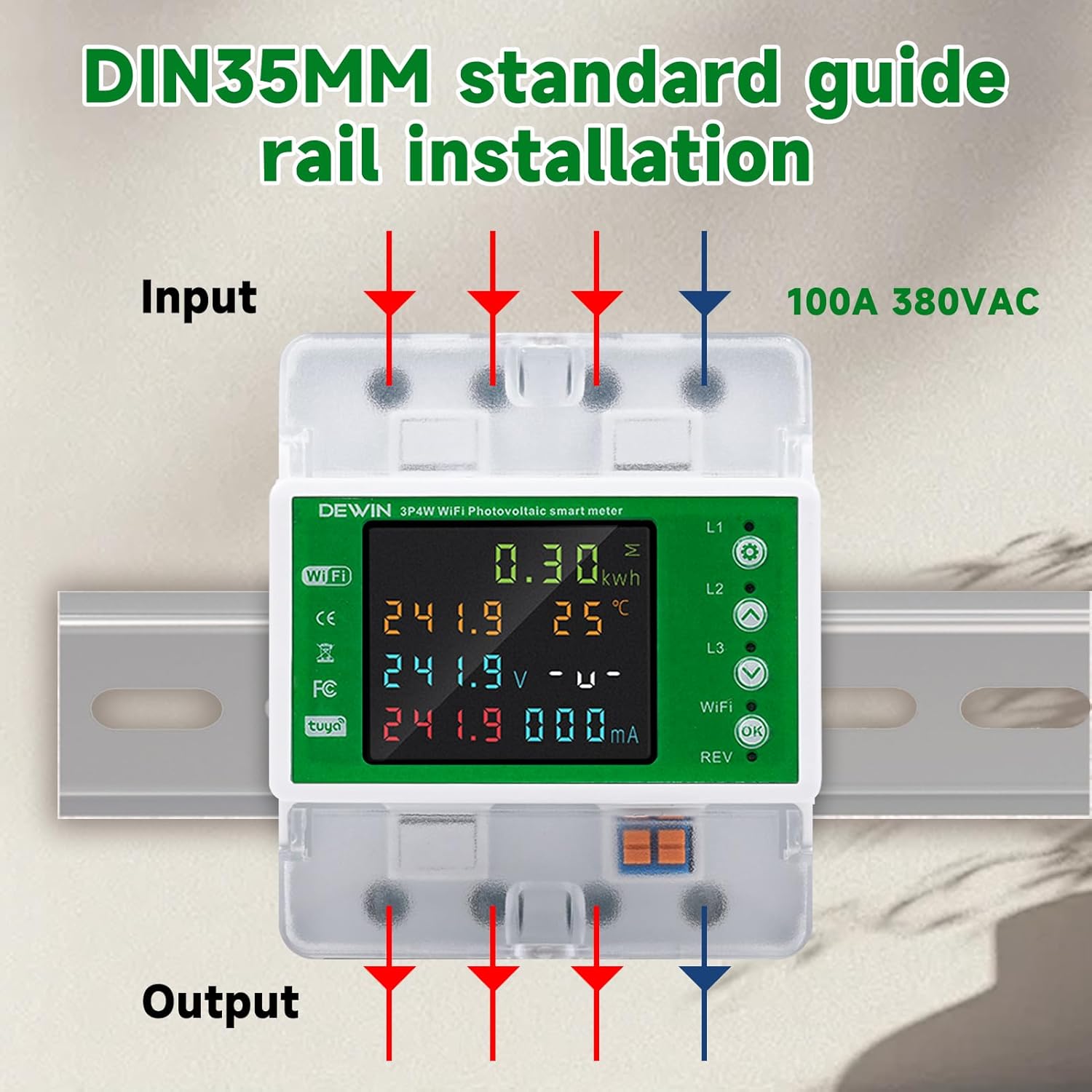
Figure 4: Diagram illustrating the input and output connections for DIN rail installation of the 3-phase 4-line smart energy meter.
4.3 Istruzioni per il cablaggio
Connect the device according to the following wiring diagram. This is a 3-phase, 4-line device. Ensure all connections are tight and secure.
- Connect the three phase lines (L1, L2, L3) and the neutral line (N) to the input terminals.
- Connect the corresponding output lines to your load.
- The device supports 100A 380VAC.
Refer to Figure 4 for a visual guide on wiring connections.
4.4 Connessione all'app (app Tuya Smart)
- Scarica l'app "Tuya Smart" dall'app store del tuo smartphone (iOS o Android).
- Registrati o accedi al tuo account Tuya Smart.
- Assicurati che il tuo smartphone sia connesso a una rete WiFi a 2.4 GHz.
- Power on the DewinLVD Smart Energy Meter. The WiFi indicator on the device should start blinking.
- In the Tuya Smart app, tap "+" to add a new device.
- Select "Electrical" then "Circuit Breaker (Wi-Fi)" or "Energy Meter (Wi-Fi)".
- Follow the on-screen instructions in the app to connect the device to your WiFi network. This typically involves confirming the blinking indicator and entering your WiFi password.
- Once connected, the WiFi indicator on the device will become solid.

Figure 5: The smart energy meter displaying data, with a smartphone showing the Tuya Smart App interface for remote monitoring.
5. Istruzioni per l'uso
5.1 Funzionamento del display locale
The color LCD display shows real-time electrical parameters. Use the physical buttons (usually "WiFi" and "OK" or similar) to navigate through different display modes or settings.
- Voltage(V): Visualizza il volume correntetage per ciascuna fase.
- Corrente (A): Shows the current flowing through each phase.
- Potenza (kW): Indicates instantaneous power consumption.
- Energia (kWh): Displays cumulative energy consumption.
- Frequenza (Hz): Shows the system frequency.
- Temperatura (°C): May display internal device temperature.

Figure 6: The meter's LCD display showing various electrical parameters and the physical buttons for interaction.
5.2 Controllo remoto tramite l'app Tuya Smart
Once connected to the Tuya Smart App, you can perform various functions remotely:
- Monitoraggio in tempo reale: View all electrical parameters (voltage, current, power, energy, frequency) from anywhere.
- ON/OFF remoto: Switch the circuit breaker on or off remotely.
- Pianificazione: Imposta programmi per l'accensione/spegnimento automatico.
- Impostazioni di protezione: Regola il sovra-volumetage, sotto-volumetage, and over-current protection thresholds.
- Rapporti energetici: Accedi ai dati storici e ai report sui consumi energetici.
- Controllo vocale: Integrate with smart assistants like Amazon Alexa or Google Assistant for voice commands (e.g., "Alexa, turn on the circuit breaker").
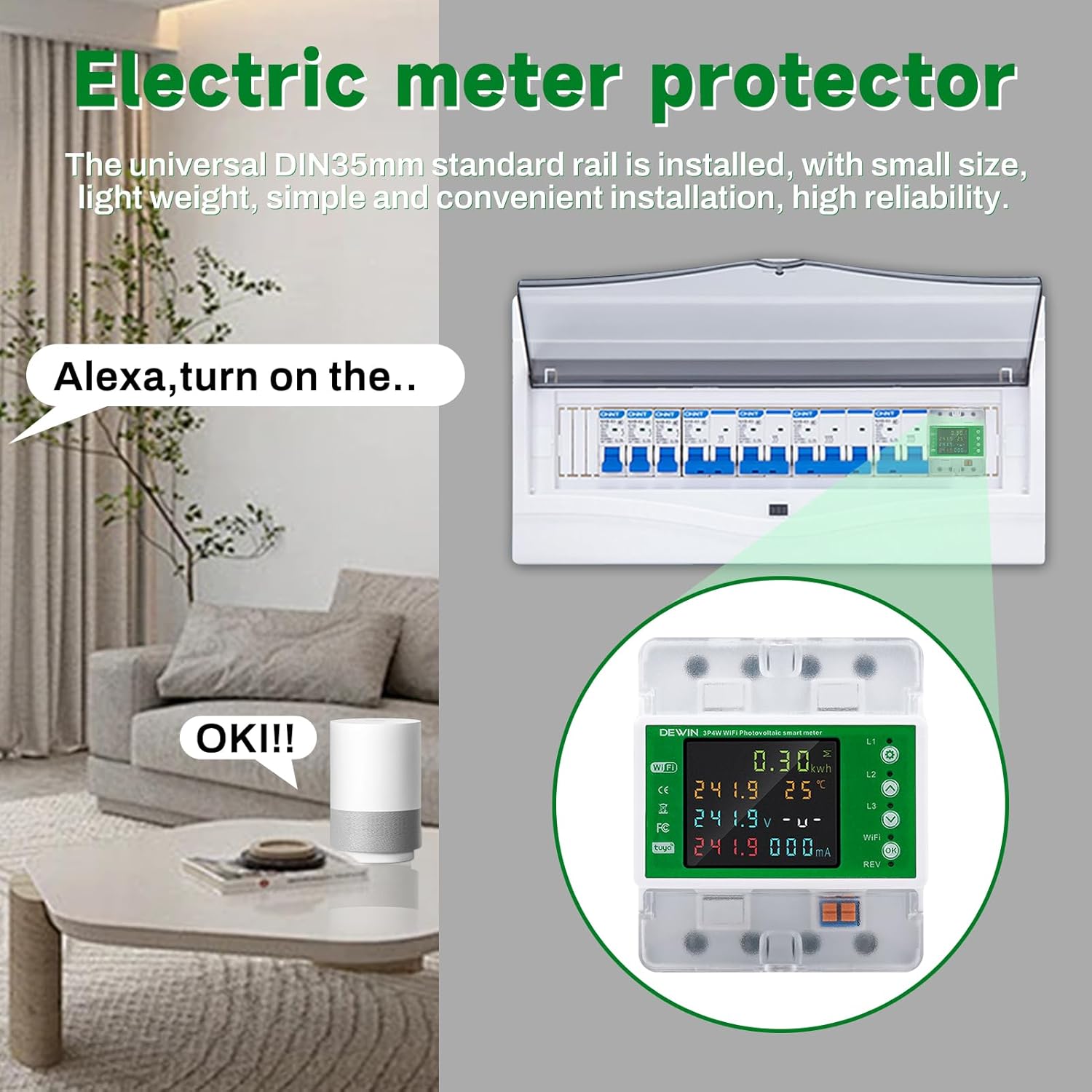
Figura 7: Esample of smart home integration, showing the energy meter responding to voice commands via a smart assistant.
6. Manutenzione
The DewinLVD Smart Energy Meter is designed for minimal maintenance. However, regular checks can ensure optimal performance and longevity.
- Pulizia: Pulire periodicamente il dispositivo con un panno asciutto e morbido. Non utilizzare detergenti abrasivi o solventi.
- Verifiche della connessione: Verificare annualmente, o quando necessario, che tutti i collegamenti elettrici siano saldi e privi di corrosione.
- Aggiornamenti del firmware: Check the Tuya Smart App for any available firmware updates for the device to ensure you have the latest features and security patches.
- Condizioni ambientali: Ensure the device operates within its specified environmental temperature range (-30°C to 70°C) to prevent damage.
7. Risoluzione Dei Problemi
| Problema | Possibile causa | Soluzione |
|---|---|---|
| Il dispositivo non si accende. | Nessuna alimentazione; cablaggio errato. | Controllare l'alimentazione principale. Verificare i collegamenti elettrici secondo lo schema. |
| WiFi indicator not blinking/connecting. | Incorrect WiFi password; 5GHz network; device too far from router; network issues. | Ensure correct 2.4 GHz WiFi network. Move device closer to router. Reset device (refer to manual for reset procedure, usually holding a button). Check router settings. |
| L'app non visualizza dati in tempo reale. | No internet connection on phone; device lost WiFi connection; app glitch. | Check phone's internet connection. Verify device's WiFi status. Restart the app. Reconnect device to WiFi if necessary. |
| L'interruttore automatico scatta frequentemente. | Overload; short circuit; protection settings too sensitive. | Reduce load. Check for short circuits in the connected system. Adjust over-current/over-voltage protection thresholds in the app (consult a qualified electrician if unsure). |
8. Garanzia e supporto
8.1 Informazioni sulla garanzia
The DewinLVD Smart Energy Meter Circuit Breaker comes with a standard manufacturer's warranty. Please refer to the warranty card included in your package or contact your retailer for specific warranty terms and conditions. The warranty typically covers defects in materials and workmanship under normal use.
Nota: Any unauthorized modification, improper installation, or misuse of the device will void the warranty.
8.2 Supporto tecnico
For technical assistance, troubleshooting, or inquiries regarding your DewinLVD Smart Energy Meter, please contact your point of purchase or visit the official DewinLVD website for support resources. When contacting support, please have your model number (LDZDB02) and purchase information ready.
You can also refer to the "Tuya Smart" app's help section for common issues related to app connectivity and features.
9. Scenari applicativi
The DewinLVD 3-Phase 4-Line WiFi Smart Energy Meter is versatile and suitable for a wide range of applications, including:
- Solar Photovoltaic Systems
- Electricity Metering Systems
- Edifici commerciali
- Edifici residenziali
- Scuole
- Alberghi
- Laboratori
- Rental Properties
- Uffici
- Dining Establishments

Figura 8: Esamples of environments where the smart energy meter can be effectively utilized.