
bmani T16
bmani Wireless Earbuds User Manual
Modello: T16
Brand: bmani
Introduzione
Welcome to the bmani Wireless Earbuds user manual. These Bluetooth headphones are designed for comfort and performance, featuring a secure over-ear fit, long battery life, and intuitive controls. This manual will guide you through setting up, operating, and maintaining your new earbuds.
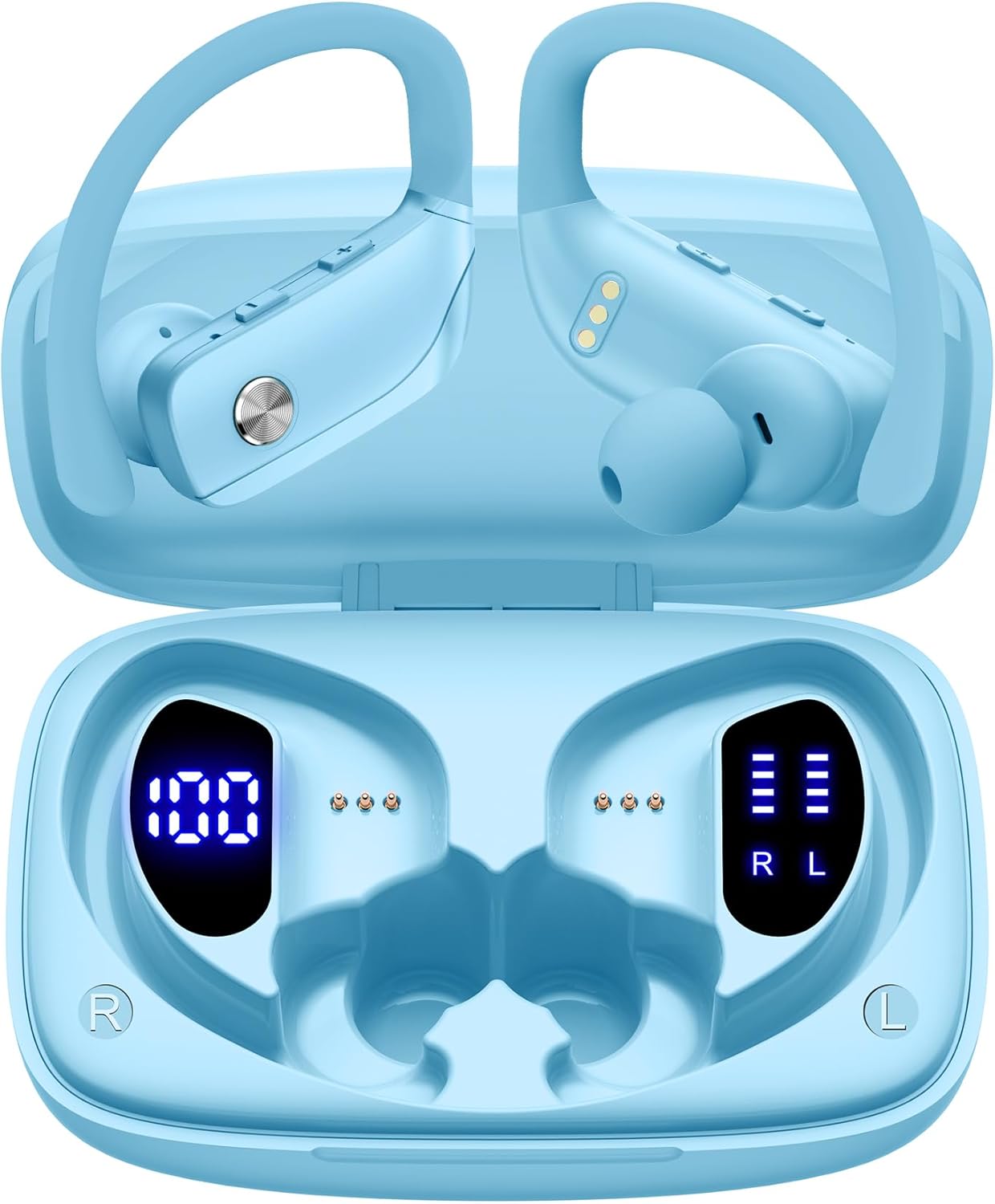
Image: The bmani Wireless Earbuds in their open sky blue charging case, showcasingli auricolari e l'interno della custodia.
Cosa c'è nella scatola
- Auricolari senza fili
- Custodia di ricarica
- Eartips (three size options: L, M, S)
- Cavo di tipo C
- Manuale dell'utente (questo documento)

Image: This image displays all the items included in your bmani Wireless Earbuds package: the two wireless earbuds, their charging case, a set of three different sized eartips (L, M, S), a Type-C charging cable, and the user manual.
Prodotto finitoview & Caratteristiche
The bmani Wireless Earbuds are engineered for an exceptional audio experience with user-friendly features.
Dual LED Displays Charging Case
The charging case features dual LED displays. The left display shows the remaining battery power of the case in percentage. The right side indicates the charging process of each earbud with four grids, each representing 25% of the bud's power. The LED indicator light will flash during charging.

Image: This image highlights the dual LED digital display on the charging case. The left screen shows the charging case's battery capacity as a percentage, while the right screen displays the power status of the left (L) and right (R) earbuds using four bars each.
Batteria a lunga durata
Enjoy extended listening sessions with up to 8 hours of music time per earbud and an additional 40 hours provided by the 600mAh charging case, totaling 48 hours of playback.

Image: This diagram illustrates the impressive battery life: 8 hours of music time per earbud (50mAh each) and an additional 40 hours of listening time provided by the 600mAh charging case, totaling 48 hours of playback.
Bluetooth 5.0 and Hi-Fi Stereo Sound Quality
Equipped with advanced Bluetooth 5.0 technology, these earbuds provide a clear and smooth connection with extended range and fewer dropouts, ensuring crystal-clear calls and uninterrupted music listening. The 10mm speakers deliver Hi-Fi stereo sound.

Image: This image visually represents the 10mm speakers within the earbuds, emphasizing their capability to deliver Hi-Fi stereo sound.

Image: This image emphasizes the Bluetooth 5.0 technology, offering extended range and fewer dropouts, and the integration with voice assistants like Siri.
Designed for Sports (IPX5 Water Resistant)
These sport headphones are designed to stay securely in place during long hours of training, preventing shifting or falling out. They come with flexible earhooks and three pairs of ear caps (S, M, L) to ensure a comfortable and suitable fit, even during intense activities like camping, running, or working out. They are also IPX5 water-resistant, protecting them from splashes and sweat.

Image: This image shows a woman wearing the earbuds during exercise, highlighting their secure fit. An inset graphic demonstrates the flexible earhooks and the three included eartip sizes (L, M, S) for personalized comfort.

Image: This infographic summarizes key features: Dual LED Battery Display, 600mAh Charging Case, Anti-skid Earhooks, IPX5 Waterproof rating, Hi-Fi Stereo sound, and Voice Assistant compatibility.
Impostare
Ricarica degli auricolari e della custodia
Prima del primo utilizzo, caricare completamente sia gli auricolari che la custodia di ricarica.
- Connect the provided Type-C cable to the charging port on the back of the case.
- Collega l'altra estremità a una fonte di alimentazione USB.
- Il display LED sulla custodia mostrerà l'avanzamento della ricarica.
- Once fully charged, the display will show 100% for the case and full bars for both earbuds.
Pairing with Your Device (One-step Pairing)
The bmani earbuds feature automatic pairing for convenience.
- Apri la custodia di ricarica ed estrai entrambi gli auricolari. Si accenderanno automaticamente e tenteranno di associarsi tra loro.
- Sul tuo dispositivo (smartphone, tablet, laptop, ecc.), attiva il Bluetooth.
- Cercare "T16" nell'elenco dei dispositivi Bluetooth disponibili e selezionalo per connetterti.
- Una volta connessi, sentirai un messaggio audio e gli auricolari saranno pronti per l'uso.
- Una volta estratti dalla custodia, gli auricolari si riconnetteranno automaticamente all'ultimo dispositivo associato.

Image: This image demonstrates the one-step pairing process, showing the earbuds connected to a smartphone. It also highlights their wide compatibility with various Bluetooth-enabled devices, including notebooks, TVs, desktops, smartwatches, and tablets.
Istruzioni per l'uso
Indossare gli auricolari
Per un suono e un comfort ottimali, assicurarsi di indossare correttamente gli auricolari.
- Posizionare il gancio dietro l'orecchio.
- Inserire il tappo auricolare nel condotto uditivo.
- Adjust by twisting the earbud for a comfortable and secure fit.

Image: This visual guide provides three simple steps for wearing your earbuds: 1. Place the ear hook over your ear. 2. Insert the ear cap into your ear. 3. Adjust the earbud by twisting it for a secure and comfortable fit.
Controlli
The bmani earbuds feature intuitive button controls.
| Azione | Funzione |
|---|---|
| Fai clic una volta | Riproduci/Metti in pausa la musica, Rispondi/Termina chiamata |
| Quick Double-click (R) | Traccia successiva |
| Quick Double-click (L) | Traccia precedente |
| Premere il pulsante "+" | Alza il volume |
| Premere il pulsante "-" | Abbassa il volume |
| Triplo clic rapido | Attiva l'Assistente Vocale |
| Presa | Accensione/spegnimento |

Image: This image illustrates the dual audio controls on the earbuds. It shows the physical volume buttons (+/-) and a diagram explaining single click for play/pause, double click for track navigation, and holding the button for power on/off.

Image: This infographic details the various controls: single click for call answer/end and play/pause, double click for next/previous track, pressing +/- for volume, and triple click for voice assistant.
Manutenzione
Per garantire la longevità e le prestazioni ottimali dei tuoi auricolari wireless bmani, segui queste linee guida per la manutenzione:
- Pulizia: Regularly clean the earbuds and charging case with a soft, dry, lint-free cloth. Do not use harsh chemicals or abrasive materials.
- auricolari: Remove and clean the eartips periodically. You can gently wash them with mild soap and water, then ensure they are completely dry before reattaching.
- Resistenza all'acqua: The earbuds are IPX5 water-resistant, meaning they can withstand splashes and sweat. Do not submerge them in water or expose them to heavy rain. Ensure they are dry before placing them back in the charging case.
- Magazzinaggio: Quando non li usi, riponi gli auricolari nella custodia di ricarica per proteggerli da polvere e danni.
- Ricarica: Use only the provided Type-C cable for charging. Avoid extreme temperatures during charging and storage.
Risoluzione dei problemi
Se riscontri problemi con i tuoi auricolari wireless bmani, fai riferimento alle seguenti soluzioni comuni:
Gli auricolari non si associano tra loro o con il dispositivo:
- Assicurarsi che entrambi gli auricolari siano completamente carichi.
- Place both earbuds back into the charging case, close the lid, wait a few seconds, then open the lid and take them out again. This often resets the pairing.
- On your device, forget or delete "T16" from your Bluetooth device list. Then, try the pairing process again from step 1.
- Assicurarsi che nessun altro dispositivo Bluetooth interferisca con la connessione.
Nessun suono o volume basso:
- Controlla il livello del volume sia sugli auricolari che sul dispositivo connesso.
- Assicurati che gli auricolari siano posizionati correttamente nelle orecchie.
- Clean any debris from the eartips or earbud speakers.
- Ricollega gli auricolari al tuo dispositivo.
La custodia di ricarica non si ricarica:
- Assicurarsi che il cavo Type-C sia collegato saldamente sia alla custodia sia alla fonte di alimentazione.
- Prova un adattatore di alimentazione USB o una porta diversa.
- Controllare il cavo di ricarica per eventuali danni.
Auricolari che cadono:
- Try different sizes of eartips provided in the box to find the best fit for your ears.
- Assicurarsi che i ganci auricolari siano posizionati correttamente sulle orecchie.
Specifiche
| Caratteristica | Dettaglio |
|---|---|
| Nome del modello | T16 |
| Tecnologia di connettività | Senza fili (Bluetooth 5.0) |
| Durata della batteria | Fino a 8 ore (auricolari), 40 ore (con custodia di ricarica) |
| Capacità della custodia di ricarica | 600mAh |
| Capacità della batteria degli auricolari | 50 mAh (ciascuno) |
| Resistenza all'acqua | Grado di protezione IPX5 |
| Tipo di controllo | Controllo dei pulsanti |
| Materiale | Plastica |
| Peso dell'articolo | 2 once |
| Dimensioni del prodotto | 3.54 x 2.36 x 0.79 pollici |
| Componenti inclusi | Charging Case, Eartip, Type-C Cable, User Manual, Wireless Earbuds |
| Dispositivi compatibili | Tutti i telefoni cellulari, tablet, laptop, computer, audiolibri, TV e tutti i dispositivi con Bluetooth 5.0 abilitati |
Garanzia e supporto
bmani products are designed with quality and reliability in mind. For specific warranty information or technical support, please refer to the contact details provided on the product packaging or visit the official bmani webluogo. Conserva la ricevuta di acquisto per eventuali richieste di garanzia.
Ask a question about this manual
Ask about setup, troubleshooting, compatibility, parts, safety, or missing instructions. Manuals+ will review the question and use this page’s manual context to help answer it.